



Insights
Webflow
Copy Link




Compara WordPress y Webflow para sitios de marketing: Webflow para sitios rápidos, orientados al diseño y de bajo mantenimiento; WordPress para sitios grandes, personalizables y ricos en contenido.
La elección de la plataforma adecuada para su sitio web de marketing se reduce a las necesidades de su equipo. WordPress ofrece una flexibilidad inigualable con su amplio ecosistema de complementos y temas, lo que lo hace ideal para proyectos con mucho contenido o altamente personalizables. Sin embargo, requiere un mantenimiento continuo y la participación de los desarrolladores. Webflow, por otro lado, simplifica el proceso al combinar diseño, CMS y alojamiento en una sola plataforma. Permite a los equipos de marketing trabajar de forma independiente, con herramientas de SEO integradas y un rendimiento más rápido desde el primer momento.
Característica
WordPress
Webflow
De horas a días
Minutos
Moderado; se necesita ayuda para desarrolladores
Editor visual; no se requiere codificación
Actualizaciones manuales
Totalmente gestionado
Alto con complementos o código personalizado
Alto con herramientas visuales
Basado en complementos
Incorporado
Puntuación de velocidad de 60 a 80 páginas
Puntuación de velocidad de página de 90 a 100
Contenido ilimitado con alojamiento
Número limitado de artículos de CMS (entre 2000 y 10 000)
Para los equipos que priorizan la autonomía, la velocidad y el mantenimiento simplificado, Webflow es un fuerte competidor. Para aquellos que necesitan una mayor escalabilidad o una personalización avanzada, WordPress sigue siendo una opción sólida.
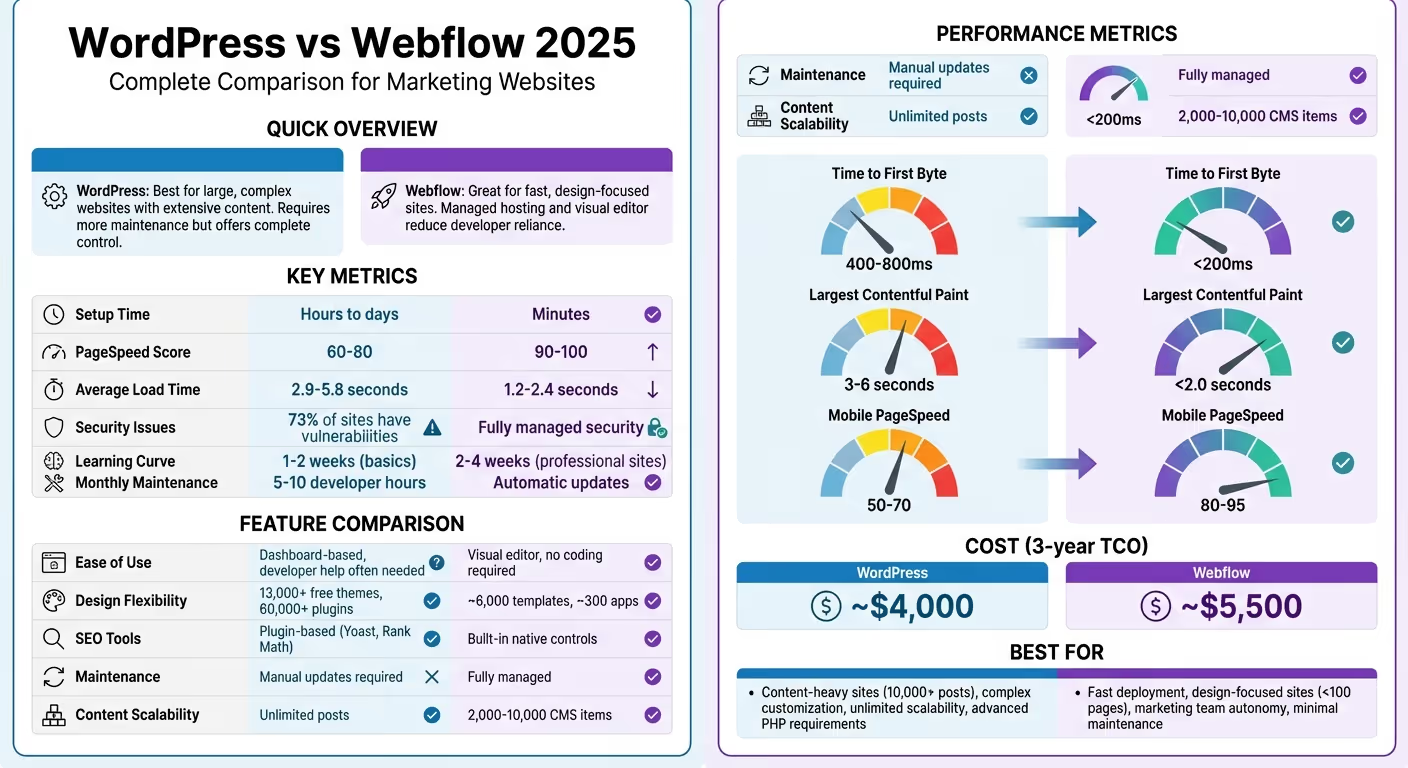
Cuando se trata de la administración diaria, las diferencias entre WordPress y Webflow son bastante marcadas. WordPress requiere que te encargues del alojamiento, instales el software y configures los temas antes de que puedas empezar a crear. Webflow, por otro lado, agiliza este proceso al combinar el alojamiento, la seguridad y un editor visual en un solo registro. Esto significa que puedes empezar a crear tu sitio en cuestión de minutos.
Para las actualizaciones de contenido rutinarias, WordPress ofrece un panel de control que hace que tareas como la creación de publicaciones de blog o la actualización del texto sean relativamente sencillas. Pero cuando se trata de cambios de diseño avanzados, es probable que necesites la ayuda de un desarrollador. Webflow invierte el script aquí. Su editor visual permite a los profesionales del marketing gestionar tareas como duplicar plantillas, modificar diseños o gestionar la configuración de SEO, todo ello sin necesidad de presentar un ticket de desarrollador.
«El impacto de una mala elección de plataforma surge en cuestión de meses, cuando tu equipo no puede actualizar una página de destino sin presentar un ticket de desarrollador».
— Daniel Verbaan
La curva de aprendizaje es otro factor clave. Los conceptos básicos de WordPress se pueden aprender en aproximadamente una o dos semanas, pero dominar su ecosistema, especialmente en lo que respecta a las personalizaciones, puede llevar meses. Webflow, aunque requiere de dos a cuatro semanas de formación práctica, está diseñado teniendo en cuenta las herramientas de diseño profesionales. Exige un conocimiento básico del CSS, pero una vez que los profesionales del marketing lo dominan, muchos lo dominan en tan solo unas semanas. Este esfuerzo inicial vale la pena, ya que permite a los equipos trabajar de forma independiente sin la intervención constante de los desarrolladores.
El mantenimiento es donde las plataformas divergen aún más. WordPress necesita atención regular para actualizar su software principal, complementos y temas para evitar vulnerabilidades. Sorprendentemente, el 73% de los sitios de WordPress tienen problemas de seguridad conocidos, a menudo relacionados con complementos o software desactualizados. Webflow te quita esta carga al gestionar automáticamente todas las actualizaciones y parches de seguridad.
He aquí un análisis detallado de la forma en que cada plataforma gestiona la configuración, la usabilidad diaria y el mantenimiento:
WordPress ofrece una flexibilidad sin igual, pero viene con pasos adicionales. Tendrás que comprar el alojamiento, instalar el software (a menudo mediante una configuración con un solo clic) y ampliar sus capacidades mediante complementos. El mantenimiento continuo implica mantener actualizados el software principal, los complementos y los temas. Un sitio de WordPress bien mantenido normalmente requiere de 5 a 10 horas de trabajo de desarrollador cada mes para realizar actualizaciones y solucionar problemas. Para los profesionales del marketing, hacer cambios estructurales a menudo implica confiar en un desarrollador o aprender herramientas avanzadas como Elementor o Divi.
«WordPress con Elementor es mejor que Webflow si no tienes conocimientos de codificación. Webflow es bueno, pero necesitas tener algunos conocimientos de diseño web, de lo contrario será una molestia».
— Jafor Ahmed, ingeniero informático
WordPress brilla en entornos con mucho contenido. Sus herramientas editoriales, como el historial de revisiones y la gestión de taxonomías, lo convierten en una opción sólida para publicar a gran escala. Además, su sólido sistema de roles y permisos te permite asignar roles personalizados, como administrador, editor o colaborador, lo que lo hace ideal para equipos más grandes.
Estos matices operativos pueden afectar significativamente a la rapidez con la que los equipos de marketing pueden adaptarse a las demandas cambiantes.
Webflow se salta por completo la molestia de configuración. Puedes registrarte y empezar a crear tu sitio de inmediato. Su editor visual le brinda una vista en vivo de su sitio, lo que elimina la necesidad de previsualizaciones separadas. Este enfoque de «lo que ves es lo que obtienes» permite a los especialistas en marketing crear páginas de destino en horas, no en días.
La verdadera fortaleza de la plataforma es su flexibilidad de diseño. Los especialistas en marketing pueden duplicar plantillas, ajustar diseños e intercambiar imágenes sin escribir una sola línea de código. Los diseñadores también pueden establecer medidas de seguridad en el CMS para evitar contratiempos de diseño accidentales cuando se agrega contenido nuevo. Webflow incluso admite la colaboración en tiempo real, con comentarios en la página que permiten a las partes interesadas dejar sus comentarios exactamente donde los necesitan.
«Webflow es muy intuitivo y fácil de usar para los profesionales del marketing sin conocimientos técnicos... No necesitas un desarrollador, Webflow te permite, como vendedor, ser ese desarrollador».
— Bud Hennekes, redactor publicitario, Third Rail Creative
Si bien la interfaz de Webflow es fácil de usar, requiere una inversión inicial en aprendizaje. Sus herramientas de diseño siguen el modelo de un software profesional, por lo que los usuarios deben comprender los conceptos básicos del CSS y el modelo de caja. Sin embargo, una vez superado este obstáculo, los equipos suelen descubrir que pueden reducir el tiempo de desarrollo hasta en un 50% en comparación con WordPress. Webflow incluye de forma nativa funciones como los entornos de ensayo integrados y la restauración de versiones con un solo clic (cosas que suelen requerir complementos en WordPress).
Característica
WordPress
Webflow
De horas a días (requiere alojamiento, instalación)
Minutos (plataforma todo en uno)
De 1 a 2 semanas para lo básico; meses para la personalización completa
De 2 a 4 semanas para crear sitios profesionales
Basado en paneles de control con dependencia de complementos
Editor visual de arrastrar y soltar
Alto (se necesitan actualizaciones manuales)
Bajo (las actualizaciones se administran automáticamente)
Sistema robusto con funciones personalizadas ilimitadas
Más limitado; los asientos adicionales pueden conllevar un coste adicional
Edición secuencial con posibles bloqueos
Edición en tiempo real con comentarios en la página
A menudo requiere herramientas de desarrollador o de creación de páginas
Permite la creación rápida directamente por parte de los profesionales del marketing
WordPress te ofrece tres opciones principales para crear tu sitio: empezar con un tema prediseñado, usar un generador visual de páginas como Elementor o Divi, o contratar a un desarrollador para crear código personalizado. Webflow, por otro lado, adopta un enfoque más simplificado al ofrecer un único editor visual que manipula directamente las propiedades de CSS sin necesidad de tocar ningún código. Analicemos más detenidamente cómo cada plataforma gestiona la personalización del diseño y qué significa eso para el rendimiento y el desarrollo.
WordPress cuenta con un amplio ecosistema de temas y complementos, que ofrece un alto nivel de flexibilidad. Sin embargo, esta abundancia a veces puede provocar problemas de rendimiento, especialmente cuando se trata de creadores de páginas, ya que a menudo introducen un exceso de código que puede ralentizar tu sitio. Por otro lado, el desarrollo personalizado de WordPress es la mejor opción para crear sitios de alto rendimiento. Al producir HTML5 semántico y ágil, es posible lograr puntajes de rendimiento móvil superiores a 90. Dicho esto, el desarrollo personalizado requiere profesionales cualificados y un mantenimiento continuo.
«WordPress es de código abierto... Si te lo puedes imaginar, un desarrollador puede crearlo. Se trata de una verdadera flexibilidad desde cero, no solo de modificar cosas superficiales».
— Nick Marden, fundador de Strong Digital
Webflow aborda el diseño de manera diferente. Su editor visual funciona directamente con propiedades CSS como flexbox, grid y margin, lo que permite diseños perfectos en píxeles que pueden coincidir con precisión con las maquetas de Figma. A medida que diseñas, Webflow genera automáticamente HTML y CSS limpios e incluye herramientas integradas para las animaciones, como los efectos de desplazamiento y los estados de desplazamiento, funciones que requerirían complementos en WordPress. Este modelo de diseño todo en uno acelera el proceso de lanzamiento y satisface las rápidas demandas del marketing moderno. Por ejemplo, los clientes de Webflow Enterprise han informado de que han reducido en un 67% la venta de entradas a los desarrolladores.
Sin embargo, la simplicidad de Webflow tiene limitaciones. Si bien la naturaleza de código abierto de WordPress permite a los desarrolladores modificar los archivos principales o crear funciones personalizadas basadas en PHP, Webflow funciona como un sistema cerrado. La lógica de backend avanzada a menudo requiere integraciones de API o soluciones de terceros, y dejar de usar Webflow significa perder la funcionalidad del CMS, aunque el código estático se pueda exportar.
WordPress proporciona flexibilidad a través de múltiples capas. El editor de bloques de Gutenberg ofrece una forma ligera y compatible con versiones avanzadas de crear diseños sin depender de complementos. Para un mayor control visual, los creadores de páginas como Elementor y Divi proporcionan la funcionalidad de arrastrar y soltar, aunque pueden afectar al rendimiento si no se gestionan con cuidado. Los desarrolladores avanzados suelen recurrir a herramientas como Campos personalizados avanzados (ACF) Pro y Madera, que permiten crear páginas personalizadas que separan la lógica de la visualización. Este enfoque brinda a los clientes una experiencia de edición fácil de usar sin la sobrecarga de código adicional.
«Timber te ayuda a crear temas de WordPress totalmente personalizados con mayor rapidez y con un código más sostenible... tu archivo PHP puede centrarse en los datos o la lógica, mientras que tu archivo Twig puede centrarse al 100% en el HTML y la visualización».
— Robert Guss, ingeniero de software sénior
La comunidad de WordPress está adoptando cada vez más el editor del sitio (edición completa del sitio) para mejorar la velocidad y la seguridad al reducir la dependencia de creadores de terceros. Este método se adapta a los sitios con mucho contenido que requieren una funcionalidad compleja, capacidades multilingües o una planificación SEO a largo plazo. Para mantener el rendimiento, es importante limitar el uso de complementos de widgets adicionales, ya que pueden ralentizar tu sitio e introducir riesgos de seguridad. Esta personalización por capas es ideal para los profesionales del marketing que necesitan un equilibrio entre actualizaciones rápidas y un rendimiento escalable.
La característica más destacada de Webflow es su entorno de diseño unificado. Todo ocurre en el navegador, donde tienes un control detallado sobre los diseños adaptables en todos los puntos de interrupción, sin cambiar entre los modos de código y de vista previa. Su función «Componentes» te permite crear elementos de diseño reutilizables, como un bloque testimonial, que se pueden actualizar en todas las páginas a la vez.
«Webflow combina herramientas de diseño sin código con un control total de la interfaz... Los equipos pueden recrear los diseños de Figma con precisión, gestionar los puntos de interrupción adaptables y reutilizar los componentes para aumentar la eficiencia».
— Grupo de edición
Esta configuración es perfecta para sitios SaaS, MVP y páginas de destino en fase inicial, donde la velocidad y la precisión son esenciales. Los sitios con Webflow suelen alcanzar puntuaciones en PageSpeed de 90 a 100 desde el primer momento, en comparación con los sitios de WordPress, que suelen tener un promedio de 60 a 80 sin optimización adicional. Webflow también entrega alrededor del 98% de los activos en forma de archivos estáticos mediante entrega perimetral, lo que mejora el rendimiento de los diseños personalizados.
Dicho esto, Webflow tiene una curva de aprendizaje más pronunciada en comparación con los conceptos básicos de WordPress. Tendrás que entender la lógica del CSS y el modelo de caja para sacarle el máximo provecho. Pero una vez que tu equipo esté al día, podrás crear páginas de marketing de nivel profesional sin la participación de desarrolladores. Al configurar «barreras» en las colecciones de CMS, puedes asegurarte de que los editores de contenido puedan realizar actualizaciones sin interrumpir tus diseños personalizados.
Característica
WordPress
Webflow
Depende del tema; requiere compiladores o código personalizado
Desarrollo visual perfecto desde cero
Más de 13 000 temas responsivos gratuitos
~6.000 plantillas (en su mayoría pagas)
Más de 60 000 complementos gratuitos
~300 aplicaciones e integraciones
Puede estar repleto de constructores; opta por un desarrollo personalizado
HTML/CSS limpio y semántico generado automáticamente
Requiere complementos o JavaScript personalizado
Motor de interacción nativo de alto rendimiento
Gestionado por la configuración del tema o del generador
Control granular sobre cada punto de interrupción
Varía según el tema/creador
Los componentes globales se actualizan en todas las páginas
Acceso completo a nivel de servidor y PHP personalizado
Ecosistema limitado y cerrado que requiere soluciones de API
No es compatible con código limpio
Exportación limpia a HTML/CSS (pierde la funcionalidad de CMS)
Promedio de puntuación de velocidad de página de 60 a 80
Puntuación típica de velocidad de página de 90 a 100
Cuando se trata de sitios web de marketing, el SEO y el rendimiento no son solo palabras de moda, sino que influyen directamente en las clasificaciones, la experiencia del usuario y, en última instancia, las conversiones. WordPress y Webflow abordan estas áreas de maneras muy diferentes. WordPress se basa en gran medida en complementos de terceros como SEO de Yoast o Matemáticas de rango para tareas como establecer metatítulos, descripciones y generar mapas de sitio. Webflow, por otro lado, integra estas funciones directamente en su plataforma, lo que agiliza el proceso y elimina la necesidad de complementos adicionales.
El rendimiento es otra área en la que estas plataformas divergen. Los sitios con Webflow suelen obtener una puntuación de entre 90 y 100 en cuanto a PageSpeed, mientras que los sitios de WordPress tienen un promedio de 60 a 80 a menos que estén muy optimizados. Esto es fundamental porque el 53% de los usuarios de dispositivos móviles abandonarán un sitio que tarde más de tres segundos en cargarse. La ventaja de Webflow reside en su HTML/CSS limpio y semántico, generado automáticamente, y en su alojamiento empresarial a través de AWS, junto con Rápidamente y Cloudflare CDN.
Para los profesionales del marketing, WordPress puede ser un arma de doble filo. Si bien ofrece flexibilidad, el mantenimiento de la plataforma puede convertirse en una pérdida de recursos. Dado que el 73% de los sitios de WordPress tienen vulnerabilidades conocidas, mantenerse al tanto de las actualizaciones del software, los temas y los complementos principales es esencial para evitar riesgos de seguridad que podrían dañar el SEO. Webflow elimina esta carga al gestionar las actualizaciones automáticamente como parte de su plataforma gestionada.
Dicho esto, WordPress proporciona un control más avanzado para necesidades complejas de SEO. Por ejemplo, plugins como Esquema Pro o Rank Math puede automatizar el marcado de esquemas, lo que ahorra tiempo en proyectos a gran escala con amplios requisitos de metadatos. Si bien Webflow es ideal para los equipos que se centran en los elementos esenciales de la Web y en un despliegue rápido sin problemas técnicos, el ecosistema de plugins de WordPress ofrece una flexibilidad sin igual para gestionar estrategias de SEO complejas. Analicemos en detalle los puntos fuertes y los desafíos de cada plataforma.
WordPress no viene con herramientas de SEO integradas, por lo que los complementos son imprescindibles para gestionar elementos esenciales como metaetiquetas, redireccionamientos y mapas de sitio XML. Plugins como Yoast SEO y Rank Math van un paso más allá y ofrecen funciones como el marcado automático de esquemas, las sugerencias de enlaces internos y el análisis de legibilidad. Sin embargo, confiar en los complementos implica un mantenimiento constante: actualizar los complementos, garantizar la compatibilidad con los temas y evitar retrasos en el rendimiento.
El rendimiento es otra área en la que WordPress a menudo tiene problemas. Su dependencia de PHP y MySQL introduce una sobrecarga que el HTML estático evita. Los creadores de páginas como Elementor y Divi también pueden añadir «exceso de código», lo que ralentiza la forma en que los motores de búsqueda procesan tu sitio. Los sitios de WordPress suelen tener un tiempo hasta el primer byte (TTFB) de 400 a 800 ms y un LCP (Largest Contentful Paint) de 3 a 6 segundos. La mejora de estas métricas suele requerir plugins adicionales para el almacenamiento en caché, la compresión de imágenes o la integración de CDN. La calidad del alojamiento también juega un papel importante: un alojamiento compartido económico puede afectar gravemente a la velocidad en comparación con el alojamiento administrado de WordPress. Para los equipos sin desarrolladores dedicados, gestionar estos aspectos técnicos puede consumir hasta un 30% de su tiempo, lo que desvía la atención de la estrategia.
A pesar de estos obstáculos, WordPress sobresale en capacidades avanzadas de SEO. Plugins como Enlace Whisper para enlaces internos, WPML para contenido multilingüe y Schema Pro para la generación de esquemas programáticos ofrecen herramientas poderosas para campañas con mucho contenido. Para administrar miles de publicaciones o páginas, la estructura de bases de datos y las opciones de complementos de WordPress brindan más flexibilidad que las colecciones de CMS de Webflow.
Webflow adopta un enfoque diferente, integrando el SEO y las optimizaciones de rendimiento directamente en su plataforma. Con Webflow, puedes gestionar metatítulos, descripciones, imágenes de Open Graph y redireccionamientos 301 directamente desde la interfaz del diseñador, sin necesidad de complementos. Los mapas de sitio XML se generan automáticamente, los certificados SSL vienen incluidos y el alojamiento se gestiona en AWS con un rápido soporte de CDN a través de Fastly y Cloudflare. Esta configuración minimiza el tiempo de inactividad y garantiza tiempos de carga rápidos para las páginas de alto valor.
Las métricas de rendimiento de Webflow hablan por sí solas. Su tiempo hasta el primer byte suele ser inferior a 200 ms, y su pintura con mayor contenido suele estar por debajo de los 2 segundos. Los tiempos de carga promedio oscilan entre 1,2 y 2,4 segundos, significativamente más rápidos que los 2,9 a 5,8 segundos de WordPress. Los puntajes de Webflow en páginas móviles oscilan entre 80 y 95, en comparación con los 50 a 70 de WordPress. Estas cifras tienen un impacto directo en las clasificaciones de Core Web Vitals de Google y en la participación de los usuarios. Webflow logra esto mediante la generación de código limpio y optimizaciones integradas, como la compresión de imágenes, la compatibilidad con WebP, la minificación y la carga diferida.
«Webflow no solo se está poniendo al día con WordPress, sino que está redefiniendo lo que puede hacer una plataforma web moderna. Con herramientas de SEO nativas, un alojamiento más rápido y libertad de diseño sin código, Webflow ofrece un rendimiento superior».
— Stefan Ivic, Broworks
Sin embargo, Webflow tiene limitaciones para necesidades de SEO más avanzadas. El marcado de esquemas, por ejemplo, requiere una entrada JSON-LD manual o un código personalizado, mientras que los complementos de WordPress pueden automatizar este proceso en varias páginas. Para campañas de SEO programáticas a gran escala, el CMS de Webflow funciona bien para páginas de destino y proyectos más pequeños, pero resulta menos práctico para gestionar más de 10 000 publicaciones. Si bien Webflow admite carpetas y subdirectorios basados en regiones para el SEO multilingüe, esta configuración es más manual en comparación con el complemento WPML de WordPress. Aun así, Webflow sigue siendo una opción popular entre los equipos de marketing que priorizan la velocidad y la simplicidad, ya que ofrece puntuaciones altas en PageSpeed y una interfaz visual fácil de usar para gestionar los elementos de SEO, como las metaetiquetas, el texto alternativo y los redireccionamientos.
Característica
WordPress
Webflow
Requiere complementos (Yoast, Rank Math)
Controles nativos integrados
Depende del complemento
Integrado en el diseñador
Generado por complementos
Automático
Automatizado mediante complementos
JSON-LD manual o código personalizado
Requiere complementos (Smush, ShortPixel)
Compresión integrada y compatibilidad con WebP
Proporcionado por hosting
Incluido
Configuración separada
Es nativo de AWS/Fastly
2,9 a 5,8 segundos
1,2—2,4 segundos
60 a 80 (típico)
90—100 (típico)
50—70
80—95
400 a 800 ms
<200 ms
3—6 s
<2.0 s
Puede ser hinchado por complementos/constructores
HTML/CSS limpio y semántico
Actualizaciones manuales para el núcleo y los complementos
Totalmente gestionado y automático
El 73% de los sitios tienen problemas conocidos
Plataforma gestionada con actualizaciones automáticas
A medida que su sitio de marketing crece, necesita gestionar más tráfico, contenido e integraciones. WordPress gestiona la escalabilidad a través de tu proveedor de alojamiento. Servicios como Motor WP, panteón, o Kinsta puede gestionar el tráfico de nivel empresarial mediante funciones como PHP 8.4+, almacenamiento en caché de objetos y entrega perimetral. Por otro lado, Webflow se encarga automáticamente de la escalabilidad mediante las CDN de AWS y Fastly, lo que garantiza un rendimiento fluido durante los picos de tráfico, sin necesidad de mantenimiento del servidor. Sin embargo, los límites de elementos del CMS de Webflow (normalmente entre 2000 y 10 000) pueden ser una limitación, mientras que WordPress admite una cantidad ilimitada de contenido.
Esta distinción es fundamental para los equipos de marketing. Si planeas publicar cientos (o incluso miles) de publicaciones de blog, estudios de casos o páginas de destino, WordPress ofrece un margen de crecimiento prácticamente infinito. Webflow es más adecuado para sitios muy centrados en el diseño con menos de 50 a 100 páginas. Para ir más allá de esa cantidad, a menudo se requieren planes empresariales, que pueden costar más de 30 000$ al año. Además, WordPress admite usuarios ilimitados con controles de acceso detallados basados en roles, mientras que Webflow limita los puestos de los editores, y los costos aumentan a medida que agregas más colaboradores. A continuación, analicemos cómo cada plataforma gestiona las crecientes demandas de tráfico y contenido.
La capacidad de WordPress para escalar depende en gran medida de la configuración de tu alojamiento. Los proveedores de alojamiento gestionado de WordPress pueden gestionar millones de visitantes mensuales al aprovechar el escalado automático y las integraciones de CDN. WordPress por sí solo no impone límites al tráfico o al contenido, por lo que puedes publicar más de 10 000 publicaciones sin problemas de rendimiento, siempre que tu infraestructura sea lo suficientemente sólida.
Sin embargo, Webflow vincula su escalabilidad a su plan de suscripción. Estos planes incluyen límites de ancho de banda y elementos de CMS, pero su enfoque basado en el «jardín amurallado» significa que no puedes acceder a la configuración del servidor para optimizar aún más el rendimiento.
«Los sitios de Webflow son rápidos de forma predeterminada porque se sirven desde una CDN global. Sin embargo, a medida que un proyecto crece hasta tener cientos de páginas, la capacidad para optimizarlas es limitada en comparación con el control desde el servidor que ofrece WordPress».
— WP Polonia
Más allá del tráfico y el contenido, la integración perfecta con las herramientas de marketing es igual de importante.
WordPress proporciona una amplia biblioteca de complementos y acceso completo al código, lo que permite la integración con una amplia gama de herramientas de marketing. Sus complementos pueden gestionar flujos de trabajo complejos, una lógica de CRM personalizada e incluso herramientas específicas sin el soporte de API estándar. Sin embargo, esta flexibilidad tiene un inconveniente: los complementos requieren actualizaciones periódicas, comprobaciones de compatibilidad y supervisión de la seguridad, lo que puede llevar de 1 a 2 horas al desarrollador al mes.
El Webflow, por el contrario, requiere un mantenimiento mínimo. Ofrece integraciones nativas para las principales herramientas, como HubSpot y Mailchimp, junto con alrededor de 300 aplicaciones en su App Marketplace. Para flujos de trabajo más avanzados, utilice middleware como Zapier o Make puede conectar su CRM, herramientas de correo electrónico y software de análisis. Si bien esta configuración funciona bien para los sistemas de marketing estándar (piense en GA4, Facebook Pixel y los flujos básicos de formulario a CRM), puede tener dificultades para necesidades más avanzadas, como el contenido condicional basado en datos de CRM o los flujos de trabajo editoriales de varios pasos. Dado que Webflow administra el backend, el mantenimiento se reduce considerablemente.
Algunas empresas han obtenido resultados impresionantes con Webflow. Por ejemplo, en 2025, Lattice adoptó Webflow e informó de un aumento del 20% en las tasas de conversión, además de una reducción del 67% en las solicitudes de tickets de desarrollo para las páginas de la campaña. Del mismo modo, Spin Master utilizó Webflow Enterprise para optimizar su presencia digital, lo que permitió ahorrar aproximadamente 500 000$ en costes de desarrollo al permitir a los equipos de marketing realizar actualizaciones sin depender de los desarrolladores. Estos ejemplos muestran cómo la plataforma que elijas puede afectar directamente a la eficiencia de tu equipo.
«Si tu hoja de ruta se basa en flujos de trabajo personalizados, SSO, formularios complejos e integraciones a nivel de código, un paquete de WordPress bien gobernado te llevará más lejos».
— Agencia de diseño Fineart
Característica
WordPress
Webflow
Se amplía con el proveedor de alojamiento; apto para empresas
CDN de AWS y Fastly integrada; límites basados en el plan
Publicaciones ilimitadas y tipos de publicaciones personalizadas
Artículos de CMS limitados (de 2000 a 10 000 en los planes estándar)
Usuarios ilimitados; funciones personalizadas granulares
Tarifas por usuario; plazas limitadas en los planes que no son para empresas
Más de 60 000 complementos; acceso completo a API/bases de datos
Aproximadamente 300 aplicaciones; soporte nativo para HubSpot/MailChimp
Plugins y código personalizado (PHP/JS)
Aplicaciones nativas, Marketplace, Zapier/Make
Actualizaciones manuales (o administradas por el host)
Totalmente gestionado por plataforma
Propiedad total de la base de datos y el código
Plataforma patentada; los datos residen en los servidores Webflow
Aproximadamente 4.000$
Aproximadamente 5.500 dólares
Tras evaluar la usabilidad, la flexibilidad del diseño, el SEO y la escalabilidad, Webflow se convierte en la mejor opción para los sitios web de marketing centrados en la conversión en 2025. Su capacidad para evitar los atascos de los desarrolladores, producir código más limpio y ofrecer un alojamiento totalmente gestionado a través de las CDN de AWS y Fastly la convierten en una opción excepcional. Los equipos de marketing pueden lanzar las páginas de destino y las actualizaciones con mayor rapidez, mientras que su arquitectura ofrece constantemente puntuaciones de PageSpeed superiores a 95, sin necesidad de utilizar complementos de optimización de terceros.
«Webflow permite un despliegue rápido, elimina el mantenimiento de los complementos y ofrece un rendimiento y unos costes predecibles».
— Vimalan Vijayasekaran, fundador de la agencia Webflow
Para sitios con mucho contenido con más de 10 000 publicaciones o sistemas complejos que requieren una amplia personalización de PHP, WordPress sigue siendo un fuerte competidor. Sin embargo, los sitios de WordPress a menudo se enfrentan a desafíos de seguridad y mantenimiento, especialmente cuando los complementos quedan desactualizados. Para los equipos B2B y SaaS que priorizan un despliegue rápido, una mayor autonomía de diseño y un mantenimiento mínimo, Webflow ofrece una clara ventaja.
Si está listo para aprovechar los beneficios de Webflow, el soporte profesional puede hacer que la transición sea perfecta. The Hoop Studio ofrece planes de retención flexibles a partir de 3.125 dólares al mes para el desarrollo continuo, o diseños de sitios web personalizados a partir de 7.500 dólares para sitios de marketing escalables de varias páginas. Sus clientes han visto duplicar las tasas de conversión y aumento de diez veces en las clasificaciones de las 10 principales palabras clave. Con una tasa de recomendación de clientes del 100% y una amplia experiencia en migraciones de WordPress a Webflow, ayudan a los equipos de marketing a avanzar más rápido sin necesidad de contratar personal interno.
Para la mayoría de los equipos de marketing en 2025, Webflow ofrece la velocidad, el rendimiento y la autonomía necesarios para mantenerse competitivos.
Elegir entre WordPress y Webflow se reduce a lo que más necesita tu equipo. Si buscas libertad de diseño, un despliegue más rápido y herramientas de SEO integradas, Webflow es una opción sólida, perfecta para sitios de marketing elegantes y escalables. Por otro lado, WordPress brilla cuando se trata de una amplia personalización, una amplia biblioteca de complementos y el manejo de grandes cantidades de contenido. Sin embargo, a menudo exige más conocimientos técnicos. En cuanto a simplicidad y velocidad, Webflow es un fuerte competidor. Pero si necesitas integraciones complejas y la máxima flexibilidad, WordPress podría ser la mejor opción.
La migración de WordPress a Webflow requiere algunos pasos esenciales para garantizar que todo pase sin problemas. En primer lugar, es necesario exporta tu contenido en formato XML de WordPress. A continuación, convierte ese archivo XML a un formato CSV, que sea compatible con Webflow. Una vez que esté listo, importe los datos a Webflow Collections.
Tras la importación, tendrás que recrea el diseño de tu sitio web en Webflow, haciéndolo coincidir lo más posible con su diseño original. Por último, no te olvides de configurar 301 redireccionamientos para preservar sus clasificaciones de SEO y garantizar que las URL antiguas apunten a las nuevas correctas.
La planificación minuciosa es clave aquí: haz copias de seguridad de tu sitio, prueba tus URL y comprueba todo para evitar problemas durante el proceso de migración.
Para un crecimiento sostenido del SEO en 2025, Webflow destaca por sus herramientas de SEO integradas, su rendimiento de carga rápida y su código limpio que se alinea bien con los requisitos técnicos de SEO. Sus funciones integradas y su alojamiento optimizado hacen que mejorar la velocidad del sitio y configurar el SEO sea mucho más sencillo.
Por otro lado, WordPress proporciona una mayor flexibilidad a través de su amplia gama de complementos. Sin embargo, lograr resultados de SEO comparables a largo plazo a menudo exige un mantenimiento adicional y un mayor nivel de conocimientos técnicos.
{» @context «:» https://schema.org","@type":"FAQPage","mainEntity":[{"@type":"Question","name":"How ¿elijo entre WordPress y Webflow para mi equipo?» , "acceptedAnswer»: {» @type «:"Answer», "text»:» La <p>elección entre <strong>WordPress</strong> y <strong>Webflow</strong> depende de lo que más necesite tu equipo. Si buscas libertad de diseño, una implementación más rápida y herramientas de SEO integradas, <strong>Webflow es una opción sólida, perfecta</strong> para sitios de marketing elegantes y escalables. Por otro lado, <strong>WordPress</strong> destaca cuando se trata de una amplia personalización, una amplia biblioteca de complementos y el manejo de grandes cantidades de contenido. Sin embargo, a menudo exige más conocimientos técnicos. En cuanto a simplicidad y velocidad, Webflow es un fuerte competidor. Pero si necesitas integraciones complejas y la máxima flexibilidad, WordPress podría ser la</p> mejor opción. «}}, {» @type «:"Question», "name» :"¿ Qué se necesita para migrar de WordPress a Webflow?» , "acceptedAnswer»: {» @type «:"Answer», "text»:» La <p>migración de WordPress a Webflow requiere algunos pasos esenciales para garantizar una transición fluida. En primer lugar, tienes que <strong>exportar</strong> tu contenido en formato XML desde WordPress. A continuación, convierte ese archivo XML a un formato CSV, que sea compatible con Webflow. Cuando esté listo, importe los datos a Webflow</p> Collections. <p>Tras la importación, tendrás que <strong>recrear el diseño de tu sitio web</strong> en Webflow para que coincida lo más posible con tu diseño original. Por último, no olvides configurar los <strong>redireccionamientos 301</strong> para preservar tu clasificación de SEO y asegurarte de que las URL antiguas apunten a las</p> nuevas correctas. <p>En este sentido, la clave es una planificación minuciosa: haz copias de seguridad de tu sitio, comprueba tus URL y compruébalo todo para evitar cualquier contratiempo durante el proceso de migración.</p> «}}, {» @type «:"Question», "name» :"¿ Qué plataforma es mejor para el crecimiento del SEO a largo plazo en 2025?» , "acceptedAnswer»: {» @type «:"Answer», "text»:» Si desea un <p>crecimiento sostenido del SEO en 2025, <strong>Webflow</strong> destaca por sus herramientas de SEO integradas, su rendimiento de carga rápida y su código limpio que se ajusta perfectamente a los requisitos técnicos de SEO. Sus funciones integradas y su alojamiento optimizado hacen que mejorar la velocidad del sitio y configurar el SEO sea mucho más</p> sencillo. <p>Por otro lado, <strong>WordPress</strong> ofrece una mayor flexibilidad a través de su amplia gama de complementos. Sin embargo, lograr resultados de SEO comparables a largo plazo a menudo exige un mantenimiento adicional y un mayor nivel de conocimientos técnicos.</p> «}}]}