



Insights
SEO
Copy Link




Cómo el código limpio de Webflow, las herramientas de SEO integradas y la rápida CDN aumentan el rendimiento de las búsquedas, en equilibrio con una curva de aprendizaje más pronunciada y un menor número de complementos.
Sí, Webflow es una buena opción para el SEO. Ofrece código limpio, herramientas integradas y un rendimiento rápido del sitio, lo que facilita a los motores de búsqueda rastrear e indexar tu sitio. Los equipos de marketing pueden gestionar las tareas técnicas de SEO, como las actualizaciones de metadatos, los redireccionamientos y marcado de esquema directamente en la plataforma, sin necesidad de ingenieros.
Puntos clave a tener en cuenta:
Sin embargo, Webflow tiene una curva de aprendizaje más pronunciada que las plataformas para principiantes como Wix o Squarespace. También carece del extenso ecosistema de complementos de WordPress, lo que podría limitar la flexibilidad para algunos usuarios.
Característica
Webflow
Otros constructores (por ejemplo, WordPress, Wix)
HTML5 limpio y semántico
A menudo abarrotado de temas/complementos
Incorporado, no se necesitan complementos
Se basa en complementos de terceros
Rápido, con CDN global
Varía; a menudo se ve afectado por la sobrecarga de código
Requiere algunos conocimientos de HTML/CSS
Más fácil para los principiantes
El CMS admite el SEO a gran escala
Depende del complemento; varía según la plataforma
Para los equipos que se centran en el SEO y el rendimiento, Webflow proporciona una base sólida. Pero si la simplicidad o la variedad de complementos son una prioridad, otras plataformas podrían ser más adecuadas.
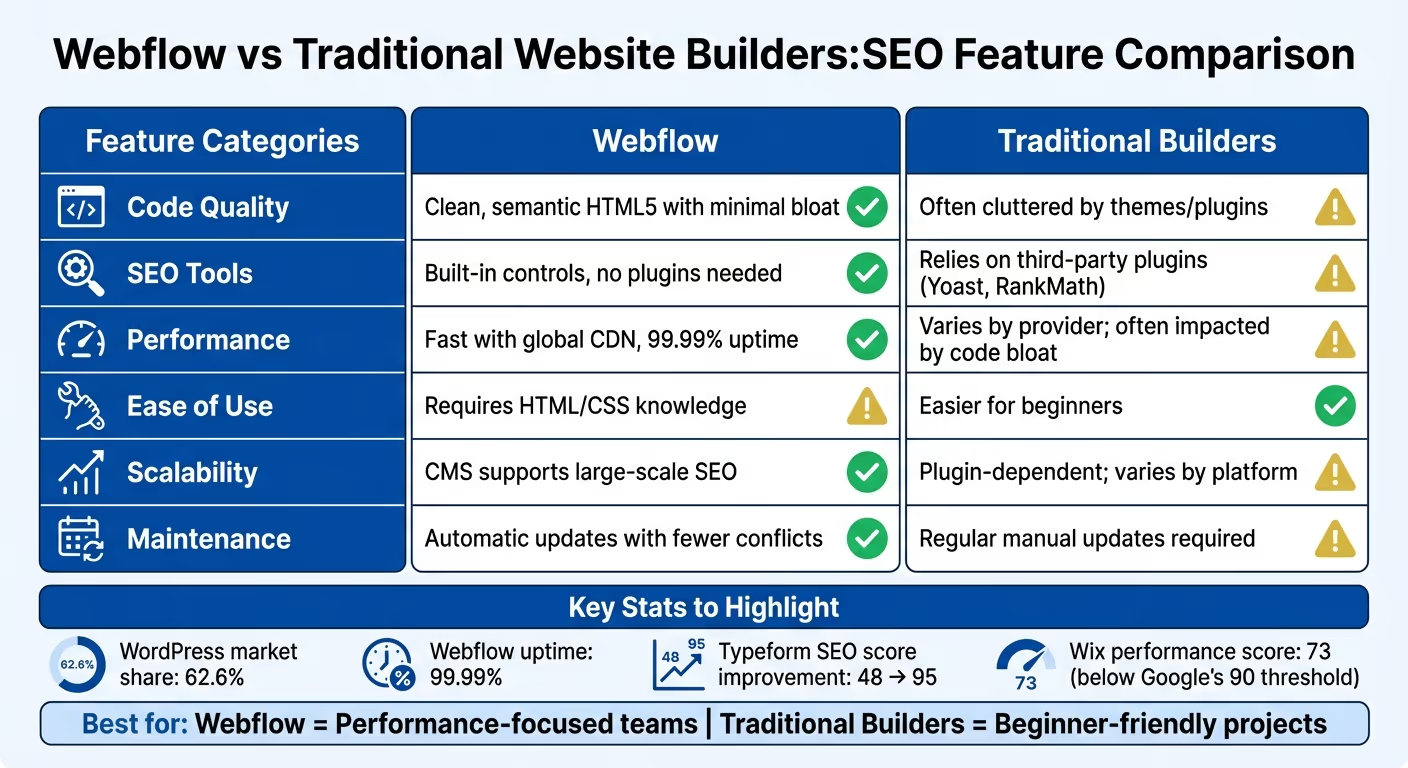
Webflow adopta un enfoque único para el SEO al integrar funciones de optimización esenciales directamente en su editor. Esta configuración permite a los usuarios realizar tareas técnicas de SEO sin necesidad de esperar al soporte de ingeniería.
Webflow crea un código HTML5 limpio y semántico por el que los motores de búsqueda pueden navegar fácilmente. Actualiza automáticamente los mapas de sitio XML, incluye certificados SSL como función estándar y permite a los usuarios establecer etiquetas canónicas de forma global o en páginas individuales. Su infraestructura de alojamiento, respaldada por AWS y un Rápidamente La CDN con más de 100 centros de datos garantiza un tiempo de actividad del 99,99%. También tienes el control total sobre los archivos robots.txt y puedes gestionar la configuración de indexación de páginas individuales, lo que resulta especialmente útil para mantener los sitios de prueba fuera de los resultados de búsqueda.
«Webflow le brinda un control preciso sobre los metadatos de SEO, las reglas de indexación, los redireccionamientos y más, para que pueda publicar los cambios rápidamente sin depender de ingenieros». - Webflow
Webflow equipa cada página con campos integrados para metatítulos y descripciones, además de contadores de caracteres y una vista previa en tiempo real de cómo aparecerá tu anuncio en los resultados de búsqueda. En el caso de los sitios basados en CMS, los campos de metadatos se pueden conectar directamente a tu contenido, lo que permite crear etiquetas únicas y optimizadas para miles de páginas con una sola plantilla. El panel de auditoría de la plataforma simplifica aún más la optimización al escanear tu sitio en tiempo real para detectar problemas como la falta de texto alternativo, las estructuras de los encabezados incorrectas o los problemas de accesibilidad. Por ejemplo, Tipoformulario mejoró su puntuación técnica de SEO de 48 a 95 después de migrar a Webflow. Estas herramientas integradas en la página funcionan de la mano con las mejoras de rendimiento de Webflow.
Webflow aumenta el rendimiento del sitio mediante la carga diferida automática de imágenes, el escalado de imágenes adaptables y la minimización del código. Estas funciones contribuyen a mejorar los Core Web Vitals, que miden factores clave como la velocidad de carga, la interactividad y la estabilidad visual. Con su CDN global, Webflow garantiza tiempos de carga rápidos para los usuarios de todo el mundo, mientras que su estructura de código limpia facilita que los motores de búsqueda rastreen e indexen su sitio.
El CMS de Webflow optimiza el SEO al habilitar patrones de metadatos en las colecciones, lo que permite la optimización automatizada. Soporta la generación dinámica de esquemas JSON-LD al vincular los campos del CMS a los datos estructurados. En el caso de los sitios multilingües, las herramientas de localización de Webflow gestionan las etiquetas hreflang automáticamente, lo que garantiza que la versión en el idioma correcto llegue a la audiencia adecuada.
Los creadores de sitios web tradicionales como Wix, GoDaddy, y WordPress ofrecen un enfoque más convencional para crear sitios web. Estas plataformas tienen como objetivo equilibrar la facilidad de uso con la flexibilidad, aunque a menudo se inclinan por la simplicidad. Por ejemplo, Wix y GoDaddy simplifique el proceso ocultando las complejidades de la codificación detrás de botones y asistentes. Por otro lado, WordPress, que cuenta con una enorme 62,6% cuota de mercado, depende en gran medida de complementos de terceros para gestionar tareas avanzadas de SEO.
Cuando se trata de SEO, los constructores tradicionales cubren lo esencial, pero sus métodos son diferentes. Plataformas como Wix y Squarespace utilizan sistemas propietarios que a menudo limitan la visibilidad del código subyacente. WordPress ofrece más control, pero requiere complementos como Yoast para gestionar las metaetiquetas y los datos estructurados de forma eficaz. En cuanto al marcado de esquemas, muchos de estos creadores carecen de herramientas visuales integradas, lo que permite a los usuarios insertar código personalizado o confiar en aplicaciones de terceros. Estos diferentes enfoques conducen a diferencias notables en la forma en que se gestiona la optimización de la página en todas las plataformas.
Los constructores tradicionales han logrado avances en el suministro de herramientas de SEO fáciles de usar. Wix, por ejemplo, ofrece una lista de verificación de SEO personalizada y se integra con Semrush para la investigación de palabras clave, lo que le otorga una puntuación SEO perfecta de 5/5 por parte de Website Builder Expert. Squarespace se destaca como el primer constructor en integrarse directamente con Consola de búsqueda de Google, lo que permite a los usuarios controlar qué palabras clave generan tráfico. Mientras tanto, Shopify usa su IA «Shopify Magic» para generar automáticamente descripciones de productos optimizadas para palabras clave. Si bien estas herramientas simplifican las tareas de SEO, no ofrecen el mismo nivel de precisión a nivel de código que el editor integrado de Webflow.
El rendimiento es una mezcla para los constructores tradicionales. Wix, por ejemplo, tiene una puntuación de rendimiento promedio de 73, por debajo del umbral recomendado por Google de 90. El rendimiento de WordPress puede variar mucho según el alojamiento, los temas y los complementos, ya que la sobrecarga de temas y complementos a menudo reduce las puntuaciones de Core Web Vitals. Sin embargo, las plataformas administradas, como Squarespace, utilizan valores predeterminados que mejoran el rendimiento y ayudan a muchos sitios a cumplir con los requisitos básicos de la Web Vitals sin necesidad de realizar ajustes exhaustivos. Un problema común en los compiladores tradicionales es la sobrecarga de código, que suele estar provocada por plantillas y complementos, lo que puede afectar negativamente a los tiempos de carga.
«Muchos sitios de WordPress tienen un rendimiento inferior en Core Web Vitals debido a los temas pesados, las imágenes no optimizadas y la sobrecarga de complementos. La plataforma no impone medidas disciplinarias. Lo habilita si los equipos lo eligen». - Brand Vision
La escalabilidad es otra área en la que estas plataformas difieren. WordPress sobresale en este sentido, gracias a su extenso ecosistema de complementos, pero esta flexibilidad a menudo viene acompañada de la necesidad de actualizaciones periódicas y mantenimiento de seguridad. Por el contrario, Wix y Squarespace se centran en la simplicidad, lo que los hace más adecuados para sitios más pequeños. Shopify mejora la escalabilidad de los sitios de comercio electrónico con su mercado de aplicaciones centradas en el SEO, que ofrece funciones personalizadas para las tiendas en línea.
Al comparar Webflow con los creadores de sitios web tradicionales, cada uno aporta su propio conjunto de puntos fuertes y desafíos, especialmente en lo que respecta al SEO. Webflow se destaca por ofrecer un HTML5 limpio y semántico, por el que los motores de búsqueda pueden navegar de manera eficiente. También incluye herramientas de SEO integradas para administrar las metaetiquetas, los redireccionamientos 301 y el marcado de esquemas sin depender de complementos de terceros. Esto no solo mantiene los sitios rápidos, sino que también minimiza las posibles vulnerabilidades de seguridad.
Por otro lado, Webflow tiene una curva de aprendizaje más pronunciada y requiere cierta familiaridad con HTML y CSS. Además, carece del extenso ecosistema de complementos que ofrecen plataformas como WordPress. Esto significa que tareas como las auditorías automatizadas de SEO o la creación de sitios web multilingües a menudo deben gestionarse manualmente. Por el contrario, los constructores tradicionales son más accesibles para los principiantes y ofrecen una amplia gama de complementos (como Yoast o Matemáticas de rango) para simplificar las tareas de SEO. Sin embargo, estas plataformas suelen sufrir un exceso de código, problemas de seguridad y necesidades frecuentes de mantenimiento debido a que dependen de complementos y temas.
Característica
Webflow
Constructores tradicionales
HTML5 limpio y semántico con un mínimo de hinchazón
A menudo abarrotado de temas/complementos
Controles integrados, no se necesitan complementos
Se basa en complementos de terceros
CDN AWS/Fastly integrada, tiempo de actividad del 99,99%
Varía según el proveedor; es posible que sea necesario ajustarlo
Más empinado; requiere conocimientos de HTML/CSS
Más fácil para los principiantes
Plugins nativos limitados
Amplia variedad (por ejemplo, Yoast, RankMath)
Actualizaciones automáticas con menos conflictos
Se requieren actualizaciones manuales periódicas
Los constructores tradicionales brillan cuando la simplicidad y la accesibilidad son prioridades, lo que los convierte en una excelente opción para proyectos más pequeños o equipos con conocimientos técnicos limitados. Por otro lado, Webflow es más adecuado para aquellos que valoran un control preciso sobre el código de su sitio y están dispuestos a invertir tiempo en aprender a usar la plataforma. Estas diferencias subrayan las ventajas y desventajas entre ambos, sentando las bases para una evaluación más profunda en la conclusión.
Webflow se destaca como una plataforma que ofrece buenos resultados de SEO, gracias a su código limpio, su rápido rendimiento y su flexibilidad en la gestión de la configuración técnica. Genera HTML5 semántico, lo que facilita el rastreo de los motores de búsqueda, y aloja sitios web en una CDN distribuida a nivel mundial con un tiempo de actividad del 99,99%. Además, las herramientas integradas de Webflow para administrar las metaetiquetas, los redireccionamientos 301 y el marcado de esquemas eliminan la necesidad de usar complementos, lo que agiliza el proceso.
Esta plataforma es particularmente atractiva para los equipos centrados en el crecimiento que priorizan la velocidad y la autonomía. Los equipos de marketing pueden actualizar los metadatos de forma independiente, abrir páginas de destino y configurar redireccionamientos sin esperar a los desarrolladores. El CMS de Webflow también es compatible con el SEO programático a gran escala, lo que permite a los usuarios crear cientos de páginas segmentadas mediante la importación de archivos CSV, una característica que las plataformas tradicionales, a menudo empantanadas por la dependencia de los complementos y la dependencia de los desarrolladores, tienen dificultades para igualar. Sin embargo, estas ventajas conllevan algunas desventajas.
La curva de aprendizaje de Webflow es más pronunciada en comparación con las plataformas aptas para principiantes. Si bien las actualizaciones de contenido son sencillas, aprovechar todo su potencial requiere algunos conocimientos básicos de HTML y CSS. Tareas como la creación de sitios multilingües también exigen un esfuerzo manual. Por otro lado, los creadores tradicionales pueden ofrecer una integración más sencilla y una gama más amplia de complementos, pero a menudo comprometen la calidad del código y el rendimiento general.
Webflow viene con funciones diseñadas para impulsar el SEO, lo que la convierte en una opción sólida para mejorar la visibilidad de su sitio. Produce un código HTML limpio y semántico, que ayuda a los motores de búsqueda a rastrear e indexar tu sitio de forma más eficaz. Además, ofrece herramientas fáciles de usar para administrar los elementos clave de SEO, como las metaetiquetas, el texto alternativo y las URL personalizadas, lo que le brinda más control sobre la optimización de su sitio.
Otro punto destacado es el de Webflow alojamiento rápido y velocidades rápidas de carga de páginas, los cuales son fundamentales para las clasificaciones de búsqueda. Las herramientas integradas adicionales, como los mapas de sitio automáticos, la compatibilidad con hreflang y la gestión sencilla del SEO desde la página, facilitan aún más la mejora del rendimiento de tu sitio en los resultados de búsqueda.
Webflow proporciona herramientas poderosas para ajustar los sitios web multilingües para los motores de búsqueda, lo que facilita la conexión con audiencias de todo el mundo. Una característica destacada es la asignación automática de etiquetas de idioma HTML para cada configuración regional, lo que ayuda a los motores de búsqueda a entender el idioma del contenido. Además de eso, Webflow admite etiquetas hreflang, garantizando que los usuarios accedan al idioma o la versión regional correctos del sitio en función de su ubicación.
Otra ventaja importante es la posibilidad de personalizar los slugs de URL, los metatítulos y las descripciones para cada idioma, elementos esenciales para impulsar el SEO. Las opciones de localización fáciles de usar de Webflow también te permiten administrar el contenido y el diseño para cada ubicación de forma individual. Esto reduce los dolores de cabeza que a menudo se asocian a la administración de sitios multilingües, como el contenido duplicado o la segmentación por idiomas que no coinciden. ¿Cuál es el resultado? Un proceso más fluido que mejora la visibilidad de su sitio web en los rankings de búsqueda internacionales.
Sí, Webflow es una gran opción para principiantes, incluso si no tienes experiencia en codificación. Su interfaz de arrastrar y soltar fácil de usar simplifica el proceso de diseño de sitios web, por lo que puede centrarse en la creatividad en lugar de en los conocimientos técnicos.
Además de eso, Webflow incluye herramientas de SEO integradas, lo que facilita la optimización de su sitio para los motores de búsqueda sin necesidad de conocimientos avanzados. Además, genera automáticamente un código semántico limpio que los motores de búsqueda pueden rastrear fácilmente. Esto garantiza que su sitio web no solo sea visualmente atractivo, sino que también esté optimizado para el rendimiento y la visibilidad en línea. Si eres nuevo en el diseño web pero quieres un sitio profesional y listo para los motores de búsqueda, Webflow es una opción sólida.
{» @context «:» ¿https://schema.org","@type":"FAQPage","mainEntity":[{"@type":"Question","name":"What convierte a Webflow en una buena elección para el SEO?» , "acceptedAnswer»: {» @type «:"Answer», "text»:» <p>Webflow viene repleto de <strong>funciones diseñadas para impulsar el SEO, por lo que es una buena opción para mejorar</strong> la visibilidad de su sitio. Produce un código HTML limpio y semántico, que ayuda a los motores de búsqueda a rastrear e indexar tu sitio de forma más eficaz. Además, ofrece herramientas fáciles de usar para administrar los elementos clave de SEO, como las metaetiquetas, el texto alternativo y las URL personalizadas, lo que le brinda más control sobre la optimización de su sitio</p>. <p>Otro punto a destacar es el <strong>rápido alojamiento y las rápidas velocidades de carga de páginas</strong> de Webflow, que son fundamentales para los rankings de búsqueda. Las herramientas integradas adicionales, como los mapas de sitio automáticos, la compatibilidad con hreflang y la gestión sencilla del SEO desde la página, facilitan aún más la mejora del rendimiento de tu sitio en los resultados</p> de búsqueda. «}}, {» @type «:"Question», "name» :» ¿Cómo apoya Webflow el SEO multilingüe para audiencias globales?» , "acceptedAnswer»: {» @type «:"Answer», "text»:» <p>Webflow proporciona herramientas poderosas para adaptar los sitios web multilingües a los motores de búsqueda, lo que facilita la conexión con audiencias de todo el mundo. Una característica destacada es la asignación automática de etiquetas de idioma HTML para cada configuración regional, lo que ayuda a los motores de búsqueda a entender el idioma del contenido. Además de eso, Webflow admite <strong>etiquetas hreflang</strong>, lo que garantiza que los usuarios lleguen al idioma o la versión regional correctos de su sitio en función de su ubicación</p>. <p>Otra ventaja importante es la posibilidad de personalizar los slugs, los metatítulos y las descripciones de las URL para cada idioma, elementos esenciales para impulsar el SEO. Las opciones de localización fáciles de usar de Webflow también te permiten administrar el contenido y el diseño para cada ubicación de forma individual. Esto reduce los dolores de cabeza que a menudo se asocian a la administración de sitios multilingües, como el contenido duplicado o la segmentación por idiomas que no coinciden. ¿El resultado? Un proceso más fluido que mejora la visibilidad de su sitio web en los rankings de búsqueda internacionales.</p> «}}, {» @type «:"Question», "name» :» ¿Webflow es apto para principiantes para quienes no tienen conocimientos de programación?» , "acceptedAnswer»: {» @type «:"Answer», "text»:» <p>Sí, <strong>Webflow</strong> es una excelente opción para los principiantes, incluso si no tienes experiencia en programación. Su interfaz de arrastrar y soltar, fácil de usar, simplifica el proceso de diseño de sitios web, por lo que puede centrarse en la creatividad en lugar de</p> en los conocimientos técnicos. <p>Además de eso, Webflow incluye herramientas de SEO integradas, lo que facilita la optimización de su sitio para los motores de búsqueda sin necesidad de conocimientos avanzados. Además, genera automáticamente un código semántico limpio que los motores de búsqueda pueden rastrear fácilmente. Esto garantiza que su sitio web no solo sea visualmente atractivo, sino que también esté optimizado para el rendimiento y la visibilidad en línea. Si eres nuevo en el diseño web pero quieres un sitio profesional y listo para los motores de búsqueda, Webflow</p> es una opción sólida. «}}]}