



Insights
Webflow
Copy Link




Mejores prácticas de URL de Webflow: usa guiones, slugs cortos en minúscula, carpetas lógicas, slugs de CMS centrados en palabras clave y redireccionamientos 301 para proteger el SEO.
La estructura de URL de su sitio web es esencial tanto para la navegación de los usuarios como para la optimización de motores de búsqueda (SEO). Las URL claras, concisas y bien organizadas mejoran la experiencia del usuario, aumentan las tasas de clics y ayudan a los motores de búsqueda a entender tu contenido. Esto es lo que necesitas saber:
En Webflow, puedes personalizar fácilmente los slugs de páginas estáticas, administrar las URL de las colecciones de CMS y crear estructuras jerárquicas para mantener tu sitio organizado. Seguir estas directrices garantiza que tus URL sean fáciles de usar y estén optimizadas para el SEO.
La creación de URL eficaces se reduce a unas pocas reglas clave que mejoran tanto las clasificaciones de los motores de búsqueda como la experiencia del usuario. Ya sea que trabajes con páginas estáticas o colecciones dinámicas en Webflow, estos principios son consistentes.
Intenta mantener tus URL por debajo de los 75 caracteres. Esto garantiza que no se trunquen en los resultados de búsqueda y que sean más fáciles de compartir. Una URL concisa como yoursite.com/seo-url-structure es mucho mejor que uno largo como yoursite.com/learn-about-seo-friendly-url-structure-best practices. Las URL cortas son más fáciles de usar, ya sea que las compartas en las redes sociales, las pegues en correos electrónicos o las imprimas en materiales de marketing.
«Cuanto más legible sea para los seres humanos, mejor». - Rand Fishkin, fundador de Moz
Empieza con el título de la página y céntrate en la palabra clave de búsqueda principal. Elimina las palabras clave innecesarias como «y», «el» o «de», a menos que sean cruciales para el significado. Este enfoque mantiene tu URL enfocada a la vez que mantiene la claridad.
Los guiones (-) son el estándar de oro para separar palabras en las URL. Los motores de búsqueda tratan los guiones como espacios, lo que facilita el reconocimiento de las palabras clave. Por el contrario, los guiones bajos (_), que unen las palabras, pueden confundir a los motores de búsqueda y reducir la visibilidad de las palabras clave. Por ejemplo, diseño_web podría interpretarse como «diseño web». Incluso Google recomienda usar guiones en sus directrices.
Evita los espacios por completo, ya que se convierten en «%20" en las URL, lo que crea un desorden innecesario. Del mismo modo, evita CamelCase (p. ej., /Nombre de mi página), lo que puede provocar problemas de distinción entre mayúsculas y minúsculas en algunos servidores.
Utilice letras minúsculas y guiones para mantener la coherencia y evitar problemas de distinción entre mayúsculas y minúsculas. Algunos servidores, especialmente los basados en Linux/UNIX, tratan site.com/page y site.com/page como URL diferentes, lo que puede provocar problemas de contenido duplicado que confunden a los motores de búsqueda y diluyen la autoridad de la página.
Cíñete a los caracteres ASCII (A-Z, 0-9) y evita los símbolos o las letras acentuadas. Mantener todo sencillo y estandarizado ayuda a garantizar que las URL funcionen sin problemas en todas las plataformas.
Incorporar tu palabra clave principal en el slug de la URL es una forma pequeña pero eficaz de mejorar las tasas de clics y, al mismo tiempo, señalar la relevancia para los motores de búsqueda.
«Incluir palabras clave relevantes en tu URL proporciona una señal de relevancia pequeña pero significativa para los motores de búsqueda. Si bien no es un factor de clasificación importante por sí solo, contribuye a la comprensión general del tema de la página». - Yue, especialista en SEO de SEOPage.ai
Usa tu palabra clave una vez para evitar que aparezca como spam. Una descripción sencilla de la página, con palabras separadas por guiones, suele ser todo lo que necesitas para el SEO. Además, evita añadir fechas como /blog/mejores herramientas de 2025 - esto mantiene tus URL imperecederas y evita que necesites redireccionamientos cuando el contenido queda desactualizado.
Principio
Mejor práctica
Por qué es importante
Usa guiones (
)
Los guiones son universalmente reconocidos; los espacios se vuelven confusos
cuerdas.
Use solo minúsculas
Evita los problemas de contenido duplicado en los servidores que distinguen mayúsculas y minúsculas.
Menos de 75 caracteres
Garantiza la legibilidad y evita que se trunquen los resultados de búsqueda.
Incluir palabra clave principal
Aumenta las tasas de clics y proporciona contexto tanto para los rastreadores como para los usuarios.
Evite los parámetros dinámicos
Parámetros como
no añaden valor y confunden a los usuarios.
Webflow le brinda la flexibilidad de personalizar las URL para las páginas estáticas y las colecciones de CMS. Saber cómo acceder a estas configuraciones y ajustarlas es clave para mantener tu sitio organizado y apto para los motores de búsqueda.
Para personalizar la URL de una página estática, dirígete a Panel de páginas, coloca el cursor sobre el nombre de la página y haz clic en Configuración (icono de engranaje). Aquí encontrarás el Babosa campo. De forma predeterminada, Webflow transforma el título de una página, como «Acerca de nosotros», en una URL como domain.com/about-us.
Al crear slugs, Webflow solo permite letras latinas en minúscula (a—z) y números (0-9). Las letras mayúsculas se convierten automáticamente en minúsculas, caracteres especiales como !, &, y . se eliminan y los caracteres no latinos se transliteran. Esto mantiene tus URL limpias y fáciles de administrar sin esfuerzo adicional.
También puedes organizar las páginas estáticas en Carpetas para crear subdirectorios como /servicios/diseño web. Una página estática puede compartir el mismo slug que su carpeta principal, lo que la convierte en el «índice» o página de inicio principal de ese directorio. Sin embargo, ten en cuenta que las carpetas no pueden compartir slugs con las colecciones de CMS. Webflow evita mezclar contenido estático y dinámico en el mismo directorio.
Si actualizas el slug de una página, es fundamental configurar inmediatamente una redirección 301 para mantener tu clasificación de SEO y evitar errores 404. Esto se puede hacer en Configuración del sitio > Publicación. Recuerde ajustar el slug antes de eliminar o guardar la página como borrador para asegurarse de que la redirección funcione correctamente.
Una vez configuradas las URL estáticas, es hora de sumergirse en las estructuras de URL dinámicas para las colecciones de CMS.
Después de gestionar las páginas estáticas, querrás ajustar las URL generadas por las colecciones de CMS.
Para las colecciones de CMS, el slug de colección sirve como directorio principal para todas las páginas de elementos. Por ejemplo, si tu colección se llama «Publicaciones de blog» con el slug blog, a continuación, cada publicación aparecerá en dominio.com/blog/nombre del correo. También puedes anidar colecciones en directorios específicos ajustando la configuración de la colección, lo que te da más control sobre la jerarquía de URL.
Si bien Webflow genera automáticamente slugs de CMS, es una buena idea editarlos para mayor claridad y relevancia de las palabras clave. Mantén las URL cortas eliminando palabras innecesarias como «a», «la» o «y». Puedes editar los slugs a nivel de colección para mantener la coherencia o modificarlos individualmente para elementos específicos.
Para mejorar aún más tus páginas de CMS, usa campos dinámicos en la configuración de la plantilla de colección para completar automáticamente metatítulos y descripciones a partir de tus datos de CMS. Este enfoque garantiza que cada página tenga metadatos únicos sin necesidad de introducir datos manuales. Al añadir enlaces dentro de los campos del CMS, utilice siempre rutas relativas (p. ej., /sobre-nosotros) en lugar de direcciones URL completas. Esto garantiza que los enlaces funcionen correctamente en los entornos de ensayo y producción.
Esta es una comparación rápida de la administración de páginas estáticas y URL de CMS:
Característica
Páginas estáticas
Colecciones de CMS
Ajustado mediante el panel de ajustes de página
Se administra a nivel de colección o artículo
Organizado mediante carpetas anidadas
El slug de colección define el directorio principal
Totalmente editable (excepto los slugs reservados)
Generado automáticamente; se puede editar manualmente
Configurar manualmente por página
Se extrae dinámicamente de los campos del CMS
Con estos ajustes de URL configurados, estás en el buen camino para crear un sitio organizado y compatible con el SEO. A continuación, explora cómo crear estructuras jerárquicas de URL para mejorar aún más la navegación de tu sitio.
Una vez que hayas configurado las URL en Webflow, establecer una jerarquía clara lleva tu navegación y SEO al siguiente nivel. Una estructura de URL limpia y lógica no solo ayuda a los usuarios a entender cómo está organizado tu contenido, sino que también facilita a los motores de búsqueda la indexación de tu sitio. Por ejemplo, una URL como domain.com/services/diseño web/páginas de destino comunica instantáneamente la relación entre las diferentes secciones de su sitio web. Este tipo de claridad genera confianza y hace que la navegación sea muy sencilla.
Una estructura bien pensada también tiene un impacto directo en el SEO. Los motores de búsqueda prosperan en jerarquías organizadas, ya que permiten un rastreo e indexación más rápidos. Mantener la arquitectura de tu sitio web poco profunda (asegurarte de que ninguna página esté a más de tres clics de distancia de la página de inicio) ayuda a los motores de búsqueda a clasificar tu contenido de forma más eficaz. Exploremos cómo la agrupación lógica y las estructuras de carpetas simuladas pueden crear una jerarquía perfecta.
Para crear una estructura intuitiva, agrupa las páginas similares en carpetas principales que estén alineadas con las categorías principales de tu sitio. En el panel de páginas de Webflow, puedes lograrlo anidando las páginas estáticas dentro de las carpetas. Al hacerlo, las páginas heredan automáticamente la jerarquía de la carpeta en sus URL. Por ejemplo, colocar una página de «Diseño web» en una carpeta de «Servicios» da como resultado domain.com/services/diseño web.
También puede designar una página estática como página de inicio de una carpeta asignándole el mismo slug que la carpeta. Esto crea una página de descripción general dedicada a esa categoría y, al mismo tiempo, mantiene las URL limpias y fáciles de usar.
Para el contenido de CMS, cada slug de la colección actúa como un directorio principal para sus elementos. Por ejemplo, si tienes una colección de «estudios de casos» con el slug estudios de casos, los elementos individuales aparecerán en las URL como domain.com/case-studies/item-name. Puedes anidar aún más las colecciones en directorios específicos en la configuración de la colección, creando jerarquías más profundas, como domain.com/work/case-studies/item-name.
Si desea añadir más profundidad a la estructura, puede simular carpetas anidadas mediante el uso de babosas descriptivas. Por ejemplo, una URL como /store/auriculares/apple/airpods describe claramente la categoría del producto, la marca y el artículo específico.
Si bien agregar contexto a través de subcarpetas puede resultar útil, es esencial mantener la estructura manejable. Limítate a un máximo de cuatro o cinco niveles en tus URL; las rutas demasiado complejas pueden confundir tanto a los usuarios como a los motores de búsqueda.
Como explica Rand Fishkin:
«Cuanto más legible sea para los seres humanos, mejor... cuanto más fácil sea leer una URL para los humanos, mejor será para los motores de búsqueda».
Este consejo subraya la importancia de mantener las estructuras jerárquicas simples, naturales y fáciles de navegar, tanto para los usuarios como para los motores de búsqueda.
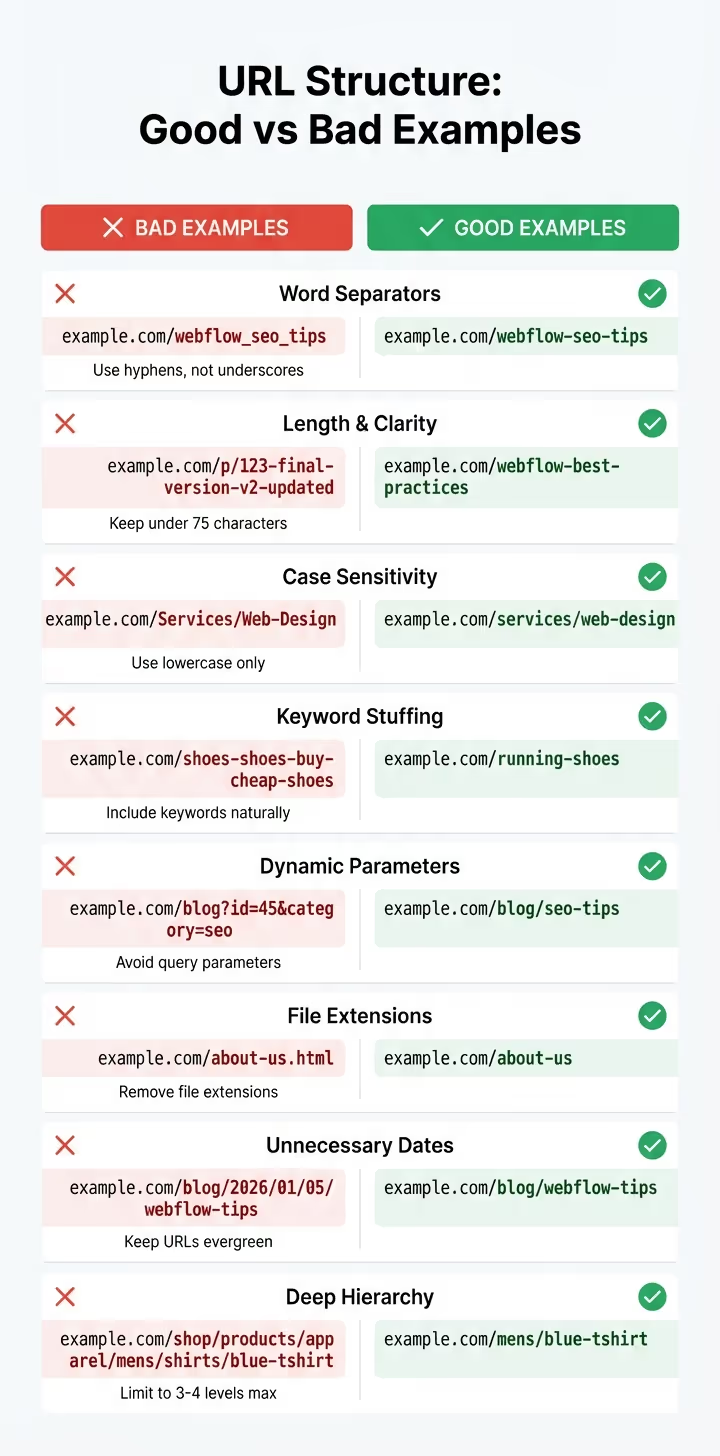
Para que tu sitio funcione al máximo, es importante evitar los errores de URL más comunes. Estos errores pueden afectar a la claridad y la eficacia del SEO de tu sitio, pero la buena noticia es que, por lo general, son fáciles de corregir.
Para empezar, evita usar guiones bajos como separadores de palabras. Pueden hacer que tus URL sean más difíciles de leer y entender. Por ejemplo, example.com/webflow_seo_tips puede parecer un término único y confuso en lugar de tres palabras clave claras.
Mantén tus slugs de URL concisos, idealmente con menos de 75 a 100 caracteres. Las URL más cortas son más fáciles de leer y compartir. Usa letras minúsculas para evitar posibles problemas de contenido duplicado. Y no caigas en la trampa del uso excesivo de palabras clave. Una URL como example.com/zapatillas para correr es mucho más limpio y eficaz que algo repetitivo.
Los redireccionamientos son otro aspecto crítico. Si cambias un slug de URL, configura siempre un redireccionamiento 301. Omitir este paso puede provocar errores 404, que no solo frustran a los usuarios sino que también perjudican tu SEO. Esto es especialmente importante si las URL en fase de almacenamiento se indexan accidentalmente.
Cada uno de estos errores puede dañar la claridad y el rendimiento de SEO de su sitio, por lo que abordarlos es esencial para una estrategia general más sólida.
Esta es una comparación rápida de los errores de URL más comunes y sus correcciones optimizadas:
Asunto
URL mal estructurada (mala)
URL optimizada (buena)
Para obtener una lista de verificación completa, continúa con la siguiente sección, donde cubriremos todos los pasos necesarios para una optimización eficaz de las URL.
Antes de publicar, comprueba que todas las URL de tu sitio se alinean con las mejores prácticas de SEO. Esta guía rápida describe los pasos esenciales para mantener tus URL limpias, fáciles de rastrear y listas para competir en los rankings de búsqueda.
Formato de slug: Usa letras minúsculas y usa guiones para separar las palabras de tus URL. Mantén las babosas concisas (lo ideal es que tengan menos de 75 caracteres) y elimina las palabras finales innecesarias como «a», «la» y «y» para mantener las cosas ordenadas. Incluye tus palabras clave principales de forma natural y evita añadir extensiones de archivo como .html o .php.
Configuración de Webflow: Ve a Configuración del sitio y configura tu etiqueta canónica global correctamente. Asegúrate de que excluya la barra diagonal final: úsala https://www.website.com en lugar de https://www.website.com/ - para evitar problemas con barras dobles en las URL de las subpáginas. Activa la opción «Desactivar la indexación de subdominios» para asegurarte de que tu sitio provisional no aparezca en los resultados de búsqueda. No olvides habilitar el SSL para que tu sitio utilice HTTPS, que ha sido un factor de clasificación desde 2014.
Administración de redireccionamiento: Para cualquier cambio de URL, configura redireccionamientos 301. Si mueves directorios enteros, los redireccionamientos con caracteres comodín pueden simplificar el proceso (p. ej., /carpeta antigua/ (.*) a /nueva carpeta/ %1). Audite regularmente sus redireccionamientos para evitar cadenas complicadas: manténgalos en dos saltos o menos.
Verificación previa al lanzamiento: Usa herramientas como Rana gritando o SEMrush para rastrear tu sitio. Estas herramientas pueden ayudarte a detectar enlaces rotos, contenido duplicado y cadenas de redireccionamiento. Conecta tu sitio a Consola de búsqueda de Google para hacer un seguimiento de los problemas de indexación y detectar errores de rastreo directamente desde Google. Además, revisa manualmente los slugs de tu colección de CMS (no confíes en los que se generan automáticamente) y confirma que tu página 404 personalizada esté activa en la sección Páginas de utilidades.
Esta lista de verificación garantiza que tus URL estén optimizadas y se integren perfectamente en tu estrategia más amplia de Webflow.
La estructura de tu URL actúa como una hoja de ruta que guía tanto a los usuarios como a los motores de búsqueda hacia tu contenido. Una URL bien organizada y rica en palabras clave no solo mejora la eficiencia de la indexación, sino que también aumenta las tasas de clics al aparecer más relevante y confiable en los resultados de búsqueda.
Webflow facilita la implementación de estas mejores prácticas con sus herramientas de SEO integradas. Funciones como la administración de slugs para páginas estáticas, los slugs automatizados de CMS Collection para contenido dinámico y la administración de redireccionamientos 301 están disponibles sin necesidad de complementos adicionales. Como explica el equipo de Webflow:
«El SEO técnico es la base que ayuda a los motores de búsqueda a rastrear, comprender y clasificar tus páginas».
Para configurar 301 redireccionamientos en Webflow, comience por navegar hasta su Configuración del sitio desde el panel de control de Webflow. Una vez allí, dirígete al Hospedaje pestaña y desplázate hacia abajo hasta la 301 Redireccionamientos sección. Aquí, introducirás la ruta URL anterior (p. ej., /página antigua) y la nueva ruta URL (p. ej., /nueva-página). Asegúrese de incluir la barra diagonal inicial de ambas rutas para evitar errores.
Después de agregar la redirección, haga clic Guardar y publique su sitio para aplicar los cambios. Si necesitas gestionar redireccionamientos más complejos, puedes usar comodines. Por ejemplo, /carpeta antigua/ (.*) puede redirigir varias URL a una nueva estructura como /carpeta-nueva/ $1. Esta es una forma práctica de simplificar los redireccionamientos y, al mismo tiempo, mantener su sitio funcionando sin problemas.
Consejo profesional: Equipos como The Hoop Studio siga estos pasos durante los cambios de marca centrados en el SEO y los lanzamientos de sitios para mantener el flujo de tráfico y proteger las clasificaciones en los motores de búsqueda.
Cuando se trata de estructurar las URL, los guiones son el camino a seguir. Los motores de búsqueda reconocen los guiones como separadores de palabras, lo que facilita la lectura e interpretación de las URL. Esto no solo mejora la legibilidad para los usuarios, sino que también hace que las URL sean más eficaces para los motores de búsqueda.
Por el contrario, los guiones bajos no tienen el mismo propósito. Los motores de búsqueda no tratan los guiones bajos como separadores de palabras, lo que puede generar confusión a la hora de interpretar las palabras individuales de una URL.
Por ejemplo, una URL como example.com/best practices es mucho más claro y fácil de usar para los motores de búsqueda que example.com/best_practices. Al usar guiones, ayudas a los motores de búsqueda a indexar y comprender tu contenido de manera más eficiente.
Las URL cortas (idealmente de menos de 75 caracteres) son más fácil de leer, más fácil de recordar y más fácil de compartir, lo que puede llevar a tasas de clics más altas. También facilitan que los rastreadores de los motores de búsqueda naveguen e indexen tus páginas, lo que puede impulsar tus esfuerzos de SEO. Mantener las URL cortas garantiza que tengan un aspecto limpio y profesional, especialmente cuando se comparten en las redes sociales o en contenido promocional.
{» @context «:» https://schema.org","@type":"FAQPage","mainEntity":[{"@type":"Question","name":"How ¿puedo crear 301 redireccionamientos en Webflow?» <strong>, "acceptedAnswer»: {» @type «:"Answer», "text»:» Para configurar <strong>301 redireccionamientos</strong> en Webflow, empieza por ir a la configuración del sitio desde el panel de control de Webflow.</strong> <p> <strong>Una vez allí, dirígete a la pestaña de <strong>Alojamiento y desplázate hacia abajo hasta la sección de redireccionamientos 301</strong>.</strong> <code>Aquí, introducirás la ruta URL anterior (por ejemplo, <code>/old-page</code>) y la nueva ruta URL (por ejemplo, /new-page).</code> Asegúrate de incluir la barra diagonal inicial de ambas rutas para evitar errores</p>. <p>Tras añadir la redirección, haz clic en <strong>Guardar</strong> y publicar tu sitio para aplicar los cambios. Si necesitas gestionar redireccionamientos más complejos, puedes usar comodines. <code>Por ejemplo, <code>/old-folder/ (.*)</code> puede redirigir varias URL a una estructura nueva, como /new-folder/ $1.</code> Esta es una forma práctica</p> de simplificar los redireccionamientos y, al mismo tiempo, mantener tu sitio funcionando sin problemas. </a><p><em>Consejo profesional:</em> equipos como <a href=\» https://www.thehoopstudio.com/\">Hoop Studio utilizan estos pasos cuando lanzan sitios web y cambios de marca centrados en el SEO para mantener el flujo de tráfico y proteger su posicionamiento en los motores de búsqueda.</p> «}}, {» @type «:"Question», "name» :» ¿Por qué debo usar guiones en lugar de guiones bajos en mis URL?» <p><strong>, "acceptedAnswer»: {» @type «:"Answer», "text»:» Cuando se trata de estructurar las URL, los guiones son la mejor opción.</strong> Los motores de búsqueda reconocen los guiones como separadores de palabras, lo que facilita la lectura y la interpretación de las URL. Esto no solo mejora la legibilidad para los usuarios, sino que también hace que las URL sean más eficaces para los motores</p> de búsqueda. <p>Por el contrario, los guiones bajos no tienen el mismo propósito. Los motores de búsqueda no tratan los guiones bajos como separadores de palabras, lo que puede generar confusión a la hora de interpretar las palabras individuales</p> de una URL. <p><code>Por ejemplo, una URL como <code>example.com/best-practices es mucho más clara y fácil de usar para los motores de búsqueda que example.com/best_practices</code>.</code> Al usar guiones, ayudas a los motores de búsqueda</p> a indexar y entender tu contenido de manera más eficiente. «}}, {» @type «:"Question», "name» :"¿ Por qué es importante mantener las URL con menos de 75 caracteres?» , "acceptedAnswer»: {» @type «:"Answer», "text»:» <p>Las URL cortas (idealmente de menos de 75 caracteres) son <strong>más fáciles de leer, recordar y compartibles, lo que puede llevar a tasas de clics más altas</strong>. También facilitan que los rastreadores de los motores de búsqueda naveguen e indexen tus páginas, lo que puede impulsar tus esfuerzos de SEO. Mantener las URL cortas garantiza que tengan un aspecto limpio y profesional, especialmente cuando se comparten en las redes sociales o en contenido promocional</p>. «}}]}