



Insights
Conversion
Copy Link




Structure beats style: organize hero, benefits, social proof, forms, and CTAs to boost conversions and reduce friction.
When it comes to landing pages, structure beats style every time. A sleek design might catch the eye, but without a clear, organized flow, visitors will leave before they take action. Here's the truth: clarity drives conversions.
Key takeaways:
The secret? Answer these questions in order:
This guide explains how to structure your landing page for maximum impact - starting with user journeys, content flow, and key elements like forms and CTAs. Focus on structure first, and conversions will follow.
Landing Page Conversion Statistics: Key Metrics That Drive Results
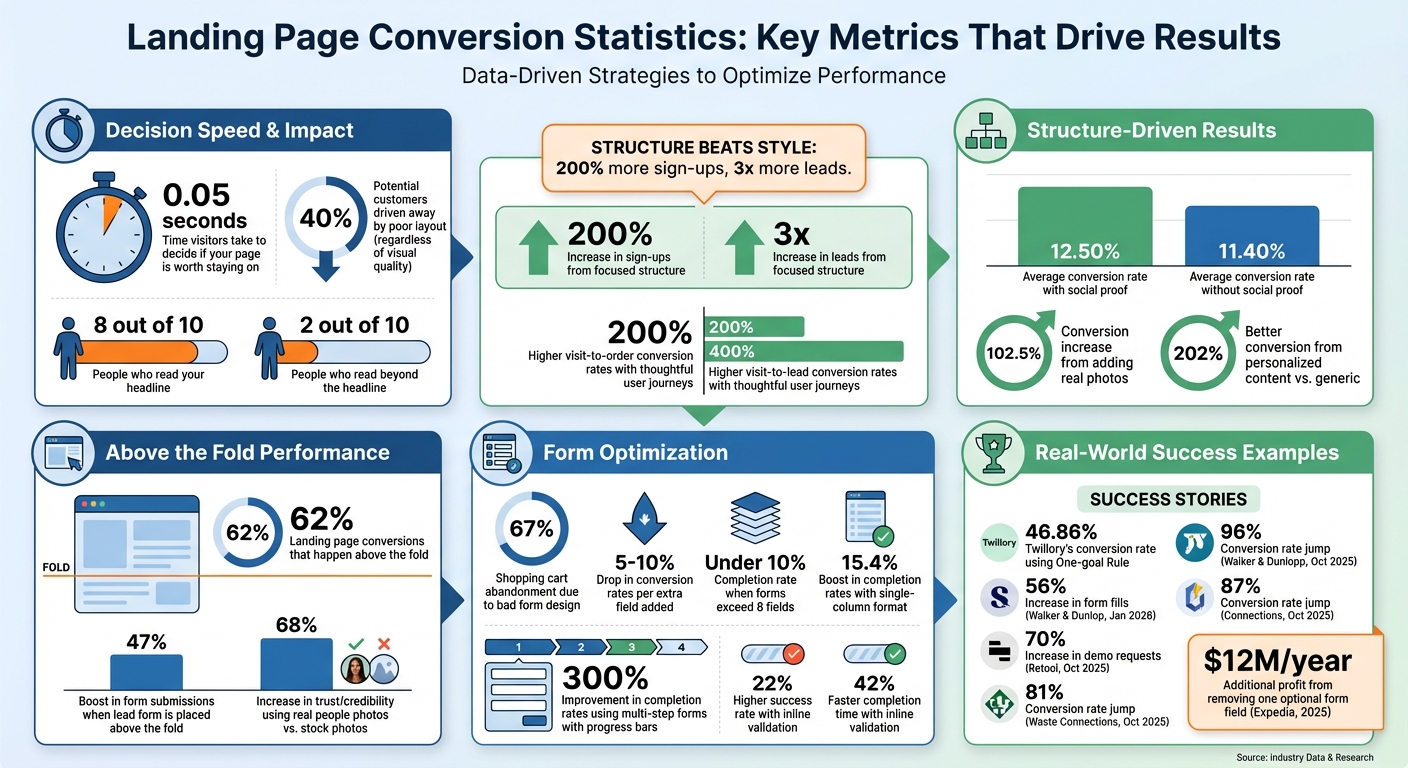
To create a high-performing page, the first step is understanding your visitors and charting their conversion path. This isn’t guesswork - it’s about knowing who lands on your page and the actions they need to take. Pages with thoughtfully designed user journeys can see up to 200% higher visit-to-order conversion rates and 400% higher visit-to-lead conversion rates, thanks to an improved user experience.
It’s important to distinguish between the technical steps of a user flow and the emotional experience of a user journey. A user flow outlines the logical process - clicking buttons, filling forms, navigating pages. On the other hand, a user journey captures the emotional highs and lows - moments of confidence, hesitation, or doubt. While both are crucial, understanding the emotional journey helps pinpoint where friction might be sabotaging conversions.
Start by crafting detailed user personas. These personas should reflect specific motivations, like “The Coffee Nerd” searching for high-quality tools or “The Gift Giver” looking for thoughtful guidance. Knowing the when, how, and why of a visit shapes every aspect of your strategy.
Next, focus on a single conversion goal. Just one. Pages that stick to the "One-goal Rule" strip away distractions - like extra navigation menus or links - to maintain a 1:1 attention ratio. For example, Twillory achieved a 46.86% conversion rate by designing every element to support a single campaign goal.
"Worry first about creating FOCUS. What's your main offer? Stick to that. Clear focus eliminates the possibility of 'paralysis by analysis.'" - Blake Emal, Senior Manager of Demand Gen at Talkdesk
With a clear goal and well-defined personas, structure your content to align with the user’s thought process.
Using your audience insights, organize your content to address their questions in the order they naturally arise. Start by tackling pain points, then highlight benefits, differentiate your offering, handle objections, provide social proof, and finish with a compelling call to action. Keep in mind that 8 out of 10 people will read your headline, but only 2 out of 10 will read further.
A great example of this strategy in action is Walker & Dunlop. In January 2026, they saw a 56% increase in form fills and 23% year-over-year organic search growth by analyzing real user data to optimize their content flow. This effort, led by Kokko Tso, VP of Digital Marketing, highlights the power of tracking conversion paths.
Incorporate trust-building elements, like money-back guarantees or security badges, at points where visitors might hesitate. And remember, personalized content converts 202% better than generic alternatives. Tailor your messaging to address the unique concerns of each persona you’ve defined.
Once you've mapped out the user journey, the next step is organizing your landing page to encourage conversions. Every element should guide visitors toward taking action. When done right, these components work together to answer questions, build trust, and remove obstacles. Start with a hero section that grabs attention and directs users toward your primary goal.
The hero section has one primary job: to answer three key questions within five seconds - "What is this?", "Who is it for?", and "Why should I care right now?". Clarity is everything here.
Begin with a headline that focuses on benefits, ideally mirroring the ad or link that led visitors to your page. This ensures a "message match", reducing confusion and keeping users engaged. Keep it short - no more than eight words - and emphasize the outcome over features.
Follow the headline with a subheadline that explains how you deliver the promised benefit. While the headline grabs attention, the subheadline connects with specific pain points, making your offer feel relevant. Use a high-contrast color for the primary call-to-action (CTA) button - think orange, red, or green - to make it stand out as the most noticeable element on the page.
Make sure all critical information stays above the fold - visible without scrolling. Why? Because 62% of landing page conversions happen above the fold, and adding a lead form here can boost submissions by 47%. Include a visual that showcases your product in action or depicts the desired outcome. Images featuring real people tend to build more trust, increasing credibility by 68% compared to generic stock photos.
Lastly, consider removing or minimizing your site’s navigation menu. This reduces distractions and keeps visitors focused on your conversion goal.
"One of the biggest mistakes site owners make when building landing pages is not having a clear, single focus for the page." - Ryan McHugh, Director of CRO at NP Digital
Once the hero section captures attention, the next step is to clearly communicate the benefits and features of your offering.
After establishing what you offer in the hero section, use the benefits section to explain why it matters. Every part of this section should work to guide visitors closer to conversion.
Make this area easy to scan. Use bullet points or short paragraphs that translate features into real-world benefits. Benefits highlight the value ("Save 10 hours per week"), while features describe functionality ("Automated reporting dashboard").
Use visual hierarchy - through font size, color, and spacing - to draw attention to the most important points. Bold key phrases to help skimmers quickly grasp the value of your offer.
Organize this section to answer questions in a logical order. Visitors typically want to know how your product helps them (benefits), what sets you apart (unique selling proposition), and whether it’s worth their time or money (social proof). This progression reduces mental effort and keeps users engaged.
Social proof is a powerful way to turn doubt into trust. Adding it after the benefits section strengthens credibility and reassures users. Landing pages that include social proof see an average conversion rate of 12.50%, compared to 11.40% for those without it.
Start with a logo bar of customer brands right below the hero section to establish authority. For a cleaner look, desaturate the logos so their colors don’t distract from your main message.
Place detailed testimonials near the benefits section or mid-page to create an emotional connection. Include high-quality headshots (shoulders up), full names, job titles, and company names to emphasize authenticity. Bold key phrases in testimonials to make them skimmable for readers in a hurry.
Add trust badges and security seals near forms or CTAs to ease hesitation at critical decision points. These can include certifications, media mentions ("As seen in Forbes"), or user ratings like "4.8/5 on Capterra". Research shows that people read at least 10 reviews before trusting a business, so feature multiple reviews rather than just one.
"I'm a firm believer in ensuring that the content on your landing page is relevant and consistent with the content that drove the visitor to your page. If you're running paid ads on social - include some of the ad copy, the image used in the ad, and any other branding elements." - Datis Mohsenipour, Director of Marketing, HeyOrca!
Consider using video testimonials to highlight benefits in a more engaging way. Videos often create stronger emotional connections than text alone. And don’t underestimate the power of adding real photos to your page - images of actual people can increase conversions by over 102.5%.
Forms and CTAs play a crucial role in turning interest into action. They’re the final hurdle before a visitor becomes a lead or customer. But poorly designed forms are a major roadblock - 67% of shopping cart abandonment is due to bad form design, and adding extra fields can drop conversion rates by 5-10%.
The simpler the form, the better the results. Stick to the essentials - fields like name and email. When forms exceed eight fields, completion rates plummet to under 10%. If it’s not critical, leave it out.
Layout matters too. A single-column format aligns with the natural top-to-bottom reading flow, boosting completion rates by 15.4%. Place easy fields, like "Full Name", at the top to encourage users to start filling out the form. Once they begin, they’re more likely to finish - this is called the commitment principle.
For longer forms, break them into steps with a progress bar. This simple tweak can improve completion rates by up to 300% compared to a long, uninterrupted form. Each step feels manageable, reducing the chance of users abandoning the form halfway through.
Inline validation is another game-changer. It provides real-time feedback as users fill out fields, catching errors immediately. This reduces frustration and speeds up the process, resulting in a 22% higher success rate and a 42% faster completion time. Also, when fewer than five options are available, switch from dropdown menus to radio buttons - they’re 2.5 seconds faster to complete.
"Every poorly designed form represents lost revenue, while well-optimized forms can increase conversions by double or triple digits." - Jonathan Davies, Website Lead, involve.me
A great example of the impact of form optimization comes from Expedia. In 2025, they removed a single optional field labeled "Company" from their booking form. That small change led to an additional $12 million per year in profit. Minimizing unnecessary fields can have enormous payoffs.
Once your form is streamlined, it’s time to focus on your CTAs.
Your primary CTA should always be above the fold, making it visible without scrolling. Use bold, high-contrast colors to ensure it grabs attention and stands out as the page’s focal point.
To keep the CTA accessible, consider sticky or repeated buttons that stay in view as users scroll. This ensures visitors don’t have to backtrack to take action. And don’t underestimate the power of good copy - replace generic phrases like "Submit" with action-oriented, benefit-focused language such as "Get My Free Quote" or "Start My Free Trial".
Make sure your CTA buttons have plenty of white space around them to maintain their prominence. Design elements like shadows, highlights, or rounded edges can make buttons look more interactive and clickable. Lastly, build trust by including a brief privacy statement or a link to your privacy policy near the form to reassure users about data security.
Webflow offers a unique set of tools that can help you fine-tune your landing page structure while keeping performance at the forefront. Its flexibility allows you to create visually appealing designs without compromising functionality.
Start with a mobile-first approach to ensure your design focuses on the essentials: a strong headline, a clear call-to-action (CTA), and a concise core message. Webflow's responsive design tools, such as Flexbox and Grid, make it simple to scale your layout from mobile to desktop. Use relative units for typography to maintain readability across devices and ensure images adjust proportionally. Also, make sure interactive elements like buttons and form fields are large enough - at least 44×44 pixels - for easy tapping on smaller screens.
A great example comes from October 2025, when Katie Giori, Growth Marketing Leader at Retool, led a project that optimized their mobile conversion forms. The result? A 70% increase in demo requests.
"With Webflow Optimize, we gained the autonomy to quickly design, launch, and measure experiments. The ease of setting up tests and collaborating across teams has elevated our entire web strategy." - Katie Giori, Growth Marketing Leader, Retool
Webflow's CMS makes it easy to scale your landing page efforts. Instead of creating individual pages manually, you can use a Collection Template to pull dynamic content from a database. This approach allows you to launch new pages instantly, saving time and effort. Features like Multi-Reference Fields let you connect different collections, while Conditional Visibility enables you to show or hide elements based on specific data. These tools allow for highly tailored layouts without the need to build new templates.
Personalized content has been shown to convert 202% better than generic messaging. With Webflow's CMS, you can easily customize your landing pages based on user behavior, search terms, or even location. Additionally, the ability to bulk-import data via CSV files makes scaling from a handful of pages to thousands a seamless process. This dynamic approach ensures your landing pages are both personalized and scalable, driving higher conversions.
Webflow Analyze provides a built-in way to monitor user behavior, offering insights into metrics like bounce rates, scroll depth, and click events - all without requiring custom code. Scrollmaps can help you identify where users are dropping off, while Webflow Optimize enables A/B testing for headlines, CTAs, and layouts to determine what resonates most with your audience.
For example, in October 2025, Waste Connections optimized their mobile experience and saw conversion rates jump by up to 81%. To deepen your insights, you can integrate Webflow with tools like GA4, Segment, or Mixpanel, making it easier to consolidate and analyze experiment data. Define primary conversion goals - such as form submissions completed within a session - and track secondary engagements like video views or scroll depth to refine your strategy further. Even small improvements, such as a 2% monthly lift in conversions, can lead to a 26% increase over the course of a year.
Structure isn't just where you begin - it's what determines if your landing page actually converts. Sure, a sleek design can grab attention, but without a solid structure guiding visitors through a logical flow - from promise to proof to action - even the most visually stunning page will fall short.
To sum it up: clarity beats aesthetics every time when it comes to driving conversions. As Harry Dry, Founder of Marketingexamples.com, wisely says:
"Clarity above everything... The smart stuff only works if what you're selling and why I should care are easy to understand".
When you focus on structure - organizing key elements like your hero section, social proof, forms, and CTAs to minimize friction - you create a landing page that works like a skilled digital salesperson.
Tools like Webflow make this process easier. Its mobile-first layouts, CMS personalization, and built-in analytics allow you to apply these principles without needing to write code. Plus, rapid testing and optimization become seamless. For instance, Retool saw a 70% jump in demo requests, and Waste Connections achieved an 81% lift in conversions by zeroing in on structural improvements.
Start with the essentials: map out the user journey, define one clear conversion goal, and align every element to support that purpose. When structure leads the way, style naturally follows - and your results will speak for themselves.
To map a user journey, begin by analyzing how visitors interact with your site from their initial visit to the point of conversion. Pinpoint the key touchpoints and steps they take, ensuring your content aligns naturally to guide them toward the desired action. Use visual representations of user flows to identify any areas where users might face obstacles or drop off. Strategically position elements like headlines, calls-to-action (CTAs), and forms in a way that creates a smooth experience, encouraging engagement and boosting conversions.
Your headline is the first thing visitors see - it needs to clearly communicate the value you bring. Pair that with a strong call-to-action (CTA) placed prominently above the fold, and you’ve got a winning combination. This setup ensures visitors instantly understand what you offer and what they should do next.
Whether it’s signing up, exploring your services, or making a purchase, a well-crafted headline and CTA can guide them in the right direction and boost engagement right from the start.
When it comes to boosting conversion rates, shorter forms are the way to go. Studies reveal that forms with four or more fields see completion rates drop to just 3%. Why? Longer forms often feel overwhelming, causing potential leads to abandon them altogether.
To keep engagement high, stick to the basics. Ask for only the most critical details - this not only simplifies the process for users but also increases the likelihood they'll follow through.