


Insights
Conversion
Copy Link




Trend-driven web design often slows sites, hides CTAs, and confuses users — lowering conversions. Prioritize performance, clear hierarchy, and user testing.
Chasing flashy web design trends can hurt your website’s performance and drive away potential customers. While trends like parallax scrolling, glassmorphism, and AI-generated layouts may look appealing, they often come at the cost of usability, speed, and clarity - key factors that directly impact conversions. Here’s the bottom line:
To boost conversions, focus on performance-first design:
Instead of chasing trends, prioritize usability and user needs. A fast, functional, and user-friendly website will always outperform one that’s just visually trendy.
How Page Speed and Design Trends Impact Website Conversion Rates
When websites chase after trendy visuals instead of focusing on user needs, they often hurt conversion rates in three critical ways. These aren't just abstract problems - they're measurable, costly, and more common than you'd think. Let’s break down how each issue can undermine your website’s ability to convert visitors.
Trendy designs sometimes treat websites as art pieces rather than functional tools designed to guide users toward specific actions. The outcome? Stunning visuals that confuse visitors and fail to drive conversions.
"A beautiful site that confuses the user is a failure. A slightly raw site that communicates clearly is a success." - Pio Greeff, Founder & Lead Developer, grEEff.dev
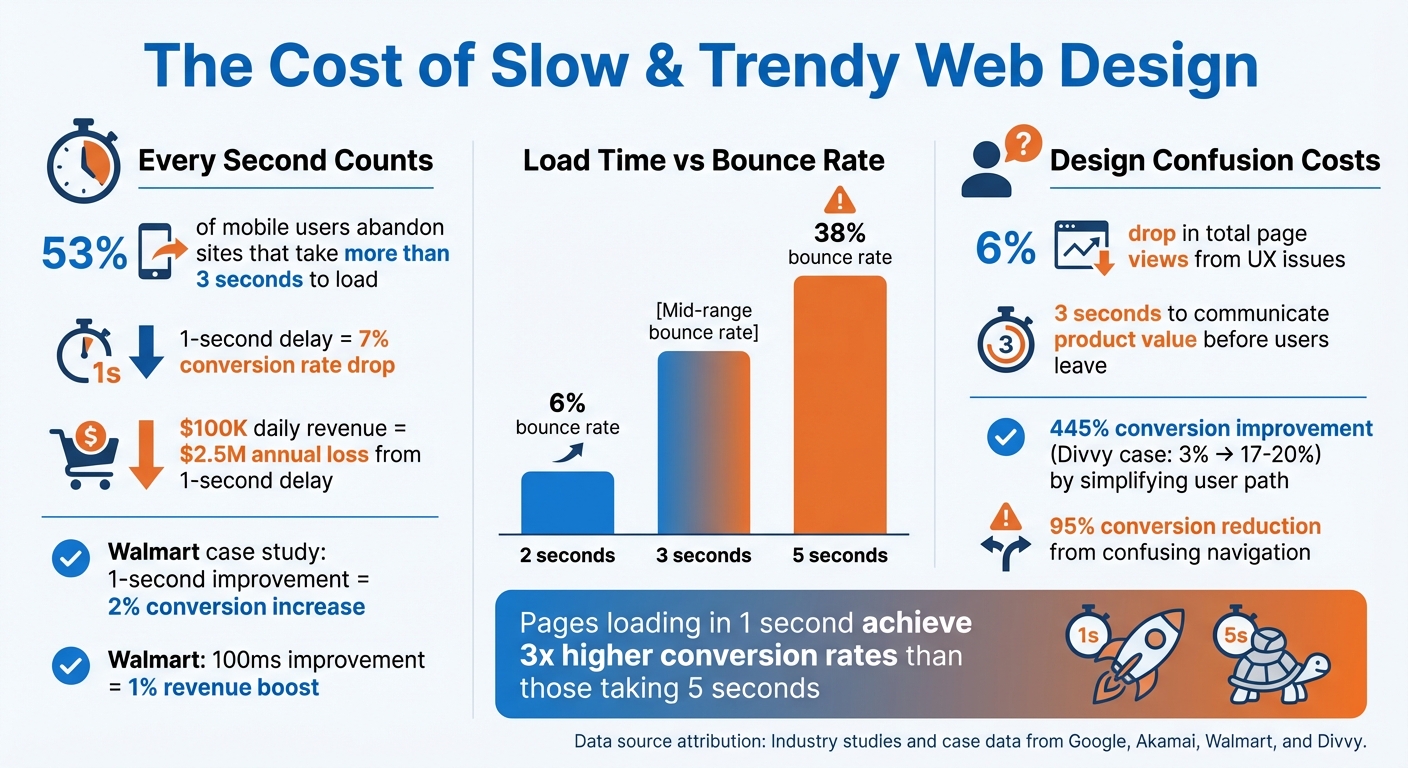
Even small user experience issues can cause a 6% drop in total page views, as frustrated visitors leave the site. The problem gets worse when trendy elements make it hard for users to find what they need. For example, oversized hero images often push essential content below the fold - content that many users will never even see.
Here’s the reality: your website has about three seconds to communicate what your product is, who it’s for, and the value it offers. Clever but vague slogans that fail to provide clear answers will lose users every time. If visitors have to work to understand your site, they won’t - they’ll just leave.
Trendy design elements like heavy animations, high-definition video backgrounds, and complex JavaScript effects can slow down your site, and that directly impacts conversions.
53% of mobile users abandon a site if it takes more than 3 seconds to load. Even worse, a 1-second delay in page load time can slash conversion rates by 7%. For an e-commerce site making $100,000 daily, that single second could mean $2.5 million in lost sales annually.
Walmart’s engineering team highlighted this when they found that every 1-second improvement in load time increased conversions by up to 2%. On top of that, every 100ms improvement boosted incremental revenue by up to 1%. Their analysis revealed that pages with faster load times (3.22 seconds) converted better compared to slower ones (6.03 seconds).
The bounce rate data paints a similar picture. Pages loading in 2 seconds have a bounce rate of 6%, while those taking 5 seconds see bounce rates soar to 38%. Trendy features like parallax effects and video backgrounds are especially problematic for mobile users, where slower 3G and 4G networks amplify performance issues.
Beyond speed, poor design choices can disrupt the user’s path to conversion. Bright gradients, bold typography, or other trendy elements might grab attention - but often at the expense of your call-to-action buttons or other key actions.
This is where Hick’s Law comes into play: the more choices or pathways you give users, the longer it takes them to decide. In many cases, too many options or unclear navigation leads users to abandon the process altogether.
"If you put too many decisions in front of the user, they'll just opt out of making a decision at all." - Michael Harrington, Director of Web Strategy, Vanta
In 2024, Michael Harrington shared a case study from his time at Divvy. Their credit product page was underperforming with a 3% conversion rate. The team discovered that the "Get A Demo" button was slowing users down. By embedding a sign-up form directly in the header, they eliminated extra steps. This tweak boosted the conversion rate to between 17% and 20% - a 445% improvement.
Similarly, trendy features like full-page search overlays without clear "close" buttons, hidden hamburger menus on desktop, and infinite scrolls can all cause friction. These designs force users to focus on navigation rather than your product. Every extra step or moment of confusion increases the chance that visitors will simply leave.
Some design trends, while visually appealing, can unintentionally harm your website's conversion rates. These trends often introduce unnecessary friction, making it harder for users to complete their desired actions.
Glassmorphism, with its frosted glass effects and translucent overlays, might look sleek and modern, but it can cause real usability issues. When contrast is reduced due to transparent layers, text becomes harder to read, and clickable elements, like buttons, can blend into the background. This confusion often leads to lower click-through rates and higher bounce rates.
Users also tend to develop "banner blindness", where they instinctively ignore elements that resemble ads, further reducing engagement with key site features.
"If a task requires too much effort, System 1 flags it as difficult or untrustworthy, leading to immediate abandonment." – Austin Lindsay, UI/UX Designer
The problem is even worse on mobile devices. Split-screen designs and complex animations often don't scale well to smaller screens, resulting in errors like misplaced or hidden call-to-action (CTA) buttons. For example, if your main conversion button gets obscured by a translucent effect, it might as well not exist.
Other trendy design elements, such as excessive animations, can also disrupt the user experience.
Overusing animations and parallax scrolling can create more problems than they solve. Beyond slowing down site performance, these effects can overwhelm users and even cause discomfort, pushing them to leave the site. This isn't just an annoyance - it’s a real accessibility issue.
Parallax scrolling, in particular, can make content harder to control. Users who scroll quickly may find text flying by too fast to read or encounter blank screens as animations struggle to catch up. As Katie Sherwin from Nielsen Norman Group points out:
"The outcomes didn't justify the work that went into creating and maintaining elaborate parallax-scrolling effects... harm to the user experience or lukewarm user reactions, at best."
Slow or poorly executed animations can also make your site feel broken or unresponsive, which is a quick way to lose visitors. To maintain a fast, responsive feel, animations should generally be kept under 500 milliseconds. On mobile devices, parallax effects often go unnoticed because users’ hands block the screen while swiping.
But the challenges don’t stop with motion effects - AI-driven layouts present their own set of issues for conversions.
AI-generated layouts often prioritize aesthetics over usability, a trend sometimes referred to as "vibe coding". While these designs might look impressive, they can disrupt the predictable navigation patterns users rely on. Consistency is key, and when AI introduces unexpected changes, it increases cognitive load and frustrates users.
First impressions matter - a lot. Studies show that 94% of initial opinions about a brand are based on its website design, and users form these opinions in just 0.5 seconds. When AI creates layouts that deviate from standard design norms, it can confuse users and make navigation feel disjointed. This confusion can reduce conversion rates by as much as 95%.
"In a world of algorithmic sameness, human craft is becoming the differentiator." – Webflow
AI layouts can also unintentionally create "false bottoms", where users think they've reached the end of a page when they haven’t, causing them to miss critical content. Another common issue is the failure to follow the "One Goal" rule, where every page should have a clear primary objective. Instead, AI-generated layouts often introduce multiple competing CTAs, which can confuse users and drive up bounce rates.
Creating a website that converts effectively starts with focusing on user experience and performance instead of chasing fleeting design trends. By implementing the following strategies, you can craft a site that not only looks great but also drives results.
Cluttered designs and confusing layouts can alienate visitors. Instead, aim for a clean visual structure that naturally guides users to your key messages and call-to-actions (CTAs).
As designer Tom Kenny points out:
"Colour is an often underrated aspect of web design. But it can play a very important role in usability, in conveying the overall meaning of a brand, and in setting the overall mood of the website".
Real-world case studies highlight the impact of these adjustments. For instance, Underwater Audio enhanced its homepage hierarchy and saw a 35.6% boost in online sales. Similarly, Cocohanee revamped its mobile menu to display subcategories upfront, leading to a 29% increase in transactions.
Core Web Vitals are critical for measuring and improving user experience. They focus on three main areas: loading speed (Largest Contentful Paint or LCP), responsiveness (Interaction to Next Paint or INP), and visual stability (Cumulative Layout Shift or CLS).
The impact of these improvements is undeniable. Websites that load in 1 second can achieve conversion rates nearly three times higher than those taking 5 seconds. Companies like Retool and Waste Connections have seen dramatic results by focusing on performance. Retool, for example, increased demo requests by 70% after optimizing their forms with Webflow Optimize, while Waste Connections achieved up to an 81% conversion boost through mobile-specific adjustments.
Even the most well-thought-out designs need validation. Real-user testing helps identify what works and what doesn’t.
Simplifying forms, for instance, by reducing the number of fields can significantly boost conversions. Testing different CTA copy (e.g., "Sign up now" vs. "Try for free") is another effective way to find what resonates with your audience.
A great example is Aspect, which doubled its conversion rates by testing variations of its homepage hero section. While "Contact Sales" initially performed best, "Get a Tour" later emerged as the top-performing CTA. Katie Giori from Retool emphasized the value of data-driven testing:
"With Webflow Optimize, we gained the autonomy to quickly design, launch, and measure experiments. The ease of setting up tests and collaborating across teams has elevated our entire web strategy".
Chasing flashy design trends without considering their impact on conversions can be a costly mistake. Data shows that poor functionality and unnecessary design tweaks often hurt conversions rather than help them.
Instead, focusing on a performance-first design approach can lead to long-term success. This strategy blends aesthetics with clear, user-friendly functionality. For example, when Walker & Dunlop transitioned from a developer-reliant site to a performance-focused model in May 2025, they saw a 56% jump in form fills and a 23% year-over-year increase in organic search traffic. These results highlight how prioritizing the basics can lead to measurable improvements.
The formula is straightforward: make it work, make it clear, then make it beautiful. Start by optimizing Core Web Vitals, removing obstacles in the user journey, and relying on real data instead of guesswork. Studies confirm that every second shaved off your site’s load time can boost conversions by 17%.
It’s time to move beyond superficial aesthetics and embrace design that drives action. Build websites that lead users toward meaningful interactions, not distractions. While trends may come and go, a well-structured, user-focused site will continue delivering results long after the latest design fad fades away.
Blindly jumping on the latest web design trends can backfire, especially if they emphasize style over usability. Features like intricate animations, overly busy visuals, or quirky navigation might catch the eye, but they often confuse users or make it harder for them to accomplish simple tasks. The result? Frustrated visitors, higher bounce rates, and fewer conversions.
Some trendy elements, such as parallax scrolling or hidden menus, might also hurt your site's performance. These designs can slow down load times or cause issues on mobile devices, making the experience less enjoyable for users. Instead of chasing trends, focus on user-centric design principles that strike the right balance between modern looks, functionality, and performance.
Core Web Vitals are a set of performance metrics developed by Google to assess a website's speed, responsiveness, and visual stability from the user's perspective. These metrics include:
These metrics are crucial for driving conversions. A website that loads quickly and functions smoothly not only enhances user trust but also keeps visitors engaged, making them more likely to complete actions like purchases, sign-ups, or exploring additional pages. Plus, improving Core Web Vitals can boost your search engine rankings, driving more traffic and increasing opportunities to connect with potential customers.
To figure out whether your website design changes are working, you can rely on tools like A/B testing and user testing.
A/B testing is all about comparing two versions of your site to see which one performs better. It focuses on measurable metrics like conversions or click-through rates, helping you pinpoint which design tweaks - whether it's the layout, wording, or visuals - are making a difference.
User testing, meanwhile, involves watching actual users navigate your site. This method can uncover usability problems and highlight areas that need attention.
By using both approaches together, you can make informed decisions that improve your site’s usability and overall performance.