



Insights
Conversion
Copy Link




How thoughtful web animations guide attention, boost engagement and conversions, and improve UX while staying lightweight to keep site speed and accessibility.
Web animations are more than just visual effects - they’re tools that guide user behavior, improve engagement, and drive conversions. Here’s why they work:
Animations like hover effects, scroll-triggered visuals, and hero section motion graphics not only enhance user experience but also improve key metrics like time on page, click-through rate, and bounce rate. However, poorly implemented animations can slow down websites, so it’s essential to focus on lightweight, optimized designs that maintain fast load times.
In short, when used thoughtfully, animations can transform your website from static to dynamic, driving more clicks, actions, and conversions.
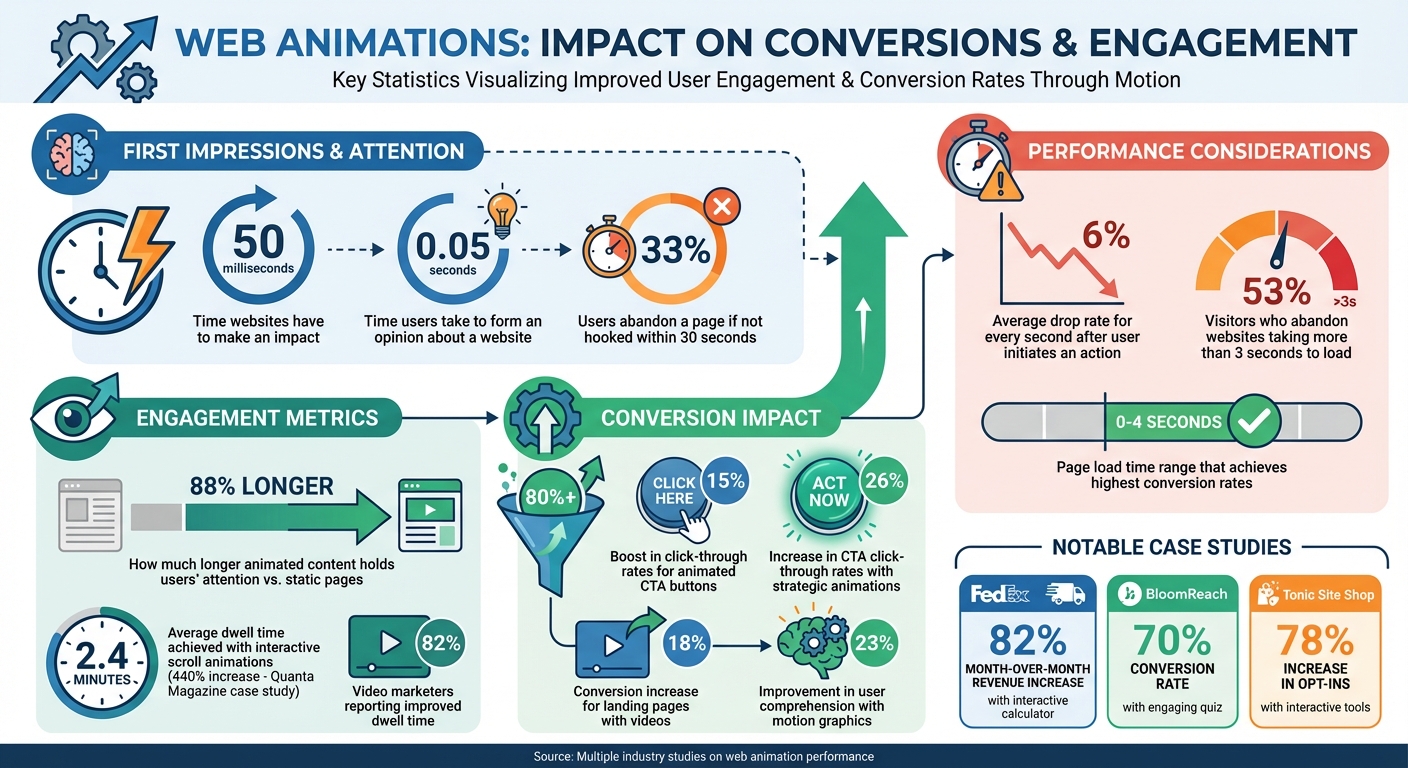
How Web Animations Impact Conversion Rates and User Engagement Statistics
Static websites create a passive browsing experience by loading all their content at once, leaving no room for gradual reveals, interactive elements, or incentives to keep exploring. The result? Visitors skim quickly, and if nothing grabs their attention within a few seconds, they’re gone. In fact, about 33% of users abandon a page if it doesn’t hook them within the first 30 seconds. This lack of engagement doesn’t just affect immediate interaction - it also influences how users perceive and interact with the site moving forward.
Without motion or interactive elements to guide the eye, critical features like call-to-action buttons often go unnoticed. This leads to users losing focus and leaving the site prematurely.
"People don't spend much time on a site that doesn't catch their eye." - Brimar Online Marketing
Another major issue is information overload. Dense blocks of text can overwhelm visitors, making it harder to absorb the intended message. Complex ideas or technical processes become even more challenging to explain without the clarity that motion or step-by-step visuals can provide. On top of that, the absence of interactive feedback - like hover effects or dynamic responses - leaves users feeling disconnected and less in control.
The limitations of static websites become even more apparent when you examine user behavior. Modern visitors tend to skim content and make decisions within seconds. Without visual cues or interactive elements to guide them, static pages often feel like uninspired digital brochures.
The numbers back this up. Web content experiences an average drop rate of 6% for every second after a user initiates an action. Static websites also miss the chance to create emotional connections or leave a lasting impression, which are key to building a strong brand identity. Instead of offering an engaging journey, they deliver an experience that feels flat and unmemorable.
Web animations are a powerful tool because they tap into how we naturally process visuals. Movement grabs attention, provides instant feedback, and creates a sense of flow as users navigate a site. When used strategically, animations can turn passive visitors into active participants, boosting CTA click-through rates by 26% and increasing landing page conversions by more than 80%.
This impact often starts with small, thoughtful details - like animated call-to-action buttons.
A subtle hover effect, such as a slight color change or scaling, reassures users by confirming their actions. Pulsing animations can further draw attention by signaling urgency. However, timing is everything - animations should last between 150ms and 300ms to feel responsive without being sluggish. For basic effects like hover states, CSS transitions are ideal because they leverage hardware acceleration for smoother performance.
But subtlety is key. While a pulsing button might boost engagement, overly aggressive animations are one of the reasons marketing websites fail to convert. For example, a VWO study found that a bouncing "Pay Now" button reduced conversions by 11% because users perceived it as buggy. The right animation not only signals interactivity but also gently nudges users toward taking action.
| Animation Type | Recommended Duration | Purpose |
|---|---|---|
| Micro-interactions | 150ms – 300ms | Provide immediate feedback and tactile feel |
| UI Transitions | 300ms – 600ms | Smoothly transition between different states |
| Entrance Animations | 500ms – 800ms | Introduce content without blocking interaction |
First impressions happen fast - users form an opinion about a website in just 0.05 seconds. That makes the hero section a critical area for capturing attention. Animations like sequentially fading in headlines can guide users through the page’s value proposition. For instance, the main headline might appear first, followed by the sub-headline, and then the CTA.
Motion graphics, such as parallax scrolling and background videos, add depth and emotional resonance. Parallax scrolling, where background elements move more slowly than the foreground, creates an immersive 3D effect. Video content is another game-changer - 82% of video marketers report that videos have improved dwell time on their sites, and landing pages with videos see an 18% increase in conversions. To avoid slowing down your site, use lightweight formats like Lottie files or SVG animations, ensuring load times stay under three seconds.
"The most effective animations aren't the ones you notice the most, but the ones that seamlessly guide your eye and enhance your experience without you even realizing they're there."
– Thrive Themes
Scroll-triggered animations transform browsing into an active experience, revealing content as users progress and sparking curiosity. For example, Quanta Magazine’s "The Unraveling of Space-Time" used interactive scroll animations to achieve a staggering 440% increase in average dwell time, bringing it up to 2.4 minutes per visit.
Interactive elements like calculators, sliders, and quizzes take engagement a step further by offering personalized value. For instance, FedEx saw an 82% month-over-month revenue increase after adding an interactive freight shipping calculator to its landing page. Similarly, BloomReach achieved a 70% conversion rate with an engaging quiz, while Tonic Site Shop boosted opt-ins by 78% using similar interactive tools.
"With hover effects, you can hide cool design elements that users find at their own pace. It makes them want to keep exploring your site."
– Eliran Vadhi, Brand Designer, Wix Studio
Adding animations to your website is just the beginning - understanding their impact is what truly shapes your conversion strategy. If you’re not tracking the right data, you won’t know whether that sleek new animation is boosting conversions or dragging down performance.
Thankfully, you don’t need to be a tech wizard to measure success. By focusing on a few core metrics and running straightforward A/B tests, you can quickly identify which animations are pulling their weight and which ones might need a rethink.
To measure success, focus on metrics that directly affect your goals. The conversion rate - whether it’s sales, signups, or form completions - is your ultimate indicator of success. But conversions don’t happen in isolation. Metrics like click-through rate (CTR) on animated calls to action (CTAs) reveal whether users are engaging with your prompts. Meanwhile, time on page shows if animations are keeping visitors interested, and bounce rate can signal if they’re driving users away instead.
You’ll also want to track how users interact with specific animations, such as hover effects or scroll-triggered elements. And don’t overlook page load speed - animations that bog down your site can harm both user experience and SEO performance. Tools like Google Analytics and Webflow Analyze can give you an overview of these metrics, while platforms like Hotjar or Crazy Egg provide heatmaps to show where users are clicking - or not clicking - on your animations.
| Metric | What It Measures | Why It Matters |
|---|---|---|
| Conversion Rate | % of users completing a goal | The clearest measure of ROI |
| Click-Through Rate (CTR) | % of users clicking animated CTAs | Shows how effective your animations are at driving action |
| Time on Page | Average visit duration | Indicates whether animations are holding attention |
| Bounce Rate | % of users leaving after one page | Signals if animations are distracting or slowing the site |
| Interaction Rate | Engagement with hover/scroll animations | Tracks user interaction with animated elements |
Once you’ve established these metrics, testing becomes the next step to confirm what’s driving conversions.
The best way to determine if an animation is improving conversions is to test it against a static alternative. A/B testing removes the guesswork, giving you clear insights into what resonates with your audience.
Start with a hypothesis like: "If we change [element] to [animated version], our [metric] will increase by [X]%." For example, you might hypothesize, “If we replace the static hero image with a Lottie animation, time on page will increase by 10%.”
Keep it simple - test one variable at a time. For instance, if you change both an animation and a button color, you won’t know which adjustment caused the results. Run both versions simultaneously with the same audience, and aim for at least 20% of your monthly traffic or 100 conversions per variant before making any conclusions. It’s worth noting that only about 12% of design changes lead to statistically significant improvements.
You can also test more than just "animated vs. static" elements. Experiment with different animation triggers (like on-hover vs. continuous loop), speeds, and placements. For instance, HubSpot once tested CTA button colors with 2,000 visitors and found that a red button outperformed a green one by 21%. Even small tweaks can yield surprising results.
One technical tip: when running tests, use 302 redirects for temporary test pages and canonical tags to let search engines know which version is the primary source. This ensures your SEO won’t take a hit. And don’t forget about mobile - 73% of users say content needs to display properly on their devices for a good experience. Make sure your animations run smoothly across all screens.
Designing great animations is just the start - making sure they work seamlessly on a high-performing website is where the real challenge lies. The Hoop Studio addresses this by building Webflow sites that combine lightweight animations with SEO-friendly practices right from the beginning. This ensures fast-loading pages that still deliver visually engaging experiences to users. Their track record includes doubling conversion rates for clients, generating over $50 million in revenue, and driving more than 100,000 newsletter signups. These numbers highlight how properly integrated animations can significantly impact conversions. Let’s explore how their technical expertise in Webflow makes this possible.
Did you know that pages loading within 0–4 seconds achieve the highest conversion rates? The Hoop Studio keeps this in mind by using efficient CSS properties like transform and opacity, which are optimized for browsers and help maintain a smooth 60 frames per second. Using Webflow’s built-in tools alongside the GSAP (GreenSock Animation Platform) engine, they craft hardware-accelerated animations that run effortlessly across all browsers.
"Built in Webflow with a clean CMS, SEO best practices, and lightweight animations, your site becomes visually engaging and robust, designed for ease of management and scalable growth." - The Hoop Studio
Every animation has a purpose. Instead of adding movement just for show, they design interactions to build trust, guide users toward actions, and reflect the brand’s personality with precision. Before launch, they conduct rigorous QA and testing to ensure animations work flawlessly on mobile devices, where the majority of users interact with websites.
But performance isn’t the only priority - flexibility is equally important.
Marketing teams need websites that can adapt quickly to new campaigns, product launches, or rebrands. Acting as an extension of their clients’ marketing departments, The Hoop Studio creates tailored solutions that make it easy to update and iterate. Their Growth Enablement phase includes A/B testing and conversion tracking, allowing teams to fine-tune animated elements for better performance over time.
"Harry manages our website superbly with... much creative genius to bring our site alive, all of which has significantly boosted our SEO and drawn visitors to the site." - Rob P., Headmaster, Kingsley Devon
From a high-converting landing page for a product launch to a full-scale rebrand featuring scroll-triggered animations, The Hoop Studio ensures every hover effect, content reveal, or parallax scroll is designed to meet specific goals. Their approach ensures that animations aren’t just visually appealing but also actively contribute to higher engagement and conversions.
Thoughtfully designed animations do more than just grab attention - they can significantly boost conversions. When used effectively, web animations guide focus, reduce friction, and create emotional connections. For instance, strategic animations have been shown to increase click-through rates by 15%, improve landing page conversions by over 80%, and keep users engaged on a site 88% longer. The secret lies in ensuring that every animation serves a clear purpose, whether it's highlighting a call-to-action (CTA), simplifying complex ideas, or providing immediate feedback during interactions.
But let’s not forget: performance is just as critical as design. Animations that bog down your site can drive users away - 53% of visitors abandon a website if it takes more than three seconds to load. To avoid this, focus on lightweight, optimized animations that leverage properties like transform and opacity. These techniques maintain fast load times while still delivering engaging user experiences.
Striking the right balance between visual appeal and technical performance is essential. Animations should function seamlessly across all devices, especially mobile, and respect accessibility settings for users who may be sensitive to motion. A/B testing can further reveal which animations resonate most with your audience and drive the best results.
Web animations can impact website load times, but the extent depends on how they're implemented. When done thoughtfully - using efficient methods like CSS transitions or GPU-friendly properties such as transform and opacity - the effect on performance is minimal. On the other hand, heavy assets like large videos or unoptimized code can slow your site down.
To keep animations running smoothly without hurting performance, consider these tips:
By sticking to these practices, you can create dynamic, engaging animations while maintaining speed and a great user experience. At The Hoop Studio, we specialize in crafting websites that combine sleek design with top-notch performance.
To make web animations effective, focus on intentional design. Every animation should serve a purpose - whether it's highlighting important elements, offering feedback, or guiding users through interactions. Steer clear of unnecessary or repetitive animations that could distract or irritate visitors.
Aim for animations that are short and fluid, with durations typically ranging from 0.2 to 0.5 seconds. Use natural easing to make movements feel intuitive and seamless. For better performance, rely on GPU-friendly properties like transform and opacity, and keep load times in check by compressing assets and lazy-loading effects that aren't immediately essential.
Accessibility is a must. Respect user preferences by supporting the prefers-reduced-motion setting and providing static alternatives for those sensitive to motion. Subtle, purposeful, and lightweight animations can enrich engagement and boost conversions while ensuring a positive experience for all users.
To evaluate how well web animations perform, start by defining clear objectives and tracking relevant metrics like conversion rate, click-through rate, bounce rate, and session duration. Tools such as Google Analytics or Webflow’s built-in tracking can help you establish a baseline before introducing animations.
Once you have your baseline, conduct A/B tests. Compare a version of your page featuring animations (the variant) with a version without them (the control). Pay close attention to metrics like engagement time and conversions. Tools like heatmaps or session recordings can also provide valuable insights into how users interact with your page. Even slight improvements in conversion rates can translate into noticeable revenue growth.
Lastly, make sure your animations are quick and seamless. Aim for page load times within the first 0–4 seconds and keep animation durations under 200ms to maintain a smooth user experience. By combining data analysis, testing, and performance optimization, you can effectively measure and refine the impact of animations on your conversion goals.