



Insights
Webflow
Copy Link




WordPress's developer reliance and plugin bloat create costly bottlenecks that slow marketing, erode agility, and waste budget.
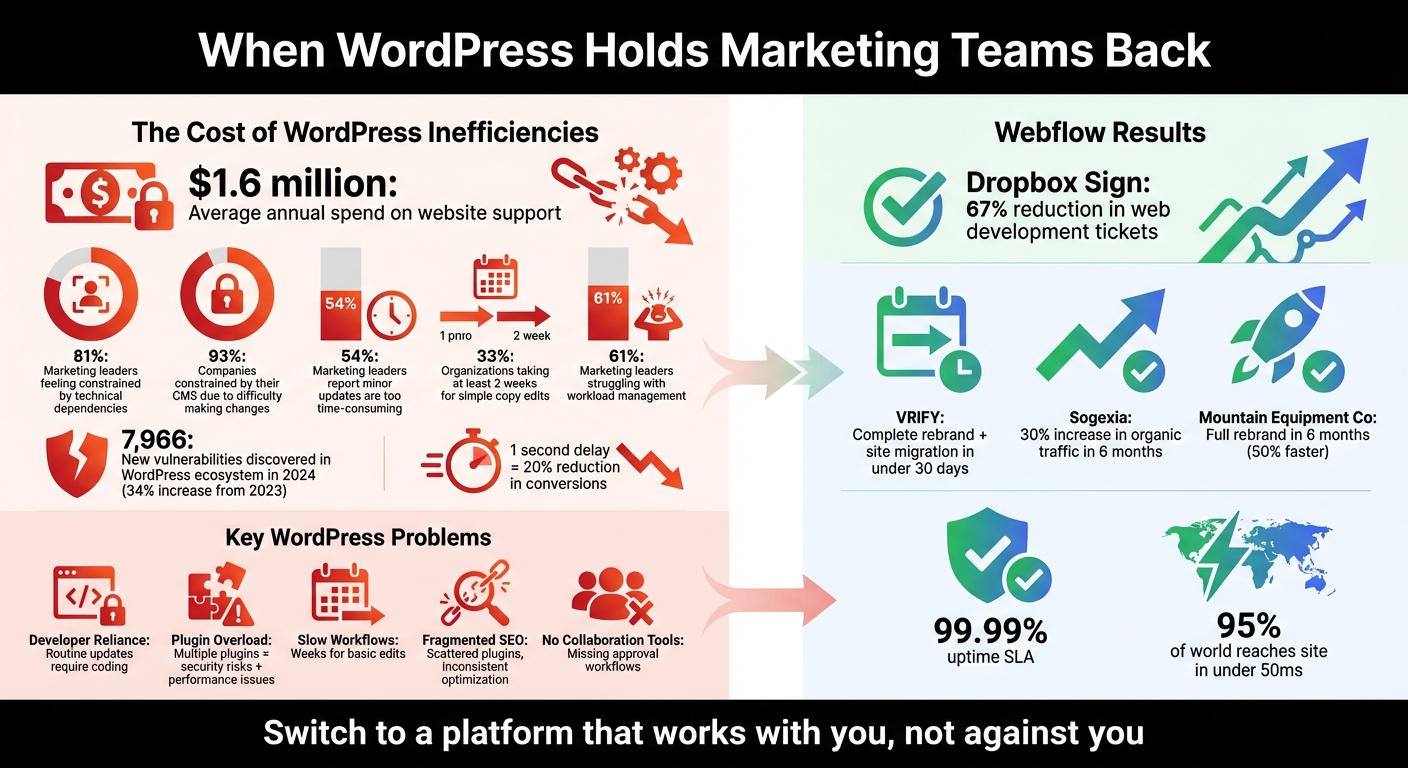
Your website should accelerate growth, not slow it down. Yet, for many marketing teams using WordPress, even simple updates can take weeks, leading to missed opportunities and higher costs. The numbers don’t lie: businesses spend an average of $1.6 million annually on website support, and 81% of marketing leaders feel constrained by technical dependencies.
Key challenges with WordPress include:
These issues drain time, money, and energy - hampering your team’s ability to execute campaigns quickly and effectively.
Switching to Webflow solves these problems. With a visual editor, built-in tools for SEO, security, and performance, and no reliance on plugins, Webflow gives marketers the control they need to move faster and focus on growing the business. Companies like Dropbox Sign and VRIFY have already seen massive improvements, cutting development delays by up to 67% and launching projects in record time.
If WordPress is holding your team back, it’s time to consider a platform that works with you, not against you.
WordPress vs Webflow: Marketing Team Performance Statistics
WordPress often falls short when it comes to meeting the fast-paced demands of modern marketing. Its reliance on a code-first structure means developers must preemptively code for every potential marketing need. If anything deviates from the plan, new custom code is required. This creates a frustrating dependency on developers, slowing down campaigns and stifling growth.
93% of companies feel constrained by their current CMS due to the difficulty of making changes. Adding to the frustration, 54% of marketing leaders report that even minor website updates are either too time-consuming or overly complex. And when a third of organizations need at least two weeks to make simple copy edits, marketing becomes less about agility and more about waiting.
Let’s look at some of the most pressing challenges that WordPress presents for marketing teams.
Something as minor as updating a call-to-action button or changing hero text can turn into a drawn-out process on WordPress. These tasks often require developer involvement, creating unnecessary bottlenecks.
Take Dropbox Sign as an example. Their reliance on developers for routine updates slowed their marketing efforts. After shifting away from their traditional setup, they cut web development tickets assigned to engineers by 67%, allowing their marketing team to take control of updates.
The problem lies in WordPress's rigid themes and templates. Custom designs often demand extensive coding because standard page builders lack flexibility. Additionally, WordPress doesn’t offer native safeguards like "locked" components, leaving marketers wary of making updates that might accidentally disrupt the site. This fear turns developers into gatekeepers, further delaying campaigns.
"Our new designs didn't need to go through anyone else besides brand and marketing - no engineers needed. The freedom and flexibility we gained... was invaluable." - Elyssa Albert, VP of Design, Attentive
Out of the box, WordPress is basic. To add essential marketing features - like SEO tools, security, or image compression - you need plugins. Each plugin comes with its own scripts, styles, and update schedule, creating what developers call "architecture debt." Removing one plugin can unexpectedly break unrelated parts of the site.
The numbers tell the story: in 2024, 7,966 new vulnerabilities were discovered in the WordPress ecosystem - a 34% increase from 2023. Security flaws in plugins, like the Jupiter X Core vulnerability, have left thousands of websites exposed. This fragile setup makes marketing teams hesitant to experiment or refresh content without developer oversight, a phenomenon known as "fear-based publishing."
When companies are spending an average of $1.6 million annually on website teams and software, yet still face basic operational struggles, it’s clear that resources are being misdirected. Instead of focusing on strategy, teams are stuck managing technical upkeep.
"The 'plugin for everything' approach... can create challenges over time. This often leads to inefficiencies requiring developer intervention, resulting in bottlenecks, code bloat, performance issues, security risks, and high overhead costs." - Brett Domeny, Senior Group Product Manager, Webflow
Keeping a WordPress site running quickly requires constant effort. Marketers (or their developers) have to manage caching, compress images, minify code, and optimize databases. The stakes are high: a 1-second delay in page load time can reduce conversions by up to 20%. And with Google's Core Web Vitals influencing search rankings, slow sites are no longer just an inconvenience - they’re a liability.
The root of the issue is often plugin bloat. The more plugins you add, the more conflicts and slowdowns you introduce. For marketing leaders - 92% of whom believe website improvements are critical to meeting business goals - this constant troubleshooting isn’t just frustrating. It’s a roadblock to achieving their objectives.
On WordPress, SEO requires piecing together multiple plugins. One handles meta descriptions, another manages XML sitemaps, a third takes care of schema markup, and so on. This fragmented approach creates inefficiencies and inconsistencies.
Each plugin operates independently, with its own interface and settings. This often leads to conflicting directives, duplicate meta tags, or incomplete optimizations. Instead of focusing on creating high-quality content, marketing teams waste time juggling tools.
Over time, the situation worsens. Plugins can fall out of maintenance or clash with WordPress updates, turning a straightforward SEO strategy into a patchwork solution that needs constant attention. This scattered setup pulls focus away from actual marketing efforts.
WordPress was built for blogging, not for managing the complex workflows of enterprise marketing teams. It lacks native features for content approvals, collaboration, or editorial oversight. Teams can’t easily assign tasks, track changes, or set up review stages.
This forces marketing teams to cobble together solutions using third-party tools or external project management platforms. Content might live in WordPress, feedback in Slack, and approvals in email threads. Unsurprisingly, 61% of marketing leaders report struggling with workload management due to inefficient tech stacks.
Another issue is the lack of governance. Content editors either get full admin access (a risky move) or have to route every change through developers (a slow one). Neither option supports the fast, iterative workflows that modern marketing demands.
"Technical debt is anything that makes change risky, slow, expensive, or dependent on specific people." - Stefan Ivic, Author, Broworks
The inefficiencies tied to WordPress don’t just create headaches - they drain budgets and stunt growth. On average, organizations shell out $1.6 million every year on teams and software just to keep their websites running smoothly. This financial burden often results in slower campaign rollouts and missed opportunities in the market.
But it doesn’t stop there. These costs directly feed into workflow delays. For example, 33% of marketing organizations take at least two weeks to make simple copy edits. Combine that with the fact that 81% of marketing leaders feel constrained by their technical teams, and it’s no surprise that campaigns stall, leaving opportunities on the table.
Add to this the constant battle with design and maintenance issues, and the impact on performance becomes even more pronounced. In 2024 alone, the WordPress ecosystem saw 7,966 new vulnerabilities. This forces teams to spend their time applying security patches and resolving technical conflicts instead of driving innovation. Unsurprisingly, 61% of marketing leaders report struggling to manage their teams’ workloads due to these technical hurdles. Many describe this state of affairs as “fear-based publishing,” where every update feels like a risky endeavor.
When technical challenges consistently chew into time meant for strategy, the costs spiral out of control. Beyond the financial hit, the opportunity cost is immense, threatening an organization’s ability to stay competitive in the long run. The pressing question is: how much longer can teams afford to operate this way?
Webflow tackles the common frustrations marketing teams face with WordPress by offering a more agile, marketer-friendly platform. By giving teams full control over design and automating maintenance tasks, Webflow eliminates delays and technical hurdles, streamlining workflows from start to finish.
With Webflow's visual editor, marketing teams can create and update web pages without needing to write a single line of code. Its intuitive drag-and-drop interface generates clean code automatically in the background. Designers can pre-build components - like hero sections, FAQs, and testimonials - that marketers can easily use to assemble new pages. This ensures consistent branding and prevents layout issues. For example, Dropbox Sign saw a 67% drop in web development tickets after moving to Webflow. Similarly, VRIFY revamped its entire brand and migrated its site in less than 30 days after securing a $12.5M Series B. By using reusable components, VRIFY's marketing team sped up content launches by three times, all without relying on developers.
"With page building, our web design team gets to control the building blocks, and our marketers get a drag-and-drop interface to help them run campaigns faster with more autonomy, which will ultimately give our web team a lot of time back."
– Marius Jurtz, Web Design Lead, MURAL
Webflow also supports team-specific workflows with customizable user roles. For instance, the "Marketer" role enables page building with pre-defined components, while the "Content Editor" role focuses on simple updates like text or images. This structure ensures team members can work independently without risking major site disruptions.
On top of simplifying design processes, Webflow addresses critical concerns like performance and security.
Webflow not only empowers marketers but also ensures high performance and robust security. Unlike WordPress, which often relies on multiple plugins, Webflow provides a fully managed hosting environment. Powered by enterprise-grade AWS servers and a global CDN, the platform ensures 95% of the world can access sites in under 50ms, with a 99.99% uptime SLA. Security patches and updates are handled automatically in a secure sandbox, removing the need for manual maintenance.
Sogexia, a financial services company, reaped these benefits when it transitioned from WordPress to Webflow in July 2024. Within just six months, they saw a 30% boost in organic traffic and resolved persistent issues like 404 errors and sitemap problems. Chief Growth Officer Benjamin Bianchet highlighted the newfound independence their marketing team gained over content management.
| Feature | What You Get |
|---|---|
| Hosting | Global CDN on AWS infrastructure with automatic scaling |
| Security | SSL certificates, DDoS protection, and SOC 2 Type II compliance included |
| Backups | Automatic backups every 10 minutes with one-click restore |
| Updates | Zero-maintenance updates handled automatically |
Webflow’s streamlined infrastructure eliminates the plugin bloat commonly associated with WordPress themes and page builders. Features like forms, SEO tools, and backups are built directly into the platform, reducing compatibility issues and improving security.
Webflow simplifies SEO and content management by offering native tools that eliminate the need for third-party plugins. Marketing teams can easily update meta titles, meta descriptions, 301 redirects, and structured data directly within the platform. Plus, Webflow enables real-time collaboration, allowing multiple team members to work on the same project simultaneously.
During its 2023 rebranding, Dropbox Sign leveraged these collaboration features to speed up content updates, achieving results over 100% faster than the previous year.
"I think what it really looks like now is that there are no silos. It's nice for us to be able to build together and work side by side."
– Corey Shrecengost, Content Producer, Dropbox Sign
Webflow’s visual CMS allows content teams to edit text and images directly on the page, while its Data Manager supports long-form content like blog posts. Built-in tools also make it easy to manage translations for different markets. Features like version control, quick rollbacks, and approval workflows ensure site integrity, giving non-technical teams the confidence to publish changes efficiently.
Together, these tools create an agile, collaborative environment for marketing teams to thrive.
WordPress bottlenecks can slow marketing teams down, draining their speed and flexibility. Constantly relying on developers, juggling frequent plugin updates, and managing scattered SEO tools eats up valuable time and resources. These roadblocks often lead to frustrating delays and technical hurdles that make executing campaigns a challenge.
Modern marketing teams need a platform built for their pace. Webflow eliminates these obstacles by putting control directly in marketers' hands. Its visual editor removes the need for developer intervention, enabling teams to create and launch landing pages in hours instead of weeks. Plus, Webflow’s built-in tools for performance, security, and SEO streamline workflows, replacing the need for a patchwork of plugins. With 99.99% uptime and a global content delivery network that delivers content to 95% of the world in under 50ms, Webflow offers the infrastructure marketing teams can rely on for smooth operations.
The results speak for themselves. Dropbox Sign cut development tickets by 67% after switching to Webflow. Mountain Equipment Company completed a full rebrand in just six months - less than half the time it would typically take. And VRIFY launched its rebrand and migrated its site in under 30 days after securing Series B funding.
For marketing teams tired of waiting on developers and dealing with WordPress headaches, Webflow offers a way forward. It’s not just about building a better website - it’s about moving faster, testing ideas quickly, and scaling campaigns without technical limits. Switch to Webflow and take back control of your marketing momentum.
If you're noticing frequent plugin conflicts, sluggish load times, or difficulty making quick updates, it could be a sign that WordPress is holding your team back. When routine changes demand developer intervention, security becomes harder to maintain, or publishing gets delayed, these are red flags.
Dealing with plugins, custom code, or theme overrides can pile up technical debt. This not only slows down updates but also drives up costs, which can hurt the speed and efficiency of your campaigns.
Migrating from WordPress to Webflow means transferring your content - like posts, pages, and media - into Webflow while ensuring everything is mapped correctly. Double-check that all images and media display as expected, set up proper redirects to maintain your SEO rankings, and update your DNS settings to connect to Webflow hosting. Using a step-by-step migration checklist can help you make the switch without any downtime or major issues.
To keep your brand consistent while speeding up the publishing process, opt for a platform that blends flexibility with governance. Tools like reusable components and visual editors make it easy for marketers to update content quickly while sticking to the established design. Built-in design systems and ready-made templates help maintain a cohesive look, giving teams the freedom to work independently without worrying about design missteps. This setup simplifies workflows and gives marketing teams the tools they need to move fast - without sacrificing brand integrity.