




Insights
Conversion
Copy Link




Essential 2025 landing page tactics: mobile-first speed, clear hero copy, strong CTAs, layered trust signals, and AI personalization to lift conversions.
Want higher conversions? In 2025, successful landing pages focus on these key elements:
Landing Page Conversion Statistics and Best Practices 2025
To see these principles in action, review these landing page layout case studies that demonstrate significant conversion lifts.
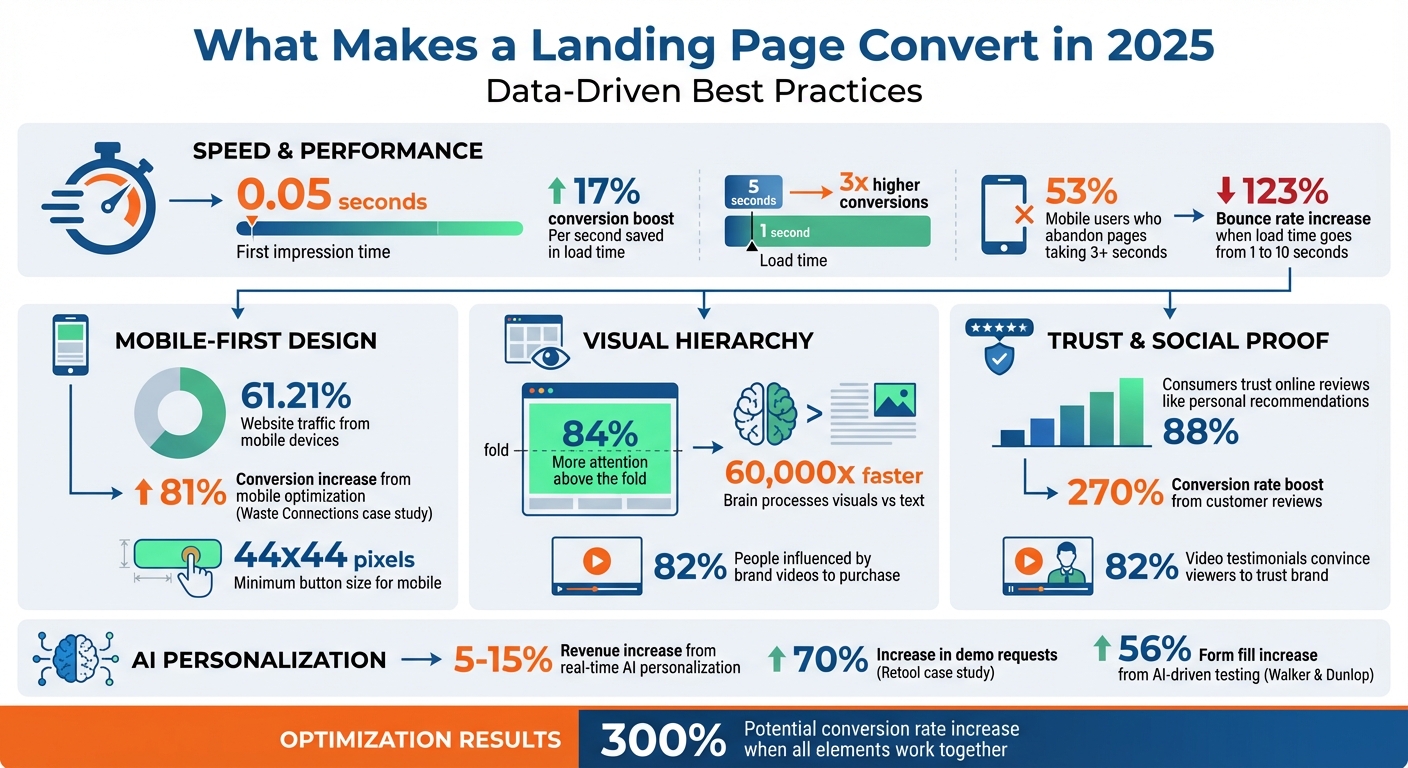
Your landing page gets just 0.05 seconds to make an impression. That’s all the time visitors need to decide whether to stay or leave. The design choices you make - and how you arrange them - play a massive role in convincing them to stick around long enough to convert. The hero section is where this crucial first impression happens, and every element within it must work together seamlessly.
The hero section is the workhorse of your landing page. It needs to communicate four things immediately: what you do, why you’re different, the benefits you offer, and how visitors can take action. All of this must be visible without requiring any scrolling. Content above the fold grabs 84% more attention than what’s below.
Ditch generic stock photos. Since the brain processes visuals 60,000 times faster than text, your images need to count. Use product screenshots, GIFs that showcase your interface, or short explainer videos. A compelling visual doesn’t just fill space - it demonstrates value. Videos, in particular, are powerful: 82% of people say a brand’s video convinced them to make a purchase.
Your CTA button should dominate the screen. High-contrast colors like bright orange on gray or bold green on white ensure it stands out. Pair those colors with action-packed verbs like "Buy", "Download", or "Get Started." Avoid vague phrases like "Learn More." Once your hero section grabs attention, the rest of your page should guide users naturally toward conversion.
After the hero section hooks visitors, a strong visual hierarchy keeps them engaged and leads them to take action. This hierarchy ensures visitors focus on the most important elements. Use size, scale, and color to direct attention. Headlines should be larger than body text, and your CTA button should outsize other elements. Bold typography can highlight key benefits.
Whitespace is your ally, not wasted space. It gives your content breathing room, reduces mental strain, and makes your page easier to scan. Group related information together and leave ample space between sections. This way, visitors can absorb your message without feeling overwhelmed.
Subtle directional cues can guide the eye. Arrows pointing toward your CTA or images of people looking in the direction of the action you want users to take are simple yet effective ways to create a natural flow through your content. These small details can have a big impact on conversions.
With 61.21% of all website traffic coming from mobile devices, having a mobile-friendly design isn’t optional - it’s mandatory. If your landing page doesn’t work seamlessly on a phone, you’re losing more than half your audience.
Take a lesson from Waste Connections, which boosted conversions by 81% just by optimizing for mobile in 2025. They shortened text, repositioned CTAs, and prioritized usability for mobile users. Design for thumbs, not cursors. Place interactive elements within easy thumb reach - usually toward the bottom or center of the screen. Buttons should be at least 44x44 pixels to ensure they’re easy to tap.
Speed is even more critical on mobile. Pages that load in 1 second convert 3x higher than those taking 5 seconds. Compress images, cut down on redirects, and use lazy loading to ensure above-the-fold content appears instantly.
| Element | 2025 Best Practice | Conversion Impact |
|---|---|---|
| Load Speed | Under 1 second | 17% improvement per second saved |
| CTA Placement | Above fold + section ends | 84% more attention above fold |
| Mobile Design | Touch-friendly, fast, responsive | Captures 61%+ of traffic |
| Visuals | Product GIFs/videos over stock photos | 82% influenced by video |
| Form Length | Minimal fields only | Up to 70% increase in leads |
Design grabs attention, but copy is what drives action. A landing page's copy needs to do more than just explain your offer - it should resonate with visitors and speak directly to their needs. Too often, landing pages focus on the company instead of addressing what the audience truly cares about.
Instead of listing features, highlight the benefits your product or service delivers. For example, instead of saying "Our software has automated tools", say, "Save hours each week with automation." Features explain what a product does, but benefits paint a picture of how it improves the user's life.
Take inspiration from successful brands. Slack doesn’t dwell on technical details like "channels and integrations." Instead, they say, "Great teamwork starts with a digital HQ". Similarly, Dropbox promises to "keep life organized and keep work moving," and Grammarly leads with "Compose bold, clear, mistake-free writing". These headlines answer the key question every visitor has: "What’s in it for me?"
To test your messaging, use the "So What?" test. If the benefit isn’t obvious, rewrite it. Whenever possible, quantify the results. For instance, "Cut your bookkeeping time in half" is far more compelling than "automated accounting features".
Once you’ve nailed the benefits, it’s time to connect them to your audience’s pain points.
People trust solutions that address their struggles head-on. Start by articulating your audience’s pain points - sometimes even better than they can themselves. When visitors see their challenges reflected in your copy, they’ll feel understood and see your product as the answer they’ve been looking for.
Open with a question or statement that captures their frustration. For example: "Tired of seeing great products get zero online sales?" This approach instantly resonates and positions your offer as the solution.
Use subheadlines to tackle objections before they arise. For instance, if visitors might think your product is too hard to use, add something like, "Get started in under 5 minutes. No code required". This reduces hesitation and builds trust.
Once you've built trust and addressed objections, your call-to-action (CTA) is where the magic happens. This is your moment to guide the visitor toward the next step. Avoid generic phrases like "Submit" or "Click Here" - they don’t inspire action. Instead, use CTAs that clearly convey value.
Personalized CTAs perform better. For instance, saying "Claim My Discount" instead of "Claim Your Discount" creates a sense of ownership. Adding urgency with phrases like "Now", "Today", or "Limited Time Offer" can also motivate action. Be transparent about what happens next - if the visitor will receive a call, say "Request a Quote." If the result is immediate, try "Get an Instant Quote".
CTA optimization doesn’t stop there. Test different wording to see what resonates. A small change, like switching "Download" to "Get My Free Ebook", can make a big difference. For longer pages, repeat your CTA or use a sticky header so it’s always within reach as visitors scroll.
Karlo Čičko, a Software Developer at GameBoost, highlights the importance of speed in conversions:
"Especially with new feature launches or seasonal promos, we need to make sure our pages convert in seconds – not minutes".
Once you've crafted engaging copy, the next step is to establish trust. Social proof is a powerful way to do this - it answers the question every visitor is silently asking: "Can I trust this company?" With 88% of consumers trusting online reviews as much as personal recommendations, social proof isn't just helpful; it's essential for building credibility and driving conversions.
Testimonials are most effective when they include a customer's name, photo, and professional affiliation. These details make the feedback feel personal and credible. Pair this with data-driven results, like "We increased revenue by 88% in six months", and the impact becomes even stronger. In fact, customer reviews and quotes can boost conversion rates by as much as 270%.
Video testimonials take this to another level. They convince 82% of viewers to trust a brand, and 88% of consumers say they want to see more video content from companies they engage with. These short, authentic videos create an emotional connection that text alone can't achieve.
But trust doesn't stop at individual endorsements. A variety of trust signals can amplify your credibility even further.
Relying on just one type of social proof limits its effectiveness. Instead, combine different trust signals like client logos, star ratings, case studies, and security badges to create a layered approach. Each plays a unique role: logos showcase partnerships with well-known companies, ratings provide instant validation, case studies offer detailed success stories, and security badges reassure visitors about data privacy.
Live notifications, such as "Sarah from Chicago just signed up", add a sense of urgency and show that others are actively engaging with your brand. AI-powered personalization can make these trust signals even more impactful. For example, in May 2025, Walker & Dunlop, a commercial real estate firm, used AI-driven testing to tailor content delivery. This approach led to a 56% increase in form fills and 23% year-over-year growth in organic search traffic. Kokko Tso, Vice President of Digital Marketing at Walker & Dunlop, highlighted the importance of this strategy:
"Combined with Webflow's visual-first platform, Optimize and Analyze empower our teams to evolve with our clients, experiment and pivot quickly, and, ultimately, create more personalized digital experiences".
By blending these varied signals, you create a "trust environment" that supports your messaging and design.
Strategic placement of trust elements is key to reinforcing your message. High-authority client logos work best just below the hero section, immediately establishing credibility.
Position testimonials or trust badges near call-to-action buttons to reduce hesitation at the moment of decision. On checkout pages, security seals and payment icons reassure users about the safety of their transactions.
As visitors scroll through your page, weave in testimonials and case studies to back up specific claims. For instance, if you're highlighting a feature, follow it with a testimonial from a customer who benefited from that exact functionality. This creates a seamless flow from promise to proof, making it easier for visitors to trust and take action.
Attracting visitors with great design and trust signals is only part of the equation. To turn those visitors into customers, your landing page needs to perform flawlessly on a technical level. A slow-loading page or one lacking proper tracking tools can derail even the most compelling content. Let’s dive into the technical elements that keep visitors engaged and drive conversions.
Page speed is a major player in conversion rates. Did you know that shaving just one second off your load time can increase conversion rates by 17%? On the flip side, 53% of mobile users will abandon a page if it takes more than 3 seconds to load. If load times stretch from 1 to 10 seconds, the bounce rate on mobile shoots up by 123%.
To boost speed, focus on compressing images, cutting down redirects, and cleaning up your code. Using platforms with clean code and incorporating content delivery networks (CDNs) can also make a big difference. For mobile users, Accelerated Mobile Pages (AMP) can help ensure near-instant load times. Ideally, aim for a load time under 3 seconds - less than 1 second is even better. Simplify your page by trimming unnecessary images and removing tracking pixels that don’t add value.
Generic landing pages are fading into the background. Personalization, especially when powered by AI, is proving to be a game-changer. Real-time adjustments to content based on visitor behavior can increase revenue by 5% to 15%. Tools like Webflow Optimize use machine learning to display the most relevant page variation for each visitor, reducing the need for manual A/B testing.
Take the example of Retool’s growth marketing team in 2024. Under Katie Giori’s leadership, they used Webflow Optimize to revamp their demo request forms, leading to a 70% increase in demo requests. Katie shared:
"With Webflow Optimize, we gained the autonomy to quickly design, launch, and measure experiments. The ease of setting up tests and collaborating across teams has elevated our entire web strategy."
This kind of personalization empowers marketing teams to test and iterate faster, without relying heavily on developers.
Once your page is personalized, it’s time to closely monitor how it’s performing. Google Analytics 4 offers a solid foundation to track and refine your design and content based on ROI. Keep an eye on key metrics like form completions and purchase rates, as well as micro-conversions like click-through rates, scroll depth, and time on page. These insights can highlight where users drop off.
Behavioral analytics tools like Hotjar provide heatmaps and session replays, showing which parts of your page grab attention and which are ignored. When testing changes, tweak one element at a time - like a headline or CTA color - so you can clearly identify what’s working. Make sure your tests reach a meaningful sample size (at least 20% of your monthly traffic) before drawing any conclusions.
Integration is another essential piece. Real-time tracking becomes far more effective when combined with tools like HubSpot or other CRMs. This allows you to link specific web experiences directly to pipelines and deals. By creating a connected system, you can turn raw data into actionable insights, setting the stage for ongoing improvements.
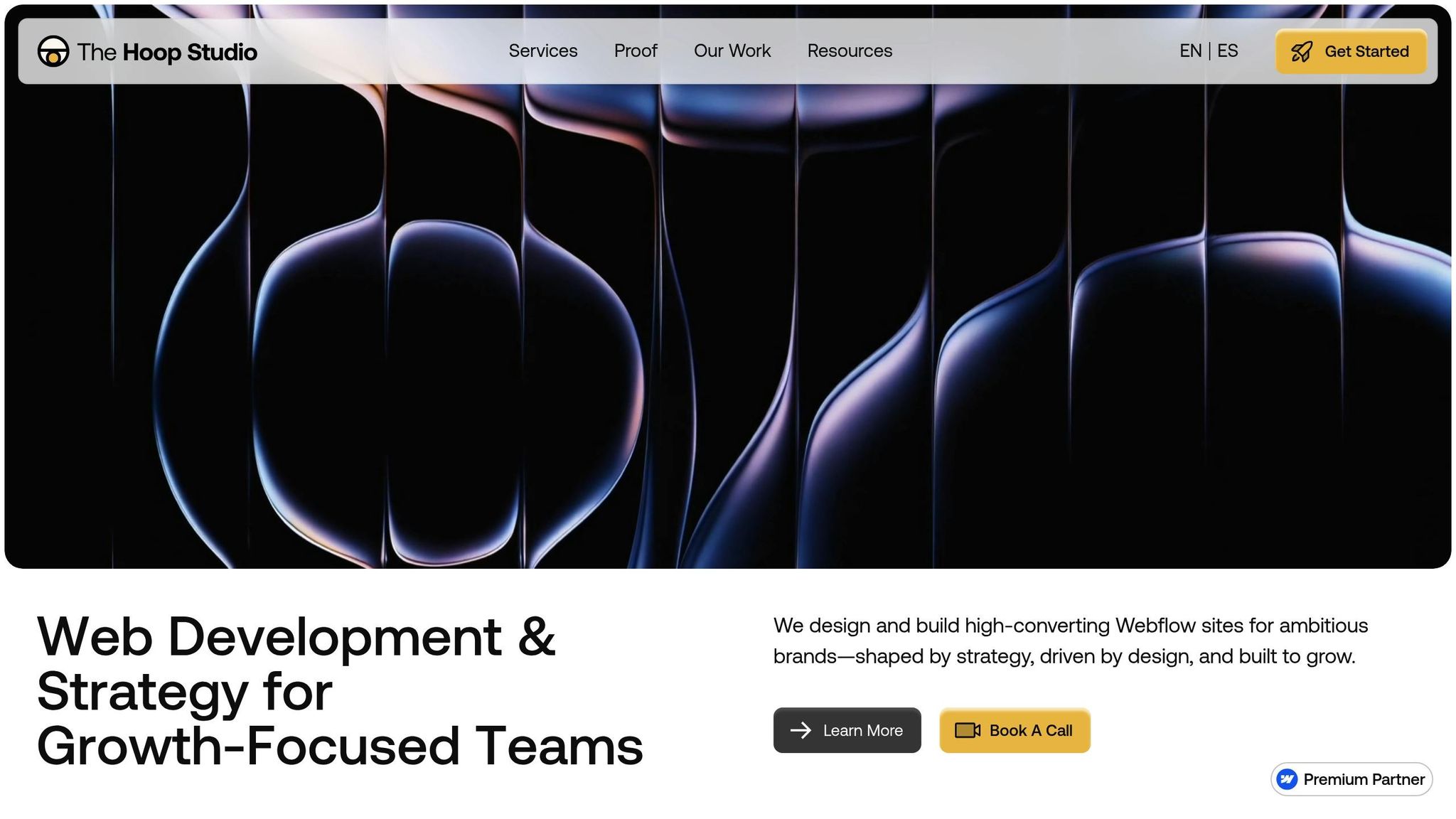
Creating a landing page that drives conversions requires a balance of thoughtful design, strong performance, and ongoing refinement. At The Hoop Studio, we specialize in crafting Webflow landing pages that deliver results right out of the gate - and continue to improve over time. These principles work hand-in-hand with the design and content strategies mentioned earlier, ensuring every landing page is built with conversions in mind.
Every successful landing page begins with a solid strategy. Before diving into design, we collaborate closely with your team to understand your audience, campaign goals, and desired outcomes. Whether you’re aiming for demo requests, sign-ups, or sales, we tailor every element to align with your objectives. This includes integrating CRM systems for seamless lead capture and structuring the page with Webflow SEO tips for lead generation, boosting your visibility online. Custom landing pages start at $4,000, offering a personalized approach to help you achieve your marketing goals.
Once the strategy is set, we shift gears to ensure the page performs flawlessly on every device.
Page speed isn’t just a nice-to-have - it’s a dealbreaker. With 70% of consumers saying that load time affects their willingness to make a purchase, we prioritize speed from the start. By leveraging Webflow’s efficient architecture, we strip out unnecessary code and optimize for mobile-first layouts. This includes compressing images, minimizing redirects, and ensuring pages load in under 3 seconds. Why? Because every extra second of load time increases the risk of losing a potential customer.
But launching a fast, well-designed page is just the first step.
The best-performing landing pages are never static. Teams that consistently see high conversion rates know that optimization is an ongoing process, not a one-and-done task. That’s why we offer Webflow retainers starting at $500 per month. These retainers give you priority access for quick updates, conversion-focused adjustments, and analytics reviews. As your campaigns evolve, we can also develop new page variations to keep your marketing fresh. By continuously testing and refining, we help ensure your landing pages maintain peak performance over time.
Building a high-converting landing page in 2025 comes down to balancing design, compelling copy, trust signals, and speed. Your design should guide visitors seamlessly, your copy must focus on delivering clear outcomes, trust signals need to reinforce confidence, and fast load times are a baseline expectation. When these elements work together, conversion rates can increase by as much as 300%.
The rise of AI-powered personalization and real-time optimization has fundamentally changed how landing pages operate. Static, one-size-fits-all pages are a thing of the past. Instead, AI transforms them into dynamic tools that adapt to user behavior in real time. This evolution highlights one key idea: every element on the page must align and contribute to the overall experience.
"High-converting landing pages aren't just product-driven - they're experience-driven. They blend together a symphony of persuasive elements to nudge visitors toward one singular, focused call to action." - Jesse Sumrak, Author, Webflow
Whether you're launching a new campaign or refreshing an existing page, the same principles hold true: clear messaging, mobile-first design, fast load times, strategic social proof, and a single, irresistible call to action. Today’s tools make it easier than ever to personalize these elements at scale and test variations quickly, ensuring your landing page doesn’t just grab attention - it drives action.
Looking to create a Webflow landing page that delivers results? The Hoop Studio has you covered. From strategic development to performance-focused execution and ongoing optimization, we’ll help you craft a page that converts from day one and keeps improving over time.
AI-driven personalization has transformed how landing pages connect with visitors, offering tailored experiences that resonate with individual preferences, behaviors, and needs. By 2025, this strategy has become a must-have for engaging users. Why? Because personalized content makes people feel seen and valued, which builds trust and encourages action.
Some standout techniques include dynamic content, customized calls-to-action (CTAs), and messaging that speaks directly to a user’s specific pain points. AI tools take it a step further by making real-time adjustments based on visitor data, ensuring the page stays relevant and engaging. By shifting from one-size-fits-all designs to highly targeted, experience-driven content, businesses are seeing a noticeable boost in conversion rates while forging stronger connections with their audiences.
To craft mobile-friendly landing pages that drive conversions in 2025, focus on speed, simplicity, and usability. Ensure your page loads quickly, features easy-to-navigate layouts, and includes clear, tappable call-to-action (CTA) buttons. These elements help users take action without frustration.
Stick to a single-column layout with a clear visual flow that guides visitors through your content effortlessly. Avoid clutter by using clean designs, large, readable fonts, and properly scaled images and buttons that fit smaller screens comfortably.
For an extra edge, consider adding AI-driven personalization. By tailoring content to match a user’s behavior or preferences, you can create a more engaging and relevant experience. Combining these strategies will help meet the needs of today’s mobile users while boosting your conversion rates.
Page speed is a crucial factor for landing page performance because it directly impacts how users interact with your site and whether they take action. A slow-loading page can drive visitors away before they even get a chance to engage - whether that’s signing up, making a purchase, or simply exploring further. This not only raises bounce rates but also lowers the likelihood of meeting your goals.
In 2025, people expect websites to be quick and hassle-free. Just a few seconds of delay can erode trust and discourage engagement, making it tougher to turn visitors into customers. On top of that, search engines like Google favor faster pages in their rankings, meaning slow load times can hurt both your visibility and traffic. By improving page speed, you ensure a smoother experience, keep users interested, and increase your chances of converting them.