






Insights
Conversion
Copy Link




CTA placement tactics for hero, nav, mid-page, footer and behavior-based CTAs, plus testing and mobile tips to improve conversions.
A Call-to-Action (CTA) is critical for converting website visitors into customers. Whether it's a button like "Sign Up" or "Get Started", the placement of your CTAs can significantly impact user engagement and conversions. Here's a quick breakdown of the most effective CTA placements:
Key Insight: Placement matters as much as design. Use heatmaps, scrollmaps, and A/B testing to identify high-engagement areas and refine your strategy. For mobile users, prioritize thumb-friendly designs like sticky or floating CTAs.
Quick Tip: Test one variable at a time - color, text, or position - to determine what drives the best results.
Your website has several prime spots for calls-to-action (CTAs). The key is to align their placement with how users interact with your site. Here are four strategic areas that can boost conversions.
The hero section - what visitors see first before scrolling - is the most valuable part of your website. Studies show users spend about 80% of their time above the fold, making this the moment when their attention is sharpest. Heatmaps consistently reveal that CTAs in this area get the most clicks compared to other sections.
For desktop, position your hero CTA along the Z-pattern, ideally centered under a headline or on large-image backgrounds. Use bold, contrasting colors for primary CTAs and subtle ghost buttons for secondary actions. Generous white space around the button ensures it stands out and avoids blending into the page. Devin Pfromm, Founder of Spirra Digital, emphasizes this point:
"Proper CTA placement improves conversions. This happens when user-intent, attention & readiness mix."
Your CTA copy should focus on outcomes. Replace vague phrases like "Click Here" with action-driven text like "Start My Free Trial" or "Generate My Report". Pair this with a clear value proposition so users instantly understand the benefit within 2–3 seconds. For mobile users, ensure buttons are 44–48px in size and use colors that convey urgency, trust, or action.
Having a CTA in your navigation bar ensures it’s visible on every page of your site. A sticky navigation bar with a standout CTA keeps it accessible as users scroll. Peter Lowe from Crazy Egg explains:
"A primary CTA in the navigation bar... is not a pushy tactic, it's just common sense. Many visitors will not scroll, so if your CTA is buried, they are not going to see your offer."
Make your navigation CTA stand out by styling it as a button with high contrast, while keeping the rest of the navigation links as plain text. For example, HubSpot consistently used "Get free CRM" buttons across their site in 2024, ensuring users always knew the primary action. In 2025, Glean added a creative twist by using a flashing neon border around their "Get a demo" button, drawing extra attention as users scrolled. Keep the navigation bar clean and uncluttered to avoid distractions. On mobile, ensure the CTA is either in a sticky header or prominently placed within a hamburger menu.
Mid-page CTAs are most effective when placed at the "desire point" - the moment users have absorbed enough information to take action. On content-heavy pages, users often scan in an "F-pattern", focusing on the left side and pausing at subheadings.
Position your CTA right after a key benefit, a compelling statistic, or an emotional hook. This approach works especially well for complex or expensive products, where users need more context before making a decision. In fact, one study found that a longer page with a CTA at the bottom converted 220% better than a shorter page with the CTA at the top. Michael Aagaard, a Senior CRO Consultant, explains:
"The service needed to be explained before visitors were ready to commit."
To catch attention, place CTAs near subheadings or use full-width blocks with contrasting colors to create a natural break in the content. For longer pages, include multiple CTAs at key points, such as after testimonials or case studies, to capitalize on the trust built by social proof. Research shows that contrasting CTAs grab attention 83% faster than those that blend into the design. Don’t overlook the footer as a final opportunity to engage users.
The footer is your last chance to engage users before they leave the page. It’s a logical spot for visitors who have scrolled through all your content and are ready to act. Footer CTAs are particularly effective on pages like case studies, "About Us" sections, or long-form articles.
According to the Gutenberg Diagram, users’ eyes often end their scan at the bottom right, making this an ideal place for a closing CTA. Keep the footer layout simple and aligned with your site’s main goals to avoid competing with mid-page CTAs. Visually match the footer CTA with the design of other CTAs on your site to maintain consistency and reinforce your message.
Behavior-based CTAs adapt to how users interact with your site. Unlike static placements, these advanced techniques dynamically respond to user actions, creating more timely and relevant opportunities to convert. They trigger at key moments - like when a visitor is about to leave or after they've engaged with specific content - giving your calls-to-action (CTAs) a well-timed edge.
Exit-intent technology identifies when users are likely to leave your site. On desktops, it tracks mouse movements toward the browser's close button or top bar. On mobile devices, it monitors behaviors like rapid upward scrolling, tapping the address bar, or switching tabs. This creates a critical last chance to engage visitors before they leave, often by offering discounts, free shipping, or other incentives.
Exit-intent popups can boost conversions by 2% to 4%. For example, Shockbyte, a game server host, used an exit-intent popup offering a 50% discount, which converted 13.73% of abandoning visitors and significantly increased overall sales. Similarly, Skates.co.uk employed geolocation targeting in their exit popups, offering free, fast shipping to specific regions like France. This strategy converted 10.97% of abandoning visitors and up to 39% of geotargeted users.
However, timing is crucial. Popups that appear too soon - like within the first 5 seconds - can increase bounce rates by as much as 5x. Pawel Lawrowski from Wisepops explains:
"Wait 10–50 seconds before showing your first popup. Showing a popup in the first 5 seconds can increase bounce rate by up to 5x".
Fashion brand Faguo delayed their full-screen giveaway popup by 10 seconds, resulting in approximately 5,000 leads per month and an average click-through rate of 17.5%.
To avoid overwhelming users, set frequency caps so popups only display once per session or every 7 days. Also, use specific offers like "Save $20" rather than emotional language, as quantified value performs better in most tests (68% of the time). On mobile devices, simplify the design - eliminate large images or unnecessary elements to save screen space and improve usability.
Scroll-triggered CTAs appear only after users reach a certain point on the page, often around 50% scroll depth. This ensures the message reaches users who are already engaged, without interrupting their flow.
These CTAs work particularly well for complex products or services, where users need more context before taking action. While CTAs placed above the fold can perform 304% better for simple offers, those for complex or expensive products often see higher conversions when positioned below the fold, after key details and benefits have been presented. The placement strategy should match the complexity of your offer - simple CTAs work best early, while more detailed offers benefit from being triggered later.
For example, Makerflo used URL-based targeting to deliver a bundle offer popup only to visitors browsing specific products. This approach achieved a 22.9% click-through rate, with 14.7% of those clicks leading directly to purchases. Another strategy - a one-page delay - resulted in an impressive 28.98% conversion rate.
For long-form content, sticky or floating CTAs are a smart option. These remain visible as users scroll, keeping the action accessible without being intrusive, especially on mobile devices. To optimize placement, use scrollmaps to identify high-engagement areas where users spend the most time. Placing CTAs in these zones ensures they feel like a natural next step after consuming valuable content, rather than an aggressive sales push.
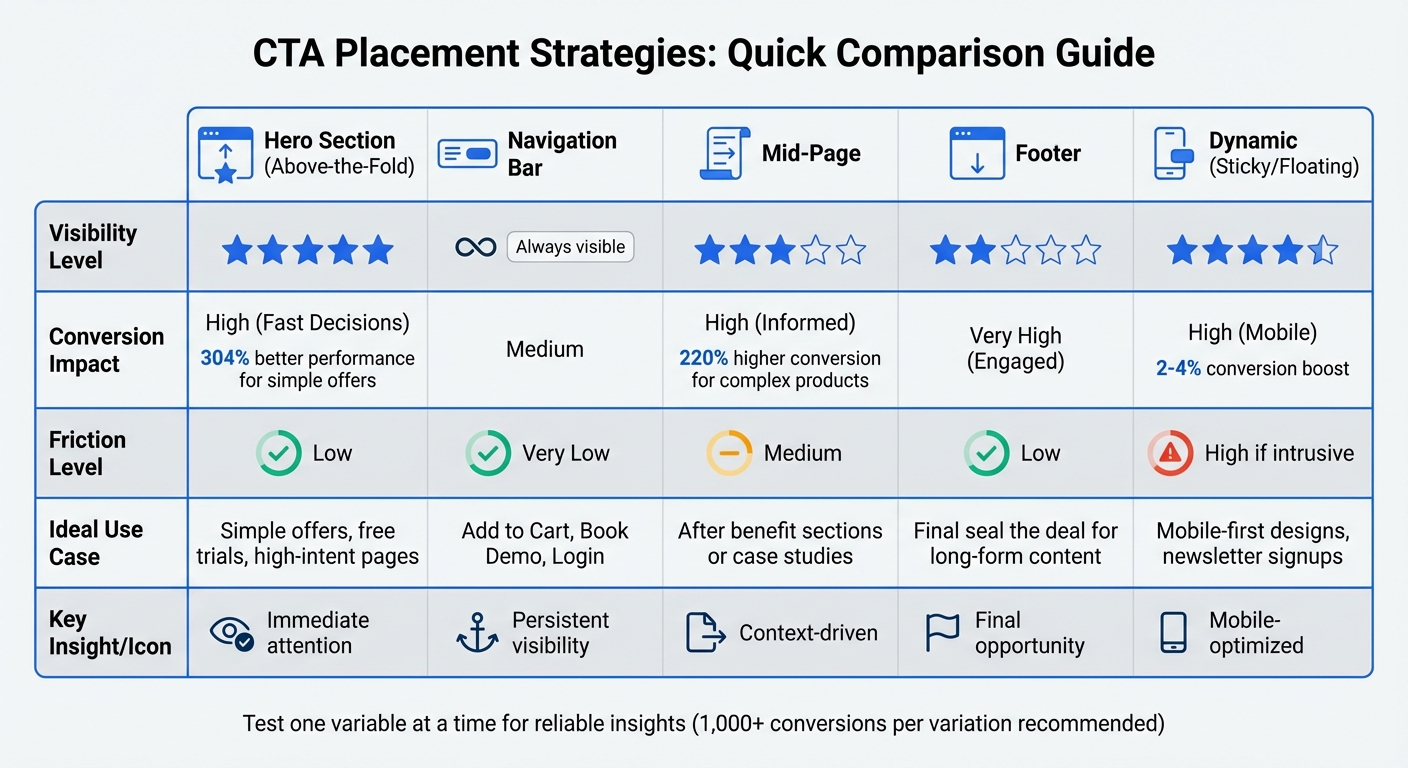
CTA Placement Comparison: Visibility, Conversion Impact, and Best Use Cases
Getting your CTA (Call-to-Action) placement right can make all the difference when turning visitor engagement into action. Here's a look at how different placement strategies stack up, along with their pros and cons, to help you decide what works best for your goals and audience.
Each placement style has its advantages and challenges, so the choice depends on what you're offering and who you're targeting.
Above-the-fold CTAs grab the attention of high-intent visitors right away. They’re great for simple actions like signing up for a newsletter or starting a free trial because they minimize friction. On the downside, they may not perform as well for complex products that need more explanation before users are ready to act.
Navigation bar CTAs are always visible, making them a subtle yet consistent nudge throughout the visitor’s journey. They’re ideal for utility actions like "Login" or "Book Demo." However, the limited space can sometimes lead to users overlooking them, a phenomenon known as banner blindness.
Mid-page CTAs show up after users have consumed some content, re-engaging them when their interest is piqued. These CTAs often convert well because visitors have more context, but they can interrupt the reading flow if not placed thoughtfully. A MECLABS test highlighted this approach’s potential: a homepage with a CTA at the bottom, following a clear value proposition, achieved a 220% higher conversion rate than a shorter page with a top-placed CTA.
Footer CTAs are aimed at highly engaged visitors who’ve made it to the end of a page. They work especially well for long-form content or services where visitors take their time to decide.
Dynamic CTAs, like sticky or floating buttons, are particularly effective on mobile devices, keeping actions within easy reach and boosting tap-through rates. However, when overdone, they can harm the user experience by feeling intrusive.
Here's a quick summary of the key features of each CTA placement strategy:
| Placement | Visibility Level | Conversion Impact | Friction | Ideal Use Case | Webflow Implementation Notes |
|---|---|---|---|---|---|
| Hero Section | Very High | High (Fast Decisions) | Low | Simple offers, free trials, high-intent pages | Use a Section with Flexbox (Center/Center) for alignment. |
| Navigation Bar | Constant | Medium | Very Low | "Add to Cart", "Book Demo", or "Login" | Set position to Sticky with a high z-index. |
| Mid-Page | Medium | High (Informed) | Medium | After benefit sections or case studies | Use section padding to ensure the CTA "breathes". |
| Footer | Low | Very High (Engaged) | Low | Final "seal the deal" for long-form content | Place in a global Footer component for consistency. |
| Dynamic | High | High (Mobile) | High (if intrusive) | Mobile-first designs, newsletter signups | Use fixed positioning at the bottom of the viewport. |
This breakdown helps match CTA placement with specific campaign objectives, ensuring your calls-to-action are as effective as possible.
Placing your call-to-action (CTA) effectively comes down to knowing your audience and aligning with their intent. For simpler offers, placing the CTA above the fold often works best. However, for more detailed or complex products, visitors usually need more context and information before they're ready to take action.
"Build smarter in 2026 - use CTA placement not just as design, but as strategy." - VictorFlow
To fine-tune your strategy, consistent testing is key. A/B testing, combined with tools like heatmaps and scroll maps, can reveal where users actually click. For reliable insights, aim for at least 1,000 conversions per variation. Test one variable at a time - whether it’s the color, text, or position of the CTA - to understand what truly impacts performance.
Don’t overlook mobile users, either. Design mobile-friendly CTAs, such as sticky or floating buttons, that stay within easy reach of a thumb. Just like with desktop, test these elements step by step to optimize results.
Ultimately, your CTA placement should follow how users interact with your site. Position buttons where their attention naturally lingers, and keep testing to adapt to changing behaviors. When your placement is driven by strategy rather than guesswork, conversions are sure to follow.
It's usually a good idea to stick with 1–3 CTAs (calls-to-action) per webpage. This approach prevents visitors from feeling overwhelmed and keeps their attention on your main conversion goals. By making your CTAs clear and purposeful, you can guide users effectively without adding unnecessary distractions.
When designing for mobile users, the Thumb Zone is the ideal spot for your CTA (Call to Action). This is the area on a phone screen that's easiest to reach with a thumb while holding the device. By placing your CTA here, you reduce effort for users, making interactions more seamless. The easier it is for them to tap, the more likely they are to take action - whether that's signing up, purchasing, or exploring further. Always aim to keep CTAs within this comfortable zone to avoid forcing users to stretch or shift their grip.
To test CTA placement effectively, it's crucial to control the conditions of your experiment. Start by randomly assigning visitors to different variations of your page to ensure fairness. Make sure to run the test long enough to gather enough data for reliable results. Keep all other elements - like the page content, design, and offers - unchanged. This way, you can focus solely on how the CTA placement influences user behavior, without interference from outside factors or shifts in traffic patterns.