



Insights
Webflow
Copy Link




What changes — hosting, CMS, maintenance, SEO and team workflows — when you migrate platforms, plus expected costs and timelines.
Migrating from WordPress to Webflow means shifting how your website is hosted, managed, and maintained, but some things - like your content and domain - stay the same. Here’s the gist:
While WordPress is better for large editorial teams, Webflow offers design flexibility and cuts down on maintenance. Migration costs range from $4,000–$12,000 and typically take 2–4 weeks. If you’re tired of plugin conflicts and manual updates, Webflow might be worth exploring.
With WordPress, hosting is a manual task. You’re responsible for managing server configurations, keeping up with security updates, and handling maintenance. If you’re on a shared hosting plan, you might notice slower speeds and less reliable uptime compared to modern cloud-based options.
One big performance hurdle is WordPress’s heavy dependence on plugins. Relying too much on third-party add-ons or using overly complex themes can drag down your site’s load times and even open the door to security risks. Before you migrate, it’s smart to check your Core Web Vitals (like LCP, FID, and CLS) using tools like PageSpeed Insights or GTMetrix. Aim for a page size under 1MB and fewer than 30 server requests. Keep in mind that DNS propagation during migration can take up to 48 hours.
These hosting limitations also influence how designs are implemented, which brings its own set of challenges.
WordPress relies on themes and page builders like Elementor, but creating unique layouts often requires custom coding. This setup can make updates tricky, as frequent theme changes and plugin conflicts add to your workload.
A client from Shadow Digital shared their experience:
"I thought WordPress would give me full control, but I still felt stuck. Every time I wanted to tweak something, I had to hire someone."
Because WordPress layouts are tied to theme code, migrating to another platform means rebuilding each page manually. While this might sound daunting, it’s also a chance to clean house. By reviewing your active plugins and customizations, you can decide what’s truly necessary. Tools like WP All Export can simplify the process by converting WordPress XML exports into CSV files, making it easier to import your data elsewhere.
In WordPress, even basic functionality often depends on plugins like Yoast or ACF. This reliance complicates migrations, as each plugin’s data needs to be handled separately. Plus, WordPress exports content in XML format by default, which usually requires conversion to CSV for compatibility with newer CMS tools.
As Webflow points out:
"WordPress websites require engineering time to maintain and they don't give marketing or design the autonomy to build their own designs, run experiments, or personalize content."
- Webflow
Before making the leap, take stock of your WordPress taxonomies and custom post types. Determine whether they’ll need to be converted into static pages or CMS collections. A tool like Screaming Frog can help by crawling your site and extracting titles, meta descriptions, and schema data, which is crucial for avoiding SEO losses. Don’t forget to back up everything - your database, images, and plugins. An SEO and content audit might set you back $800–$1,500 and take 1–2 weeks.
These challenges only grow when you factor in SEO and security concerns.
WordPress relies heavily on plugins for SEO and security tasks like firewalls and malware scanning. If updates are delayed, your site could be left vulnerable. You’re also responsible for manually updating PHP, core software, and plugins, which adds to the ongoing maintenance load.
Before migrating, set up a detailed 301 redirect map for all your WordPress URLs. Tools like Screaming Frog can help with this, ensuring you maintain your SEO rankings. This is a critical step in optimizing for lead generation post-migration. Expect a 301 redirect map to cost $500–$1,200 and take 3–5 days to complete. Additionally, media compression and testing might add another $500–$1,000 and take 2–4 days.
This level of manual effort stands in stark contrast to Webflow’s more streamlined approach, which will be covered in the next section.
Webflow provides an integrated solution for hosting, design, and content management, removing the complexity of manual updates and configurations often associated with WordPress.
Webflow takes care of hosting automatically, leveraging a fully managed AWS/Fastly environment. There’s no need to configure servers or handle caching manually. The platform boasts 99.99% uptime and delivers content to 95% of the world in under 50ms. Websites are deployed to a global CDN, and backups occur every 10 minutes or after every 10 changes, whichever comes first.
This setup brings noticeable performance improvements. For example, some companies have experienced traffic increases of up to 1,170% year-over-year after switching to Webflow. These results stem from Webflow’s automatic optimization of Core Web Vitals, eliminating the need for website speed optimization or additional plugins. This seamless hosting experience simplifies the overall design process.
Webflow’s browser-based interface generates clean, production-ready code without the constraints of themes or the conflicts that often arise with page builders. Features like scroll animations, Lottie integration, and multi-step interactions are built in, so you won’t need extra plugins.
Elyssa Albert, VP of Design at Attentive, highlighted the benefits:
"Our new designs didn't need to go through anyone else besides brand and marketing - no engineers needed. The freedom and flexibility we gained through Webflow was invaluable."
While rebuilding your design is required, tools like the Figma to Webflow plugin can simplify the process. Using a CSS framework such as Client-First, Mast, or Lumos during the rebuild can help keep your site organized and scalable. One case study reported a 67% reduction in developer ticketing after adopting Webflow, as marketing teams could make updates without relying on engineers.
Webflow’s CMS, built around Collections, offers a new approach to content management compared to WordPress. Collections function as structured content databases with native custom fields, eliminating the need for plugins like Advanced Custom Fields. Dynamic templates, called Collection Pages, automatically generate individual pages for each item - similar to WordPress single post templates but managed visually.
During migration, you’ll need to map WordPress fields to Webflow equivalents. For instance:
Categories and tags must first be imported as separate Collections and then linked to main content via reference fields. Katie Hutmacher, Director of Brand & Creative at Netgain, shared her experience:
"I've added a CMS collection for landing pages so the team can build them by populating fields... really exciting things."
To ensure a smooth migration, keep your WordPress site live so Webflow’s CSV importer can access working URLs. It’s also essential to remove WordPress-specific shortcodes and inline styles to prevent layout issues. Webflow CMS plans support up to 2,000 items, while Business plans allow for up to 10,000.
Webflow includes built-in SEO tools such as meta tags, 301 redirects, automatic sitemaps, and clean semantic HTML, removing the need for plugins like Yoast or RankMath. Security features include SSL encryption, SOC 2 Type II compliance, and global DDoS protection.
Curtis Anderson, Founder and CEO of Nursa, praised Webflow’s capabilities:
"Webflow delivers the performance we need while giving us a flexible foundation that scales as our platform grows... all without sacrificing team or cost efficiency."
Updates occur in a secure sandbox, eliminating the need for manual updates to core software, themes, and plugins. This zero-maintenance model ensures that security patches and platform improvements are handled seamlessly.
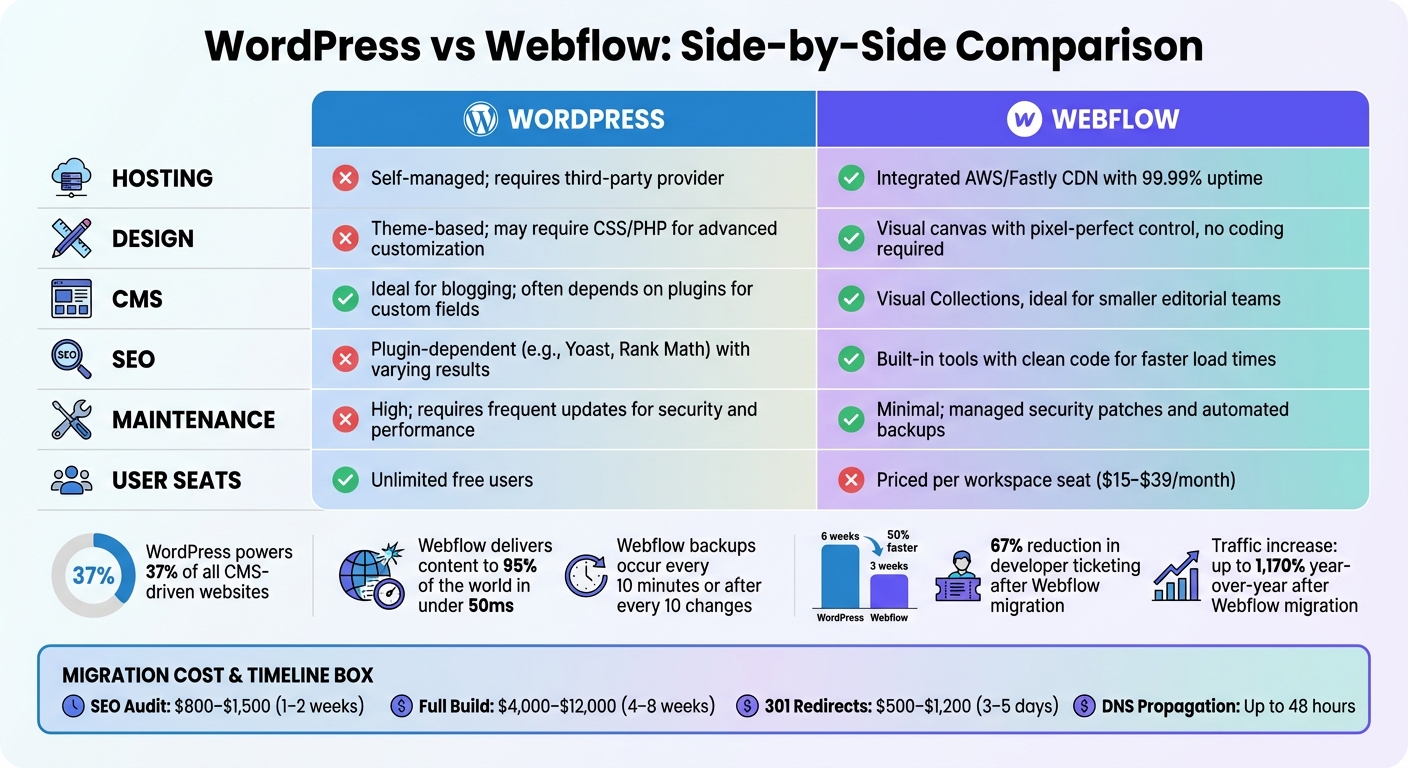
WordPress vs Webflow: Feature Comparison Chart
Here’s a straightforward comparison of the advantages and drawbacks of WordPress and Webflow, based on their core features and functionality.
WordPress stands out for its adaptability in high-volume blogging and multi-author workflows, making it a favorite for large editorial teams. Impressively, it powers about 37% of all CMS-driven websites worldwide. Its open-source nature is another major plus, offering unlimited free user seats and complete access to the source code for customizations.
On the other hand, Webflow shines when it comes to design freedom and reliable performance. Alex Rankin, a Webflow developer and former WordPress expert, shared his experience:
"As an ex-WordPress expert, using Webflow cuts build time in half. We can turn the same website around in three weeks with Webflow, as opposed to six weeks with WordPress."
However, there are clear trade-offs between the two platforms, particularly in terms of maintenance and scalability. WordPress requires regular manual updates for its core, themes, and plugins to maintain security and performance. Webflow, by contrast, automates much of this process, handling security patches, hosting optimization, and backups seamlessly - creating backups every 10 minutes or after every 10 changes, whichever comes first.
| Feature | WordPress | Webflow |
|---|---|---|
| Hosting | Self-managed; requires a third-party provider | Integrated AWS/Fastly CDN with 99.99% uptime |
| Design | Theme-based; may require CSS/PHP for advanced customization | Visual canvas with pixel-perfect control, no coding required |
| CMS | Ideal for blogging; often depends on plugins for custom fields | Visual Collections, ideal for smaller editorial teams |
| SEO | Plugin-dependent (e.g., Yoast, Rank Math) with varying results | Built-in tools with clean code for faster load times |
| Maintenance | High; requires frequent updates for security and performance | Minimal; managed security patches and automated backups |
| User Seats | Unlimited free users | Priced per workspace seat ($15–$39/month) |
These differences are crucial for aligning your platform choice with your technical skills and marketing goals. For example, Webflow’s Editor mode empowers marketers to make real-time content updates directly on the canvas, reducing the risk of errors. Meanwhile, WordPress offers better scalability for larger teams but often limits marketers to block editors or pre-designed templates.
The decision ultimately hinges on your priorities: if you value editorial scale and flexibility for large teams, WordPress might be your best bet. But if design freedom and lower technical upkeep are more important, Webflow could be the way to go.
Consider switching to Webflow if you’re looking for more design flexibility, less maintenance, and smoother team workflows.
For marketing-focused sites, Webflow can be a game changer. If your team struggles with developer-dependent updates or spends too much time dealing with security patches and plugin conflicts, the move can yield noticeable benefits. For instance, in 2025, Netgain tackled site speed challenges and reduced developer reliance by migrating to Webflow - boosting productivity by 150% and enabling their marketing team to manage campaigns independently. Webflow simplifies hosting, design, and CMS tasks, making it a strong choice for marketing-driven websites.
To ensure a smooth migration, take precautions: plan thorough URL redirects, compress images, and test mobile responsiveness. Start by documenting all URLs, metadata, and your top-performing pages. Use 301 redirects to map old WordPress URLs to their new Webflow counterparts, which helps maintain your search rankings. Don’t forget to compress images before uploading them and test forms and links in Webflow’s staging environment. Finally, be aware that updating your DNS can take up to 48 hours to fully propagate.
Migration costs can range from $800–$1,500 for SEO audits, $4,000–$12,000 for the build, and $500–$1,200 for redirects. The entire process typically takes four to eight weeks. These figures highlight the importance of tailoring your migration strategy to your specific needs. If a full migration isn’t required, you can explore partial options, like using the Webflow Pages plugin for WordPress.
The key distinction comes down to how hosting is handled. With WordPress, you’re responsible for selecting and managing your own hosting provider. This means you’ll need to take care of server setup, security measures, backups, and performance tuning. While this gives you a lot of freedom to tailor your hosting environment, it also requires technical know-how and regular upkeep.
Webflow, however, includes hosting as part of its platform. It offers an integrated hosting solution designed for speed and reliability. This removes the need for third-party hosting services and simplifies site management, letting you concentrate on design and content instead of technical tasks.
To sum it up, WordPress gives you greater control and customization options, whereas Webflow delivers a streamlined, hassle-free hosting experience perfect for those looking for an all-in-one platform.
Webflow makes content management easier with its visual CMS collections, letting users organize and update content seamlessly - no plugins required. Unlike WordPress, which often depends on third-party tools to handle advanced features, Webflow builds these capabilities directly into its platform. This integrated system simplifies the process, cutting down on the need for extra software and helping your team save both time and effort.
When moving your site from WordPress to Webflow, it’s essential to prioritize both SEO and security to ensure the process goes smoothly.
For SEO, your main goal is to protect your search rankings. Start by auditing your existing content to identify what needs to be transferred. Set up accurate URL redirects so users and search engines can find your pages without any hiccups. Don’t forget to transfer metadata and structured data carefully to maintain your site’s visibility. Once the migration is complete, test your site’s page speed and Core Web Vitals to ensure your rankings and user experience stay intact.
On the security front, Webflow simplifies things by offering built-in hosting with strong security measures. Unlike WordPress, which often relies on third-party plugins, Webflow handles automatic updates and security patches for you. This reduces potential vulnerabilities and makes site management easier. With proper preparation and Webflow’s secure infrastructure, you can migrate your site confidently while keeping both its SEO performance and security intact.