



Insights
Webflow
Copy Link


Webflow reduces maintenance and speeds time-to-market for growing teams; WordPress offers deeper customization but demands more upkeep.
If your team is tired of slow updates, rising costs, and constant maintenance with WordPress, switching to Webflow might be a game-changer.
Webflow offers faster performance, simplified maintenance, and tools that empower marketing teams to work independently. WordPress, while highly customizable, often requires developer support, frequent updates, and extra costs for hosting, plugins, and security. Here’s the quick breakdown:
Bottom line: Webflow is ideal for teams prioritizing speed, simplicity, and independence, while WordPress suits those needing advanced customization and backend control.
| Criteria | Webflow | WordPress |
|---|---|---|
| Performance | Fast out of the box, built-in CDN | Depends on hosting and plugins |
| Design | Visual editor, no coding needed | Requires plugins or coding |
| Cost | Predictable subscription fees | Free upfront, but hidden costs |
| Maintenance | Fully managed by Webflow | Manual updates required |
| Scalability | Supports up to 1M CMS items | Unlimited but hosting-dependent |
For teams looking to reduce maintenance and speed up workflows, Webflow is a smart choice for landing page development. If you need full control over technical features, WordPress remains a solid option.
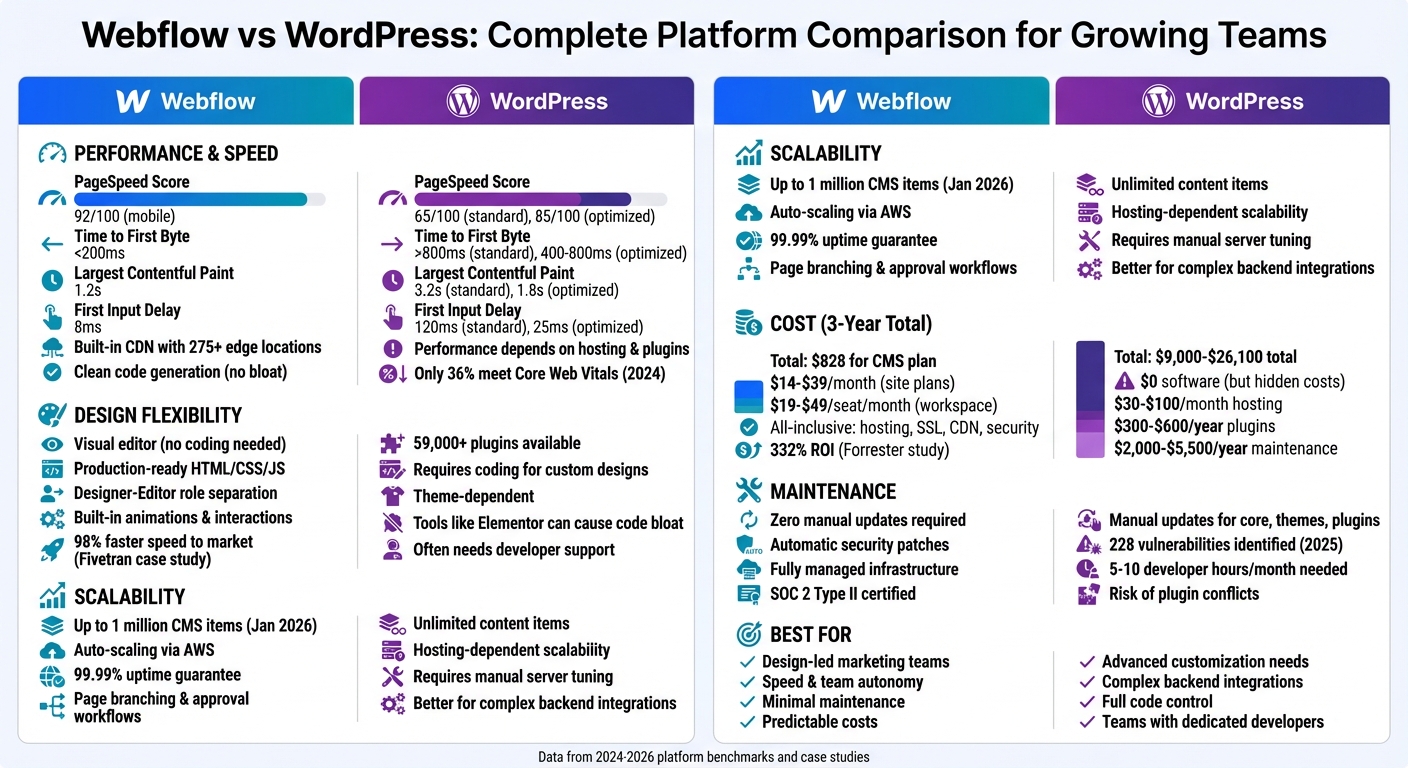
Webflow vs WordPress: Performance, Cost, and Maintenance Comparison
When it comes to speed, Webflow has an edge thanks to its managed infrastructure. It uses enterprise-level hosting through Amazon Web Services (AWS) and includes a built-in global CDN with over 275 edge locations. This setup automatically distributes assets worldwide, enabling Webflow sites to hit a Time to First Byte (TTFB) of under 200ms. On the other hand, WordPress is self-hosted, meaning its performance heavily depends on your hosting provider and how well you configure elements like caching, CDN integration, and server resources. Beyond hosting, the quality of the code each platform generates plays a big role in overall performance.
Webflow creates clean, semantic HTML, CSS, and JavaScript, avoiding the clutter that can come from third-party plugins. WordPress sites, however, often suffer from plugin overload, which can lead to extra database queries and unnecessary JavaScript, slowing down page load times.
Google’s Core Web Vitals - key metrics for performance - highlight these differences:
| Performance Metric | Webflow (Standard) | WordPress (Optimized) | WordPress (Standard) |
|---|---|---|---|
| Largest Contentful Paint | 1.2s | 1.8s | 3.2s |
| First Input Delay | 8ms | 25ms | 120ms |
| Time to First Byte | <200ms | 400–800ms | >800ms |
| PageSpeed Score (Mobile) | 92/100 | 85/100 | 65/100 |
These benchmarks clearly show the performance gap between the platforms. For WordPress, closing this gap often requires additional investments. Teams can improve WordPress performance by opting for premium managed hosting (ranging from $30 to over $100 per month), using advanced caching plugins like WP Rocket, and conducting regular plugin audits - especially important for maintaining speed during marketing campaigns.
Webflow, by contrast, handles many optimizations automatically. Features like image conversion to WebP or AVIF, code minification, and HTTP/2 compression are built-in. While WordPress has made progress - its mobile Core Web Vitals pass rate improved from 28% in 2021 to 36% in 2024 - achieving modern performance standards still requires ongoing effort.
Webflow’s visual editor empowers designers to work directly with production-ready HTML, CSS, and JavaScript, enabling them to create fully functional websites without being tied to rigid pre-built themes. Unlike WordPress, which often requires additional plugins or manual coding for customization, Webflow uses a class-based styling system to maintain design consistency across reusable components.
The advantages of this approach are evident in real-world examples. Take Fivetran, for instance: after switching to Webflow in 2025, they saw a 98% boost in speed to market, launching over 130 new pages in just one year. Similarly, Walker & Dunlop cut their content update cycle from a month to a single day, leading to a 56% increase in form fills and a 23% bump in organic traffic. This kind of design flexibility directly supports the scalability needs of growing organizations.
When it comes to scalability, Webflow has made major strides. By January 2026, it could handle up to 1 million CMS items per project, making it a solid choice for large-scale content operations. WordPress, on the other hand, doesn’t impose strict content limits, but its scalability depends heavily on hosting configurations and database optimization. For teams managing intricate taxonomies or requiring complex backend integrations, WordPress might still hold an edge.
Another feature that sets Webflow apart is its distinct Designer and Editor roles. This separation helps ensure that non-technical team members don’t accidentally disrupt site layouts - a common issue in WordPress when editors have broad access to design settings. However, Webflow does come with a tradeoff: every update requires a full-site publish, which can slow things down for larger websites. By contrast, WordPress allows individual post updates, supports unlimited concurrent users, and offers granular roles along with Git-based version control.
Up next, we’ll explore how these design and scalability features influence cost and maintenance considerations.
The pricing structures for Webflow and WordPress are worlds apart. Webflow operates on a Software as a Service (SaaS) model, offering predictable monthly fees that include hosting, security, and maintenance all in one package. WordPress, on the other hand, is free to use but depends on a mix of paid third-party services for hosting, security, and added functionality.
Over a 3-year period, the costs tell a very different story. An optimized WordPress site can cost between $9,000 and $26,100, while a Webflow CMS plan comes in at about $828. Why the gap? WordPress expenses include managed hosting ($1,500–$6,000), themes and plugins ($900–$2,400), security services ($600–$1,200), and maintenance fixes ($6,000–$16,500). These costs add up, especially when you factor in ongoing maintenance.
Speaking of maintenance, the two platforms couldn’t be more different. WordPress requires frequent manual updates for its core software, themes, and plugins. A 2025 study even identified 228 vulnerabilities in WordPress core software alone. Ignoring updates leaves your site open to security risks, but installing them can sometimes cause plugin conflicts that break your site. To keep things running smoothly, WordPress sites typically demand 5–10 developer hours per month, which translates to $2,000 to $5,500 annually for maintenance and emergency fixes. For growing teams, this constant upkeep can be a significant drain on resources.
Webflow takes a completely different approach. It handles security patches, backups, and infrastructure updates automatically, requiring no involvement from your team. As Luke Stahl, Senior Product Marketing Manager at Webflow, explains:
"The true cost of open source isn't the license fee, it's everything you have to build, maintain, and secure around that 'free' software to make it production-ready".
Then there’s the cost of plugins. To replicate Webflow’s built-in features - like SEO tools, forms, caching, and backups - an optimized WordPress site often requires 10–30 premium plugins, adding over $800 annually to your expenses. Webflow includes these features right out of the box. Dalton Craighead, a web designer and developer, sums it up perfectly:
"Spending money on growth is an investment that actually pays back. Spending money on fixing your site is just a cost".
WordPress performance largely hinges on your hosting provider, caching setup, and the plugins you use. Most growing teams install anywhere from 20–30 plugins to expand functionality, but this often leads to bloated code and an overload of JavaScript. By 2024, only 36% of WordPress sites had managed to meet Google's mobile Core Web Vitals benchmarks. That means nearly two-thirds of these sites struggle with basic performance standards, posing challenges for teams aiming to maintain a smooth user experience.
WordPress is well-known for its customization options, thanks to an ecosystem of over 59,000 plugins and thousands of themes. Tools like the Gutenberg block editor or visual builders such as Elementor and Divi allow users to create layouts without touching code. However, crafting a truly one-of-a-kind design often requires diving into custom PHP, CSS, or JavaScript. For teams without dedicated developers, this can slow down workflows and limit how quickly they can adapt designs to meet new demands.
WordPress is capable of handling high traffic and large databases, but it requires a solid technical foundation to do so. Scaling effectively means setting up a finely tuned LAMP stack, implementing object caching, deploying global CDNs, or even adopting decoupled architectures with frameworks like Next.js. All of this demands not only additional engineering resources but also constant monitoring to keep everything running smoothly.
Although WordPress itself is free, the overall costs of running a professional site can add up quickly. Over a three-year period, expenses for managed hosting, premium plugins, security services, and ongoing maintenance can range from $9,000 to $26,100. These rising costs and the effort required for upkeep are major reasons why many teams start exploring other platforms, like Webflow, as a simpler alternative.
Webflow offers a seamless approach to optimizing performance, design, and scalability, setting it apart from platforms like WordPress.
Webflow ensures fast and reliable performance right out of the box. It generates clean HTML, CSS, and JavaScript, delivering content through a global CDN powered by AWS. Most Webflow sites achieve PageSpeed scores between 85 and 98 without requiring extra tweaks. With a Time to First Byte typically under 200ms and content reaching 95% of users in under 50ms, Webflow's infrastructure handles traffic spikes effortlessly. Unlike WordPress, where performance can depend on hosting quality and plugin configurations, Webflow's enterprise-grade setup takes care of these aspects automatically.
For instance, when Attentive, a mobile marketing company, transitioned from WordPress to Webflow (2024–2025), they saw immediate results: a 27% traffic boost in the first week, a 14% increase in impressions, and a 6-point improvement in their SEO health score. This level of performance provides a solid foundation for creative flexibility.
With Webflow, designers can create production-ready websites without needing to write code. Its visual interface closely resembles front-end code, enabling precise control over design elements. The platform also supports no-code animations and scroll-based interactions, along with integrations for tools like Spline, GSAP, Lottie, and Rive. This makes it an ideal choice for crafting visually engaging campaigns.
Webflow’s "Designer-Editor" split is particularly helpful for marketing teams. It allows them to safely update content within pre-approved components, minimizing the need for engineering support on routine tasks.
"Our new designs didn't need to go through anyone else besides brand and marketing - no engineers needed. The freedom and flexibility we gained through Webflow was invaluable."
- Elyssa Albert, VP of Design at Attentive
Webflow's CMS, updated in January 2026, now supports up to 1 million items per project, making it perfect for large-scale SEO initiatives and content-heavy websites. On Enterprise plans, features like page branching and approval workflows allow multiple team members to collaborate without overwriting each other’s work. Additionally, Webflow guarantees 99.99% uptime and handles traffic surges automatically, removing the need for manual server adjustments.
When Fivetran, a data movement platform, rebuilt its marketing site on Webflow, they launched over 130 new pages in a year and achieved a 98% improvement in speed to market.
"Webflow delivers the performance we need while giving us a flexible foundation that scales as our platform grows and the landscape of site discovery evolves - all without sacrificing team or cost efficiency."
- Curtis Anderson, Founder and CEO of Nursa
Webflow combines hosting, SSL, CDN, and security into one subscription. Pricing for site plans ranges from $14/month (Basic) to $39/month (Business) when billed annually, while workspace plans start at $19 per seat per month (Core) or $49 per seat per month (Growth). Enterprise plans are custom-priced and can exceed $30,000 annually for advanced requirements. While the upfront costs might be higher than WordPress hosting alone, Webflow's all-in-one approach eliminates the need for additional services like security add-ons, performance plugins, or ongoing developer retainers.
For example, Healius, an Australian healthcare company, reported 3× cost savings after switching to Webflow, completing their migration in just six weeks. A Forrester study from 2024 also highlighted a 332% ROI over three years for Webflow enterprise customers, largely due to reduced developer dependency.
WordPress provides unmatched customization but demands significant upkeep, whereas Webflow prioritizes quick design and minimal maintenance. Based on earlier comparisons of performance, design, scalability, and costs, here’s a breakdown of the key pros and cons for both platforms:
| Criteria | WordPress | Webflow |
|---|---|---|
| Performance | Relies on hosting and plugins; typically scores 40–75 without optimization | Consistently scores 85–98 out of the box, thanks to built-in CDN and clean code |
| Design Flexibility | Depends on themes; tools like Elementor can lead to bloated code | Offers pixel-perfect visual control with no need for coding |
| Scalability | Unlimited content items, but requires manual server tuning for high traffic | Auto-scales via AWS and supports up to 1 million CMS items as of January 2026 |
| Maintenance | High; users must manually update core, plugins, and themes | None; updates and security are fully managed by the platform |
| Security | User-managed; plugin vulnerabilities are the main risk | Fully platform-managed and SOC 2 Type II certified |
| Cost | Low initial cost ($0 for software) but hidden expenses in hosting ($30–$100/month) and plugins ($300–$600/year) | Higher upfront cost ($14–$39/month for sites, plus $19–$49/seat for workspaces); predictable pricing |
| Team Autonomy | Marketing teams often need developers to make layout changes | Marketing teams can independently create and publish pages with the Editor role |
These points highlight the central trade-off: technical flexibility versus ease of use and efficiency.
WordPress shines when it comes to functional flexibility. Its vast plugin ecosystem supports everything from membership sites to intricate e-commerce solutions, though this comes at the cost of ongoing maintenance. Webflow, on the other hand, sacrifices some customization options for speed and simplicity. According to a Forrester study, enterprise teams using Webflow saw a 332% ROI over three years, largely due to a 94% faster time-to-market for new pages.
For teams with dedicated developers, WordPress offers unparalleled adaptability. Meanwhile, teams seeking quicker, independent updates often lean toward Webflow's managed approach.
When it comes to growing teams, the decision often boils down to two paths: investing in developer hours with WordPress or opting for predictable subscription fees with Webflow.
Webflow shines for design-led, marketing-driven teams. It empowers designers and marketers to take the reins, enabling them to launch campaigns in days instead of weeks. Case studies show that teams migrating to Webflow have seen faster time-to-market and higher conversion rates. For teams that need to tweak landing pages weekly without involving developers, Webflow's visual-first approach and managed infrastructure provide a clear return on investment.
On the other hand, WordPress is the go-to for teams requiring extensive technical customization or handling large-scale content operations. If your plans include complex backend integrations, custom PHP logic, or managing thousands of posts with detailed editorial workflows, WordPress delivers the flexibility you need. However, this flexibility comes with the responsibility of ongoing maintenance - regular plugin updates, security fixes, and server optimizations become part of your routine.
Cost is another key factor. While WordPress may have no upfront software fees, you'll face hosting costs ($30–$100/month), security tools ($99–$299/year), and the expense of developer time. Webflow, with its all-in-one subscriptions ($14–$39/month per site plus workspace fees), often results in a lower total cost when factoring in the efficiency gains.
Ultimately, the choice is clear: Webflow for speed, autonomy, and minimal upkeep, or WordPress for full code control and advanced customization - provided your team has the technical bandwidth to manage it.
Migrating from WordPress to Webflow is usually a straightforward process, but the level of difficulty can vary based on your website’s size and structure. Moving content is often simple, but extra attention is needed for things like internal links, rich text formatting, and SEO settings. Larger websites may require manual adjustments, especially for hardcoded URLs. With the right preparation and tools, most migrations can be wrapped up within a few weeks, though some technical know-how might come in handy.
Switching from WordPress to Webflow doesn’t have to hurt your SEO or rankings - as long as the migration is well-executed. The key is to focus on a few critical steps: maintaining your URL structures, setting up proper redirects, and ensuring all content is transferred accurately.
In fact, Webflow’s built-in SEO tools, faster page load speeds, and cleaner code can potentially improve your site’s rankings over time. With careful planning and attention to detail, moving to Webflow can actually strengthen your site’s SEO performance instead of setting it back.
A team that's expanding might want to stick with WordPress if they rely on a wide range of plugins, need the flexibility of an open-source platform, or require complete control over hosting and customization. It's also a great fit for teams already deeply integrated into the WordPress ecosystem or those with developers experienced in working with it. On the flip side, if challenges like plugin conflicts, security concerns, or high maintenance costs become a burden - and if having extensive plugin options isn't a top priority - considering Webflow could be a smart move. It offers easier scalability and lower maintenance demands.