






Insights
Webflow
Copy Link




Marketing teams can eliminate developer bottlenecks, launch campaigns faster, and personalize websites to drive measurable revenue.
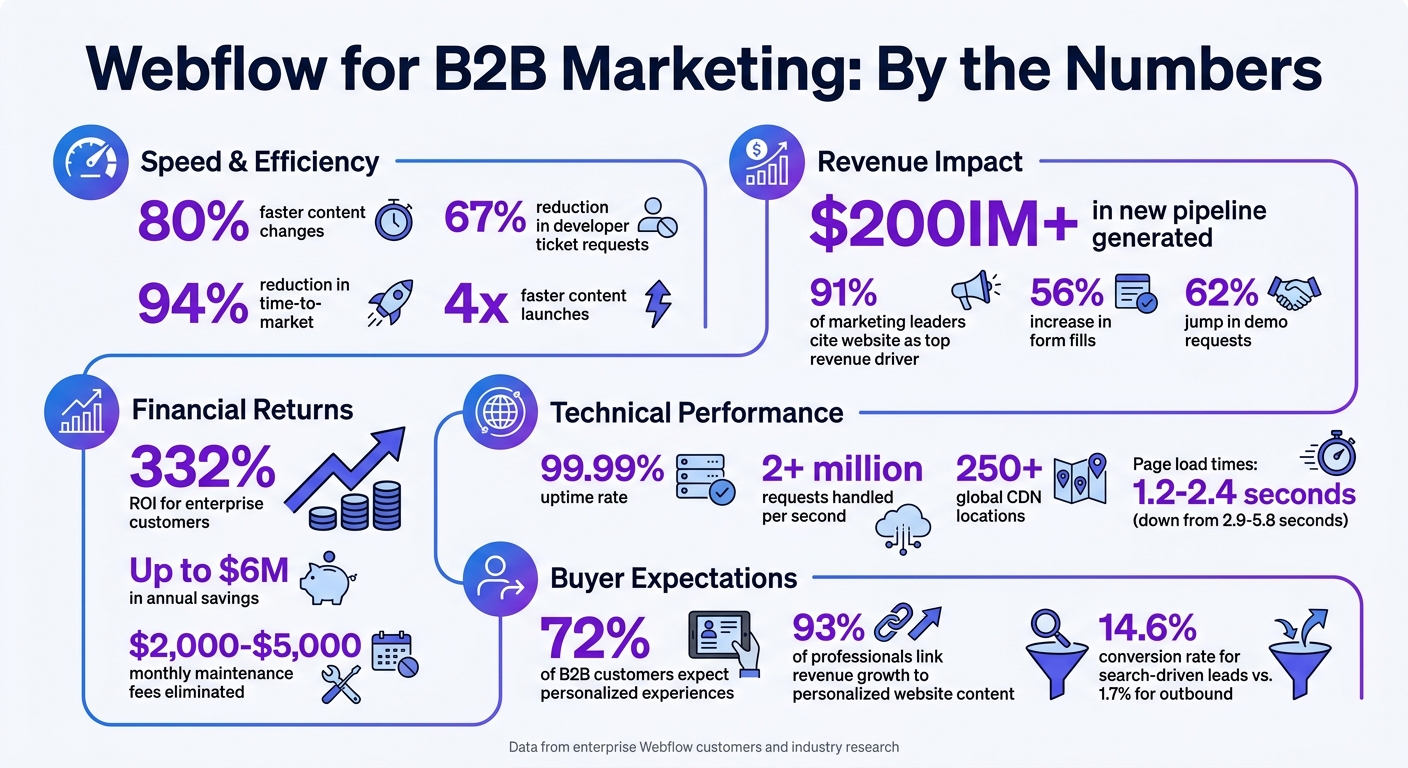
Webflow is rapidly becoming the go-to platform for B2B marketing teams because it eliminates the delays caused by traditional website platforms like WordPress and Adobe Experience Manager. By giving marketers direct control over website updates, Webflow reduces reliance on developers, speeds up content changes by up to 80%, and cuts developer ticket requests by 67%. This shift allows teams to launch campaigns faster, personalize buyer experiences, and focus on driving revenue.
Webflow transforms websites from bottlenecks into growth engines, empowering marketing teams to move faster and achieve measurable results.
Webflow ROI and Performance Statistics for B2B Marketing Teams
B2B marketing teams are increasingly turning to Webflow to transform their websites into powerful growth tools. Webflow’s self-service features allow teams to bypass common roadblocks, like waiting on developers for routine updates. In fact, marketing teams using Webflow have reported a 67% drop in developer ticket requests. This shift not only reduces costs but also frees up engineering teams to focus on core product development, creating a win-win scenario.
For enterprise customers, the results are striking: 332% ROI and up to $6M in annual savings. These figures highlight how Webflow is reshaping the landscape for B2B marketing.
Traditional platforms often trap marketing teams in a frustrating loop. A simple headline update can require submitting a ticket, waiting for it to be scheduled into a sprint, and then seeing the change go live only after the campaign window has passed. Webflow eliminates this bottleneck by separating site design from content editing. Marketers can update text and images independently, without needing developer assistance.
"The winning approach is to separate 'building' from 'publishing.' Keep the design system, components, and templates protected, then give marketing safe editing power through the Editor and CMS roles." – Miroslav, Co-founder, Creative Corner Studio
This approach lets marketers make updates directly on the live site - whether it’s swapping out images, updating copy, or managing blog posts - without risking the site’s integrity. Teams can launch landing pages in just hours, thanks to drag-and-drop components that ensure brand consistency. This level of control not only speeds up workflows but also supports the highly personalized experiences today’s buyers expect.
Modern B2B buyers are more independent than ever. They often research anonymously, weigh their options, and expect tailored interactions. A staggering 72% of B2B customers now expect personalized experiences, and 93% of professionals link revenue growth directly to personalized website content. Generic, cookie-cutter websites simply don’t meet these demands anymore.
Webflow’s flexibility makes it easy for teams to iterate quickly. Features like Collections allow marketers to manage complex content and dynamic SEO - such as integration directories or case studies - using a single template. With Webflow Optimize, teams can create tailored experiences based on CRM data, traffic sources, or visitor behavior.
"For enterprise marketers who are used to waiting weeks for site changes, personalization with Webflow Optimize is a dream come true." – Ellen Smoley, Director, Growth Marketing
The results speak for themselves. Companies have reported a 56% increase in form fills and generated over $200M in new pipeline after launching their Webflow-powered sites. By enabling teams to test messaging, personalize content, and roll out campaigns without relying on developers, Webflow turns websites into growth engines instead of bottlenecks.
B2B marketing teams today face increasing pressure to demonstrate revenue impact rather than just driving more traffic. In fact, 91% of marketing leaders attribute their websites to driving revenue. This means that every page on a site needs to do more than look appealing - it has to actively convert visitors into leads and customers. Webflow helps teams move beyond surface-level metrics like pageviews and focus on what really drives growth: MQL-to-SQL conversion rates, opportunity creation, and sales velocity.
One of Webflow’s standout advantages is how it reduces time-to-market by an impressive 94%. Instead of waiting weeks for development cycles to test something like a pricing page or a demo form, marketing teams can make updates instantly. This agility allows teams to respond quickly to re-engage stalled deals or seize opportunities from emerging buyer interest. By prioritizing revenue outcomes, Webflow empowers marketers to experiment and adapt with speed.
Webflow’s CMS isn’t your typical blogging tool - it operates more like a relational database. Content types, or "entities", such as case studies, ROI calculators, testimonials, and product features, are interconnected through references and multi-references. This structure enables dynamic layouts where, for instance, service pages automatically pull in relevant case studies complete with unique metrics and client quotes.
The CMS supports up to 1 million items per collection and allows multi-level nesting up to three layers deep. For B2B teams, this means you can create robust resources like integration directories that automatically display customer stories tailored by industry or use case. This eliminates the need for manual updates across multiple pages. Additionally, CMS Collections are being used for programmatic SEO, enabling teams to generate hundreds of unique pages like "YourTool vs. Competitor" from a single template using CSV imports.
Another key feature? CMS fields map directly to JSON-LD structured data, ensuring that your content is easily discoverable by AI-powered search tools.
"Your CMS architecture determines what your site can express to search engines, AI models, and visitors... These are revenue decisions." – Karpi Studio
Webflow doesn’t just organize content - it helps you personalize it for better results. With Webflow Optimize, teams can quickly tailor pages based on CRM data, traffic sources, or past visitor behavior. For example, if a visitor from a stalled deal revisits your site after 30 days, Webflow can automatically present them with targeted re-engagement content or sales assets.
Sarah Scharf, VP of Product and Corporate Marketing at Vanta, highlights the platform’s flexibility:
"As Vanta moves upmarket, Webflow gives our marketing team more freedom to quickly test new messaging and create personalized experiences for the different audiences and personas we serve."
Campaigns can also be assembled in record time using pre-approved, brand-compliant components. Instead of relying on custom-built pages for each new initiative, marketers can experiment continuously without waiting for quarterly updates.
Elliott Chapman, Director of Growth Marketing at Webflow, underscores the value of this speed:
"Growth marketers need to move fast and scale what works and that's where things like components, page builder, and templates are a huge solve. Being able to create brand-approved pages quickly and programmatically gives much more power and ability to drive impact."
When your team can test ideas faster than scheduling a meeting, your CMS becomes a tool for growth instead of a bottleneck. Webflow’s capabilities make it easier for marketing teams to turn their websites into powerful, revenue-driving assets.
For B2B marketing teams, having the right technical tools is just as important as crafting a great strategy. While personalized campaigns and creative execution drive engagement, technical performance underpins everything. A website’s speed, for instance, directly impacts whether a visitor stays or leaves. With Webflow's managed infrastructure, marketing teams can focus on their campaigns without needing to worry about server setups or technical slowdowns.
Webflow uses a serverless architecture powered by AWS and global CDNs like Fastly and Cloudflare. This setup ensures assets are delivered from over 250 locations worldwide, so your site loads quickly no matter where visitors are located - whether they’re in New York or halfway across the globe. The platform handles over 2 million requests every second, moves more than 8 terabytes of data hourly, and maintains a 99.99% uptime rate.
When traffic spikes - like during a campaign launch or unexpected media coverage - Webflow’s infrastructure automatically scales to handle the load. Additionally, Webflow optimizes images by creating device-specific versions and converting them into modern formats like AVIF and WebP. Behind the scenes, the platform processes over 5 million Lambda functions every hour to render both static and dynamic CMS content, with an impressive failure rate of less than 0.001%.
"Webflow provides both speed to unleash marketing teams to build without relying on engineering and the power and scale that engineering teams expect." – Allan Leinwand, Chief Technology Officer at Webflow
This speed isn’t just about user experience - it also strengthens your site’s SEO performance.
Webflow excels in generating clean, semantic code, which helps pages load faster and makes them easier for search engines to crawl. Built-in tools for managing meta tags, 301 redirects, and schema markup eliminate the need for extra plugins [31,32]. For content-heavy sites, Webflow’s CMS allows you to automate metadata creation, generating unique titles and descriptions across thousands of pages [31,34]. An integrated SEO audit panel also alerts users to issues like missing alt text, broken links, or incorrect heading structures before content goes live [32,33].
The platform is optimized for Core Web Vitals, consistently achieving metrics like a Largest Contentful Paint (LCP) under 2.5 seconds and Interaction to Next Paint (INP) under 200 milliseconds. For example, after moving to Webflow, Typeform boosted its technical SEO score from 48 to 95, thanks to the platform’s improved crawlability and performance.
Webflow is also embracing AI to make SEO even smarter. Recent updates include AI-driven tools that generate alt text for images and optimize meta tags based on page content [33,36]. These features align with Answer Engine Optimization (AEO), helping your content appear in AI-powered search results. By 2027, traffic from AI-driven search is expected to convert at 4.4 times the rate of traditional organic search.
"Performance isn't a vanity metric. For B2B websites, page speed directly affects whether prospects stay, convert, or bounce to a competitor." – Daniël Verbaan
To turn your website into a true revenue-generating tool, it needs to work seamlessly with your CRM, marketing automation, and analytics platforms. For B2B marketing teams, Webflow shines when integrated with these tools. These connections transform your site from a static presence into a dynamic part of your marketing pipeline - capturing leads, tracking visitor behavior, and feeding actionable data back into your campaigns. Essentially, these integrations ensure every visitor interaction has value.
Webflow makes it easy to connect your forms to your CRM without needing a developer. For example, HubSpot, which supports over 248,000 customers globally, offers a native app that allows you to map Webflow forms to HubSpot properties - no coding required. You can also deploy tracking scripts site-wide for better data collection. If you use Salesforce or Pipedrive, tools like Zapier connect Webflow to over 5,000 applications, ensuring high-value leads are routed to the right sales team members.
To avoid integration issues, like field mapping errors, use HubSpot's "Internal Name" for properties and ensure proper deduplication with actions like "Create or Update Contact". Naming your forms descriptively, such as "Pricing-Page-Demo-Request", helps keep automation workflows organized and avoids confusion in dropdown menus.
"For maximum design control, use Webflow forms + HubSpot (App or Zapier). For maximum simplicity, embed HubSpot forms (directly or via App)." – Leopoldo Pirela, Co-founder and Lead Web Strategist, L & S Creative
Here’s a real-world example: In early 2026, Hopstack, a B2B SaaS startup based in Bangalore, integrated Webflow with HubSpot using raw HTML forms and Zapier automation. This project, handled by the agency Webyansh, eliminated manual data entry, which had been causing a 20% data loss. The result? A 47% boost in lead-to-customer conversion rates and a 22% improvement in page load times.
While CRM integrations simplify lead management, analytics tools provide the insights needed to refine your strategy.
Integrating analytics platforms with Webflow ensures that every visitor's actions inform your marketing decisions. Tools like Google Analytics 4 (GA4) and Mixpanel help track traffic sources, user demographics, and conversions, while platforms like Hotjar add depth with heatmaps and session recordings. Together, these tools offer a clear picture of both what’s happening on your site and why.
To set up analytics, add tracking codes to the "Head Code" section in Webflow to ensure they load before the page renders. Test your setup in an incognito browser window, as ad blockers can sometimes interfere with tracking scripts. Also, keep an eye on API rate limits. For instance, HubSpot allows 100 requests every 10 seconds on Free/Starter tiers and up to 190 for Professional/Enterprise tiers.
The results of using analytics effectively speak for themselves. Search-driven content leads have a conversion rate of 14.6%, compared to just 1.7% for outbound methods. Businesses that analyze user behavior can often double the conversion rates of underperforming pages. By identifying where visitors drop off and understanding the reasons behind it, you can make targeted improvements quickly.
Webflow gives marketing teams the tools to tackle long-standing hurdles. By cutting out technical delays, teams can roll out campaigns much faster. Instead of waiting weeks, marketers can now create and publish landing pages in just hours, run A/B tests without needing engineering support, and make live updates confidently without risking site issues. For example, companies using Webflow have reported a 62% jump in demo requests and are launching content 4x faster.
This shift isn’t just about speed - it also reduces costs and drives revenue. Teams save thousands by avoiding the typical $2,000–$5,000 monthly maintenance fees tied to older platforms. Plus, page load times improve dramatically, dropping from 2.9–5.8 seconds to just 1.2–2.4 seconds. Faster load times directly boost conversions. With 91% of marketing leaders stating their website generates more revenue than any other channel, having a platform that supports quick updates and constant improvements is no longer optional - it’s essential. A responsive, high-performing marketing site is key to meeting the expectations of today’s B2B buyers.
"The era of the developer bottleneck is over. The era of the agile, empowered marketing team has arrived." – Parth Parmar
Webflow’s enterprise-grade infrastructure (SOC 2 Type II compliance, AWS hosting, 99.99% uptime) and smooth integrations with CRM tools, Salesforce, and analytics platforms turn your website into a revenue-driving machine. Its CMS structure helps scale content production, build SEO-friendly topic hubs, and launch personalized campaigns - all without developer delays.
If your team is still stuck relying on tickets for simple updates, it’s time to rethink your platform. Take a close look at your current setup and consider switching to Webflow to supercharge your marketing results.
Migrating a B2B site to Webflow isn’t just about moving content and layouts - it’s a detailed process that demands careful planning. You’ll need to think about technical aspects, preserving SEO rankings, rebuilding the CMS, and ensuring the site functions seamlessly post-migration. These steps are crucial to avoid disruptions or data loss.
Because of the complexity involved, seeking expert help can make a big difference. Professionals can ensure your SEO remains intact, your data stays accurate, and your design aligns perfectly with your brand. While it’s not a simple task, with the right approach and expertise, a smooth migration is entirely achievable.
Webflow comes equipped with features designed to keep your site running smoothly. These include advanced security measures, custom traffic scaling, guaranteed uptime, and role-based permissions. Together, they help protect your site from disruptions or accidental changes, so marketers can concentrate on what they do best - creating and managing content with ease.
To keep tabs on your pipeline efficiently, begin by connecting your CRM with your analytics tools. This integration allows data from Webflow forms to flow seamlessly into your sales and marketing platforms, making it easier to track performance and simplify your processes.