




Insights
Webflow
Copy Link




Webflow sites cost roughly $3,000–$80,000+ (excl. platform/tool fees); learn how pages, CMS, integrations, animations, and support affect price.
If you want the short answer: a Webflow site in 2026 can cost from about $3,000 to $80,000+, and that does not include all monthly platform fees. I’d split the budget into two parts right away: build cost and Webflow fees. That one step clears up most pricing confusion.
Here’s the simple breakdown:
What changes the price? Usually these things:
Here’s the main point: you’re not just paying for pages. You’re paying for planning, design, setup, testing, and support. That’s why two sites that look similar can come with very different quotes.
| Project type | Typical scope | Build cost |
|---|---|---|
| Simple marketing site | 5–10 pages | $3,000–$8,000 |
| CMS-driven company site | 10–25 pages | $6,000–$18,000 |
| High-spec lead-gen site | 25+ pages | $30,000–$80,000+ |
I’d use these numbers as a fast budget check before talking to a freelancer or agency.
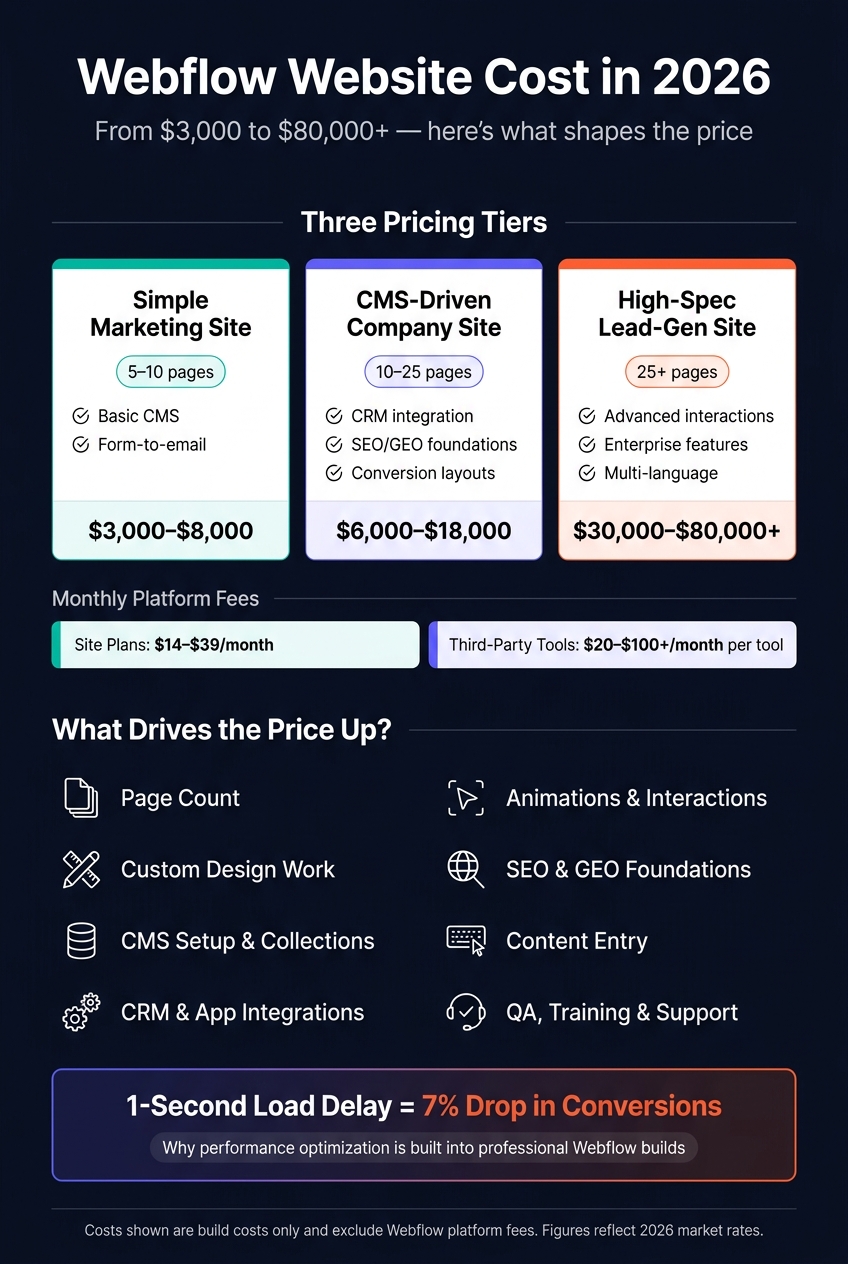
Webflow Website Cost Breakdown 2026

Two sites can have the same number of pages and still come with very different price tags. Why? Because the work behind the scenes can be wildly different.
A simple-looking site might still need deep planning, a smart content structure, and careful build work. That behind-the-scenes effort is often why quotes drift apart so fast.
Strategy and planning usually include discovery, messaging, sitemap planning, and content mapping tied to leads or sales.
That part matters more than most teams expect. It’s the difference between “here’s a website” and “here’s a site built to help people take action.”
Design is another big pricing factor. A template-led design usually costs less because the visual system already exists. By contrast, a custom design system takes more time. That often means reusable components, a type scale, spacing rules, and responsive behavior built from scratch.
CMS setup can also swing the budget. A basic blog is fairly simple. But a custom CMS structure with collections and fields takes more planning, especially when non-technical teams need to update content safely. Those setup choices also shape how much integration and automation work the project needs later.
Many teams want the site to do more than look good. They need it to bring in leads and pass data where it needs to go. That’s where CRM connections such as HubSpot or Salesforce, form routing, and automations through tools like Zapier or Make come in [2][1].
Animations can push costs up too. Simple motion is one thing. Advanced animations and custom interactions take more build time because they need extra technical work.
Technical SEO is another area that often gets shortchanged in budgets. Semantic HTML, SSL, canonical tags, sitemaps, and schema markup all need to be set up, along with search and GEO foundations [2][3].
Performance and speed play a big role as well. A 1-second delay in page load can reduce conversions by 7%. That’s a direct business hit. So it makes sense that many professional builds aim for Lighthouse scores of 90+ across Performance, Accessibility, Best Practices, and SEO.
Then there’s all the work that tends to hide in the proposal:
Each of those steps adds hours. After that, there’s still team training and post-handoff support to account for.
Launch isn’t the finish line. It’s the handoff point.
Most teams need editor training, documentation, and launch help so the right people can update the site with confidence.
Support after launch often includes monitoring, fixes, security checks, content updates, and repeat design or development help. Those needs don’t sit on the side of the budget. They add straight to it.
These are the cost drivers that shape whether a project lands in the low, mid, or high range.
Once you know the main cost drivers, most Webflow projects tend to land in three pricing bands.
| Project Type | Typical Scope | Common Inclusions | Estimated Build Cost (USD) |
|---|---|---|---|
| Simple Marketing Site | 5–10 pages | Basic CMS, form-to-email | $3,000–$8,000 |
| CMS-Driven Company Site | 10–25 pages | Conversion-led layouts, CRM integration, SEO/GEO foundations | $6,000–$18,000 |
| High-Spec Lead Generation Site | 25+ pages | Advanced interactions, enterprise features, multi-language | $30,000–$80,000+ |
The sections below show what tends to change as a project gets larger and more involved.
This tier works well for teams that need to get live fast and keep the scope tight. In most cases, that means 5 to 10 pages, a template-led design, a basic CMS setup, and simple form-to-email integrations. It’s a good fit for early-stage teams that need a solid, credible site without a long build cycle.
Costs start to climb here because the site needs more structure, more editing control, and more connected tools. If you need multiple page templates, a structured CMS, or a CRM connection, this is usually the range you’re looking at. It fits teams that want smoother editor workflows, more room to grow, and fewer developer bottlenecks.
This tier costs more because the work goes deeper across design, content structure, and integrations. You can expect bespoke design, advanced interactions, deeper CMS architecture, multi-language support, and deep integrations. SEO and GEO foundations are built in from the start. This level makes sense for established brands that depend on their website as a core growth channel.
Once the base scope is priced, the biggest budget surprises usually show up after kickoff. In most cases, the overrun doesn’t come from the core build. It comes from scope changes, custom features, platform migrations, and the work that starts after launch.
When the scope changes after kickoff, the project can jump into a higher pricing tier. A new page isn’t just “one more page.” It adds design time, copy time, and QA time. The same goes for each new CMS collection.
Review rounds can also drag things out. A few extra rounds of feedback may not sound like much at first, but they add more project management time and can slow approvals across the whole build. That’s why it helps to lock the sitemap and content map before pricing.
The same thing happens with integrations and custom features: small asks at the start can turn into a bigger line item fast.
Custom animations, CRM connections, lead routing logic, and custom automations all sit on top of the core build cost. They’re not minor add-ons. They take extra setup, testing, and revision time.
Connector tools like Zapier or Make can also add monthly software costs. Those fees are easy to miss early on because each tool can seem small on its own. But stack a few together, and the monthly total climbs fast.
Here’s where costs often creep up:
Most Webflow sites need work after launch. New campaign landing pages, SEO expansion, and funnel updates all take more design and development time. This is where many teams get caught off guard. They budget for the site launch, but not for the work needed to keep the site moving.
A monthly retainer can make costs more predictable and usually gives teams faster turnaround than random, one-off requests.
That’s why the right budget depends on the project stage, how tightly the scope is managed, and how much post-launch work the team expects.
Once you know what drives cost, the next step is to line up your budget with where your business is right now.
Set your budget based on scope. That means page count, CMS setup, integrations, motion, SEO, content readiness, and the support you’ll need after launch. A small marketing site and a high-spec Webflow build can look similar on the surface, but the work behind them can be miles apart.
Your budget should match the job your site needs to do.
It also helps to plan for work after the site goes live. Budget a monthly retainer for updates, fixes, and SEO work, so you’re not scrambling every time something needs attention.
Use these questions to pressure-test any proposal before kickoff.
Before you sign, confirm page count, CMS structure, integrations, animation scope, SEO and redirect coverage, content ownership, QA, and training.
That last part matters more than people think. A proposal can look fine at a glance, then turn into extra invoices once the project starts. Getting clear answers before kickoff helps you avoid those surprises.
A professional Webflow build usually covers the full process from start to finish: strategy, design, and development.
Depending on the project tier, that can also mean a custom design system or template-led layouts, CMS setup, integrations, animations, plus foundational SEO and AEO.
Fixed-price agreements help keep scope clear and cut down on surprise costs.
Beyond the standard Webflow subscription, it’s smart to set aside money for services that keep your site running well as it grows.
For example, ongoing maintenance and monitoring, such as Care+ packages, start at $250/month. That usually covers fast fixes and technical support, which can save you a headache when something breaks.
You may also need a retainer for continued design and development work. On top of that, there can be added costs for third-party integrations, plan upgrades for higher traffic, content population, and SEO.
Start with thorough discovery before development begins. Lock down the project brief, sitemap, content inventory, and a clear definition of what “done” means.
It also helps to have your content ready early and confirm your integration and CMS needs up front. And if you can, go with a fixed-price model for better budget certainty.