






Insights
SEO & GEO
Copy Link




Step-by-step SEO and content checklist for website rebrands: audits, 301 redirects, keyword mapping, content updates, technical fixes, and post-launch monitoring.
Rebranding your website can either boost your online presence or severely damage it. A poorly executed rebrand risks losing up to 35% of your search visibility - sometimes permanently. But with a solid SEO and content strategy, you can protect your rankings, retain traffic, and even grow your audience. Here’s how:
Rebranding isn’t just about a new look - it’s a critical opportunity to align SEO, content, and technical elements for long-term growth. Skip the shortcuts, follow a structured plan, and monitor results closely to make your rebrand a success.
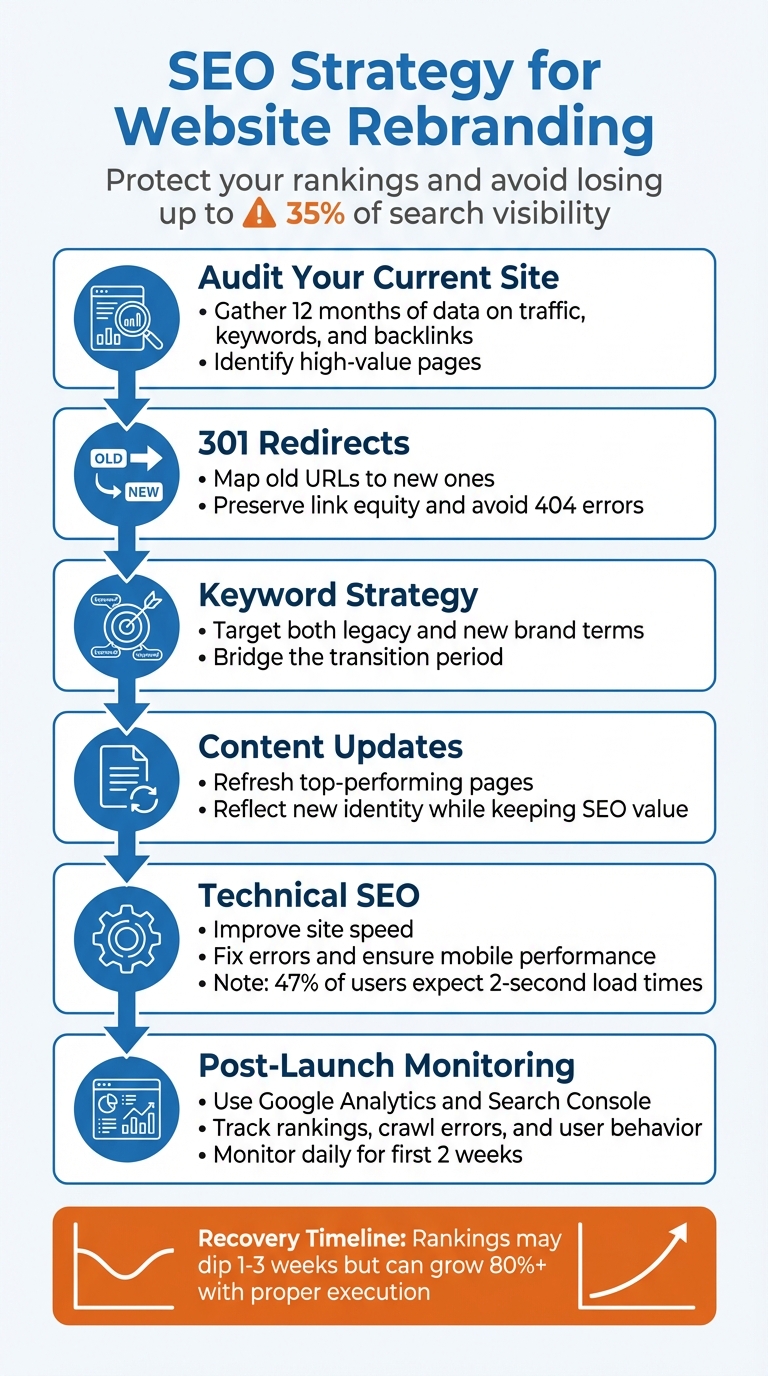
6-Step SEO Strategy for Website Rebranding Success
Before diving into any redesign or rebranding efforts, it’s essential to get a clear snapshot of your current website’s performance. Think of this audit as your safety net - it captures everything you’ve built so far, ensuring nothing valuable slips through the cracks during the transition. Skipping this step can lead to costly mistakes. As Modestos Siotos, Technical SEO Consultant, explains:
"The motto 'let's launch ASAP and fix later' is a classic mistake. What most stakeholders are unaware of is that it can take just a few days for organic search visibility to tank, but recovery can take several months".
Here’s how to evaluate your existing SEO and content assets effectively.
Start by gathering 12 months of data from Google Analytics 4 and Search Console. Why 12 months? It accounts for seasonal trends, giving you a more accurate picture of your organic traffic patterns. Focus on key metrics like organic sessions, unique visitors, and conversion rates to see how search traffic supports your business goals.
Next, benchmark your keyword rankings. Pay close attention to both branded and non-branded terms across desktop and mobile devices. Non-branded keywords are typically more volatile during a rebrand, so they’ll need extra attention. Export this data from Search Console, including impressions, clicks, and the total number of keywords driving traffic. Keep in mind that once you switch domains, accessing historical data for your old site will become more complicated .
Don’t forget your backlink profile. Use tools like Moz, Ahrefs, or Majestic to analyze referring domains, assess domain authority, and identify your most linked pages. These pages often hold significant SEO value. Create a spreadsheet of high-priority pages with strong traffic, quality backlinks, and good conversion rates, and plan to redirect them with 301 redirects to preserve rankings .
Finally, conduct a full technical crawl using tools like Screaming Frog or Sitebulb. This crawl will give you a clear view of your current metadata, headers, URL structures, and any crawl errors like 4xx or 5xx status codes. Site speed is another critical factor - 47% of users expect a page to load in two seconds or less. Measure metrics like First Contentful Paint (FCP) and DOMContentLoaded (DCL) to establish a baseline for performance.
With all this data in hand, you’ll have a clear understanding of your site’s SEO strengths and areas that need attention.
A content inventory is essentially a detailed catalog of all your site’s assets - blog posts, landing pages, videos, PDFs - paired with performance metrics like organic traffic, keyword rankings, and backlink counts .
To build this inventory, pull data from multiple sources. Use a site crawler like Screaming Frog to identify all URLs, Google Search Console to find indexed pages, and Google Analytics 4 to uncover pages users have visited. This ensures you don’t miss any hidden or underperforming content . Export this data into a spreadsheet, including columns for organic traffic, keyword rankings, backlink counts, and any notes on content quality.
This process can also reveal content gaps - topics or keywords where competitors rank higher than you. These gaps provide opportunities to create new content that aligns with your rebranded vision. Additionally, it helps identify "thin" or duplicate content where multiple pages might compete for the same keyword. Consolidating these pages can improve your overall rankings. For example, in 2024, Smash VC - a venture capital firm - conducted a thorough content audit, removed outdated assets, and boosted organic traffic by 76%.
To make this inventory actionable, map each URL to its target keywords. This will help you visualize which pages hold valuable search rankings. Then, categorize your content into four actions: Keep as-is, Update, Consolidate/Redirect, or Delete.
Creating an effective SEO strategy during a rebrand is all about maintaining your current search rankings while paving the way for growth. Your plan should seamlessly connect the old brand identity with the new one, ensuring you cater to legacy brand searches while building authority for the updated brand. From the very beginning, integrate essential SEO practices like 301 redirects to preserve traffic. As Karla Hesterberg, Senior Manager at HubSpot, puts it:
"Having a beautiful site without a technical SEO consult isn't going to get you the results you want."
Start by setting clear, measurable goals that align with your rebrand's objectives. Instead of vague targets like "improve rankings", focus on specific outcomes - such as maintaining key keyword positions or achieving measurable traffic growth post-launch. To do this, document your baseline metrics, including organic traffic, keyword rankings (positions 1–20), site speed, and backlinks. These benchmarks will guide your efforts and help you protect high-value pages.
Use analytics to identify those high-value pages - ones with strong link equity or high conversion rates - and prioritize their preservation during the transition. Retaining your current traffic should be your top priority. Modestos Siotos, a Technical SEO Specialist, emphasizes this point:
"The primary objective should be the retention of the site's current traffic and revenue levels."
For businesses undergoing a name change, it’s crucial to communicate the transition clearly. Update your "About Us" page and meta descriptions to reference your former brand name, helping users navigate the change without confusion.
To track your progress effectively, use the right tools for different goals:
| Goal Type | Metric to Track | Tool Recommendation |
|---|---|---|
| Visibility | Keyword positions (Brand & Non-Brand) | SEMrush, Ahrefs, Moz |
| Engagement | Bounce rate, Time on page, Pathing | Google Analytics 4, Microsoft Clarity |
| Authority | Backlink count and quality | Majestic, Ahrefs |
| Technical | Page load times, Core Web Vitals | Google PageSpeed Insights, Lighthouse |
Once your goals are in place, focus on aligning your keyword strategy to bridge the gap between the legacy brand and the new identity.
With your goals defined, refine your keyword strategy to connect the old and new brand identities. This step builds on the earlier inventory of keywords and content. Start by identifying core seed terms that reflect your updated brand direction, then branch out into new keyword opportunities that align with your rebrand. Balance this by continuing to target terms tied to your legacy brand.
Keyword research should account for search intent at all stages of the buyer’s journey. As Greg Gifford, VP of Search at Search Lab, explains:
"Now that Google has evolved and is providing search results based on the intent of the search query, keyword research is more important than ever... We have to understand how potential customers are searching - and specifically, the intent of their search query."
Perform a competitor gap analysis to uncover opportunities, especially for long-tail keywords. These terms, though less popular, often have lower competition and make up about 80% of search queries. Use a keyword map to connect specific terms with both legacy and new URLs, ensuring your high-performing keywords remain tied to critical pages. Organize your keywords into topic clusters to help search engines recognize your authority in key areas.
Finally, update your metadata and image alt text to include new keywords that reflect your rebrand. Use synonyms and natural language that align with your brand’s tone - always writing for people first, not just search engines. Identify and either redirect or remove pages that no longer fit with your updated brand identity. This ensures a clean, cohesive presence that resonates with both users and search engines.
When you're rebranding, a strong technical foundation is your safety net for maintaining search rankings and visibility. Done right, migrations that include technical updates can lead to organic traffic growth of more than 80% post-launch. But without careful planning, you risk a steep drop in visibility - sometimes within days - that could take months to recover.
To avoid setbacks, build on your pre-rebrand audit by ensuring your technical setup is airtight. Before launch, document baseline metrics like rankings, organic traffic, and page speed for your key pages. These benchmarks will help you spot and resolve post-launch issues quickly.
Think of 301 redirects as the guardians of your SEO authority. These permanent redirects tell search engines that your pages have moved, transferring link equity from old URLs to their new equivalents. The goal? A precise, one-to-one mapping of every old URL to its most relevant new destination.
Start by crawling your current site to create a detailed inventory of URLs, metadata, and headers. Use this data to build a spreadsheet that maps each old URL to its new counterpart. Avoid the common mistake of redirecting everything to your homepage; instead, match each page to the most relevant destination.
Watch out for redirect chains - where URL A redirects to URL B, which then redirects to URL C. These chains dilute link authority and slow down crawl speeds. Instead, ensure every old URL redirects directly to its final destination. If some content is being permanently removed with no equivalent on the new site, use a 410 (Gone) status code instead of redirecting to unrelated pages.
Before going live, test all redirects in a staging environment to catch any loops or broken links. Once your site is live, monitor Google Search Console daily for the first few weeks to identify any high-traffic pages that might have been missed. If you're changing your domain name, use Google Search Console's "Change of Address" tool to notify Google about the move.
Site speed isn't just about user experience - it directly impacts your rankings. Nearly half of all users expect a page to load in two seconds or less. And with Google's mobile-first indexing, your site's mobile performance plays a major role in determining search visibility.
Focus on improving Core Web Vitals: Largest Contentful Paint (LCP), which measures how quickly your main content loads; First Input Delay (FID), which tracks how quickly your site responds to user interactions; and Cumulative Layout Shift (CLS), which measures visual stability during loading. Use tools like Google PageSpeed Insights and Lighthouse to evaluate your current performance and identify areas for improvement.
Make your site faster by compressing CSS, JavaScript, and HTML files. Ensure your design is fully responsive for mobile users, and update your XML sitemap immediately after making changes to help search engines process your new redirects.
During development, block your staging site from search engines using password protection or noindex tags, and remove these blocks as soon as the new site goes live. Update self-referencing canonical tags to reflect the new domain, and implement schema markup to help search engines understand your rebranded site.
Revamp your top-performing content to reflect your new brand identity while maintaining the search rankings you've worked hard to achieve. With a solid technical foundation in place, focus on refreshing content without losing its core value. Start by identifying your best-performing pages using tools like Google Search Console, Google Analytics, and SEMrush. Pay attention to pages with the highest shares, views, inbound links, and keywords ranking in positions 1–20.
For these standout pages, keep the original topics and high-ranking keywords intact to protect your visibility in search results. Instead, focus on updating brand mentions, metadata, and visuals. A smart move is to create a dedicated "bridge" page on your new domain that addresses your old brand name. This page can help you rank for legacy branded searches and provide users familiar with your previous identity a clear explanation of the transition. Additionally, refine elements like metadata, internal links, and images to reinforce your new brand's presence in search results.
Strengthen your SEO efforts by aligning your metadata and visuals with your rebranding goals. Update page titles and meta descriptions to include your new brand name and target keywords. Keep titles concise (under 60 characters) and meta descriptions between 150–155 characters for optimal performance. Since 13.4% of all search queries return image results, make sure your image file names and alt text are descriptive and keyword-focused. For example, instead of using generic names like image01.jpg, opt for something specific like newbrand-product.jpg to help search engines better understand your visuals.
Ensure your heading structure is clear and optimized. Use H1 tags for main titles and H2–H3 tags for subheadings. Assign one to two target keywords per page, and incorporate them naturally into the title, the first paragraph, headings, and meta tags. Compress images and other visuals to maintain fast page load times. Even small tweaks, like adjusting the number of links on a page or improving header formatting, can make a noticeable difference in search visibility.
Internal links play a crucial role in distributing authority across your site and helping search engines understand the relationships between pages. During a rebrand, broken links and outdated anchor text can disrupt your site’s structure. Before launching the updated site, use tools like Screaming Frog or Ahrefs to map out all existing internal links, noting their source URLs and anchor text, so you know exactly what needs to be updated.
Refresh navigation menus, footers, and in-content links to point directly to new URLs instead of relying on 301 redirects. This approach conserves your crawl budget and improves page load speeds. Search for and update any instances of your old brand name, ensuring the associated links are updated as well. After launch, conduct a thorough site audit to catch and fix any broken internal links that may have been overlooked. Prioritize high-traffic pages or those with the most external backlinks for internal link updates, as these will have the greatest impact.
Once your rebrand goes live, the work isn’t over. In fact, the immediate post-launch period is critical for ensuring everything runs smoothly. This is the time to closely monitor how search engines and users are responding to the changes. As Rachel Handley, Senior Content Writer at Semrush, explains:
"A website migration generally has a negative impact on SEO in the short term and a positive impact in the long term."
The monitoring phase acts as a bridge between all your pre-launch efforts and the ongoing adjustments needed to keep your rebrand on the right track. By tracking key metrics early on, you can quickly identify and address any issues, helping your rankings and performance stabilize.
To make this process easier, log your launch date in GA4 and rank-tracking tools. This gives you a clear timeline for comparing performance before and after the rebrand. If you’ve switched domain names, use Google Search Console’s Change of Address tool to notify Google of the move.
During the first two weeks, check key metrics daily, then transition to weekly monitoring. Since 301 redirects and mobile performance were priorities earlier, pay close attention to index and speed metrics. Use Google Search Console’s "Page Indexing" report to ensure old URLs are deindexed and new ones are being crawled. Running a site:yourdomain.com search can also help you confirm that your pages are being indexed properly - if you notice a significant drop, it could point to issues with redirects or crawlability.
Set up rank tracking for 20–30 of your most important keywords, including terms tied to both your old and new brand names. Some fluctuation in rankings is normal for the first couple of weeks, so don’t panic if you see volatility. Keep an eye on Google Analytics 4 to track changes in organic sessions, conversion rates, and bounce rates compared to your pre-launch benchmarks. Also, review your backlink profile to confirm that high-quality links are passing authority to your new URLs. If possible, reach out to referring domains and request updates to their links so they point directly to your new structure.
In the first month, schedule weekly site audits to catch any technical issues early. Once your daily and weekly metrics stabilize, shift to monthly audits for deeper insights. Tools like Screaming Frog, Sitebulb, or Semrush Site Audit can help you identify broken links, redirect chains, missing metadata, and orphaned pages. Keep an eye on Google Search Console for 404 errors and server issues, especially on pages that previously drove significant traffic or backlinks.
Double-check that any noindex tags or password protections used during staging have been removed. Forgetting to remove these can accidentally deindex your entire site. Use PageSpeed Insights to monitor Core Web Vitals and ensure your new design maintains fast load times - this is crucial since nearly half of consumers expect pages to load in under two seconds. Heatmapping tools like Microsoft Clarity can also provide valuable insights into how users interact with your rebranded site, helping you identify any UX roadblocks that might impact conversions.
| Tool | Primary Function | Key Metric to Watch |
|---|---|---|
| Google Search Console | Indexing & Technical Health | Crawl errors, 404s, Sitemaps status |
| Google Analytics 4 | User Behavior & Traffic | Organic sessions, Conversion rate, Bounce rate |
| Semrush / Ahrefs | Competitive & Keyword Tracking | Keyword positions, Backlink profile health |
| Screaming Frog | Technical SEO Audits | Redirect chains, Missing H1s/Metadata |
| PageSpeed Insights | Performance | Core Web Vitals (LCP, INP, CLS) |

Rebranding is exciting but comes with its challenges - especially when it comes to SEO. A poorly managed site migration can lead to serious consequences, like losing up to 20% of your visibility permanently or experiencing a temporary 35% drop that might take half a year to recover from. That’s where The Hoop Studio steps in, offering a rebrand service that blends technical SEO expertise with high-performing website builds and ongoing Webflow support to help you avoid these pitfalls.
One of the key elements of their approach is precise redirect handling. Every old URL is carefully mapped to the most relevant new one, ensuring you don’t lose link equity or end up with frustrating 404 errors. This process involves creating a detailed spreadsheet to inventory current URLs and their new destinations. To keep your rebranded site fast and user-friendly, they also optimize performance by compressing files, using CDNs, and minifying code.
But technical SEO is just the foundation. The Hoop Studio takes it further by refining your site's architecture and internal linking. This helps search engine bots better understand the hierarchy and importance of your pages, boosting your site's overall visibility. As Karla Hesterberg, Senior Manager at HubSpot, explains:
"Things that might seem trivial during a redesign - like the number of links on a page, or what text gets formatted as an H2 vs. an H3 - those things can really add up and hurt your ability to get in front of the right audience."
After your rebrand goes live, the work doesn’t stop. The first 1–3 months are crucial for stabilizing your SEO metrics. The Hoop Studio offers ongoing Webflow support during this period, keeping a close eye on Google Search Console for crawl errors, unusual spikes, and any broken redirects that might pop up as DNS updates settle. They also ensure your site stays fast and efficient as you add new content or features.
For businesses looking for more robust support, The Hoop Studio offers services like the Growth Website Build (starting at $6,000) and the Ongoing Web Partner plan (starting at $1,000 per month). These packages include monthly priority support, additional page builds, and SEO monitoring, all designed to protect your search visibility throughout the rebranding process. With their careful attention to both technical and content-related SEO, The Hoop Studio ensures your rebrand doesn’t come at the expense of your online presence.
Rebranding is no small task - it’s a complex process that demands careful planning, precise execution, and consistent follow-through to protect and grow your online presence. The line between a rebrand that boosts success and one that tanks your traffic lies in thorough preparation and ongoing vigilance.
Start with a detailed audit to capture essential metrics like organic traffic, rankings, and backlinks. One of the most crucial steps? Mapping every old URL to its most relevant new counterpart using 301 redirects. This step ensures you retain link equity and maintain your hard-earned search visibility. Before going live, test everything in a staging environment to catch potential pitfalls - like accidental "noindex" tags or broken redirect chains - that could sabotage your migration. Once these foundational elements are in place, the focus shifts to seamless execution and diligent post-launch monitoring.
After launch, keep a close eye on Search Console daily, update your XML sitemap immediately, and track keyword performance for at least three months. It's normal for rankings to dip for 1–3 weeks while search engines process your redirects. However, with a well-executed plan, you can not only recover but even surpass your previous performance. In fact, rebrands that include improvements like faster site speed and better-organized taxonomy have been known to drive organic traffic growth of over 80% within just two months. This kind of consistent oversight turns potential setbacks into opportunities for growth.
It’s worth noting that 75% of users judge a website’s credibility based on its design, and a poorly managed migration can lead to a permanent visibility drop of 20% or more. But with the right strategy - bringing in SEO, UX, and development teams from the very beginning - your rebrand can be a launchpad for growth instead of a stumbling block. As Bruce Clay, the Founder and President of Bruce Clay Inc., wisely states:
"A site migration without SEO is laced with assumptions and poor decisions and can lead to a near-death traffic loss".
To protect your SEO during a rebrand, start by creating a detailed map of all your current URLs. For any URLs that will change, set up permanent 301 redirects to ensure users and search engines are seamlessly directed to the new pages. Try to keep your site’s architecture and internal links as consistent as possible to maintain your existing rankings. Don’t forget to update your XML sitemap and robots.txt file to reflect the new structure, and submit these updates to Google Search Console.
Once the rebrand is live, use analytics tools to keep a close eye on your rankings, traffic, and crawl errors. This will help you quickly identify and fix any problems that might arise. By following these steps, you can transition smoothly without losing your search engine visibility.
To maintain your site's SEO strength during a rebrand, start by reviewing all your current URLs and creating a detailed plan to match them with their new destinations. Use 301 redirects to guide both users and search engines from the old pages to the correct new ones. Don’t forget to update internal links, refresh your XML sitemap, and submit the revised sitemap along with any address changes through Google Search Console.
Once the rebrand is live, keep a close eye on your site's performance. Check traffic levels, fix any crawl errors, and make sure backlinks are still leading to the right pages. These steps are key to preserving your site's link authority and keeping your search rankings steady.
Measuring how well your website rebrand performs is essential to ensure your SEO stays on track while you tap into new opportunities. The best way to do this? Compare post-launch metrics with your pre-launch benchmarks. Key indicators like organic traffic, keyword rankings, conversion rates, and branded search volume will give you a clear picture of how things are going. Tools like Google Analytics and Google Search Console can be your go-to resources for keeping tabs on traffic, spotting crawl errors, and tracking keyword performance.
Here are some important steps to take:
Stick to a regular reporting schedule - weekly for the first month, then monthly after that - to spot trends and make adjustments as needed. A centralized dashboard that tracks traffic, rankings, and conversions can make it easier to show stakeholders the return on investment (ROI) of your rebrand.