






Insights
SEO & GEO
Copy Link




Audit buyer prompts, tighten positioning, fix key pages, and add schema so AI tools accurately cite your B2B brand.
More software buyers now start with AI than search: 51% vs. 29% last year. If I want my B2B company to show up in ChatGPT, Claude, Gemini, and Perplexity, I need to make my site easy for AI to read, label, and cite.
Here’s the short version:
The main idea is simple: I’m not trying to “rank” in the old sense. I’m trying to make sure AI tools can describe my company the right way and include it in vendor shortlists.
If I had to boil the article down to one plan, it would be this: audit prompts, fix positioning, clean up important pages, and check technical access. That’s the work that helps a B2B brand appear when buyers ask AI for recommendations.
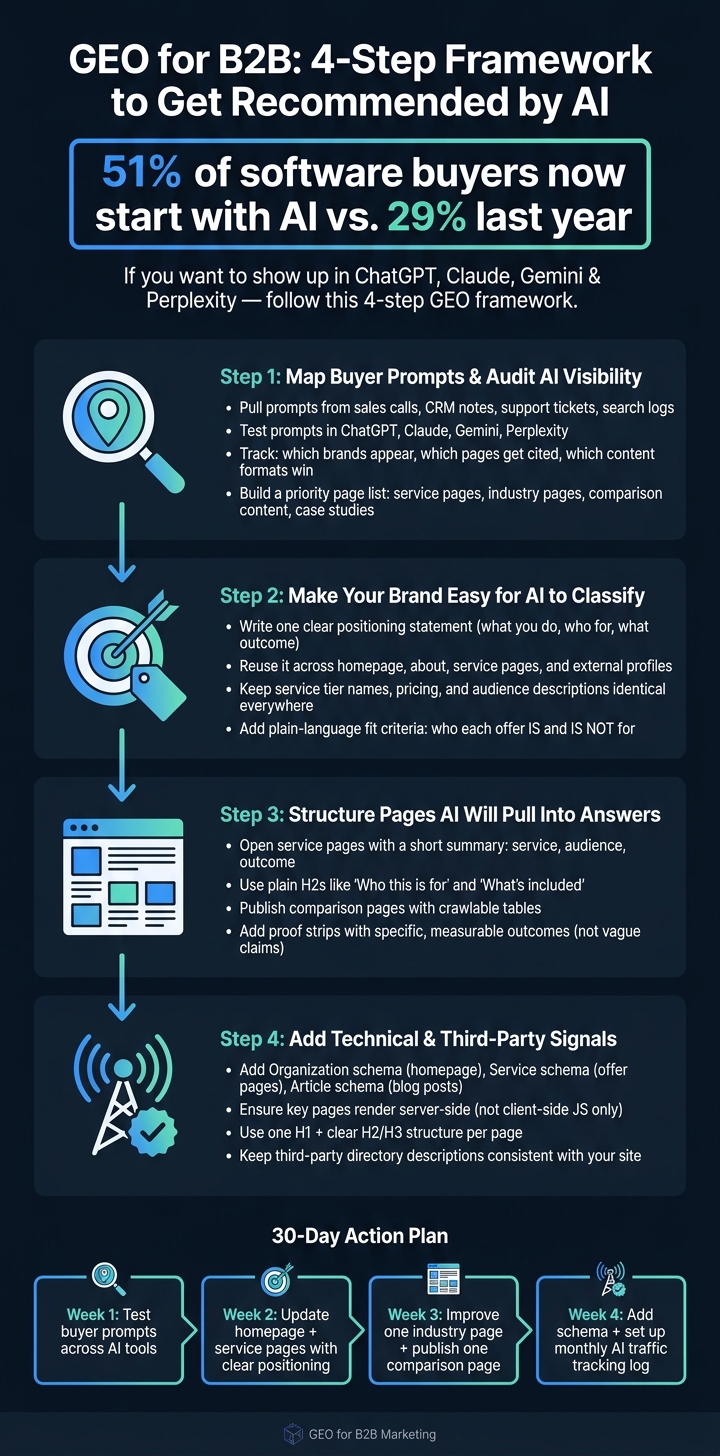
GEO for B2B: 4-Step Framework to Get Recommended by AI
Start with the words your buyers already use. Pull them from sales calls, CRM notes, support tickets, on-site search logs, and the organic queries that lead people to your service pages.
The key here is simple: use the exact wording. Grab the qualifiers. Grab the intent. Don’t settle for broad topic buckets when buyers are telling you, in plain English, what they want.
Then group those prompts by stage so you can see how AI responds to each kind of buying question.
A buyer at the start of research might ask, "How do I improve AI search visibility for a B2B site?" Someone closer to a decision might ask, "Best-fit Webflow partners for fixed-scope projects." Those aren’t the same question at all. One comes from early research. The other points to comparison and final vendor selection.
And that matters, because in one AI session, a buyer can go from vague problem to short list fast. Your prompt list needs to cover that whole path.
Run each prompt in ChatGPT, Claude, Gemini, and Perplexity. Each tool pulls in different brands and different sources, so expect the answers to vary.
For each response, track three things:
Those patterns tell you where to start. If AI keeps citing comparison pages, that’s a signal. If it leans on case studies, that’s a signal too.
Also check whether the summary of your brand is accurate. A bad summary can hurt just as much as no mention at all.
Once you’ve got the audit, turn it into a page-level to-do list.
Start with pages where your brand doesn’t appear, or where AI is citing thin or outdated content. Put extra focus on pages that support recommendation-style answers:
Then do a raw HTML check on your top pages. If the response is thin or empty, fix rendering before you add more copy. There’s no point polishing a page AI can barely read.
That priority list becomes your working guide for sharpening the pages AI is most likely to read first.
Once you know which prompts matter and where you stand, the next move is simple: make your positioning easy to classify. AI tends to recommend brands that repeat the same core facts across their site and trusted profiles. That gives it a stable label to attach to the pages you audited in Step 1.
Write one sentence that says what you do, who you do it for, and what result you help them get. For example: "We design and build Webflow marketing sites for B2B SaaS teams that need to move fast without sacrificing quality."
Then use that same sentence across your homepage, about page, service pages, and external profiles. Don’t rewrite it five different ways just to sound polished. In this case, repetition helps.
Positioning matters, but the small details matter too. Your service tier names, pricing, and audience descriptions should match everywhere. Not just on your site, but on third-party directories and social profiles too.
If your plans are called Launch, Growth, and Signature, use those exact names everywhere those offers appear. The same goes for pricing. Put it in plain crawlable text, not inside images or hidden in JavaScript.
Use this checklist across your site and external profiles.
| Brand Detail | What to Keep Consistent |
|---|---|
| Positioning statement | Same service, audience, and outcome wording everywhere |
| Service tier names | Launch, Growth, Signature - identical across all pages and profiles |
| Pricing | Plain crawlable text, server-side rendered |
| Third-party profiles | External profiles should match your site |
AI recommendation prompts are often narrow. A buyer may ask for "pre-seed founders" or "lean marketing teams." If your pages never use that language, AI has a tougher time matching your brand to those searches.
Add plain fit language right on your service and plan pages. For example: "Launch is for pre-seed founders launching a first marketing site, not enterprise teams managing multi-region sites." That kind of detail gives AI a clearer path. It also helps buyers tell, at a glance, whether the offer fits.
Once the offer is clearly framed, page structure can reinforce it.
Once your positioning is clear, the next job is page structure. AI needs pages it can read, sort, and cite with little effort. That structure - not just your market angle - shapes whether your brand shows up in shortlist and vendor-selection answers. The goal is simple: make the answer easy to find right away.
Start each core service page with a short summary that explains the service, who it’s for, and the outcome it helps drive. Then move into clearly labeled sections like scope, deliverables, industries served, and proof. Plain H2s such as "Who this is for" or "What's included" work better than clever headlines. Short paragraphs also help, and headings give AI clear semantic anchors for answer extraction.
Comparison pages do the most work when they match the exact vendor-selection question a buyer asks AI. If someone asks how to choose a B2B website partner, the system needs a page with a direct answer it can point to. If that page doesn’t exist, AI may cite a weaker source instead.
Build a page around actual evaluation criteria buyers use, such as fixed-price vs. retainer models, what makes sense for different team sizes, and how project scope should line up with budget. Then add a comparison table for your own packages. Tables are easy for AI systems to parse.
| Package | Ideal Buyer Scenario | Model | Key Scope/Fit |
|---|---|---|---|
| Launch | New brands or startups | Fixed price | Rapid landing page or MVP build |
| Growth | Scaling B2B companies | Retainer | Ongoing SEO, GEO, and CRM support |
| Signature | Established enterprises | Fixed price | Flagship site builds with custom design |
Once a page is easy to scan, proof becomes the signal that makes a recommendation feel believable. Vague claims usually don’t survive in AI-generated answers. Specific, measurable outcomes do. So instead of broad promo copy, use factual proof strips or mini tables that show the project, client context, and outcome. Don’t say “we deliver results” if you can show the result instead.
Use a mini table or proof strip with client, context, and measurable result.
Once your pages are mapped out and backed up with proof, the next step is to add the signals that help AI read, sort, and confirm what it finds.
Schema helps AI understand what your company is, what you sell, and who you serve.
A simple setup goes a long way:
That extra layer of context makes it easier for AI to connect your pages to vendor-selection searches.
Then check that AI can access the full page.
Many AI crawlers pull raw HTML and ignore JavaScript. So if a page leans on client-side rendering, the crawler may only see an empty shell. That’s a problem on pages like services, pricing, and comparisons, where the main details need to be visible right away.
In Webflow, make sure those pages render server-side. Also keep the layout clean and easy to parse: one H1, then a clear H2/H3 structure. Think of it like giving both people and machines a clean map instead of a messy desk.
Your site isn’t the only place AI checks. It also compares your claims with what shows up on directories, partner pages, and editorial mentions.
That’s why consistency matters. Use the same short company description across directories, partner listings, guest posts, and editorial coverage. When those descriptions match, your brand is easier to verify and more likely to be recommended.
Now that the groundwork is set, the next step is to turn GEO into something your team can run every month without reinventing the wheel. This isn’t a one-and-done project. It’s steady work: keep making your site easier for AI systems to read, trust, and cite.
The change is already happening. 51% of software buyers now start their research in an AI chatbot instead of a search engine, up from 29% the year before. That’s a big jump in a short time. And it changes the goal. You’re not just trying to show up. You’re trying to show up correctly.
Break the work into four simple weeks:
There’s no fixed or instant timeline for seeing results from Generative Engine Optimization (GEO). Just like search optimization, your pages first need to be crawled, indexed, and checked against what people are asking.
You might spot early signs before long, but stronger visibility usually takes time to build. It helps to publish clear, crawlable, answer-first content, add schema markup, show consistent proof, and keep key pages updated within the last six months.
Start with pages that already rank in the top 10 search results. Those pages are the ones search engines are most likely to pull from as sources.
Put your focus on pages that matter most:
Use an answer-first structure. Near the top of each page, add a direct 40- to 60-word summary that gives the main answer fast.
Then shape the rest of the page so it’s easy to parse:
Check whether your pages are answer-first. That means using a question-based heading, giving a short direct answer right away, keeping that answer in crawlable HTML, and making sure the schema lines up with what’s on the page.
Then review the details that shape trust and clarity on the page: brand info, service terms, named authors, and claims that point to sources. After that, use Search Console and manual prompts to see which URLs AI tools cite, and whether those URLs line up with the page’s intended intent.