





Insights
SEO & AEO
Copy Link




Use FAQs, comparisons, glossaries, original research, service pages, how-tos, and data reports—AI search prefers structured, citable pages.
If I want my content to show up in AI answers, I should focus less on length and more on format. The article’s main point is simple: AI tools like Google AI Overviews, Perplexity, and Bing Copilot tend to cite pages that are easy to scan, split into sections, and verify. That usually means FAQ pages, comparison pages, glossary entries, original research, service pages, expert how-to guides, and data-led reports.
A few numbers make the point fast:
So if I want better AI visibility, I should format pages so the answer is easy to lift:
The seven formats covered in the article are:
The short version: if a page gives AI a direct answer, a clean layout, and proof it can cite, that page has a better shot at showing up.
| Format | Best for | What AI tends to pull | Citation upside |
|---|---|---|---|
| FAQ pages | Question searches | Direct answers | High |
| Comparison pages | “Which is better?” searches | Tables, pros/cons, verdicts | High |
| Glossary entries | Term definitions | One-line definitions | Medium |
| Original research | Stats and proof | Numbers, methods, findings | Very high |
| Structured service pages | Service and pricing searches | Scope, process, pricing | Medium |
| Expert how-to content | Task searches | Steps, tools, warnings | Medium |
| Data-led reports | Benchmarks and trends | Summary findings, labeled sections | Very high |
If I had to boil the article down to one line, it would be this: format is often the first signal AI search reads.
AI search trusts content it can pull, sort, and check without much friction. The formats below all share the same basic signals. They just show up in different ways across the seven formats.
Lead with the answer. AI search leans toward pages it can extract and cite fast. These systems pull content in chunks, so the first sentence or two carries a lot of weight. Research suggests the first 150 words of visible content sit in the most important opening text for large language models.
Logical structure matters just as much. When a page uses clear heading levels like H1, H2, and H3, and keeps separate topics in separate sections, AI systems can line up each section with a single intent. Pages using structured data are up to 40% more likely to appear in AI answers, and AI systems show 300% higher accuracy with structured content than with unstructured copy. In plain English: give each section one job only, like defining a term, showing pricing, or walking through a process.
Two other signals matter too: specific terms and original evidence. Vague wording leads to fuzzier AI paraphrases and makes misreads more likely. Specific terms - the ones subject-matter experts actually use - help AI systems match a section to the right query with more confidence. Original evidence is what makes a page more than just useful. It makes it citable. Data, methodology, quotes, and case studies all signal that the page is a primary source.
Transparent authorship ties it together. Named authors, relevant credentials, publication dates, and last-updated timestamps give AI systems clear signs of accountability. For U.S. audiences, credentials like CPA, MD, or JD can strengthen authority.
Weak structure makes answers harder for retrieval systems to find. The bad patterns are easy to spot:
These pages hide the answer, blend too many intents, and make citation tougher. That’s why the formats below tend to perform best in AI search.
FAQ pages are one of the best fits for question-based AI queries.
An FAQ page is a structured set of question-and-answer pairs built around things people actually ask, like "How much does an SEO audit cost?" or "What is your cancellation policy?" Each Q&A block should do one thing: answer one specific question in a direct way.
Each question works like an intent label, and each answer stands on its own as the answer block. That matters because FAQ language often mirrors the way people phrase AI search queries. So answer-first writing is a big deal. If the first sentence doesn’t answer the question, an AI that pulls only that line may show an incomplete response.
Two structural details can make a clear difference.
Use FAQPage schema only when the page contains actual Q&A content, not sales copy.
The questions should also come from real data, not guesses. Good sources include:
That keeps the page tied to what users are asking. And when the questions come from actual user language, retrieval alignment tends to improve in a direct way. That’s one reason FAQs are one of the fastest formats for AI systems to parse and cite.
When a search moves from "What is this?" to "Which one should I pick?", comparison pages start doing the heavy lifting.
A comparison page is a page that puts two or more products, services, or plans side by side using the same criteria. That usually means things like price, features, use cases, support, integrations, and pros and cons. It fits choice-driven queries like "Which option is right for me?" because it compares each option on equal ground.
Say someone searches for "Is Tool A better than Tool B?" or "What's the best project management software for small teams?" In that moment, AI engines aren't looking for loose commentary. They need a source that has already lined up the answer in a clean, scannable way. That's where comparison pages help: they give AI systems direct, structured facts to pull from.
One study found 81% extraction success for tables versus 23% for prose, which makes tables much easier for AI systems to reuse.
Structure makes or breaks this page type. A strong comparison page should use an HTML <table> with clear column headers for each product or plan and row labels for each attribute, such as price, features, support, and integrations. Each cell should make sense on its own. Skip merged cells, since they can make parsing less accurate.
The copy around the table matters too. A short verdict section like "Best for freelancers" or "Best for enterprise teams" gives AI some narrative context it can match to search intent. Balanced pros and cons help as well. The goal is to make the page a decision tool, not a sales pitch.
For single-term queries, glossary entries are the better fit.
Glossary entries are built for definition searches. If someone types in a query that asks what a term means, this format is often the best fit. A glossary entry should stay short and tight: one page, one term.
When the title, URL, H1, and opening paragraph all use the same term, AI systems can sort out the page faster. That makes it easier to extract, label, and cite. Start with a one-sentence definition. Then add a short example and a few related links. Schema.org’s DefinedTerm markup is made for this kind of page, and semantic HTML like definition lists (<dl>, <dt>, and <dd>) can make entries even easier for AI systems to parse.
Definitions often appear in snippets, so glossary entries line up well with how search systems pull direct answers.
Give each term its own URL. A multi-page glossary is easier for AI systems to read as separate pages than one long glossary page. That also helps each entry stand alone and makes retrieval more precise.
For marketing teams, the best terms to work on first are the ones people need in order to judge your product or service. Focus on terms that show up on product pages, pricing pages, and in dashboards. Definitions for phrases like pipeline velocity, marketing qualified lead (MQL), or customer lifetime value give AI search a clear reference point to pull from.
If FAQs and glossaries answer the question, original research brings the proof.
Original research is content built from your own data, such as surveys, A/B tests, product benchmarks, or quantified case studies. It gives AI a primary source it can cite.
AI search engines lean toward original research because it offers verifiable numbers they can quote with less risk. Pages that host original research get 4.31x more AI citations per URL than derivative or listing-style content. AI systems need specific, verifiable numbers they can repeat without drifting into a hallucination.
These pages tend to work best when they include a short summary, a clear methodology section, and key stats written in plain text, not buried in charts or PDFs. A stat like n = 1,024 U.S. consumers, surveyed in March 2026 gives an AI model what it needs: a number, context, a date, and a source. That is what makes a report citable instead of just interesting.
For marketing teams, a smart place to start is one flagship study each year built around a question your audience is already searching for. Annual benchmarks on pricing, adoption, and performance often turn into repeat citation sources. Treat the report as the main source page, then let other content formats point back to it.
A few details matter here:
Don't bury key data in visuals. If the headline stat sits inside an image, AI may miss it. Add an "Updated" date so AI systems are less likely to treat the page as stale.
For commercial queries, AI tends to favor pages that spell out the service, its scope, and the next step. A structured service page is a dedicated page for one service, built to explain the offer, who it's for, and the outcome someone can expect.
The big idea is simple: one core service per page. When each service has its own page, AI search engines get a clean, direct signal about what that page covers. There's less guesswork. And AI tends to parse these pages better when the layout stays the same from one service page to the next.
A solid format looks like this:
You should also add Service schema markup. That gives AI systems another machine-readable signal about the provider, area served, and deliverable.
Use a clear H1, a current updated date, and visible credentials. Those details give AI systems concrete information to work with when deciding whether to surface your page in a response.
One more thing: keep pricing and process steps in HTML text, not images or graphics. If that information lives inside a design file, AI may miss it. When it's plain text on the page, extraction gets much easier. That's why structured service pages are strong candidates for pricing and provider-fit searches.
When a search shifts from choosing a service to doing a job, expert-authored how-to content is usually the better match. This type of content is a practical, step-by-step guide written or co-written by a verifiable subject-matter expert. It needs to come from someone who knows the work firsthand, not from patched-together source material.
AI search tends to favor how-to pages because task-based queries line up neatly with step-by-step instructions, and expert authorship adds trust. What sets this format apart is the mix of named expertise, numbered steps, tools, prerequisites, and safety notes. Those are the exact signals AI systems use to build step-based answers they can cite with less risk.
Authorship display matters more than many teams think. Put the author’s full name, job title, and relevant credentials on the page. It also helps to pair that with Person schema and a linked author bio page. That gives search systems a clearer signal about who wrote the guide and why that person should be trusted.
A fixed structure works best:
Adding HowTo schema markup in JSON-LD also helps AI systems parse the steps, tools, estimated cost, and total time as separate data points. In plain English, it helps the machine read the task the way a person would scan a checklist.
Don’t hide warnings inside long blocks of text. Put safety notes next to the step where they matter. That’s a strong trust signal, especially in areas like home improvement, finance, or health. Risk-aware writing is simpler for AI systems to cite.
If original research is the proof, data-led reports are the packaged version that AI can scan fast.
A data-led report turns original or aggregated data into a repeatable, easy-to-skim publication. Most are built around one clear theme, with a stated method and labeled findings. In marketing, this often shows up as recurring benchmark reports or research reports. Common examples include annual benchmarks, state-of-industry reports, and recurring research reports.
That packaging matters. AI systems move through reports more easily when the evidence is clearly labeled and broken into sections. An executive summary with 3–7 plain-language findings at the top gives AI something short to pull, condense, and reuse. Labeled sections like Key Finding #1, Trend 2: Shift to Subscription Models, and Segment Analysis also help. Add H2/H3 headings and bullet-point takeaways, and the report gets much easier to parse.
A source-selection analysis found that 88% of extracted content comes from the HTML body, which means a clean, crawlable HTML report is easier for AI to use than a locked PDF.
Recurring editions can build momentum over time. When a report comes out on a set schedule under the same name, both readers and AI systems begin to treat it like a go-to reference. These reports often earn backlinks and citations, which can strengthen authority as each new edition is published. That same consistency also makes each format easier to compare in the snapshot below.
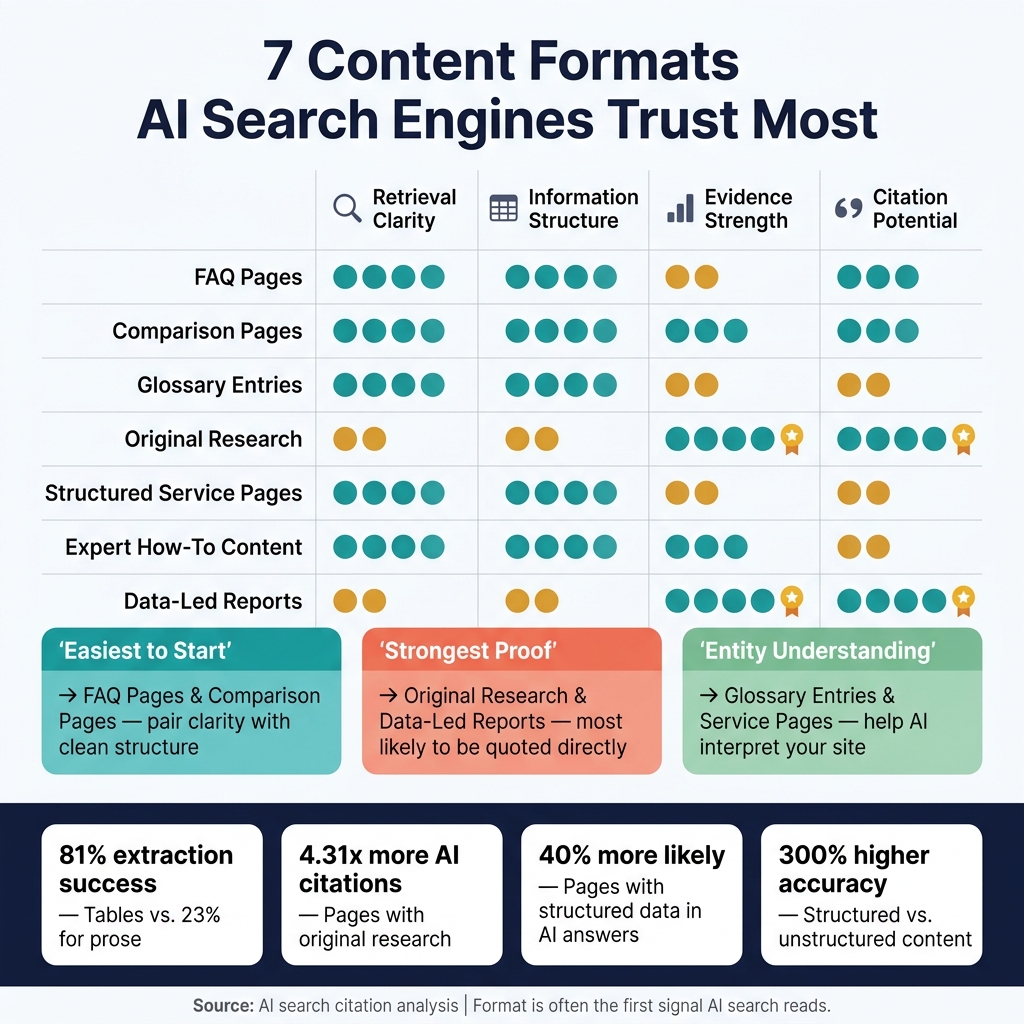
7 Content Formats AI Search Engines Trust Most
Some content formats are simply easier for AI search systems to read, sort, and cite than others.
The table below turns the seven formats into a simple priority guide. It maps each one across four dimensions: retrieval clarity, information structure, evidence strength, and citation potential.
| Content Format | Retrieval Clarity | Information Structure | Evidence Strength | Citation Potential |
|---|---|---|---|---|
| FAQ Pages | High | High | Medium | High |
| Comparison Pages | High | High | High | High |
| Glossary Entries | High | High | Medium | Medium |
| Original Research | Medium | Medium | Very High | Very High |
| Structured Service Pages | High | High | Medium | Medium |
| Expert How-To Content | High | High | High | Medium |
| Data-Led Reports | Medium | Medium | Very High | Very High |
The takeaway is pretty straightforward: FAQ pages and comparison pages are the easiest place to start because they pair clarity with clean structure.
Original research and data-led reports bring the strongest proof. They’re also the formats most likely to be quoted directly.
Glossary entries and structured service pages do a different job. They help with retrieval clarity and entity understanding, which makes your site easier for AI systems to interpret.
A practical rollout looks like this:
AI visibility depends on format just as much as keywords. The main job is pretty simple: use the format that makes the answer easiest to pull out.
FAQ pages, comparison pages, service pages, original research, and data-led reports give AI systems clean signals and cite-ready details. In many cases, that work starts with pages you already own.
Reworking existing content is often the fastest path to better AI visibility. Better discoverability usually comes from reshaping current pages into cleaner, easier-to-scan formats, not from publishing more.
The better question is this: what format fits the search intent? Format is often the first signal AI search reads.
Match each page’s format to the user intent behind it. Then put your energy into pages that tend to drive action: service, pricing, comparison, and guide pages.
Here’s the simple way to think about it:
Use an answer-first structure so the main point shows up fast. Keep key details in raw HTML, add relevant schema, and give each page one core question to answer.
That last part matters more than it sounds. When a page tries to answer five different things at once, it usually ends up doing none of them well. A page built around one clear question is easier for people to scan and easier for search engines to parse.
Yes. Updating old content can help AI visibility, especially on pages about pricing, product features, and regulations, where fresh details matter more.
Focus on your key pages. Add a direct 40- to 60-word summary near the top under a question-based heading. Make sure the page is crawlable, and add relevant schema markup. Regular reviews also help keep the content accurate and trustworthy for AI retrieval.
Put the answer first, and make the page easy to crawl. Start with a question-style H2, then give the main takeaway in the first 40–100 words. Keep those opening blocks short - about 40–60 words each - so they work on their own in search results, AI overviews, and skim reads.
After that, make sure the page is public and accessible to crawlers. It shouldn’t be blocked by robots.txt, noindex, login gates, or heavy client-side JavaScript. Use clear H1-H2-H3 headings and add schema that matches the page content.