






Insights
SEO & AEO
Copy Link




How Webflow SEO changed for AI in 2026: schema, llms.txt, AEO tools, hosting upgrades, and scalable CMS tactics.
Webflow SEO has evolved significantly in 2026. While core SEO principles remain, AI-driven changes have reshaped strategies. Here's what you need to know:
llms.txt files for AI crawlers, and localized SEO options help improve visibility.
The focus has shifted from just ranking high to becoming a trusted source for both traditional search engines and AI systems. Success now depends on structured content, schema, and consistent updates.
Recent updates and evolving search practices have brought major changes to Webflow SEO. Let’s dive into the key updates shaping the platform.
Webflow has stepped up its game with tools designed to simplify SEO management on a larger scale. One of the standout updates came in October 2025, when Webflow integrated AI into its Audit panel. This feature offers automated fixes for titles, descriptions, alt text, and schema, which can be approved in bulk. For teams managing hundreds of CMS pages, this means saving a lot of time and effort.
"The dedicated AI agents allow me to instantly do work that wasn't feasible before - like optimizing metadata across hundreds of pages at scale." - Rebecca Strehlow, Senior Content Marketing Manager, Crunchbase
Another major development arrived in May 2026 with the launch of Webflow’s AEO (Answer Engine Optimization) suite. This suite includes two powerful tools:
These features are geared toward Enterprise customers, with AEO Analytics requiring the latest version of Webflow Analyze.
Webflow also rolled out two updates to streamline SEO management. As of June 2025, native canonical tags and noindex options are available, removing the need for earlier workarounds. Additionally, Webflow now supports uploading llms.txt files and Markdown, making it easier for AI crawlers to interpret and cite your site’s content accurately.
Webflow’s hosting infrastructure has become a critical factor in SEO performance. Sites are now powered by a Tier 1 Global CDN through Fastly and AWS, operating across 100+ data centers. This upgrade improves Time to First Byte (TTFB), which became a core ranking factor in 2026.
Webflow also takes care of essential optimizations automatically, such as WebP image conversion, lazy loading, and CSS/JS minification. These features ensure strong Core Web Vitals without the need for extra plugins or manual tweaks. Uroš Mikić, CEO of Flow Ninja, highlighted the benefits of Webflow’s infrastructure:
"You're building on infrastructure that has existed for a very long time and that gets crawled very well."
For teams aiming for top Lighthouse scores, a few additional steps can make a difference: using AVIF image formats, preloading fonts, and delaying non-critical scripts. Testing across all mobile breakpoints is also crucial, as Google’s mobile-first indexing remains the standard.
AI-generated overviews are changing the game, with click-through rates dropping by about 35% when these summaries appear. While traditional ranking factors still matter, the focus has shifted to becoming a trusted source recognized by AI systems. This means structured content and clear schema are now essential - areas where Webflow excels.
Currently, nearly 60% of AI-generated answers cite incorrect sources or misrepresent brand information. Webflow’s native schema support and AEO tools aim to tackle this issue. Schema recommendations are now built into Page Settings, with AI suggesting the most relevant schema types, no coding required.
The results speak for themselves: Webflow users leveraging these tools have seen a median organic traffic growth of about 95%. For Enterprise teams, weekly organic traffic growth ranges from 15% to as high as 50%.
These updates position Webflow as a powerful platform for teams looking to stay ahead in the evolving SEO landscape.
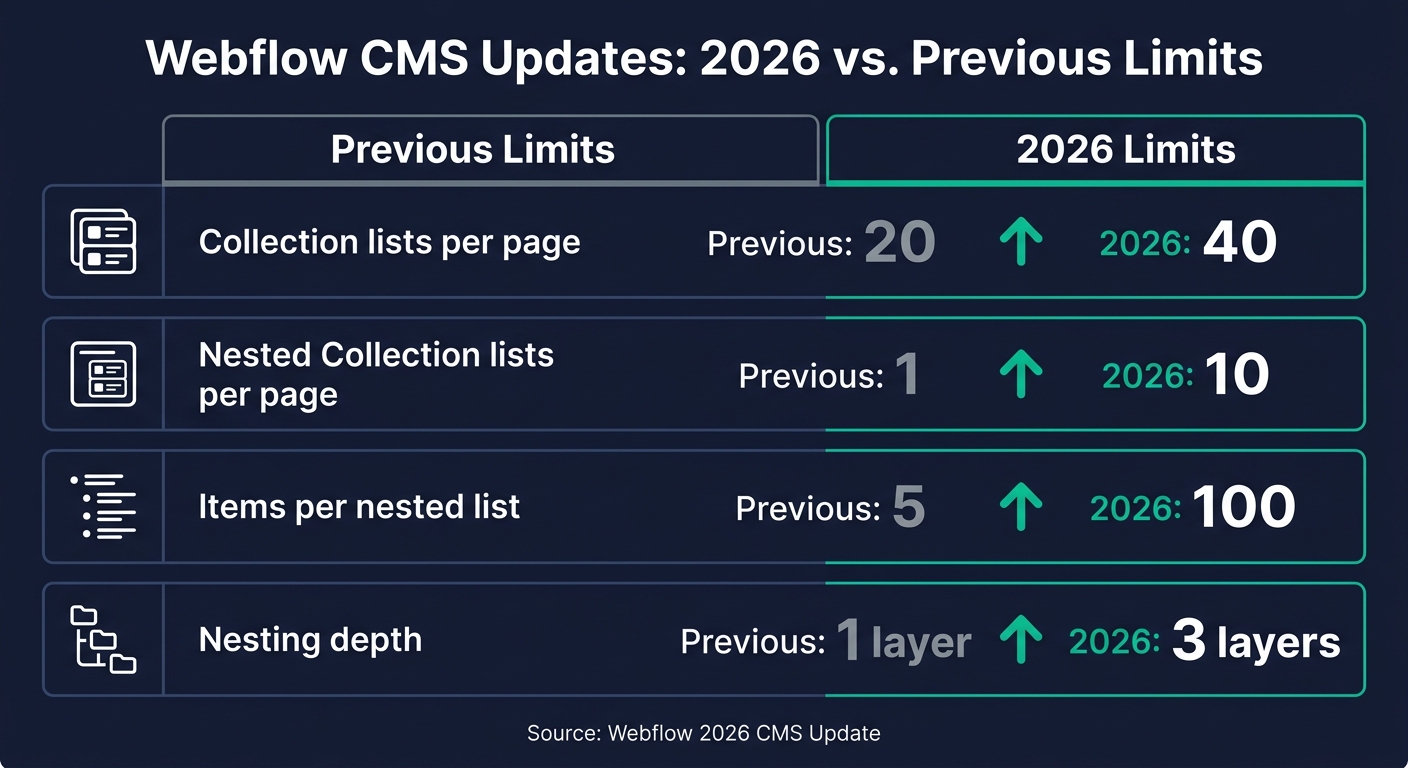
Webflow CMS 2026 Limits vs. Previous Limits
, and <footer>` - all without writing any code. This approach complements Webflow’s SEO tools, making your site both accessible and optimized.
Each page should feature only one H1 tag, with headings organized in a logical order (H1 → H2 → H3). Avoid skipping levels, and if a design requires a different look, use a CSS class for styling instead of breaking the heading structure. Webflow’s built-in Audit Panel helps you catch skipped heading levels or missing alt text before you publish, ensuring your site is clean and accessible.
For URLs, keep them short, lowercase, and hyphenated. Avoid using underscores or special characters to maintain clarity and search engine readability.
While page-level optimizations lay the groundwork, Webflow’s CMS allows you to scale your SEO efforts effectively. Think of your Collection schema as part of your SEO strategy, not just a way to organize content. Set fields like "SEO Title" and "Meta Description" at the start to avoid the hassle of bulk updates later.
With Reference and Multi-Reference fields, you can automatically link related posts, case studies, or product pages, creating a dynamic internal link structure that grows alongside your content. To add even more depth, embed JSON-LD schema into the Head Code of your Collection Template and bind CMS fields (like headline or datePublished) to schema properties. This ensures every new item generates its own structured data.
The 2026 CMS update has made content management even more flexible. It increased Collection lists per page from 20 to 40 and expanded nesting capabilities to three layers. Here’s a quick breakdown of the updated limits:
| CMS Feature | Previous Limit | 2026 Limit |
|---|---|---|
| Collection lists per page | 20 | 40 |
| Nested Collection lists per page | 1 | 10 |
| Items per nested list | 5 | 100 |
| Nesting depth | 1 layer | 3 layers |
One feature that often flies under the radar is the Sitemap Indexing toggle. This lets you exclude thin or utility pages from your sitemap, ensuring your crawl budget is spent on the pages that matter most.
Webflow's recent updates offer exciting possibilities for advanced SEO strategies. This section dives into practical techniques and tools to maximize these opportunities.
Schema markup has shifted from being optional to playing a crucial role in search rankings. As AI-powered search engines increasingly rely on structured data to identify credible sources, Webflow provides tools to manage schema efficiently using Code Embed elements and CMS field bindings.
Here’s how to organize schema based on its scope:
headline, datePublished, and author for each new post.
| Schema Type | Webflow Location | Scope |
|---|---|---|
| Organization | Site Settings > Head Code | Site-wide |
| Local Business | Page Settings > Head Code | Single page |
| Article / Blog Post | CMS Template > Code Embed | Per collection item |
| FAQ (Dynamic) | CMS Template > Code Embed | Per collection item |
| Breadcrumb | CMS Template > Code Embed | Per collection item |
To ensure your schema is functioning correctly, test it with Google's Rich Results Test and the Schema Markup Validator (validator.schema.org) before pushing updates live. These steps help position your content for better visibility in AI-driven search results.
AI search engines, like Google's AI Overviews or Perplexity, prioritize content that delivers clear, concise answers. If your content isn't structured to provide direct responses, it risks being overlooked.
To optimize for AI search:
For further optimization, use llms.txt files, which act like robots.txt but for AI crawlers. This file directs AI models to your most important pages and preferred citation details. Additionally, Webflow's Audit panel can identify gaps in schema and metadata, making it a valuable tool for preparing your site for AI search.
"The recommendations are specific to my actual site and pages, which means I can quickly spot gaps like missing schema markup or broken links that materially impact our AI visibility." - Chris Singleton, Senior Manager - Website and Organic Growth, Smartly
For businesses targeting multiple regions, Webflow's localization features eliminate the need for custom development. Once enabled, Webflow automatically generates hreflang tags and localized sitemaps, streamlining the process. It uses subfolder URLs (e.g., /es/, /fr/) to consolidate all regional traffic under one domain, preserving domain authority.
The content layer is equally important. Webflow distinguishes between simple translations, nuanced localization, and transcreation for cultural relevance. For SEO, localized URL slugs - like /servicios instead of /services - enhance keyword relevance and readability in regional search results. You can also tailor page titles, meta descriptions, and image alt text for each locale, directly improving your local search rankings. These localized efforts are essential Webflow SEO tips for lead generation in competitive global markets.
LeGrand Woolley, Marketing Operations at Moloco, noted the time and cost savings: "Webflow's localization allowed their team to ship localized sites 4X faster, save on dev costs, and create custom experiences". This efficiency is a game-changer for teams managing multiple markets.
At The Hoop Studio, SEO is baked into every step of the process, starting with a strong information architecture. Each site is designed so that no page is more than three clicks away from the homepage. This approach not only makes user navigation intuitive but also ensures shorter crawl paths for search engines, improving overall site performance.
The studio takes full advantage of Webflow's CMS by treating it as a relational system rather than a static spreadsheet. By using reference and multi-reference fields, updates can cascade across related pages seamlessly. For example, dynamic CMS features introduced in 2026 allow one template to adapt dynamically - showing different CTAs, proof elements, or content blocks based on a user’s locale or specific CMS field values.
Additionally, The Hoop Studio's Growth and Signature builds include a robust foundation for both SEO and AEO (Answer Engine Optimization). This includes structured CMS architecture, schema markup, and content formatting designed to answer user queries directly. These strategies help sites excel in traditional search engines and AI-driven discovery tools, addressing potential pitfalls from the start.
Even with a solid SEO strategy, technical missteps can derail performance. The Hoop Studio identifies and addresses common Webflow SEO challenges to ensure sites maintain their rankings.
Addressing these technical issues is crucial, but maintaining long-term performance requires ongoing effort.
Even the best-optimized sites can experience performance drops without consistent upkeep. The Hoop Studio bridges this gap with scalable support packages designed to sustain and improve SEO performance over time.
"Success shifted from outranking competitors to becoming one of the authoritative voices AI systems reference." - Leah Retta, Senior Content Marketing Manager, Webflow
To achieve this, the studio integrates ongoing optimization into its support offerings. The Scale+ retainer ($6,500/month) combines an advanced SEO and AEO program with CRM and lead funnel automation, creating a unified growth system. For teams with smaller needs, the Scale retainer ($3,250/month) provides a streamlined SEO and AEO program along with dedicated design and development support. For basic technical upkeep, the Care+ package ($325/month) focuses on monthly audits, uptime monitoring, and quick fixes within an hour.
The Hoop Studio also prioritizes content freshness, a critical ranking factor. By automating content refresh workflows, they help clients increase updates from 15 articles annually to 12–15 per month. This consistent updating positions sites as authoritative sources, which is increasingly important as AI-driven search tools favor recently updated content.
This guide has shown how Webflow's SEO tools and strategies have evolved to support smarter and more structured content creation. By 2026, Webflow has automated many of the technical essentials - clean code, fast hosting, and optimized Core Web Vitals - allowing users to concentrate on strategic priorities like structured content, schema markup, AI-friendly architecture, and regular content updates.
The numbers speak for themselves. Webflow users leveraging AI-powered SEO and AEO tools have experienced a median organic traffic growth of around 95%, compared to less than 20% for those not using these features. Visitors arriving through AI-driven discovery channels also convert at much higher rates due to their stronger intent. This data highlights the growing importance of aligning SEO strategies with quality and user intent.
"Before, we focused on a lot of new content to capture high-volume topics... Now, our focus has shifted to bottom-of-funnel, high-intent queries that answer specific questions." - Vivian Hoang, SEO/AEO Lead, Webflow
As outlined, long-term success in SEO isn't about doing more - it’s about doing the right things consistently. Practices like answer-focused content formatting, automating metadata through a CMS, using llms.txt to guide AI crawlers, and conducting monthly audits to catch problems early are what separate high-performing teams. These strategies demand steady, ongoing effort.
The best-performing teams aren't just publishing more - they're publishing smarter. By building systems that search engines and AI tools can easily interpret and reference, your Webflow site will be set up to thrive in both traditional search and AI-driven discovery for years to come. Focus on systems, not just individual pages, to stay ahead.
To include schema markup in Webflow, where there's no built-in interface for it, you can use custom code blocks with JSON-LD script tags.
An llms.txt file is a handy way to help AI models grasp your website's structure and content. Here's what to include:
You can upload this file directly using Webflow’s built-in tools or automate the process through their Enterprise API.
To monitor traffic and conversions coming from AI sources in Webflow, head to your site's Insights tab within the dashboard and locate the AI discovery section. This area provides a breakdown of visitor counts by source, including traffic referred by AI. To focus specifically on these sessions, use the Generative AI traffic source filter in Webflow Analyze. For tracking conversions, set up goals in Analyze or Optimize to measure how AI-referred visitors perform on important actions, such as signups.