





Insights
SEO & AEO
Copy Link




Clean, accurate schema helps search and AI read your site, qualify rich results, and improve AEO visibility.
Structured data does not push pages up in search on its own. What it does is help Google and AI answer engines read your site with less confusion, connect your brand to the right topics, and decide whether your pages can show rich results or get cited in AI answers.
If I had to sum it up fast, it would be this:
A few points stand out right away:
My takeaway: keep schema lean, accurate, and tied to what users can see on the page.
Here’s the short version of what matters most:
Schema type
What it helps with
Best use
Brand identity
Homepage, About
Site structure and topic paths
Main site pages
Topic, author, dates, publisher
Blog posts, guides, case studies
Direct question-and-answer content
FAQ, pricing, support pages
Pricing and offer details
Pricing and package pages
Address, hours, phone, service area
Contact and location pages
So if you want better AEO visibility, I would not add every schema type I can find. I would make sure the right markup matches the right page, keep business details in sync, and build schema into CMS templates so it stays clean over time.
Three myths eat up marketing time: that schema boosts rankings, that more schema leads to more visibility, and that markup can rescue a weak page. Google treats structured data as a way to help its systems understand a page and decide if it can show rich results, not as a ranking signal. So the better question isn’t whether schema helps in some vague way. It’s which schema types are worth your time.
When schema is set up well, it can do three specific things:
That word eligible matters. Schema can help a page qualify for added visibility, but Google still decides if it wants to show those features.
Schema doesn’t do much for pages that are thin, off-topic, outdated, or unclear in purpose. And piling on every schema type you can find often backfires. Irrelevant or overlapping markup can trigger validation warnings and teach AI systems to treat your schema like noise.
A better approach is simple: use fewer schema types, make sure they’re accurate, and connect every property to content people can actually see on the page. If your business details change, your markup should change too.
That’s why schema selection is the real issue. The upside comes from the small set of schema types that match the page and the entity behind it. From there, the practical question becomes which schema types should come first on a marketing site.
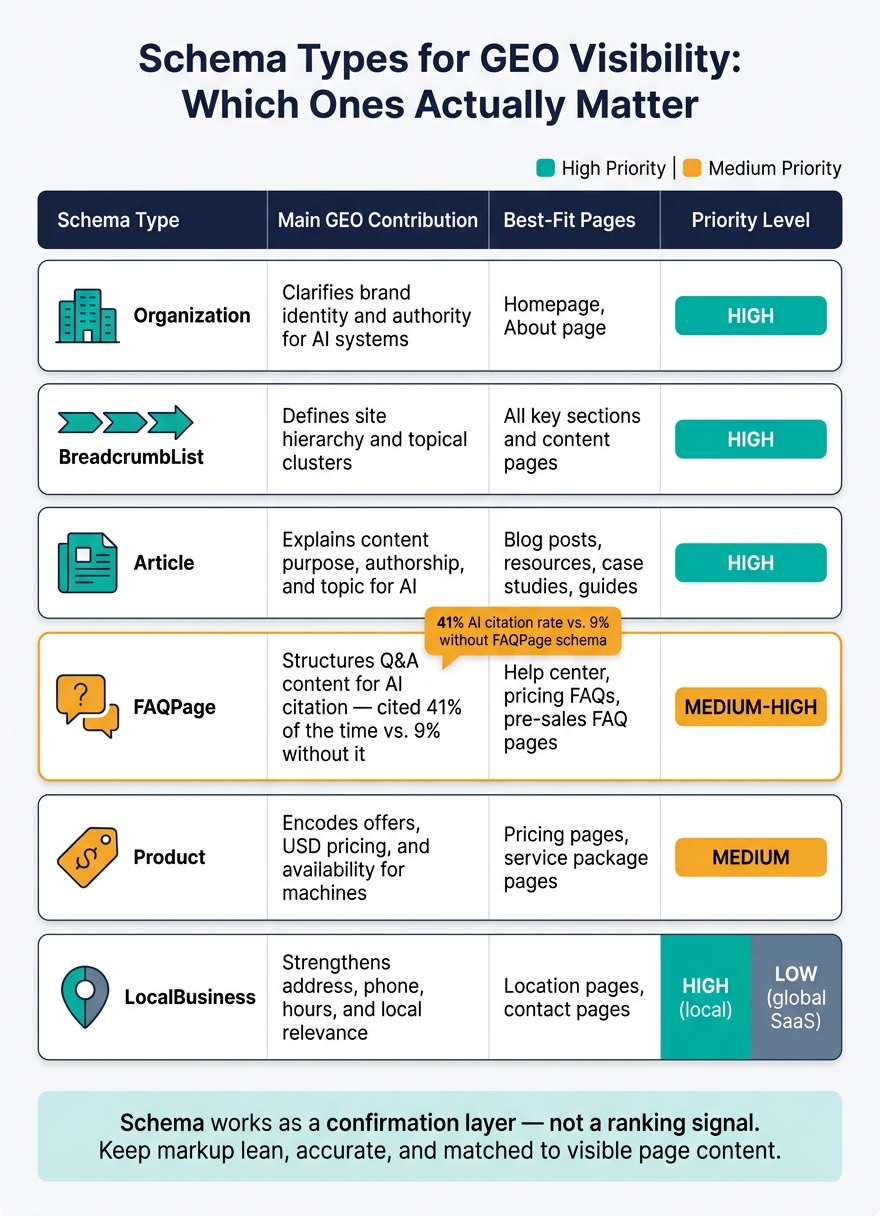
The schema types that matter most for AEO are Organization, Article, BreadcrumbList, FAQPage, Product, and LocalBusiness. Each one sends a different signal to AI systems about your brand, your content, your site structure, your offers, and your location. Start with identity and structure first. Then layer in content, offer, and location markup where it fits the page.
Organization schema tells AI systems who you are. It marks up your brand name, logo, official URL, and sameAs links to trusted profiles. Stick to one version only. If your markup says different things in different places, that muddies the picture.
Article schema explains what a page is about and why it exists. It marks up the headline, author, publisher, and main image for a given page. That gives AI systems the details they need to connect the content to a real person or organization. Use ISO publish and modified dates so machines can read freshness correctly. If the author shown on the page doesn’t match the author property in your JSON-LD, that can quietly weaken trust in how the page is read by machines.
BreadcrumbList schema shows where a page sits on your site. A path like Home → Solutions → Local SEO → Restaurant SEO gives AI a clean map of how your topics connect. That helps machines understand your clusters instead of treating pages like isolated pieces. Don’t cram breadcrumb labels with repeated geo terms. A path such as SEO Services USA → SEO Consulting USA → Local SEO USA looks more like noise than a useful signal. Once your structure is clear, the next move is to mark up the page types that answer buyer questions.
FAQPage schema turns questions and answers into machine-readable fields. AI systems, including the ones behind AI Overviews and chat-style assistants, can use that markup to pull and reuse direct answers. Pages with FAQPage schema were cited by AI search engines 41% of the time, compared to just 9% for similar pages without it. The best questions come from actual user intent, not filler. Each answer should stand on its own, so it still makes sense if an AI pulls only that snippet.
Product schema makes pricing and package details readable to machines. Use it only on pages with real offers, current prices, and USD currency. For U.S. sites, that means "priceCurrency": "USD" and decimal formatting like "price": "149.00". If old pricing stays in your markup, AI systems may repeat the wrong offer in generated recommendations.
LocalBusiness schema adds location and service-area signals for businesses with a physical presence or a regional focus. It structures your address, phone number, business hours, and service area in a format machines can read with less guesswork. For service-area businesses, the areaServed field helps show regional relevance even if customers never visit a storefront. These schema types matter most when the page content is accurate and used the same way across the site.
For most marketing sites, the best place to start is Organization and BreadcrumbList. They set the base that everything else depends on. After that, add Article schema to blog posts, guides, and case studies. That’s often the content AI systems pull from when building answers.
Then add the next layer based on what your site actually has:
For globally distributed SaaS companies with no local footprint, LocalBusiness usually doesn’t need to be a priority.
Schema type
Main AEO contribution
Best-fit page types
Priority level
Clarifies brand identity and authority
Homepage, About page
High
Defines site hierarchy and topical clusters
All key sections and content pages
High
Explains content purpose, authorship, and topic for AI
Blog posts, resources, case studies, guides
High
Structures question-based content, including local Q&A
Help center, pricing FAQs, pre-sales FAQ pages
Medium-High
Encodes offers, USD pricing, and availability
Pricing pages, service package pages
Medium
Strengthens address, phone, hours, local relevance
Location pages, contact pages
High for local; Low for global SaaS
Schema works best as a confirmation layer. It helps answer engines check entity names, offers, and locations that are already visible on the page. That matters most when the markup matches the visible page exactly.
Schema helps most when your page content and markup say the same thing. For example, a pricing page that shows "Professional – $79.00/month" and uses Product schema with "price": "79.00" and "priceCurrency": "USD" gives AI systems a clear, machine-readable view of the offer. If the page and markup conflict, systems are more likely to trust the visible content.
Use datePublished and dateModified only when they reflect real page updates.
Match the byline to author and the footer address to streetAddress. When those details don't line up, the signal gets weaker.
The most practical rollout starts with items that affect the whole site, then moves to page-level schema.
Step
Schema Type
Where to add it
1
Site-wide
2
Pages with clear navigation hierarchy
3
Blog posts, guides, insights
4
Contact, office, service-area pages
5
Pricing and offer pages
6
Pages with fully visible Q&A blocks
The next step is keeping the setup simple enough to maintain. From here, the goal is to keep the markup lean and tied to what users can actually see.
Structured data helps search engines and AI systems understand what a page is and what a business does. But it won't rescue weak content. So the goal isn't to pile on more markup. It's to use clean, accurate markup on the pages that matter most.
Stick to the schema that fits the page:
That part matters more than people think. Each schema type should match what the page actually is, not what you'd like it to rank for.
After that, focus on consistency across the site. The easiest way to do that? Build schema into your CMS templates and component defaults from day one. If you bolt it on later, you usually end up with gaps, conflicts, and stale fields. When markup lives inside component defaults, each new page inherits the same clean signals automatically. That's a huge maintenance win over time.
At the end of the day, simple and consistent implementation is what makes schema useful for AEO instead of just another technical checkbox. Structured data can support AI citations and help systems interpret a page more accurately, but it can't replace strong content or patch messy business details. Keep the markup tied to visible facts, and it will do its job.
For most businesses, start with Organization schema. If you serve a set local area, use LocalBusiness instead.
After that, focus on FAQPage, Service, and Article schema on pages that already rank well or answer key customer questions.
Set these up at the CMS collection level so they apply to new content as it goes live. And make sure the schema lines up with the visible page copy, headings, and metadata.
Yes. Bad schema can hurt your AEO visibility when it doesn’t match the content people can actually see on the page, your headings, or your metadata. That mismatch sends mixed signals, and search engines and AI systems can get thrown off by it.
If your markup includes old facts, wrong service details, or entity data that doesn’t line up with the page, it becomes harder for systems to verify your brand. And when verification gets shaky, citation rates can drop too. The fix is pretty simple: keep your schema validated, accurate, and in sync with the page.
No. Schema markup should match the page’s actual content and purpose. If it doesn’t, you can confuse search engines.
For service pages, Service schema is usually the main pick. Use Product schema only when the page actually functions like a product listing and includes specific transactional details.
{"@context":"https://schema.org","@type":"FAQPage","mainEntity":[{"@type":"Question","name":"How do I know which schema to add first?","acceptedAnswer":{"@type":"Answer","text":"For most businesses, start with Organization schema. If you serve a set local area, use LocalBusiness instead. After that, focus on FAQPage, Service, and Article schema on pages that already rank well or answer key customer questions. Set these up at the CMS collection level so they apply to new content as it goes live. And make sure the schema lines up with the visible page copy, headings, and metadata."}},{"@type":"Question","name":"Can bad schema hurt my AEO visibility?","acceptedAnswer":{"@type":"Answer","text":"Yes. Bad schema can hurt your AEO visibility when it doesn’t match the content people can actually see on the page, your headings, or your metadata. That mismatch sends mixed signals, and search engines and AI systems can get thrown off by it. If your markup includes old facts, wrong service details, or entity data that doesn’t line up with the page, it becomes harder for systems to verify your brand. And when verification gets shaky, citation rates can drop too. The fix is pretty simple: keep your schema validated, accurate, and in sync with the page."}},{"@type":"Question","name":"Should every service page use Product schema?","acceptedAnswer":{"@type":"Answer","text":"No. Schema markup should match the page’s actual content and purpose. If it doesn’t, you can confuse search engines. For service pages, Service schema is usually the main pick. Use Product schema only when the page actually functions like a product listing and includes specific transactional details."}}]}