




Copy Link
Webflow Maintenance: What Matters and What’s a Waste of Time


Now taking new projects
Last updated:
March 2, 2026
Webflow Maintenance: What Matters and What’s a Waste of Time
Focus Webflow maintenance on what protects revenue: weekly form tests, CMS cleanup, speed and SEO audits—skip constant visual tweaks and excess tools.
Maintaining your Webflow site isn’t just about keeping it functional - it’s about protecting your revenue, SEO rankings, and user trust. Neglecting tasks like fixing broken links or optimizing site speed can lead to lost leads, lower search visibility, and frustrated visitors. But not all maintenance tasks are worth your time. Here’s what you need to know:
High-Priority Tasks That Matter:
- CMS Updates: Remove outdated content, refresh high-traffic pages, and standardize SEO fields.
- Functionality Testing: Check forms weekly, fix broken links, and test cross-browser compatibility.
- Performance Optimization: Compress images, clean unused styles, and monitor Core Web Vitals.
- SEO & Security: Update meta tags, resubmit sitemaps, and track traffic for sudden drops.
Tasks That Waste Time:
- Constantly tweaking visuals, overhauling designs unnecessarily, and relying on excessive third-party tools.
Focus on tasks that directly impact your site’s performance and user experience, and skip the busywork. If managing this feels overwhelming, services like The Hoop Studio’s retainer can handle the heavy lifting, ensuring your site stays optimized without draining your resources.
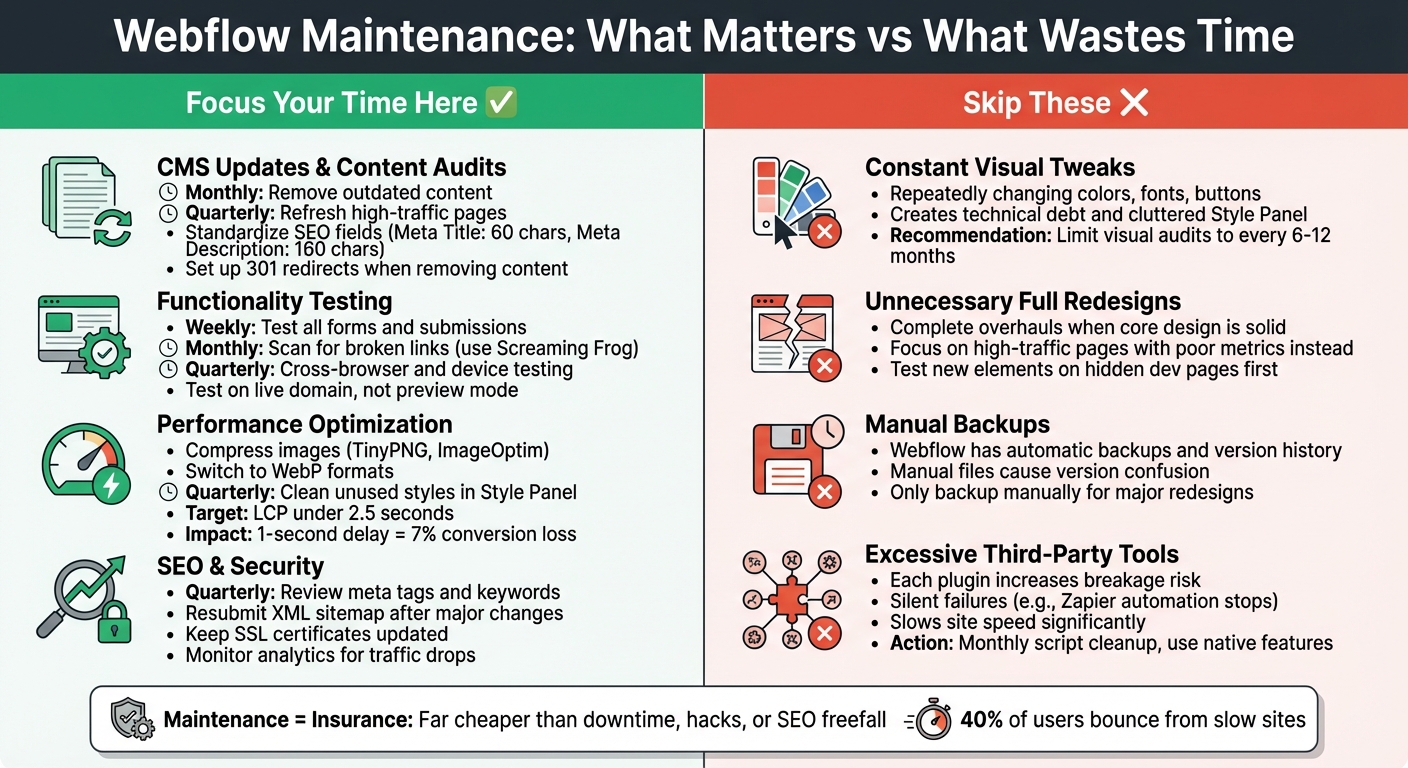
Webflow Maintenance Priority Matrix: Essential vs Time-Wasting Tasks
3 easy ways to clean up & organize your Webflow project
sbb-itb-3a3230e
High-Priority Maintenance Tasks That Actually Matter
Not every maintenance task is worth your time. Some are essential for protecting your revenue and search rankings, while others can be time-wasters. Here’s what’s worth focusing on.
CMS Updates and Content Audits
A cluttered CMS can be a nightmare. Duplicate posts, outdated case studies, and forgotten pages don’t just confuse visitors - they can hurt your search engine performance. Monthly audits can help clean up your content by archiving old posts, merging duplicates, and removing irrelevant pages from the search index.
"Your content is your SEO fuel. Keeping it fresh and functional is non-negotiable." – Little Big Things
Make sure every CMS collection has standardized SEO fields like Meta Title (up to 60 characters), Meta Description (up to 160 characters), Focus Keyword, Alt Text for images, and Canonical URLs. Using dynamic meta tag formulas can save time by automating optimized titles and descriptions for hundreds of pages. This prevents your SEO from slipping as algorithms change.
High-traffic pages deserve extra care. Refresh them every quarter with updated stats, new calls-to-action, and fresh visuals to maintain rankings and user trust. Always test key templates like blogs and case studies after updates to catch issues like broken dynamic lists or missing fields. For larger collections, consider adding pagination to avoid slow load times.
Watch your CMS item limits, especially on platforms like Webflow. Hitting capacity could silently block new content from being published. If you’re removing outdated items or renaming collections, set up 301 redirects to preserve SEO authority and avoid 404 errors.
| Frequency | CMS Maintenance Task | Objective |
|---|---|---|
| Weekly | Test all forms and submissions | Ensure lead generation functionality |
| Monthly | Review CMS for outdated entries | Ensure content accuracy |
| Quarterly | Audit the Style Panel for unused classes | Improve site speed and performance |
| Quarterly | Update meta titles and Open Graph tags | Maintain rankings and prevent SEO drift |
After cleaning up your CMS, it’s time to ensure all links and site functions are working smoothly.
Broken Link Checks and Functionality Testing
Broken links do more damage than you might think. They waste your crawl budget, hurt user trust, and can even dilute your PageRank. Internal broken links confuse search engines, while broken external links cost you valuable backlinks.
"A broken link or form is more than an inconvenience - it's a credibility killer." – littlebigthings.dev
Use tools like Screaming Frog (free for up to 500 URLs), Ahrefs, or SEMrush to run monthly scans for 404 errors. Common issues on platforms like Webflow include renaming slugs without setting up 301 redirects, deleting CMS items that are still linked, or symbol overrides breaking after updates.
Forms are another potential weak spot. They may look fine but silently fail to send data. Test forms weekly to ensure notifications and CRM integrations are working. If you rely on third-party tools like Zapier, Make, or Calendly, verify they’re functioning correctly after updates to avoid automation hiccups.
Cross-browser and device testing should be a quarterly habit. Pay extra attention to Safari and mobile devices, as updates to browsers or platforms can introduce bugs in interactions or animations. Always test on your live domain, not just in preview mode, since elements like SSL certificates and third-party scripts can behave differently in production.
Once your links and forms are in good shape, you can shift focus to improving Webflow hosting performance.
Performance Optimization
Site speed impacts everything from user satisfaction to revenue. Compress your images with tools like TinyPNG or ImageOptim before uploading, switch to WebP formats, and enable lazy loading for assets below the fold. Setting explicit width and height dimensions for images and iframes can also help prevent layout shifts during loading.
Minify your CSS and JavaScript to reduce file sizes, and limit the use of third-party embeds like chat widgets or analytics tools that can slow down your pages. Regularly clean up your Style Panel by removing unused combo classes and duplicate styles to keep the DOM lean and interactions fast.
For Core Web Vitals, aim for a Largest Contentful Paint under 2.5 seconds, monitor Interaction to Next Paint for responsiveness, and minimize Cumulative Layout Shift for visual stability. Test your site speed from different regions, as performance can vary based on CDN effectiveness or asset size.
When adding new code, widgets, or Lottie files, test them on a hidden sandbox page first to avoid disrupting your live layout.
SEO Monitoring and Security Checks
Once your content, functionality, and speed are under control, focus on monitoring SEO and security for long-term stability. If you make major changes to your CMS collection URLs, resubmit your XML sitemap to Google Search Console. Quarterly reviews of meta tags and keywords can help you stay ahead of algorithm updates. Don’t forget to keep schema markup accurate and SSL certificates up to date.
Before redesigning your site, always back it up. Rotate admin passwords regularly and review your legal documents - like Privacy Policy and Terms of Service - annually to ensure compliance. Keep an eye on analytics for sudden traffic drops or conversion changes, as these could indicate technical issues or algorithm shifts.
"Maintenance isn't overhead; it's insurance - far cheaper than the cost of downtime, hacks, or SEO freefall." – littlebigthings.dev
Maintenance Tasks That Waste Your Time
Not all maintenance tasks are worth your effort. Some may seem productive but bring little to no real value. Here’s what to steer clear of.
Constant Visual Tweaks and Unnecessary Redesigns
Tweaking colors, fonts, or buttons over and over? It’s busywork. As Little Big Things puts it, "Webflow maintenance isn't about 'keeping the site pretty.' It's about protecting growth." These uncoordinated design changes can pile up technical debt fast. Your Style Panel can become cluttered with unused combo classes and tangled style inheritance, which makes future updates more complicated.
Full redesigns are another time sink unless they’re absolutely necessary. If your site’s core design is solid, a complete overhaul may not be the best use of resources. Instead, "inject new life with an update," as the Webflow Team suggests. Focus on refreshing high-traffic pages or areas with poor performance metrics, like high bounce rates or low conversions, rather than making changes based on personal preferences.
Here’s a smarter approach: limit visual audits to twice a year, and always test new design elements on a hidden development page before making them live. If you do make changes, follow up with a quarterly cleanup of your Style Panel to get rid of duplicate styles and keep your design system organized. Redirect your energy toward fixing integrations or optimizing workflows instead of obsessing over aesthetics.
Manual Backups and Excessive Third-Party Tools
Beyond design, some routine tasks also waste time. For example, Webflow’s automatic backups and version history make manual backups unnecessary in most cases. Naming files like "Project-v1.3-Oct2025" might feel safe, but it can lead to version mix-ups, especially if someone edits an outdated copy instead of the live project.
Third-party tools can be another hidden drain. Each chat widget, analytics script, or plugin you add increases the chance of something breaking when updates roll out. Worse, these tools can fail without you noticing - like a Zapier automation stopping and causing data to disappear. Plus, too many scripts can slow your site. A one-second delay in load time can cost you up to 7% in conversions, often thanks to excessive third-party integrations.
Stick to Webflow’s built-in features for SEO, forms, and security instead of relying on unnecessary plugins. Conduct a monthly cleanup to remove unused scripts, heavy background videos, or outdated assets that drag down your site’s performance. Save manual backups for major redesigns only, and use Webflow’s staging domain to test updates before going live. Simplifying your toolkit will save you time and keep your site running smoothly.
| Issue Type | Impact on Efficiency | Recommended Action |
|---|---|---|
| Frequent Visual Tweaks | Technical debt; broken global styles | Limit visual audits to every 6–12 months |
| Manual Backups | Version confusion; wasted time | Rely on Webflow's automatic backups |
| Excessive Third-Party Tools | Silent failures; slow load times | Monthly script cleanup; use native features |
How The Hoop Studio's Retainer Handles Webflow Maintenance
Managing Webflow maintenance can be a real drain on resources, often pulling attention away from more impactful tasks. That’s where The Hoop Studio's maintenance retainer steps in. By taking on the critical upkeep - like CMS updates, performance monitoring, SEO checks, and bug fixes - it ensures your site stays functional and optimized without tying up your team. With continuous updates and quick turnarounds, you can skip the hassle of hiring freelancers or scrambling for last-minute fixes. This service locks in a system designed to handle the ongoing maintenance priorities mentioned earlier.
The retainer also includes direct Slack access, simplifying communication and cutting out the need to repeatedly explain brand guidelines or negotiate costs for individual tasks. Built on a clean and scalable "Client-First" framework, projects are optimized for fast load times, SEO-friendly coding, and reusable components. This structure avoids piling up technical debt and ensures your site runs smoothly from the start. Performance isn’t an afterthought - it’s the foundation.
What's Included in The Hoop Studio Retainer
The retainer covers a range of high-priority tasks to keep your site in top shape. These include CMS updates, content adjustments, bug fixes, layout tweaks, and creating new sections as needed. Technical SEO for lead generation is handled through structural improvements, speed optimizations, and regular updates to metadata, titles, descriptions, and schema. Analytics support integrates tools like Google Analytics (GA4), Google Search Console, Tag Manager, and CRM/form connections such as HubSpot.
Beyond maintenance, the service also builds campaign-ready landing pages, runs A/B tests, and provides strategic advice on site structure and analytics. This "Growth Enablement" mindset transforms your website into a dynamic marketing tool rather than a static online brochure. As Ruth P., Director of Marketing at Kingsley Devon, shares:
"I have worked with The Hoop Studio on a number of web projects over the last 12 months, from web development, technical SEO, site optimisation and design. The quality of work has consistently been outstanding."
Pricing and What You Get
The Hoop Studio offers three retainer tiers, each tailored to different needs and budgets. Here’s a quick breakdown:
- Essentials Partner ($3,250/month): Perfect for teams with in-house design needing a Webflow developer. Includes a task-based workflow (one active task at a time), light SEO support, analytics assistance, and monthly check-ins.
- Professional Partner ($5,850/month): Adds a senior designer, guarantees project starts within 48 hours, and provides detailed monthly SEO reports.
- Enterprise Partner ($11,050/month): Offers a full team, including two developers, a senior designer, a project lead, parallel task handling, monthly CRO insights, and 24/7 support.
These retainers provide access to a team of specialists at a fraction of the cost of hiring a dedicated Webflow expert, which typically ranges from $110,000 to $227,500 annually. The results speak for themselves: The Hoop Studio has helped clients generate over $65 million in revenue, gain more than 100,000 newsletter signups, and achieve up to 2x conversion boosts and 10x increases in top 10 keyword rankings. Rob P., Headmaster at Kingsley Devon, highlights the impact:
"Harry manages our website superbly with frequent redesigns of pages, immediate response on last-minute requests, and much creative genius to bring our site alive, all of which has significantly boosted our SEO."
Conclusion
Webflow maintenance isn’t about doing everything - it’s about focusing on what truly matters. Prioritize tasks that directly impact revenue and user experience: weekly form tests, monthly speed audits, broken link checks, and maintaining a clean CMS. These actions address silent issues like slow load times (which can lead 40% of users to bounce) and broken forms that could block potential leads.
Avoid wasting time on low-impact activities like constant visual tweaks, unnecessary redesigns, or excessive manual backups. Think of maintenance as insurance - it’s far cheaper than dealing with downtime, security breaches, or a sharp drop in SEO performance. Even small delays can hurt conversions, but proactive upkeep helps you sidestep risks that might otherwise derail your business.
A structured maintenance strategy, built around high-impact and time-efficient practices, is the way forward. Not every task carries equal weight, so focus on what protects your revenue and user experience. If managing these responsibilities feels overwhelming or pulls your team away from strategic priorities, The Hoop Studio’s retainer service can take the load off. From CMS updates and performance monitoring to SEO strategies for lead generation and bug fixes, their team ensures your site runs smoothly without overburdening your internal resources. With predictable monthly costs - significantly lower than the $85,000 to $175,000 annual salary of an in-house specialist - you gain access to a dedicated team of experts.
Your website should be a reliable, revenue-generating tool, not a source of constant headaches. By concentrating on essential tasks and streamlining maintenance, you set the stage for long-term growth and stability while letting the technical details quietly work in the background.
FAQs
How do I know which Webflow maintenance tasks actually affect revenue?
Focus on tasks that improve site speed, user experience, and conversion functionality. Address issues like broken forms and links, compress and optimize media for quicker load times, and ensure content stays fresh and relevant for SEO purposes. Ignoring these areas can result in lost leads, diminished trust, and fewer conversions - directly impacting your bottom line.
What’s the easiest way to catch broken forms and links before leads are lost?
To avoid losing potential leads due to broken forms or links, it's important to stay proactive. Use automated link checkers to scan your entire site regularly for broken links. Additionally, manually test all forms on your website every week by submitting them yourself. These simple steps help you catch and fix issues quickly, ensuring your site remains functional and easy to navigate.
How can I improve Core Web Vitals in Webflow without adding more tools?
To improve Core Web Vitals in Webflow without relying on additional tools, concentrate on fine-tuning the platform's built-in features and optimizing your current elements. Start by compressing and resizing images to reduce load times. Next, clean up your project by removing unused styles and scripts, which can clutter the site's performance. Address render-blocking issues by deferring resources that aren't immediately needed.
Take advantage of Webflow’s built-in settings, such as limiting font weights, to streamline your site even further. Regularly audit your site using tools like Lighthouse or PageSpeed Insights to spot and fix performance issues quickly. This hands-on approach helps you maintain a fast and efficient website without needing external plugins.