


Insights
Conversion
Copy Link




Improve paid-ad ROI by matching ads to fast, focused landing pages—clear value, one CTA, mobile speed, visuals, and personalization.
Every click on your ad costs money, but whether that spend turns into customers depends almost entirely on your landing page. A well-optimized page can cut your cost-per-click by up to 50% and boost conversions to over 11%, while a poor one can waste up to 76% of your ad budget.
Here’s what matters most for creating high-converting landing pages:
Even small improvements - like refining your CTA, speeding up page loads, or matching ad promises - can drastically improve ROI. Start with one change and measure its impact to turn clicks into customers.
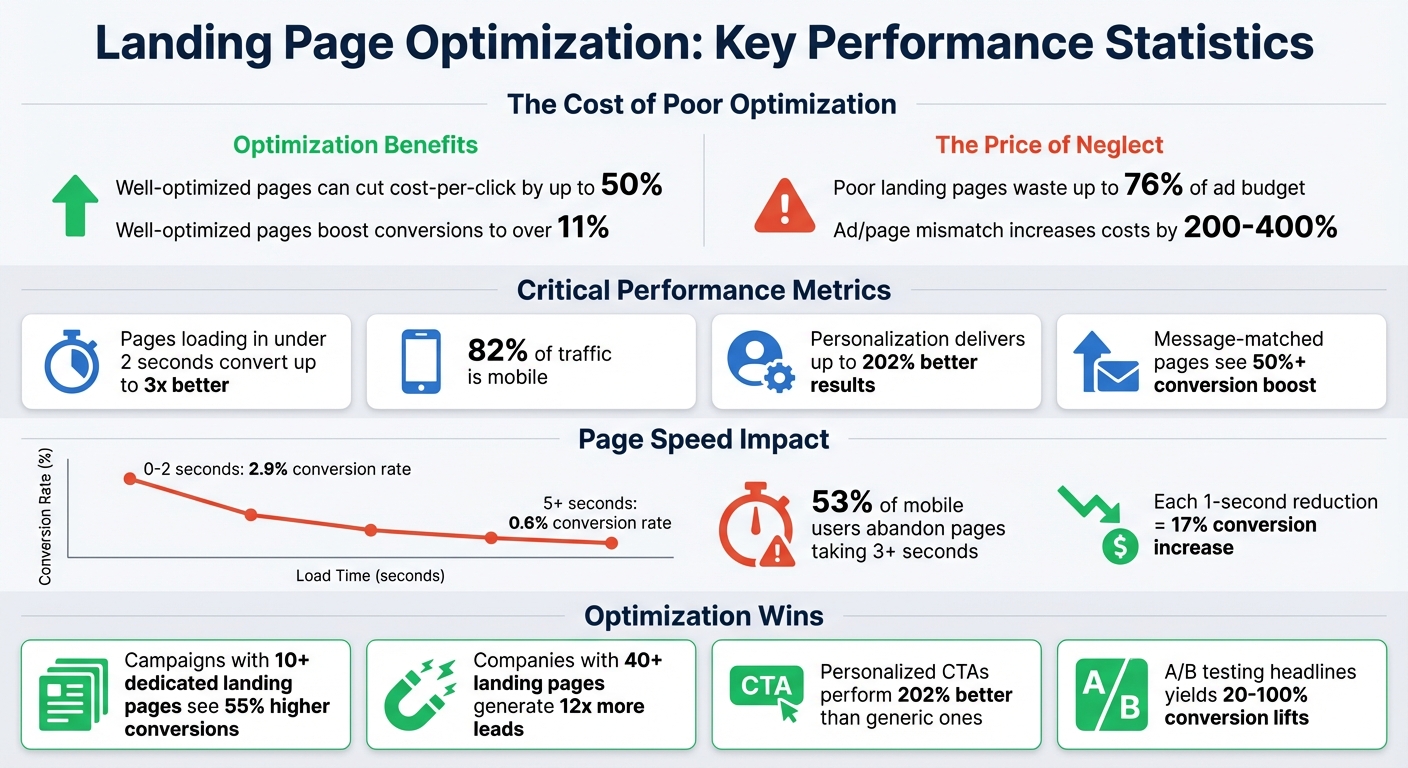
Landing Page Optimization Statistics: Impact on Conversion Rates and Ad Costs
Your value proposition needs to answer one simple question: "Why should I care?" And it needs to do so fast - within three seconds. If it doesn’t, most visitors will leave.
To make your value proposition effective, clearly outline your offer, who it’s for, and what sets it apart. It’s crucial that this message matches the promise in your ad. When visitors see the same message they clicked on, it reassures them they’re in the right place, reducing confusion and bounce rates. This alignment can boost website conversion rates significantly - sometimes by 50% or more.
Testing your headlines and value proposition through A/B testing can yield conversion lifts between 20% and 100%. The key? Clarity always beats cleverness. Avoid wordplay or vague language - visitors arriving from paid ads have a clear intent and little patience for anything unclear.
"Clever headlines might win creative awards. Clear headlines win conversions." – Chandler Supple, Co-Founder & CTO, River
Follow your main headline with a concise sentence that expands on the value and tackles the visitor’s primary concern. For instance, instead of saying "Advanced AI Technology", try "Get content ideas in seconds - no experience needed." The first highlights a feature, but the second focuses on the outcome.
Your value proposition belongs above the fold, right in the hero section where it’s visible the moment someone lands on your page. You only have about 10 seconds to convince visitors to stick around, and many will only read your headline.
Use a short, impactful headline - 10 words or fewer - that captures the main benefit. Follow it with a subheadline that explains how your product works or addresses potential doubts. Place this near your call-to-action button to reinforce why someone should take the next step.
Another prime spot is directly beneath your company logo, an area where many visitors naturally look first. On signup or checkout pages, include a condensed version of your value proposition in the sidebar to keep it visible during the decision-making process.
Once you’ve positioned your message prominently, make sure your wording highlights the benefits your audience will gain.
Features explain what your product does. Benefits explain what your audience gets - and that’s what matters most. For example, instead of saying "24/7 monitoring", say "Never worry about site downtime again". Benefits speak to pain points and connect emotionally, showing your product as the solution to a problem. This benefit-driven approach supports the conversion gains discussed earlier.
Companies like Basecamp, ConvertKit, and Shopify have shown that emphasizing clear, outcome-focused benefits leads to better results.
To craft compelling headlines, try formulas like "Get [Desired Outcome] Without [Common Problem]". This structure highlights the benefit while addressing a major objection. Use the subheadline to build credibility by briefly explaining how your product delivers the benefit. And keep your language simple - speak in the same terms your customers use to ensure your message resonates.
When running paid ads, your landing page needs to deliver on the promise made in the ad. Every design and copy element should align with what the ad offers. Imagine clicking an ad that promises "50% Off SaaS" only to land on a generic welcome page - this disconnect not only frustrates users but can also increase costs by 200–400%. To avoid this, your landing page must seamlessly reflect the ad’s message, ensuring a smooth and effective user experience.
The headline on your landing page should match the primary promise or keyword from the ad. For example, if your ad says "Stop manual entry", the H1 should address that exact issue, with a subheadline reinforcing the message. This alignment is crucial, as it impacts 50% of your Google Ads Quality Score.
"Never 'trick the click.' If the ad promises a template, the landing page must serve that template immediately, not a generic demo request." – DoWhatMatter
Consistency in visuals also plays a big role. The color scheme, images, and typography on your landing page should mirror those in the ad. If your ad uses a dark mode with neon accents, don’t switch to bright stock photos on the page. Even the tone should match - if your ad is casual, keep the same conversational voice on the landing page. And importantly, the call-to-action (CTA) must align too. If the ad says "Download Checklist", the button on the landing page should say the same, not "Book a Demo". This level of consistency builds trust and strengthens your conversion strategy.
Using a dedicated landing page for each offer is another key tactic. Avoid clutter like navigation menus, and focus solely on the specific offer. Campaigns with 10 or more dedicated landing pages see conversion rates that are 55% higher.
Message consistency between your ad and landing page is non-negotiable. Your headline is often the visitor’s first clue that they’ve landed in the right spot. Tools like Dynamic Keyword Insertion (DKI) can help by automatically placing the user’s search query into your headline, making it more relevant. Place your primary keywords in the H1, secondary ones in H2s, and sprinkle related terms throughout the page, including testimonials. Before going live, run a "Red Flag" test: check if there’s any mismatch between what the ad promises and what the page delivers, even in subtle ways. Well-aligned pages typically see bounce rates of 40–60%, while mismatched ones can go as high as 60–90%.
Your landing page design should reinforce the trust built by the ad. Use the same icons, promotional badges, and visuals from your ad to ensure continuity. For example, if your ad mentions "3 easy steps", the landing page should immediately showcase those steps in a clear, interactive format. Tone consistency is equally important - if your ad is written in a casual style, don’t switch to a formal tone on the page. Even the CTA button text must match the ad exactly. A high Google Ads Quality Score (10/10) can cut your cost-per-click (CPC) in half, while a low score (1–3) can lead to a 200–400% increase.
| Match Point | Requirement | Red Flag (Mismatch) |
|---|---|---|
| Headline (H1) | Must include the ad’s primary keyword/promise. | Ad: "50% Off SaaS" / Page: "Welcome to our Solutions" |
| Sub-headline (H2) | Should validate the specific hook or pain point. | Ad: "Stop manual entry" / Page: "We are the #1 Firm" |
| Visuals | Hero image/video must match the ad’s style. | Ad: Dark mode/Neon / Page: Bright stock photo |
| CTA | Button text must align with the ad’s intent. | Ad: "Download Checklist" / Page: "Book a Demo" |
| Tone | Brand voice must remain consistent. | Ad: Casual / Page: Corporate |
Your landing page should push visitors toward one specific action. When you present too many choices, you risk causing "paralysis by analysis", where visitors feel overwhelmed and end up ignoring all your CTAs. A landing page is most effective when it serves a single, focused purpose, and your CTA should align with that goal without introducing distractions.
The numbers don't lie. Using clear, benefit-driven language instead of vague commands like "Submit" makes it easier for users to take action. For instance, in 2025, Fox Pest Control swapped their standard phone-based CTA with a "Text With Us" widget. This simple change led to a 201% jump in conversion rate, tripling their leads in just over a month - all without increasing traffic.
"A singular, focused CTA has a greater chance of converting visitors. Whether it's to sign up, download, or buy, the CTA should be prominently displayed and designed to stand out with contrasting colors or whitespace." – Jesse Sumrak, Webflow
Every element on your landing page should support your primary goal. If something doesn’t guide visitors toward the CTA, it’s adding unnecessary friction. A clean design with a clear visual hierarchy ensures that your CTA grabs attention, as seen in these landing page layout case studies. Using whitespace and contrast effectively makes the primary action impossible to overlook.
Avoid clutter like navigation menus, multiple forms, or secondary offers that might distract users. Too many options can confuse visitors, increasing the likelihood that they’ll leave without taking any action. Keep the path simple and focused.
Start by using strong action verbs that clearly tell users what to do next. Words like "Upgrade", "Purchase", or "Subscribe" work better than generic terms. High-performing CTAs typically contain just 3 to 4 words, and emphasizing the benefit can boost conversions by up to 161%.
Color and contrast are also key. A/B testing has shown that using a high-contrast red button instead of green increased clicks by 21% on the same page. Make your button visually clickable by adding shadows, highlights, or beveled edges. For mobile users, ensure buttons meet size guidelines - 44×44 CSS pixels for Apple devices or 48×48 dp for Android - to avoid accidental taps.
Placement matters too. Use "soft" CTAs like "Learn More" at the top of the page for visitors who are still exploring, while "high-intent" CTAs like "Buy Now" should appear further down for those ready to act. Adding urgency phrases such as "Offer ends soon" can boost conversions by up to 332% compared to CTAs without urgency. Finally, surround your button with enough whitespace so it stands out and doesn’t get lost in a busy design.
A slow landing page can completely derail your conversion rates. Research shows that websites loading in 1 second achieve conversion rates nearly three times higher than those taking 5 seconds. The ideal load time for maximum conversions falls between 0–2 seconds, where the average conversion rate sits at 2.9%. But once load times exceed 5 seconds, conversions drop drastically to just 0.6%.
This issue is even more pronounced on mobile devices, which generate 82.9% of landing page traffic. On mobile, 53% of users will abandon a page if it takes longer than 3 seconds to load. Considering the cost of paid ads, losing half your visitors to slow performance is like throwing money down the drain. While design and clear calls-to-action (CTAs) certainly matter, technical factors like page speed are critical to converting clicks into customers.
Every second counts - literally. Reducing load time by just 1 second can boost conversion rates by up to 17%. Why? Because today’s users expect near-instant results. Even the smallest delays can lead to bounces instead of conversions.
"Site speed impacts every crucial web performance metric - from page views to bounce rates to your bottom-line conversions." – Liz Huang, Senior Managing Editor, Webflow
Google’s Core Web Vitals offer clear benchmarks to evaluate user experience. Here’s a quick breakdown of the key metrics:
For instance, Yahoo! Japan found that reducing layout shifts by just 0.2 seconds increased pages per session by 15.1%. These metrics highlight how even minor improvements can make a big difference.
To speed up your site, start by optimizing images. Convert them to WebP format, which reduces file sizes by around 25% without compromising quality. Use SVG for logos and MP4 for videos to avoid heavier file formats. Implement lazy loading for images below the fold so that the most important visuals - like your hero image - load immediately.
Next, focus on your code. Minify JavaScript and CSS to strip out unnecessary comments and whitespace. Remove unused fonts, scripts, or plugins that unnecessarily bloat your site. Simplify your typography by limiting font families and weights, or use system-ui fonts, which rely on the device’s native fonts and eliminate server requests.
Another effective strategy is leveraging a Content Delivery Network (CDN). CDNs serve content from servers closer to each visitor’s location, reducing load times. Enable browser caching to store frequently used assets like stylesheets and images locally, cutting down on repeat server requests. Regularly audit your site to minimize redirects and update outdated links that cause unnecessary server calls.
"For every second you reduce page load times, you potentially increase conversion rates by 17%." – Webflow Team
Lastly, prioritize above-the-fold content by preloading critical resources for your LCP element. This ensures users see your headline and CTA immediately, even if other elements are still loading. Tools like Google PageSpeed Insights and GTmetrix can help you identify bottlenecks and track your progress as you make improvements.
Visuals play a crucial role in reinforcing your ad's message and driving conversions. Since the human brain processes visuals 60,000 times faster than text, images and videos often shape opinions before visitors even read your headline. In fact, users form an impression of a landing page in just 0.05 seconds. That means every visual element on your page needs to earn its place.
The numbers back this up: landing pages with images see a 47% higher click-through rate, and adding videos can increase conversions by 80% to 86%. But there’s a catch - poorly selected or slow-loading visuals can hurt performance. The goal? Use visuals strategically to clarify your message, establish trust, and encourage action, all while keeping your page clean and fast.
Images and videos should only be included when they add value by improving clarity or building trust. Start by identifying the problem your product solves. For complex or unfamiliar products, an explainer video can make all the difference. Take Dropbox, for example: they used a simple animated explainer video to demystify their cloud storage service, boosting conversions by over 10% and driving thousands of daily sign-ups.
For physical products, consider tutorials. Zappos, for instance, introduced 360-degree videos with staff descriptions, which increased sales by 6% to 30%. Testimonial videos are another powerful tool, delivering up to a 62% increase in conversion rates. These are especially effective for high-commitment decisions, like signing up for a paid trial or booking a demo. To keep viewers engaged, aim for videos between 60 and 90 seconds, as engagement typically averages 70% for videos in this range.
When it comes to hero images, authenticity beats perfection. Landing pages featuring genuine team photos perform 65% better on trust metrics compared to those using stock images. Including human faces can also boost conversions by 38%. Additionally, ensure the subjects in your images naturally guide attention toward your headline or call-to-action (CTA).
The bottom line: visuals should align with your message and integrate seamlessly into a layout that emphasizes your headline and CTA.
Choosing the right visuals is just the first step - you also need to organize them effectively. A clear visual hierarchy ensures that your audience's attention is drawn to your value proposition and CTA. This doesn’t mean making everything big and bold; it’s about using size, color contrast, and white space to highlight the most important elements. For maximum impact, place your hero image or video above the fold so it grabs attention immediately without competing with your headline or CTA.
For technical or complex products, opt for annotated screenshots instead of cluttered galleries. A single, well-labeled image often communicates more effectively than multiple, confusing visuals. Similarly, for abstract concepts like workflows or B2B SaaS solutions, custom illustrations can simplify ideas better than generic icons.
File size matters too. Large or slow-loading visuals can harm conversions, so keep hero images under 200KB and secondary images under 50KB. Use modern file formats to maintain quality while minimizing load times.
"First impressions count, especially in business. And visuals are the most impactful and easily understood tool." – Rese Wynn, Senior Brand Designer, Webflow
Over 50% of global website traffic now comes from mobile devices. This means your landing page needs to perform perfectly on smartphones. Designing for mobile isn’t just about shrinking a desktop site - it’s about addressing the behaviors of users who are often distracted, impatient, and navigating with their thumbs. Getting mobile design right can significantly improve conversion rates and aligns with the broader strategies already discussed.
The stakes couldn’t be higher. A one-second delay in mobile load times can result in a 20% drop in conversions. Plus, about 15% of Americans rely solely on their smartphones to access the internet. A poor mobile experience doesn’t just frustrate users - it can cut off a significant portion of your audience.
A mobile-first design starts with the smallest screen and works upward, focusing on what’s essential: your value proposition, a clear call-to-action (CTA), and a direct path to conversion. It’s not just about making things smaller; it’s about prioritizing usability.
To start, simplify your content for mobile. Remove non-essential elements like decorative background videos or complex graphics that can slow down load times and clutter the interface. If you’re using Webflow, you can set these elements to Display: None for mobile views with the breakpoint system. Ensure body text is at least 16px for readability and use high-contrast colors for text and backgrounds.
When it comes to layout, ditch multi-column designs in favor of single-column stacks. Webflow's flexbox features can help reorganize desktop side-by-side elements into vertical stacks for mobile [50,53]. Use relative units like rem, vw, and vh instead of fixed pixels to ensure elements scale properly across devices [50,53]. And don’t forget speed - compress images before uploading and enable Lazy Load for images below the fold. Every second shaved off load time can make a noticeable difference in conversions.
Once you’ve nailed the layout, it’s time to refine the user experience for touch interactions.
Touch screens call for a completely different interaction approach compared to mouse-based navigation. One common issue is the 'fat finger' problem. To address this, Google recommends a minimum tap target size of 48×48 pixels for all interactive elements [50,52]. Instead of just increasing font size, expand clickable areas by adding padding. For primary CTAs, use 100% width and place them in a sticky bottom position so they remain visible during scrolling [49,50,52].
Another key consideration is the Thumb Zone - the area on the screen that’s easiest to reach with one thumb. This typically covers the bottom half of the screen [50,52]. Position navigation menus and CTAs in this zone for better one-handed usability. For forms, use specific HTML input types like email, tel, and number to trigger the appropriate mobile keyboards automatically [50,52]. Keep forms short, use clear labels, and include input validation to make the process as smooth as possible [49,52].
| Feature | Mobile Best Practice |
|---|---|
| Tap Target Size | Minimum 48×48 pixels [50,52] |
| CTA Width | 100% of screen width [50,52] |
| Body Text | Minimum 16px font size |
| Navigation | Hamburger menu or sticky bottom bar [48,52] |
| Input Types | Use tel, email, number [50,52] |
These strategies help create a smooth and intuitive mobile experience.
"In essence, while responsive design is about adaptability, mobile-first design is about intentionality - ensuring that the mobile user's experience is not just accommodated but prioritized." – Webflow Team
Generic landing pages often miss the mark by treating all visitors the same. Think about it: someone clicking a Facebook ad aimed at startups has very different expectations compared to an enterprise prospect coming from a LinkedIn campaign. Personalized CTAs (calls-to-action) perform 202% better than generic ones, and 74% of customers feel frustrated when websites fail to offer tailored content. Personalization, combined with clear value propositions and effective CTAs, is a game-changer for boosting conversions. And here’s the good news - it’s not as complicated as it sounds. By using your existing data, you can emphasize what matters most to each visitor.
You don’t need to create hundreds of unique landing pages to make personalization work. Instead, rely on first-party data - information gathered directly from user behavior on your website, email interactions, or your CRM. With this data, you can dynamically adjust key elements like headlines, CTAs, and social proof to align with the needs of different visitors. The result? Visitors are more likely to engage because the content feels relevant and tailored to them.
Start by tapping into the data you’re already collecting. The most effective personalization strategies use signals you already have, like UTM parameters or geolocation data. These can help you dynamically adjust aspects like headlines, pricing, and imagery to fit the visitor’s intent and origin. For instance, in B2B campaigns, firmographic data - such as company size or industry - can guide the messaging. A small business might see a "Start free trial" button, while an enterprise visitor gets a "Book a demo" CTA.
Some companies are already nailing this. Hostage Tape, for example, uses UTM parameters to ensure their ads and landing pages match perfectly. If a visitor clicks on an ad promoting "free nose strips", the landing page displays a banner saying, "Claim Your FREE Nose Strips", maintaining consistency and trust. Square takes it a step further by detecting browser locale to serve U.S. visitors content in either English or Spanish. They even translate product screenshots to ensure the experience feels seamless.
Upsolve went all in, creating 95,000 hyper-personalized landing page variants based on visitor screener data, which drove over 70% of their signups. But don’t worry - you don’t need to go to that extreme. Focus on the high-impact elements first, like your hero headline, primary CTA, and social proof sections.
"The key is subtle, relevant personalization that signals you understand their world without making it obvious you're tracking them." – Kristine Osri, Product Marketing Manager, Webflow
Once you’ve tailored the core elements, take it further by adapting content to match where visitors are in their buying journey. Visitors at the top of the funnel, who are just starting their research, respond well to educational resources like eBooks or guides. Meanwhile, those closer to making a decision need CTAs like "Request a demo" or "Start your free trial". This isn’t guesswork - it’s about aligning your offers with their stage in the process.
Social proof is another area where personalization can shine. Instead of showing the same customer logos to everyone, display testimonials and case studies specific to the visitor’s industry. A healthcare prospect might see success stories from other healthcare companies, while a retail visitor sees examples from their sector. This approach builds trust without feeling intrusive because it highlights relevant proof points rather than making it personal.
Take Airbnb as an example. Their "Host your home" landing page uses geolocation to show visitors an estimated monthly income based on their city and local currency. The headline adjusts automatically, making the value crystal clear and directly applicable to each visitor’s situation. This kind of personalization goes beyond surface-level tweaks; it delivers benefits that genuinely resonate with the individual.
Getting the most out of your landing pages is essential for boosting paid ad conversions, and Webflow offers a range of tools to make this process smoother. With Webflow, you can create fast, high-performing landing pages without constantly relying on developers. The platform generates clean, semantic code and hosts your pages on a global CDN, ensuring they load quickly for visitors no matter where they are. Considering that 53% of mobile users leave a page if it takes more than 3 seconds to load, speed isn’t just a perk - it’s a necessity. This level of performance simplifies the transition from design to launch.
Webflow’s visual editor allows designers to create reusable components while giving marketers the flexibility to assemble pages using drag-and-drop tools - all without touching a single line of code. Marius Jurtz, Web Design Lead at MURAL, shared how this setup has transformed their workflow:
"With page building, our web design team gets to control the building blocks, and our marketers get a drag-and-drop interface to help them run campaigns faster with more autonomy, which will ultimately give our web team a lot of time back".
This streamlined approach is especially useful when you need to roll out multiple landing pages for various paid ad campaigns quickly.
Webflow’s CMS Collections make it possible to generate hundreds of customized landing pages - perfect for location-specific ads. Meanwhile, Webflow Optimize uses AI to handle real-time A/B testing and personalization, ensuring your pages remain fast with features like automatic image scaling and WebP support. For example, if you’re running ads targeting different cities, the CMS can automatically create unique pages for each location, complete with tailored headlines, pricing, and testimonials. This keeps your messaging consistent while saving you time.
To keep load times in check, stick to 1–2 font families to avoid delays caused by loading multiple custom fonts. For tracking conversions, redirect users to a dedicated "Thank You" page after form submissions rather than using in-form confirmations. This setup makes it easier to track data accurately by setting up conversion goals in Webflow with GA4 and ad platforms such as Meta or LinkedIn. Additionally, Webflow lets you manage custom title tags, meta descriptions, and Open Graph settings directly in the page settings. The platform even auto-generates sitemaps to help with organic search visibility.
Webflow’s integrations extend its capabilities far beyond page design, making your marketing workflow even more efficient. With Zapier, you can connect form submissions and CMS data to over 5,000 tools, including CRMs like Salesforce and HubSpot and email platforms like Mailchimp and Klaviyo. To avoid duplicate entries, map Webflow fields to your CRM using the email address as the unique identifier. If your campaigns generate a high volume of data, be mindful of API rate limits: Starter and Basic plans allow 60 requests per minute, while CMS, Business, and eCommerce plans support 120 requests per minute.
For insights into user behavior, tools like Hotjar can provide heatmaps and session recordings to identify where visitors might be getting stuck or abandoning the page. You can also integrate analytics platforms like Google Analytics 4, Microsoft Clarity, or Humblytics (a privacy-focused option) by adding HTML snippets to Webflow’s "Custom Code" section in the Project Settings. If you’re managing multiple landing pages, tools like FluidSEO can audit your site for missing alt text or meta descriptions that could hurt your SEO performance.
Before launching, always test your submissions to ensure Zapier and other integrations are capturing data correctly. If you’re using Zapier "Paths", you can set up conditional routing to send leads to different destinations based on form responses, such as geographic location or lead score. Just remember to place Webflow forms outside of components, as embedded forms might not be detected by the integration. Together, these tools help you maximize the return on investment from your paid campaigns.
Throughout this guide, we've seen how every element - whether it's your value proposition or mobile optimization - directly impacts turning clicks into customers. A landing page is where your paid campaigns either thrive or fall short. And while design matters, what truly counts is delivering a fast, focused, and seamless experience that drives conversions. As Jesse Sumrak aptly states, "The quality of your landing pages isn't determined by the beauty of the design or even the amount of traffic - it's measured by the conversion rate".
The core principles are simple: match your landing page to the promise of your ad, remove distractions with a clear and singular call-to-action (CTA), and ensure your page loads in under 3 seconds to reduce bounce rates. Quick load times are a game-changer, significantly boosting conversions. Even small adjustments - like refining your CTA or layout - can lead to impressive results, with some tweaks increasing revenue by as much as 50%. These small wins create the foundation for ongoing, strategic improvements.
Looking ahead, top-performing marketers in 2026 are leveraging data-driven testing to refine every aspect of their landing pages. By experimenting with headlines, CTAs, and layouts, they’re achieving annual conversion rate increases of 20–30%. They're also prioritizing mobile-first designs, as mobile devices now account for 82.9% of landing page traffic. Adding targeted social proof and minimizing form friction are other strategies helping them stay ahead.
Focusing on landing page optimization is one of the most effective ways to boost your marketing ROI. Rather than pouring money into more traffic, improving your landing pages ensures you get the most out of every dollar already spent. Companies with 40 or more landing pages generate 12x more leads than those with just a handful, proving that consistent testing and iteration pay off.
Start with one change - whether it’s sharpening your value proposition, speeding up your page, or simplifying your CTA. Measure the impact of that change, and use those insights to keep improving. By fine-tuning each element, you’ll not only increase conversions but also stretch your marketing budget further, turning paid traffic into measurable growth.
When you're diving into A/B testing, it's smart to focus on the elements that can have the biggest impact on your conversion rates. Start with these three areas: headline, call-to-action (CTA), and page layout.
By prioritizing these elements, you'll gather actionable insights and make data-backed improvements that move the needle.
You don't need to pour more money into ads to see better results. Instead, fine-tuning your landing page's design and user experience can make a big difference. Start with clear, attention-grabbing headlines that instantly communicate your message. Simplify your navigation to guide visitors smoothly and eliminate unnecessary distractions that might pull them away from your goal.
Build trust by showcasing testimonials or well-known logos of brands you've worked with. Speed is also crucial - optimize your page load time to keep visitors from bouncing. Finally, make sure your call-to-action (CTA) stands out and is simple to follow. These small tweaks can have a powerful impact on your conversion rates without touching your ad budget.
To make a landing page more engaging, you can use dynamic content and elements tailored to specific audiences. By leveraging visitor data - like their location or online behavior - you can craft experiences that feel personalized without having to create multiple pages.
The key is to focus on a flexible design. For example, you can set up sections where headlines, images, or calls-to-action automatically adjust based on who’s visiting. This approach lets you scale personalization efficiently, without requiring additional development work.