



Insights
Webflow
Copy Link



A cheap DIY Webflow often costs more in founder time, lost leads, and rebuilds than hiring a studio.
A DIY Webflow site is cheaper to buy, but often costs more in time, delays, and missed sales.
If I strip this down to the main point, it’s this: DIY works for low-stakes sites. A studio makes more sense when the site needs to drive leads, sales, or SEO. The upfront gap is big, but the total cost changes once I count founder hours, tool fees, launch delays, post-launch fixes, and conversion loss.
Here’s the short version:
That means a site that looks cheap at first can become expensive later.
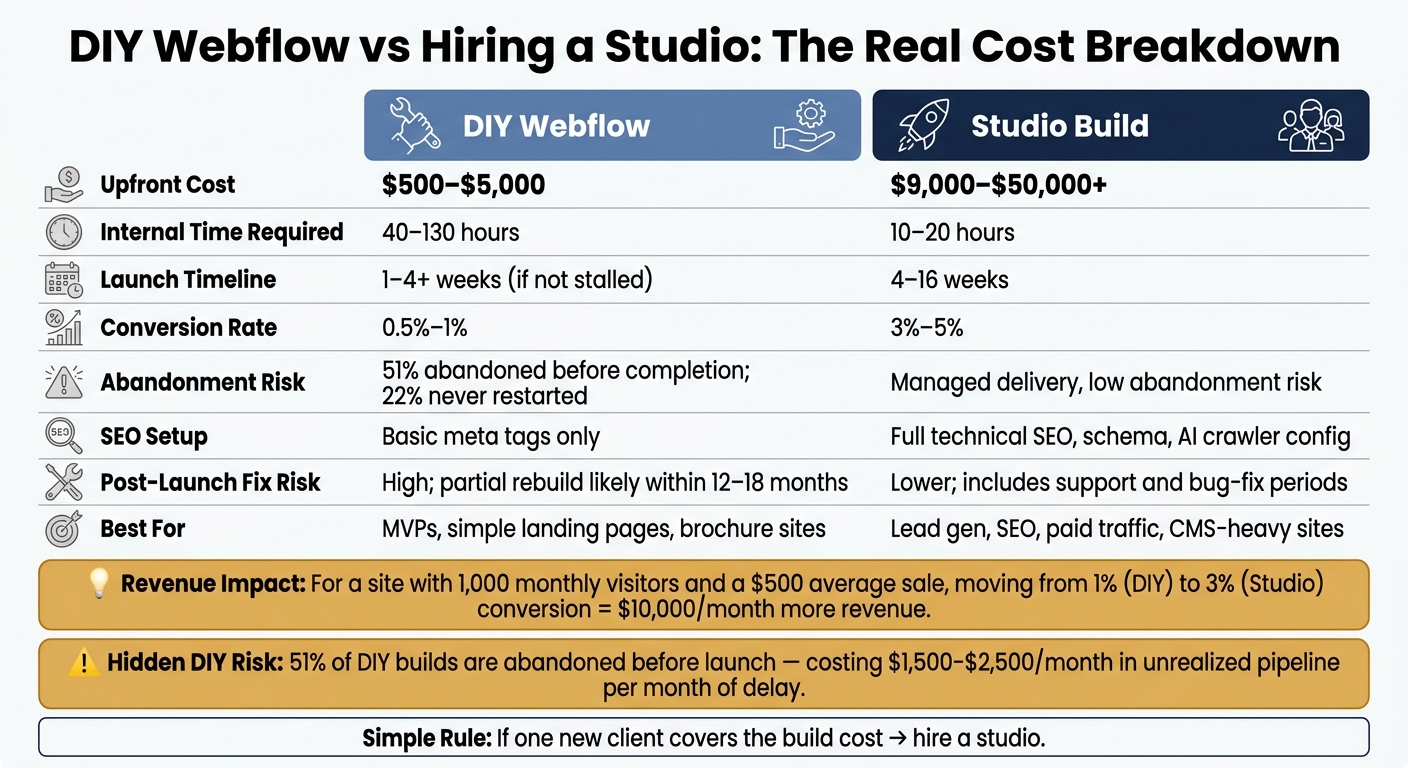
DIY Webflow vs Studio Build: True Cost Comparison
| Factor | DIY Webflow | Studio Build |
|---|---|---|
| Upfront spend | $500–$5,000 | $9,000–$50,000+ |
| Internal time | 40–130 hrs | 10–20 hrs |
| Launch speed | 1–4+ weeks | 4–16 weeks |
| Best for | MVPs, simple landing pages, brochure sites | Lead gen, SEO, paid traffic, CMS-heavy sites |
| Main risk | Delays, weak setup, rebuild costs | Higher first payment |
| Long-term cost | Often grows with fixes and lost time | Higher first fee, lower fix risk |
A simple rule I’d use: if one new client can pay for the site, hiring a studio is often the safer call.
The rest of this piece breaks down the full cost picture in plain numbers: plans, templates, labor, tools, cleanup work, and the revenue hit from a site that underperforms.
A DIY Webflow site can look low-cost at first glance. The base setup starts with a $23/month CMS plan, a $10–$20 domain, and a $24–$129 template. But for most teams, the more honest starting budget is $500–$2,500 once setup work and a few extras get added in.
Then the add-ons start stacking up.
Webflow’s built-in forms have limits, so many teams bring in tools like Zapier or Make.com. That can mean another $300–$800 in setup and subscription costs. If you need member logins, Memberstack costs $29–$199/month plus $1,500–$3,500 in setup. An extra editor seat adds $19/month. Need multiple languages? Localization can add $9–$39 per locale each month.
None of those line items look huge on their own. That’s the trap. One tool here, one subscription there, and pretty soon you’re paying more each month and juggling more moving parts. More tools also mean more setup work and more places where things can break.
Time is the other cost people tend to brush past. Setting up a premium template usually takes 20–40 hours, and a standard DIY build often lands in the 40–80 hour range. If the site leans heavily on CMS content, that can stretch to 70–130 hours. At $50/hour, that’s about $2,000–$4,000 in labor. At $80/hour, it climbs to roughly $3,200–$6,400.
Studio pricing climbs with scope, not just page count.
A small brochure site usually costs $9,000–$25,000. Growth-stage or mid-market marketing sites often land around $15,000–$30,000. More complex or CMS-driven builds tend to fall in the $20,000–$50,000 range. High-complexity or enterprise projects can go past that.
What pushes the number up? Usually the stuff that makes the site work harder:
For example, SEO migration and strategy can add $2,000–$5,000 by itself. Localization often adds 25–50 hours and about $2,000–$8,000. Copywriting is often billed separately, and support after launch usually comes through a monthly retainer instead of being tucked into the build fee.
A studio build also covers far more than just “making pages.” It often includes strategy, information architecture, UX design, development, CMS setup, QA, and launch, handled by a team with different skill sets. That’s a very different setup from handing one person a template and saying, “Let’s see what happens.”
The ranges below pull together the pricing and timeline differences above.
| DIY Build | Studio Build | |
|---|---|---|
| Upfront cash spend | $500–$5,000 | $9,000–$50,000+ |
| Internal hours | 40–130 hrs | 10–20 hrs of internal review |
| Launch timeline | 1–4 weeks if focused, longer if stalled | 4–16 weeks |
This is where the math starts to shift.
DIY projects are easy to begin. Finishing them is another story. 51% are abandoned before completion, and 22% never get picked back up. That changes the cost picture fast. A site that sits half-done isn’t just delayed work. For growth-focused teams, each extra month can mean about $1,500–$2,500 in unrealized pipeline.
So the issue isn’t only what you pay upfront. It’s also how long the site stays in limbo, how much staff time gets pulled into fixes and revisions, and what revenue gets left on the table while the build drags on.
The upfront numbers still don't show the full picture. A lot of the cost shows up after launch.
With Webflow, the learning curve often turns into lost hours, extra revisions, and slower launches. If a founder or marketing lead decides to build the site themselves, it's common to spend 20 to 40 hours just getting a template set up the right way, or 40 to 100+ hours for a custom result. That can eat up 2 to 4 weeks of focused marketing or sales work.
And that's where the bigger issue starts.
The main hidden cost usually isn't the build. It's what happens when the site underperforms. DIY builds often end up with messy class naming and CMS structures that weren't planned to grow. Later, when a studio has to step in and clean things up, that cleanup can add a 20% to 40% refactoring tax on top of the new build cost.
The difference between a DIY site and a studio-built site isn't just how it looks. It shows up in revenue.
DIY and template-based sites usually convert at 0.5% to 1%, while professionally built sites often land in the 3% to 5% range. That gap matters. A site converting at 1% can leave a lot more money on the table than one converting at 3%.
Why does that happen? Usually because of fixable issues: weak page structure, uneven mobile layouts, and content that doesn't guide people through a clear next step.
SEO can make the gap even worse. Many DIY builders stop at meta titles and never get into structured data or AI search setup. Miss those pieces, and you may be paying for rework in 6 to 12 months just to stay visible in AI search.
This is where DIY projects often hit the wall.
Connecting a Webflow site to the tools a business uses every day can get messy fast. Native forms work for simple cases. But once you need conditional logic, CRM sync, file uploads, or automated workflows, you'll often need third-party API integrations. That can add $300 to $3,500 in setup and subscription costs.
Testing is another common weak spot. A DIY builder may check the site on one device and one browser, call it good, and move on. A studio usually runs QA across multiple real devices, screen sizes, and browsers before launch. That extra work matters because the problems tend to show up later: broken forms, layout issues on certain mobile devices, or CMS items running into the 2,000-item plan limit.
Those gaps tend to show up most in three places:
| Factor | DIY Build | Studio Build |
|---|---|---|
| Design Consistency | Template-bound; weaker brand fit | Bespoke UI/UX built around your brand system |
| CMS Scalability | Built ad hoc; hard to restructure after launch | Engineered for growth with proper data modeling |
| SEO Setup | Basic meta tags only; misses schema and AEO/GEO foundations | Full technical SEO, JSON-LD schema, and AI crawler configuration |
| Responsiveness | Often breaks on non-standard devices | Rigorous QA across all browsers and devices |
| Performance | Bloated layouts; slower load times | Optimized for Core Web Vitals and page speed |
| Post-Launch Fix Risk | High; can trigger a partial rebuild within 12–18 months | Lower; includes support and bug-fix periods |
A site that needs a partial rebuild a year after launch isn't cheap. It just came with a second price tag hidden in the fine print.
Once hidden costs start cutting into revenue, this stops being a price question and starts being an ROI question.
DIY makes sense in a pretty small lane. If you're testing a new idea, putting up a one-page MVP, or building a simple brochure site with fewer than 100 CMS items, it can save money. A simple build usually costs under $500 per year, with site plans at $14–$39/month and a one-time template license of $49–$150.
But there’s a catch: DIY only works if someone can give it 20–40 uninterrupted hours over two weeks. That part matters. A site build dragged out between meetings, Slack messages, and random “I’ll get back to it later” sessions tends to stall. If it hasn’t moved in 30 days, hand it off.
DIY also fits when the site will likely be rewritten within 18 months because the product, offer, or positioning is still moving around. In that case, a rough first version is often good enough.
Once the site is tied to revenue, the math changes.
Paid campaigns, SEO growth, structured CMS content, product launches, and lead gen pages all come with business risk if the build is weak. At that point, a site isn’t just sitting there looking nice. It has a job to do.
The biggest cost driver is the conversion gap. For a site with 1,000 monthly visitors and a $500 average sale, the jump from a 1% DIY conversion rate to a 3% professionally built conversion rate equals $10,000 per month in revenue.
That’s where “saving money” can get expensive fast.
Most of the time, the choice comes down to five things: budget, timeline, internal bandwidth, tolerance for mistakes, and how much money is on the line if the site misses the mark.
| Signal | Go DIY | Hire a Studio |
|---|---|---|
| Budget | Under $1,000 | $5,000+ available |
| Timeline | Flexible; 30+ days | Fixed launch date; 4–12 week process |
| Available hours | 20–40 hours available now | Team is at capacity |
| Revenue stakes | Low; site is not a primary lead source | Site supports pipeline, ads, or SEO |
| Tolerance for mistakes | High; iteration is acceptable | Low; mistakes carry real business cost |
A simple rule of thumb: if one client would cover the build cost, hire a studio. When one client pays for the site, the site should be treated like a revenue asset, not just a design task.
The gap in upfront price is real. But total cost goes way beyond the build fee. It also includes time, delays, and what happens if the site underperforms. So this decision is less about sticker price and more about ROI.
The choice comes down to four things: site complexity, business risk, internal capacity, and revenue goals.
DIY can work when the stakes are low. Think a simple MVP, a short-term landing page, or a brochure site that isn’t expected to bring in leads. But once your site is connected to paid traffic, SEO, or pipeline, the numbers start to change. Professionally built sites tend to convert at 3–5%, while template-based DIY sites average 0.5–1%. That gap doesn’t just sit on paper. It hits revenue month after month while the site is live.
Time is the hidden cost many teams miss. A DIY build can take 40–80 hours of founder or marketer time. That’s time not spent on sales, product, or growth. And when a DIY project drags on, delay can turn into lost pipeline fast.
The real issue is simple: do the savings from DIY beat the cost of lost revenue, delays, and the chance of a rebuild? For most teams focused on growth, the answer tends to be pretty clear.
Your site is probably too important to build on your own if it’s a main business asset or a core lead-gen engine.
DIY usually isn’t the right move when your site needs SEO-sensitive pages, steady content publishing, input from several people, advanced integrations, or pro-level performance. The same goes if you’ve already missed your launch deadline or you can’t carve out 20–40 focused hours to get it built.
The biggest hidden cost is your time.
A DIY build can easily eat up 30 to 80 hours on setup, troubleshooting, and just getting up to speed. Put a dollar amount on that, and you're looking at $1,500 to $8,000 in lost productivity. That’s time you could’ve spent on sales, client work, or running the business.
And the costs don’t stop there. A weaker setup can lead to lower conversions, missed referral opportunities, thin SEO, and extra fixes later for integrations, CMS issues, or site speed problems. If the setup starts to hold you back and you need to move to something else, migration alone can cost $15,000+.
Yes - you can start with DIY and bring in a studio later. But in many cases, that ends up costing more than hiring a studio from the start.
DIY can make sense when you want to test an idea or launch an MVP on a tight budget. It’s a solid way to get something live without spending a lot up front.
That said, the tradeoff tends to show up later. If you’re missing launch deadlines, running into performance problems, or need advanced SEO and third-party integrations, it’s often time to call in a studio.
Here’s the catch: rebuilding a DIY site usually costs more than people expect. Why? Because the team isn’t just building the new site. They also have to fix structural issues first.