



Insights
SEO & GEO
Copy Link




How AI search picks brands to cite and how to optimize pages with answer-first copy, schema, facts, and crawlable pricing.
If you want Perplexity to cite your brand, your page needs to answer the question fast, show plain facts, stay up to date, and be easy for a machine to read.
That’s the short version. From what I see in the article, Perplexity tends to cite pages that do four things well:
It also seems to lean toward a few page types more than others:
A few details stand out. Pages often do better when the main answer appears in the first 60–100 words, update dates are visible in a format like March 15, 2026, and pricing is shown in plain text like $49/month instead of hidden in tools, tabs, or PDFs.
Here’s the simple takeaway: Perplexity is not looking for fancy brand copy. It is looking for pages it can read, verify, and quote with little guesswork.
| What helps citations | What hurts citations |
|---|---|
| Direct answer at the top | Long intros with no clear point |
| Clear H1, H2, and H3 headings | Vague headings |
| Plain facts and named entities | Soft claims with no proof |
| Visible dates and current info | Old pages with stale details |
| Crawlable HTML and schema | Hidden text, PDFs, login walls, bad JS |
If I were applying this today, I’d start with my top product pages, pricing pages, help docs, and comparison pages first. Those are often the easiest places to add a short answer-first intro, better headings, visible dates, and plain-language facts that Perplexity can cite.
The page-level signals that shape citation chances are the ones brands can control directly. You can see them most clearly in how a page is written, updated, and structured.
Perplexity tends to favor pages where the topic and user intent are clear right away. A focused page titled "2026 Email Marketing Benchmarks in the U.S." that opens with a short summary of key metrics is much more likely to get cited than a generic page that only mentions the topic in passing.
The fix is pretty simple: write answer-first intros. Put the main takeaway in the first 2–3 sentences. Then use question-shaped subheadings like "What is [topic]?" or "How much does [product] cost in the U.S.?" That gives Perplexity a tight, self-contained passage it can pull from directly.
After relevance, Perplexity looks for reasons to trust the source. Authority comes from clear subject knowledge, a consistent brand identity, and claims that line up with other credible sources. In practice, Perplexity seems to check for agreement across credible sources before citing a fact. So if your claims stay consistent across your own site and third-party mentions, your odds of being cited go up.
Freshness matters most for time-sensitive topics like pricing, regulations, statistics, and product features. Pages with recent publish or update dates signal that the information is current. Use date formats people in the U.S. recognize, such as "Updated: March 15, 2026", and add a scope note like "U.S. data as of Q1 2026" so the time frame is obvious.
Once a page looks relevant and trustworthy, structure affects how easy it is to extract. Clear structure helps Perplexity pull a precise passage. One H1 for the main topic, descriptive H2 and H3 subheadings, short paragraphs, and bullet lists or tables for steps and comparisons all make it easier for the model to break your content into answer-ready chunks.
Schema markup pushes this a step further. Adding FAQPage, HowTo, Product, or Article schema gives Perplexity machine-readable content units. Your main content should also live in crawlable HTML text, not be buried inside images, PDFs, or JavaScript-rendered components that can slow retrieval or block it.
| Issue | Impact on Perplexity | Fix |
|---|---|---|
| Long introductions | Intent mismatch; hard to extract | Lead with a 40–60-word direct answer |
| Missing schema markup | Harder to verify entities and facts | Add FAQPage, HowTo, or Product schema |
| Inconsistent facts across the web | Reduced trust, lower citation likelihood | Align data across your site and third-party sources |
| Vague or generic headings | Model can't identify section purpose | Use descriptive, question-shaped H2/H3s |
| Outdated content | Lower freshness signal | Add visible "Updated: [date]" in U.S. format |
These same patterns show up again in the page types most likely to earn citations.
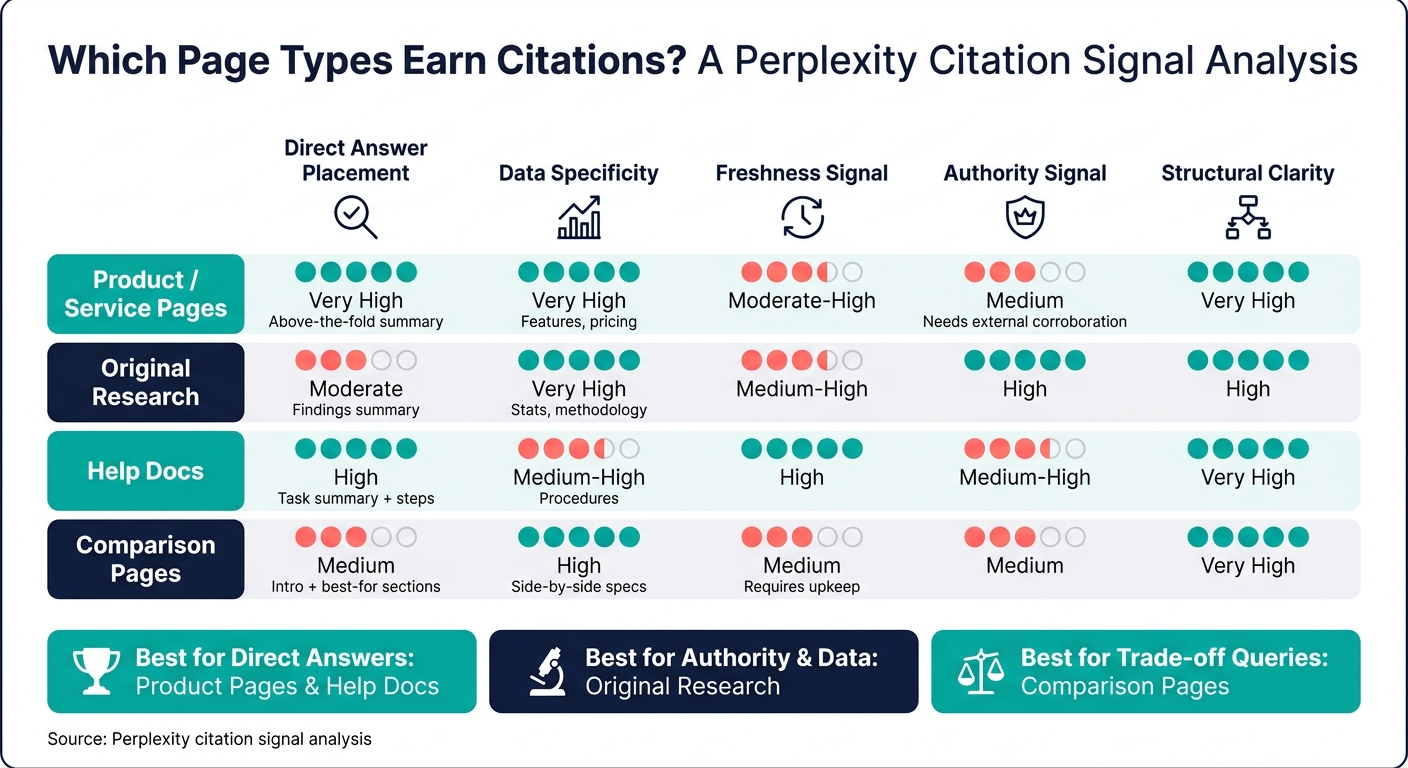
How Perplexity Decides Which Brands to Cite: Page Types Compared
Perplexity tends to cite pages that make a query easy to answer. In plain English, the best candidates usually answer one clear question fast and don’t leave much room for confusion.
Product and service pages earn a lot of citations because they answer definition, feature, and pricing questions head-on. They put the basics in one place, which makes the page easy to pull from.
These pages tend to work best when they start with a short, answer-first summary above the fold. That opening should define the offer in simple language. After that, a scannable feature list and a clearly labeled How it works section give Perplexity clean passages for more specific queries. Pricing matters too. If the page says plans start at $99/month or that a one-time purchase costs $1,250, Perplexity can answer cost questions directly instead of filling in the blanks.
That’s why these pages do so well: they bring together relevance, structure, and easy-to-pull details in one spot.
Other high-value page formats win in a different way. They package proof, process, or comparison in a format that’s easy to cite.
These page types perform well for different reasons.
Original research earns strong citations because it offers facts the model can point to. If the page includes a methodology section with sample size, collection period, and data sources, the numbers feel more trustworthy and easier to use.
Help docs earn citations in a different lane. They work well for procedural queries because they’re built around real tasks. A help article that starts with a short task summary and then moves into numbered steps lines up neatly with how people ask how-to questions.
Editorial guides sit somewhere in the middle. They tend to earn citations when the first paragraph defines the main topic, the content is grouped under descriptive H2 and H3 headings, and each section starts with the answer first. That setup makes the core point easier to spot and cite.
Comparison pages are a strong fit for queries about trade-offs, best-fit use cases, and plan differences. Perplexity uses these pages for trade-off queries.
What makes them citable is simple: neutral wording and side-by-side facts. Words like powerful or easy to use sound nice, but they don’t give Perplexity much to quote. Concrete details do. Think storage limits, user caps, pricing tiers, and uptime figures. A summary section such as Best for enterprises or Best for solo creators helps too, because it gives Perplexity a clean match between an option and the user’s situation.
These formats don’t all shine in the same area.
| Page type | Direct answer placement | Specificity | Freshness signal | Authority signal | Structural clarity |
|---|---|---|---|---|---|
| Product / service pages | High (above-the-fold summary) | High (features, pricing) | Moderate–High | Medium (needs external corroboration) | High |
| Original research | Moderate (findings summary) | Very High (stats, methodology) | Medium–High | High | High |
| Help docs | High (task summary, steps) | Medium–High (procedures) | High | Medium–High | Very High |
| Comparison pages | Medium (intro + best-for sections) | High (side-by-side specs) | Medium (requires upkeep) | Medium | Very High |
The pattern is pretty straightforward: product pages and help docs tend to be strongest at direct answer placement. Research reports lead on authority and data specificity. Comparison pages stand out when the goal is to explain trade-offs in a clean, structured way.
Knowing which page types tend to do well is only half the work. The other half is making sure those pages are easy for Perplexity to read, pull from, and cite.
Start with the pages that matter most: your homepage hero, top product or service pages, and three to five core guides or comparison pages that already rank or convert well. On each one, put the clearest definition, result, or claim in the first 60 to 100 words, before any story or backstory.
A vague opener like "Transformative solutions for forward-thinking brands" doesn't say much. A sharper version does the job fast:
"Acme Analytics is a reporting platform that connects your ad accounts and CRM to generate weekly revenue reports in under 5 minutes."
That one paragraph tells Perplexity what the product is, who it serves, and the main result.
Past the intro, tighten your H2 and H3 headings so they match the way people search. Use specific claims people can latch onto. "Cuts reporting time by 72%" or "used by 1,200+ U.S. marketing teams" says far more than loose marketing copy.
Once the writing is clear, set up the site so each page serves one intent.
Split pages by intent, so each page answers one query. That makes it easier for Perplexity to choose the right page for a given question instead of pulling a partial answer from an overloaded page trying to do too much.
After the copy and structure are in place, clear out any technical issues that keep Perplexity from reading the page. Give each content type a clear owner:
Then set a review schedule. Pricing and feature pages should be reviewed quarterly. Top-performing guides should be checked every six months. Documentation should be updated with each product release. The goal is simple: keep pages current and crawlable.
Some blockers are common, and they can quietly get in the way. Watch for pages excluded by robots.txt rules, noindex tags added by mistake, content stuck behind login walls, and JavaScript that hides key text from crawlers.
Priority pages should stay public, crawlable, and text-based. Pricing pages, in particular, should show plain dollar amounts like $49/month, billed annually in USD instead of burying the numbers in a calculator or PDF.
Use this checklist during content reviews, site redesigns, or pre-launch QA. It also works well when you audit your highest-value pages before a launch or refresh.
| Check | What to verify |
|---|---|
| Direct answer near the top | The page answers the likely question in the first screen, ideally within the first 100 words |
| Clear H1–H3 hierarchy | One descriptive H1, with supporting H2/H3 headings that match how people search |
| Named entities | Brand, product, category, and method are stated explicitly - not implied |
| Concrete facts | Specs, steps, dates, comparisons, or other data points are visible on the page |
| Named author or company byline | Named author, credentials, or company attribution is present |
| Claims backed by sources | Key claims are backed by primary sources, methodology notes, or external references |
| One page, one intent | The page answers one type of query - not a mix of commercial, informational, and navigational |
Quick test: Could a stranger understand the page topic, the core claim, and the key evidence without scrolling far? If not, it likely needs more work before it's ready for citation.
The page copy matters, but two other factors often decide whether Perplexity can use it at all: how current it is and whether it can crawl and render the page without issues.
Your update rhythm should fit the topic. If a page covers fast-moving subjects, review it more often. Add visible update dates when they make sense, keep a review schedule for high-value pages, and check that time-sensitive statements still line up with the latest source material. If a page is old and the topic changes fast, trust drops.
On the technical side, make sure key pages are public, load core content in clean HTML, and work well on mobile. Also check that they aren't blocked by robots.txt or stray noindex tags. Hidden text, overlays, tabs, and image-only layouts can get in the way if the underlying HTML isn't easy to access.
It also helps to widen your format mix. Product pages, research, help docs, and guides each answer a different kind of query. That gives you more chances to show up as a source. Clear internal linking and consistent terminology across those page types make that easier.
A page that answers the question fast, shows where its claims come from, and stays up to date is far more likely to earn a citation from Perplexity.
There’s no fixed timeline. Citations don’t happen overnight, and timing plays a big part.
In many cases, patterns start to show up early, then build over time. Keeping content up to date helps a lot, especially on pricing or feature pages. Pages updated within the past six months may be more likely to earn citations.
Brands that improve clarity and use an answer-first structure now are in a better spot as those patterns build.
Yes. Schema markup can improve your chances of being cited because it helps AI understand your page type, how the content connects, and the entities mentioned on the page.
It tends to work best when the schema is validated, lines up with your headings and body copy, and backs up answer-first content that gives direct answers to likely user questions.
Prioritize pages that work as answer-first resources.
Start with one specific user question. Then give the direct answer fast - ideally within the first 300 characters or the first two paragraphs. Don’t make people dig for it.
Use clear question-based headings, and add a short 40–60-word summary under each one. That format helps readers scan the page and find what they need without friction.
It also helps to include:
Put simply, the page should be easy to trust, easy to scan, and quick to answer the reader’s main question.