





Insights
Webflow
Copy Link




Overview of Webflow retainer services, pricing, common pitfalls, and how to choose a transparent partner for ongoing site growth.
A Webflow retainer is a monthly agreement where you pay a set fee to reserve hours from a Webflow developer or agency. This ensures your website stays updated, performs well, and supports your business goals without hiring full-time staff. Services typically include:
Pricing ranges from $2,200/month for 10 hours to $7,200/month for 40 hours. While retainers bring predictability and quick support, it's crucial to avoid pitfalls like vague agreements, underused hours, or rigid contracts. Look for detailed reporting, flexible terms, and clear communication to ensure value for your investment.
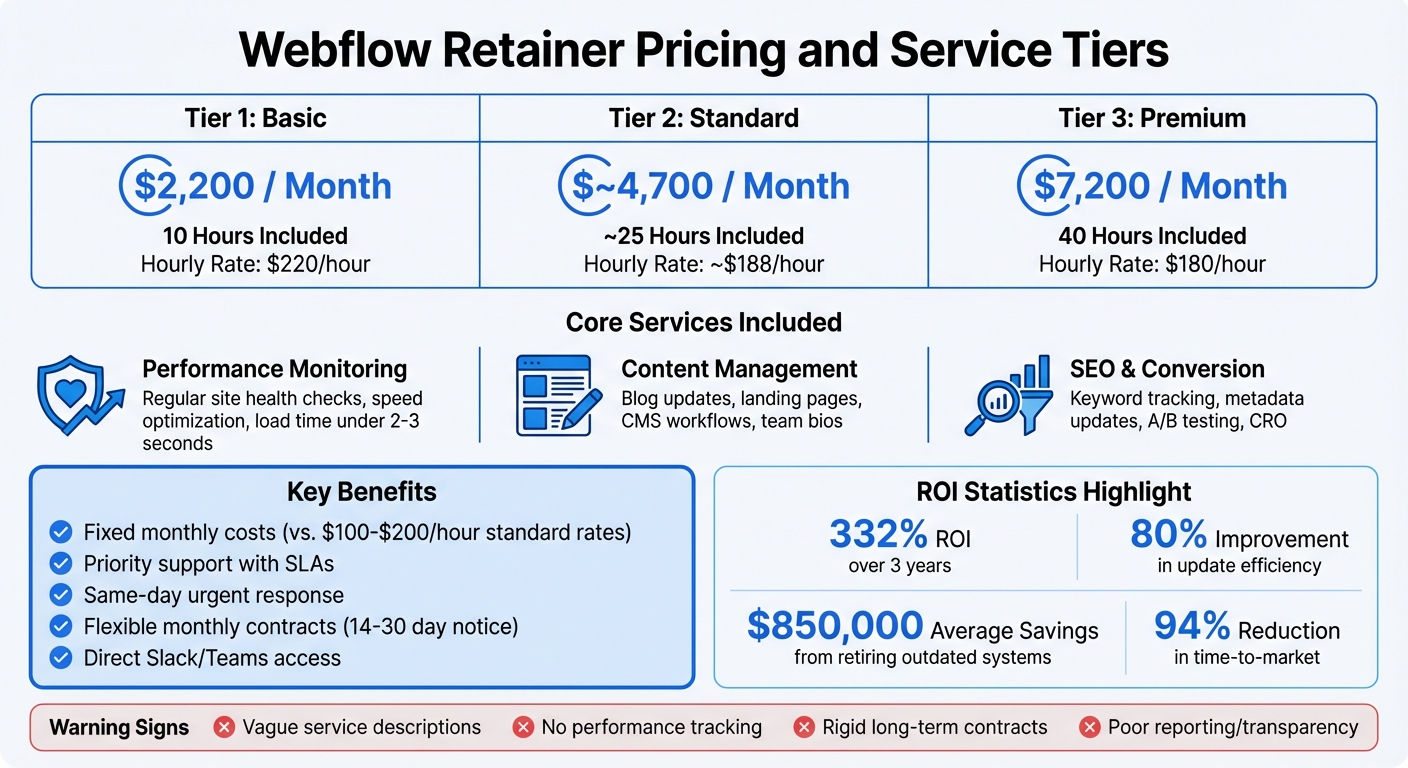
Webflow Retainer Pricing and Service Tiers Comparison
A Webflow retainer offers consistent, ongoing support that goes beyond just fixing emergencies. It’s a structured agreement that focuses on three key areas: maintaining site performance, managing content and CMS workflows, and boosting SEO and conversions. These aspects are essential for keeping your website running smoothly while driving growth.
A good retainer includes routine site health checks to identify and address hosting issues, slow-loading pages, or outdated integrations before they impact the user experience. This involves tasks like compressing images, converting them to WebP format, and ensuring they match their display sizes to minimize load times.
Your partner will also review custom code and third-party integrations to ensure compatibility across browsers and maintain peak performance. Outdated plugins and unnecessary interactions are removed to reduce bandwidth usage, keeping your site’s load time under the ideal 2-3 seconds.
Content management is another critical component. This includes tasks like uploading blog posts, updating team bios, creating landing pages, and managing forms. For websites with complex CMS setups - such as those using nested references or conditional filtering - your partner will refine and adjust these structures as your content library grows.
Webflow takes care of hosting and security updates automatically, which can save anywhere between $250 and $1,000 per month. This allows your retainer hours to focus on creating templates and training your team rather than fixing security issues.
To keep your site ranking well in search results, retainers typically include ongoing keyword tracking and metadata updates. This involves fine-tuning titles, descriptions, Open Graph images, and implementing structured schema to enhance search engine understanding.
Additionally, Conversion Rate Optimization (CRO) is addressed through A/B testing and experiments using tools like Webflow Optimize.
For instance, in May 2025, Walker & Dunlop leveraged Webflow’s AI-powered testing tools to make 10–15 content updates daily, guided by real user data. The results were impressive: a 56% increase in form submissions and 23% year-over-year growth in organic search traffic. Kokko Tso, Vice President of Digital Marketing, shared:
"Combined with Webflow's visual-first platform, Optimize and Analyze empower our teams to evolve with our clients, experiment and pivot quickly, and, ultimately, create more personalized digital experiences".
A Webflow retainer turns your website into a tool for continuous growth by offering fixed monthly pricing and quick access to support. With a retainer, you avoid long delays and unexpected expenses, ensuring your site stays updated to meet changing user expectations and maintain a competitive edge.
A retainer brings financial predictability. For example, you could secure 50 hours at $80 per hour with same-day urgent response, compared to paying standard hourly rates of $100 to $200 or more. This setup eliminates surprise costs and guarantees that a developer is ready to help whenever needed, thanks to an existing contract.
Retainers often include service level agreements (SLAs) that outline response times, along with direct access to your team via platforms like Slack or Microsoft Teams for fast communication. Most operate on flexible monthly contracts, which can be adjusted or canceled with 14–30 days' notice.
This predictable pricing ensures you’re prepared for both immediate needs and long-term improvements.
In addition to stabilizing costs, regular updates through a retainer deliver measurable returns. Webflow implementation, for instance, has been shown to provide a 332% ROI over three years while improving update efficiency by 80%. Companies have also reported saving an average of $850,000 by retiring outdated systems and reallocating resources after transitioning to Webflow.
Routine optimizations through a retainer help improve conversions and leverage AI-driven personalization for growth. For example, bounce rates can increase by 32% when page load times jump from 1 second to 3 seconds - a delay that could lead to lost revenue if not addressed quickly. Additionally, AI-driven search traffic converts six times better than non-brand SEO traffic, and refreshing content quarterly ensures your site stays optimized for both traditional and AI-powered search engines.
Retainers also align perfectly with broader marketing strategies. Webflow’s content efficiencies help reduce time-to-market by 94%, enabling teams to launch campaigns and experiments in just hours. As one Director put it:
"The value of speed to market is ultimately time is money. The more time you have [to build] these experiences and market them, the more value you can actually drive".
Over time, your Webflow partner gains a deep understanding of your business, market, and competitive landscape, acting almost like an in-house team. This partnership allows for seamless planning around product launches and marketing campaigns. Mason Poe, Managing Member at Edgar Allan, describes this shift:
"Historically, agencies won sites at cost and made money keeping them alive. With Webflow, we flip that model and focus on what actually drives growth: optimization, conversion, and revenue".
Retainers can be a great way to ensure your website stays in top shape, but they can also lead to headaches if expectations aren’t aligned. Knowing the common pitfalls can help you structure agreements that safeguard your investment and keep your site running smoothly. Since ongoing updates are essential, having clear reporting is key to tracking results.
Scope creep is one of the biggest challenges. It often happens when small requests balloon into larger projects, eating up your monthly hours faster than anticipated. With Webflow's reputation as a "no-code" platform, clients may assume that even complex features will be quick and easy to implement. As Claire Vinali from Defyn explains:
"The most common frustration we hear is: 'I thought this would be simple, but I'm spending hours trying to understand concepts that seem like coding any way.'"
Another culprit is technical debt. If a site wasn’t built with proper naming conventions or reusable symbols, updates can require manual changes across multiple pages. This wastes valuable retainer hours on tasks that should only take minutes. The solution? Clearly define the scope of work in writing. Outline what’s included, what’s not, and add a clause for billing out-of-scope work separately.
On the flip side, underused hours can also be a problem. You don’t want to pay for hours you aren’t using. To avoid this, set up automatic notifications when you hit 80% and 100% of your allotted hours. A client portal with real-time tracking of hours and pending tasks can also help. Transparent reporting ensures everyone is on the same page about how hours are being spent.
Without detailed reporting, it’s hard to know if your retainer is delivering the results you expect. Monthly reports should focus on key metrics like performance, user behavior, and conversions, all tied directly to the work being done. Including visual updates, like Loom videos showing bug fixes or new features, can help you see exactly what’s changed.
To maintain control, keep your website in your own Webflow workspace and grant your partner guest access. This prevents access issues or transfer problems if the relationship ends.
Flexibility in contracts is another important factor. Long-term, rigid agreements can leave you stuck with a partner who isn’t meeting your needs. Instead, opt for rolling monthly contracts with a short notice period - 14 to 30 days is ideal. This gives you the freedom to walk away if things aren’t working out.
Make sure your contract includes a termination clause that guarantees payment for work completed up to that point. Securing a down payment before starting work is also a smart move, as it ensures both parties are committed. Adding a buffer to deadlines can help account for unforeseen delays, like technical hiccups or illness. These small adjustments can make a big difference in keeping the partnership smooth and frustration-free - without locking you in for years.
When it comes to Webflow retainer agreements, certain warning signs can spell trouble for your investment. These issues can lead to wasted money, delays, and a lot of frustration. Here's a closer look at the key red flags to keep on your radar before signing on the dotted line.
Be cautious of agreements that use broad terms like "website support." These often gloss over critical limitations that become apparent only when advanced features are required. While Webflow is known as a no-code platform, tasks like implementing gated content, dynamic filters, or complex form logic often need custom JavaScript or third-party tools. If these aren't explicitly covered, you could face unexpected costs.
Pay close attention to how the agreement addresses Webflow's built-in limitations, such as the 10,000-character global limit for custom code, the 5,000-character cap per page, and the 10,000-item CMS entry ceiling. Without a clear strategy for handling these restrictions, you might find yourself forced into costly upgrades or even switching platforms altogether.
Another red flag? Agreements that only promise email support, which can lead to 24–48 hour delays during critical site issues. Look for providers who offer faster communication methods, like a dedicated Slack channel, especially for urgent problems. Also, ensure the contract includes tracking for Core Web Vitals and site speed and newer metrics like Answer Engine Optimization (AEO). If these aren't mentioned, it may indicate a lack of commitment to your site's performance.
A lack of detailed performance tracking and reporting is a major warning sign. Without regular updates, you won’t know if your retainer hours are being used effectively or if your site is staying healthy. Webflow sites need constant monitoring for accessibility and SEO issues, such as missing alt text or improper heading hierarchies. These can often be flagged by Webflow's Audit panel.
Reliable contracts should include regular reports from the Webflow Audit panel, highlighting critical errors (red flags) and moderate issues (yellow warnings). These reports should also confirm the active management of meta titles, descriptions, and schema markup. As Gartner predicts a 25% drop in traditional search engine use by 2026 due to the rise of AI-driven answers, your reports should also include metrics for AI visibility, not just standard SEO rankings.
Additionally, make sure embedded scripts like Google Tag Manager are monitored to ensure they stay within Webflow's character limits, avoiding emergency fixes. Accessibility checks should cover high-priority issues like missing alt text, skipped heading levels, and duplicate element IDs. If your provider can’t deliver this level of detail, they’re not offering the transparency you need.
Long-term contracts without clear termination clauses are a serious red flag. These agreements can trap you into paying for subpar work, even if deadlines are missed or deliverables don’t meet expectations.
"The negotiation window closes permanently once you sign." – QA Engineer, Symilars
Your contract should include a termination clause that allows you to exit if there are issues like missed deadlines or poor communication. Look for provisions like "kill fees", which ensure the provider is only paid for completed work if you decide to terminate the agreement. Avoid contracts that rely on time-based invoicing or require more than 50% of the payment upfront. A milestone-based payment schedule (e.g., 30% upfront, 40% midway, and 30% upon completion) is a safer choice.
Also, ensure the agreement includes a standard 30–90 day warranty period for post-launch bug fixes at no extra cost. Finally, the contract should clearly state that you own 100% of the code and assets once the project is complete or fully paid for. Without these protections, you could find yourself locked into an unsatisfactory partnership with no easy way out.
For a Webflow retainer to deliver results, you need a partner who not only understands Webflow's capabilities but also aligns with your business objectives. Look for Webflow-certified developers who can back up their skills with measurable results, not just flashy portfolio screenshots. The right partner will handle custom code when needed, integrate seamlessly with tools like HubSpot, Mailchimp, or Zapier, and focus on outcomes such as improved conversion rates and faster page load times.
It's also crucial to demand regular performance updates. These should cover metrics like page speed and SEO health, ensuring your site stays optimized. Make sure they communicate effectively, using tools like Slack or Teams, with quick response times. Clear service agreements and well-defined contract terms are non-negotiable.
"Choosing the right Webflow agency is not a design decision but a business one." – Mihajlo Ivanovic, SEO and Content Expert, Flow Ninja
Flexibility in contracts is another key factor. Opt for month-to-month agreements with a 30-day cancellation policy, giving you the freedom to pivot if the partnership doesn't meet your expectations. Additionally, confirm that the contract grants you full ownership of your Webflow account, assets, and code. A great partner will also provide training or custom documentation - like Loom videos or Notion guides - so your team can handle everyday updates independently.
By adhering to these standards, you’ll establish a partnership grounded in transparency and measurable success, ensuring your Webflow retainer drives ongoing growth and optimization.
Once you’ve outlined the qualities you need, it’s time to evaluate potential partners. Here’s how to move forward.
Start by reviewing live sites from their portfolio on both desktop and mobile. Don’t just focus on how the sites look - ask for examples of how they’ve tackled complex CMS challenges. Request samples of their monthly reports and learn about their approach to tracking performance beyond basic SEO metrics.
Pay attention during initial conversations. A trustworthy partner will clearly explain technical limitations and act as a business advisor, helping you align your website strategy with your broader marketing goals. If they’re vague about what’s included in the retainer or avoid answering questions about contract terms, consider it a red flag. The best partnerships thrive on clear expectations, measurable results, and the flexibility to evolve together.
To figure out how many retainer hours you'll need, start by evaluating your website's size, complexity, and ongoing support requirements. Think about aspects like the amount of content, the structure of your CMS, and any integrations you rely on. Outline the specific tasks you anticipate - whether it's regular updates, maintenance, or adding new features. Collaborate closely with your Webflow expert to clearly define your needs from the start. Open communication and a well-defined scope will help ensure the retainer hours match your website's goals and prevent surprise expenses.
A monthly Webflow retainer report should include key performance metrics, project updates, completed deliverables, ongoing tasks, and any issues or concerns. This helps keep communication clear and ensures everyone stays aligned with your website's growth and optimization objectives.
It's important that the client owns the Webflow account during a retainer. While a freelancer or agency might start building the site on their own account, they should transfer it to the client once the client confirms ownership of the Workspace. This approach ensures the client maintains full transparency and control over the project.