



Insights
SEO & GEO
Copy Link




Webflow gives a clean technical SEO base, but rankings still depend on content, site structure, redirects, and links.
Yes - Webflow is good for SEO, but it won’t do SEO for you.
If I had to sum it up in one line, it’s this: Webflow gives you a clean technical setup, but rankings still depend on content, site structure, redirects, and links. That’s the whole story in plain English.
Here’s what matters most:
A few points stand out. Webflow creates category and tag archive pages by default, and those pages can become thin if you leave them empty. Its CMS also has a 10,000-item cap on Business plans. And while Webflow serves images through a CDN in WebP and AVIF, that does not fix oversized source files.
My honest take: Webflow is a solid choice if your team can handle the SEO setup with care. If not, the platform won’t save you.
This article breaks down where Webflow helps, where it falls short, and which settings deserve your attention before and after launch.
Webflow’s main SEO strength is its built-in technical setup. It outputs clean, semantic HTML and gives you control over page-level SEO fields. That means search engines can read the content right away, without waiting for client-side scripts to load. It also gives you a solid starting point for site speed and other technical SEO work.
That said, Webflow doesn’t do the thinking for you. Your team still needs to handle titles, descriptions, canonicals, alt text, URL slugs, and redirects with care. Those fields need proper setup, not guesswork. These features do their best work when titles, canonicals, and content structure are set up well.
Webflow’s CMS can support SEO at scale because collection page templates keep design, semantic HTML, and heading structure consistent across large groups of pages. Dynamic fields make that process much easier. For example, you can map an “SEO Meta Title” field straight into a collection template, so each blog post, case study, or service page gets its own properly formatted title tag.
That matters a lot when you’re publishing many pages that need the same setup without looking copy-pasted. Blogs, case studies, and service pages are common examples. Large migrations can also get a lot from this kind of structure.
The CMS helps once your site starts to grow, but the results still come down to clean planning and correct setup.
Webflow itself isn't the issue. Poor execution is. Most SEO losses come from platform limits, setup mistakes, or a weak plan.
That shows up in three places again and again: platform limits, setup errors, and weak SEO strategy.
A weak content plan will stay weak on any platform, and Webflow doesn't change that. If your pages go after the wrong keywords, miss search intent, or offer thin coverage, they won't perform well no matter how clean the code is.
Archive pages are one of the biggest trouble spots. Webflow creates category and tag archive pages by default. If those pages don't include original, useful copy, they can turn into thin pages that waste crawl budget and create indexing problems. You have two solid options: build those pages out properly, or add a noindex directive so search engines skip them.
Webflow also doesn't include a built-in schema markup generator. If you want rich snippets, you'll need to add custom schema markup. And there is a ceiling for large publishing teams: CMS item limits stop at 10,000 on Business plans. Internal linking matters too. When links between pages are weak, crawlers have a harder time finding and ranking deeper content.
Before launch, turn off Search Engine Indexing on the staging subdomain.
Site migrations can also go sideways fast. If 301 redirects are missing or mapped the wrong way, you'll end up with 404 errors and lose built-up link equity.
Image handling is another easy miss. Webflow does not compress images for you when you upload them, so a big hero image stays heavy unless you shrink it first with a tool like TinyPNG or Squoosh. That extra weight can slow down pages and hurt SEO.
One more thing: don't add a second canonical tag through custom code. Conflicting canonical tags can weaken indexing signals.
Next up are the settings that matter most before launch, because they help stop these mistakes before they cost you traffic.
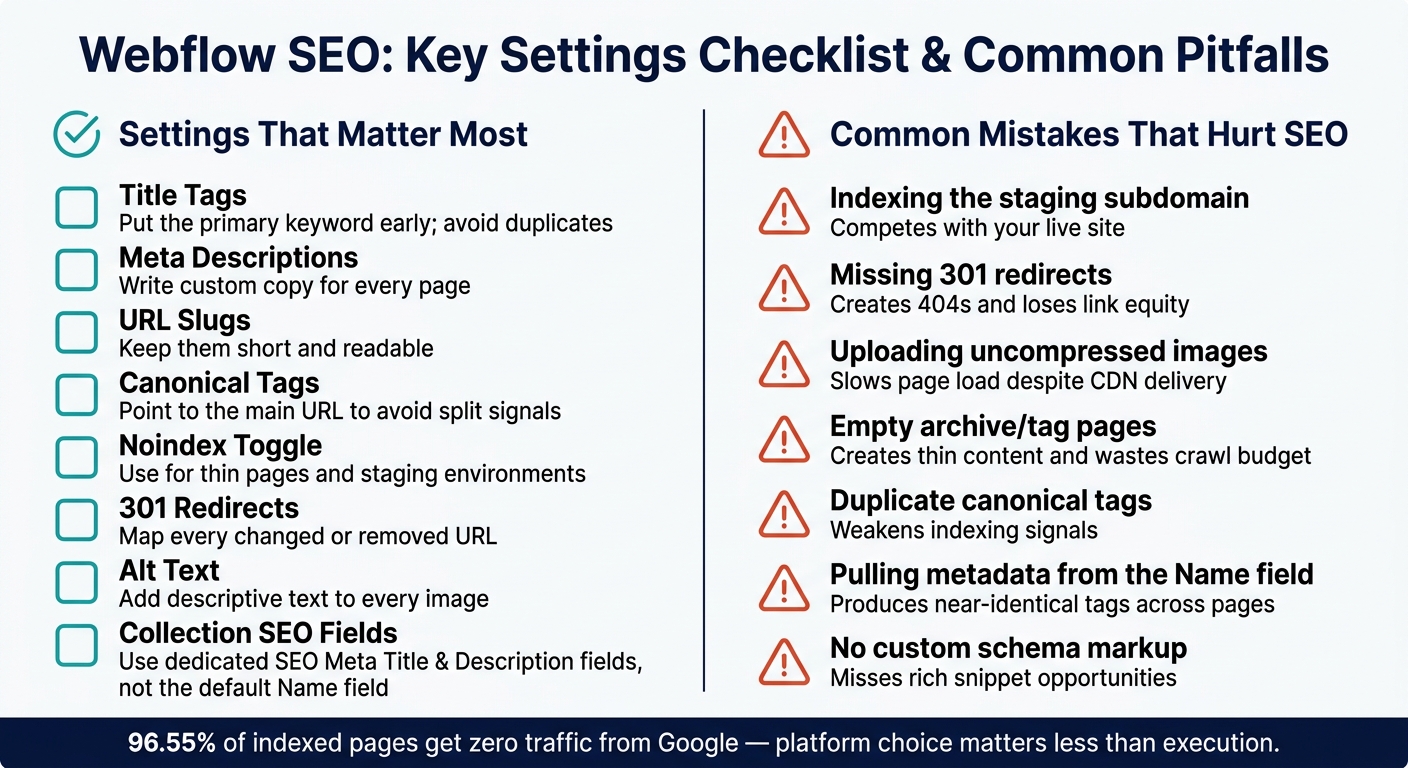
Webflow SEO: Key Settings Checklist & Common Pitfalls
These settings help you avoid the Webflow SEO mistakes that show up most often.
Start with the title tag. Put your primary keyword near the beginning, and make sure each page has its own meta description. That sounds basic, but it’s where a lot of sites go off track.
Webflow creates canonical tags by default. That works fine for most pages. But if you’re dealing with a cross-domain setup or URL parameters, you may need to override the canonical with custom code. Before launch, check that the indexing toggle is turned off in Project Settings so the webflow.io staging version doesn’t compete with your live site. After launch, submit the live sitemap in Google Search Console.
If you change slugs or move pages, use Webflow’s 301 redirects. Skip that step, and you can end up with broken pages, lost links, and traffic drops that are painful to clean up later.
Images matter too. Compress them before you upload, and add descriptive alt text to every image. Webflow serves images in WebP and AVIF through Amazon CloudFront's CDN, which helps with delivery. But that doesn’t magically fix oversized files. If the source image is huge and uncompressed, the page can still load slowly.
The settings below usually have the biggest SEO effect:
Webflow’s {{wf}} syntax fills those fields across collection items automatically, so you can create unique metadata at scale without editing every page by hand.
Once these settings are handled, the next step is figuring out whether Webflow fits your team’s workflow and the size of the site.
Webflow tends to work best when a site already has a clear SEO setup and the team knows how to maintain it. It’s a strong match for design-led marketing sites, B2B/SaaS sites, agencies, and portfolios. If your team wants to manage SEO fields and update content without leaning on developers every time, Webflow is a good fit. That’s a big deal when marketing teams need to publish and refresh pages on their own.
The sweet spot is usually small to mid-size content sites. At higher volume, Webflow can start to show its limits. It doesn’t offer server-side rendering for personalized pages, and it doesn’t provide server log access for deep technical audits. That makes it a weaker choice for very large catalogs or heavy publishing operations.
Most Webflow SEO issues don’t come from the platform itself. They come from loose process and too many thin pages.
The final call has less to do with the platform and more to do with how well the site is run.
Webflow gives you a solid technical base. But here’s the tradeoff: the platform handles the infrastructure, while your team handles the strategy. 96.55% of indexed pages get zero traffic from Google, and that almost never happens because of the CMS alone. It usually comes down to content quality, site structure, backlinks, and how steady the team is with execution.
No. Webflow gives you a solid technical base with clean, semantic code and built-in control over metadata, canonical tags, and 301 redirects. But it doesn't handle SEO for you.
Your rankings still come down to content quality, topical authority, backlinks, and site structure. So even if your Webflow site is technically sound, it can still have a hard time in search if there's no clear plan behind it.
The most common Webflow SEO mistakes usually come down to basic execution gaps. Teams often miss structured data, reuse weak meta titles and descriptions, or let utility pages like style guides and 404 pages get indexed by accident.
Performance issues can hurt too. Slow load times from uncompressed images, weak internal linking, and missed or incorrect redirects during migrations or content updates can drag down rankings and waste backlink equity you already earned.
It depends on your scale and what the site needs to do.
For marketing-led sites, blogs, and mid-sized content projects, Webflow is a strong fit. You get clean HTML, fast hosting, and solid control over metadata. That makes it a good match for teams that want speed without getting pulled into heavy dev work.
At a much larger scale, though, Webflow can start to feel tight. CMS Collections are capped at 10,000 items. So if you're running a huge content operation, building programmatic SEO at scale, connecting to deep backend systems, or managing a massive content library, you may hit architecture limits.