



Insights
SEO & GEO
Copy Link




Make category pages crawlable, answer-first, and structured so Google can quote them in AI Overviews.
If I want Google AI Overviews to cite my site, I need more than rankings. I need pages Google can crawl, read, and quote, plus a clear topic focus and pages that answer questions fast. One data point stands out: 88% of cited text in AI Overviews comes from visible body copy, and 43% of cited sources may not rank on page one for the same search.
Here’s the short version:
noindex, and put key text in raw HTMLOrganization, Article, BreadcrumbList, Service, FAQPage, and related types that fit the pageWhat this means in plain English: Google is more likely to use pages that are easy to parse, tightly grouped around one topic, and written in quote-ready language. So if I want visibility in AI Overviews, I should treat my category page like the center of a topic map, not just a sales page.
This article lays out that process in a simple order: eligibility, topic depth, site structure, and page updates.
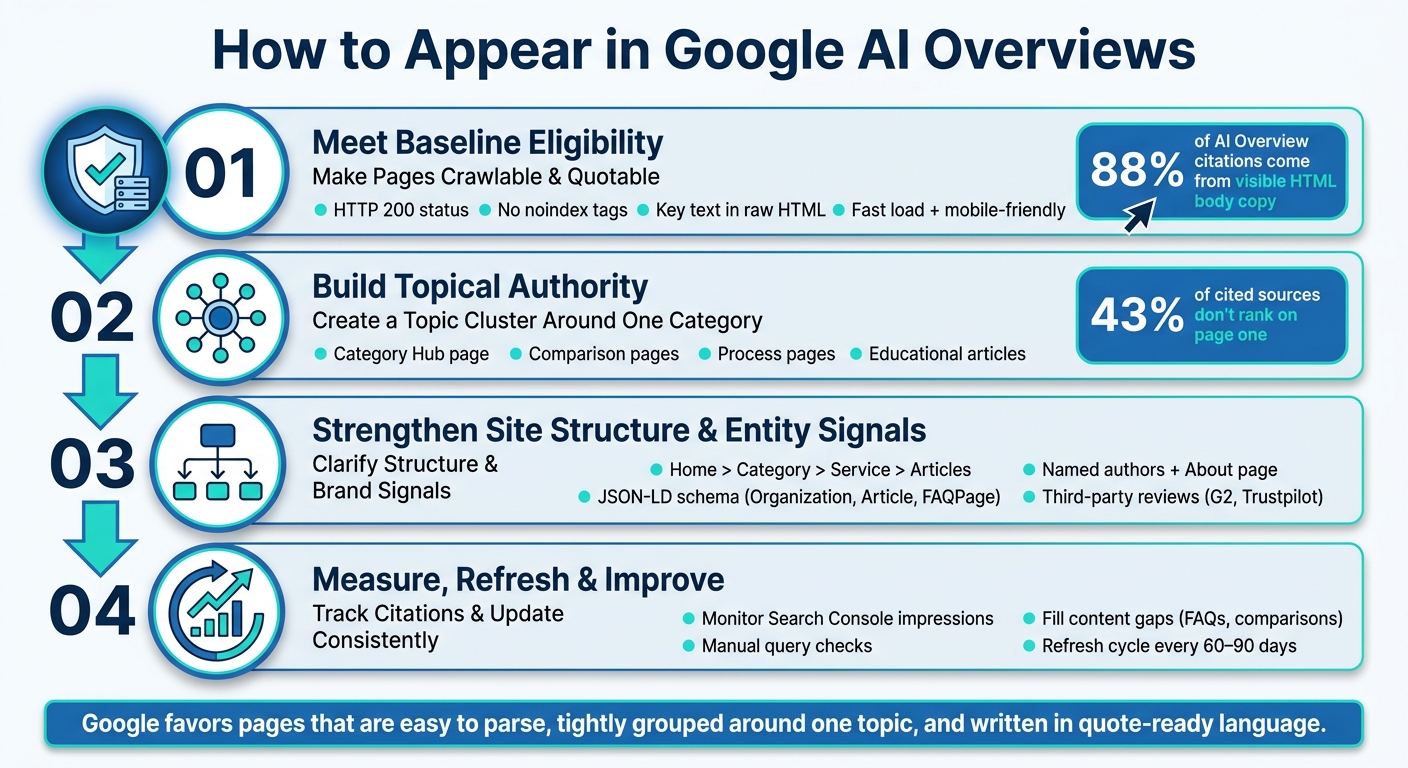
How to Appear in Google AI Overviews: 4-Step Framework
Google needs to crawl, index, and read your category pages before anything else can happen. So start with the hard stops: your target category pages should return an HTTP 200 status, not be blocked by robots.txt, and not carry noindex tags.
The text Google may quote also needs to live in the visible HTML body. Analysis of 140,000 sources found that 88% of text fragments in AI Overviews came straight from visible HTML body content. That’s a big clue. If your page depends only on client-side rendering, some crawlers may see little to nothing at all.
A simple check helps here: inspect the raw HTML with curl or a bot simulator. If the page looks mostly empty, switch to server-side rendering. If Google can’t see the text, it can’t use it.
Once the page is readable, the next layer is how fast it loads and how easy it is to scan.
Your pages should load fast, work well on mobile, and follow a clear H1-H2-H3 structure. That sounds basic, but it matters. Clean structure makes it easier for Google to find the main answer without digging through a wall of text.
Keep sections short. Use brief paragraphs, bullets, and plain language so the key point stands out.
Add descriptive alt text and video transcripts too. Those details help keep supporting information machine-readable. Meta descriptions can also play a part - AI Overviews can use them as source text. Keep them short, factual, and lined up with the category question the page answers.
Once those fixes are in place, check them in Search Console.
Google Search Console is your first checkpoint. Make sure your main category pages are indexed and free from manual actions or crawl errors. It reports impressions and clicks, but it does not break out AI Overview data on its own.
That said, impressions and clicks for your target queries still tell you a lot. If those numbers start moving on searches that are likely to trigger AI Overviews, your category pages may be showing up in the right places.
It also helps to run a monthly check on your top category pages. Look for:
Fix those issues first so your category pages stay ready to cite.
After the pages are technically eligible, the next step is building the category hub and support content that gives Google a reason to cite your site.
After crawlability, focus on one clear category and build a connected content cluster around it. That’s how you show depth. Google tends to favor sources that cover a topic from multiple angles, not just a single standalone article. It wants to see a structured set of pages built around the same subject.
One of the best ways to do that is with the hub-and-cluster model. You place one main category page at the center. That page explains what you do, who it’s for, and how it works at a high level. Then you support it with related pages, each focused on one part of the category.
For a Webflow marketing site, the hub might be a main category page, with cluster pages focused on migrations and launch questions. Each cluster page should link back to the hub, and the hub should link out to each cluster page. That setup helps Google see how your pages connect and which category you want to own.
Once the hub and cluster are live, use page structure and entity signals to help Google recognize the category more easily.
Put your effort into page formats that answer one question clearly. Use formats Google can scan fast and reuse with little friction.
| Page Type | Purpose for AI Overviews | Recommended Format |
|---|---|---|
| Category Hub | Establishes broad authority | High-level overview with links to clusters |
| Comparison Pages | Helps AI answer "best of" or "vs" queries | Structured tables and clear pros/cons |
| Process Pages | Feeds "how it works" summaries | Numbered lists and step-by-step headers |
| Educational Articles | Answers specific long-tail questions | Q&A format with direct answers at the top |
For more complex queries, comparison and process pages should move to the front of the line. In one study, 43% of sources cited in AI Overviews did not rank on the first page of old-school organic results. That means structure matters just as much as rankings.
The writing rule here is simple: put the answer first. Start with a short, self-contained answer, usually 40 to 100 words, then follow with added detail.
Go after top-of-funnel informational queries that fit formats like How to, What is, and Why is. For a Webflow marketing site, good examples include What is a Webflow migration? and What should a SaaS website include before launch? These are the kinds of questions people ask before they’re ready to pick a service, which makes them a strong fit for category-level pages.
AI Overviews tend to favor pages that answer complex questions in a format Google can reuse. That works best when your internal links, schema, and brand signals all point in the same direction.
Once your content cluster is live, make it easy for Google to understand how your site fits together. That means a clean hierarchy, smart internal links, schema markup, and clear brand details.
Stick with this structure: Home > Category > Service > Supporting Articles.
It’s simple, and that’s the point. Google can follow it without much guesswork.
Each supporting page should link back to the category page near the top of the page. Then the category page should link out to every related page. That back-and-forth linking helps turn the category page into the main hub for the topic.
Use JSON-LD for Organization, Person, Article, BreadcrumbList, Service, and FAQPage.
Only add Review or AggregateRating if you have reviews you can verify. If you update a page, update dateModified too. And keep your schema aligned with what the page actually says. If the markup and the visible content don’t match, that can create confusion.
Google tends to identify businesses more clearly when the site includes a full About page, named authors with verifiable expertise, visible contact details, and the same brand name across the site.
So don’t leave those pieces half-done. Use a complete About page, named authors, visible contact details, consistent brand naming, and detailed case studies to show expertise. Third-party proof matters as well. Google Business Profile optimization and strong ratings on review platforms like G2, Trustpilot, and Capterra give outside confirmation that supports entity clarity.
Once those signals are in place, track which pages Google surfaces and refresh the ones that already get visibility. Then measure which pages get cited, and tighten the pages that already attract impressions.
Once your category hub and support pages are live, pay attention to what Google is actually using. Search Console is a good place to start. Watch how your category terms perform over time. If impressions are high but clicks stay low, that can be a sign that an AI Overview is answering the query before anyone visits your page.
It also helps to check your top category queries yourself. Run the searches and look at the results page. See whether your brand shows up in the AI-generated box or in the linked sources. Search Console gives you impressions and clicks, but it doesn't break out AI Overview clicks from standard organic clicks. That's the gap manual checks help cover. While you're there, keep an eye on recurring People Also Ask questions. Those often point to content gaps hiding in plain sight.
Use that performance data to confirm which category pages Google already understands and cites. Then look for what's missing, especially:
After you know which queries are surfacing, update the pages most likely to feed them. A 60- to 90-day update cycle helps keep your category pages, support guides, and proof pages current.
Each update should reflect something real. That could be a new case study, a revised service scope, or a clearer answer to a common question. Think of it less like polishing old copy and more like keeping the shelves stocked. If the page is meant to be cited, it needs current information people can point to.
On each refresh, make sure your most important pages still render in raw HTML. Then check rendering again after every update.
The work doesn't stop after launch. AI Overview visibility tends to improve when your best pages stay current, crawlable, and easy to quote. Stick to a fixed refresh schedule, and keep adding answers around the questions your category hub already covers.
There’s no fixed timeline for showing up in Google AI Overviews. In most cases, it won’t happen overnight. You’ll often see early signals first, then stronger visibility can build over time.
One thing that can help is updating key pages within the last six months. The fastest path is to publish crawlable, answer-first pages backed by supporting proof, clear entity signals, and schema markup.
Yes. A small business can show up in Google AI Overviews without holding the top organic spot.
Google may pull from a lower-ranked page when that page gives a direct answer that's easy to parse and backs up its claims with trust signals.
To improve your odds, focus on a few basics:
Start with the page that already ranks best for the exact category questions you want to win. In most cases, that’s a top product or service page, or the comparison or guide page that lines up most closely with the search.
Make the page answer-first. Put the direct answer in the first 40–100 words. Use one clear main question, then build the page around question-led H2s and H3s. Add the right schema, keep the HTML crawlable, and back up key claims with a named author or clear proof.