



Insights
Webflow
Copy Link




Seven questions to vet Webflow developers for CMS, responsive builds, SEO, performance, integrations, and post-launch support.
Most Webflow hiring mistakes do not show up on day one. They show up later, when your team hits CMS limits, rankings drop after a redesign, mobile pages lag, or no one knows who owns fixes after launch.
If I were hiring, I would judge each candidate on 7 areas:
The main point is simple: do not hire based on visuals alone. A polished homepage can still hide weak structure, poor SEO setup, and a CMS your team will struggle to use.
I would also score every answer on depth, process, and proof:
Webflow powers hundreds of thousands of sites, but platform choice is only part of the story. Build quality, content structure, and handoff often decide whether a site saves time or creates more work.
| Question | Weak answer | Strong answer | What I would watch for |
|---|---|---|---|
| Experience | Screenshots only | Live URLs plus results | No proof of outcomes |
| CMS | “We’ll figure it out as we go” | Clear collection and field plan | Messy editor experience later |
| Responsive build | “It looks fine on mobile” | Grid, Flexbox, REM, device tests | Layout and accessibility issues |
| SEO | “I’ll add meta tags later” | Semantic HTML, schema, redirects | Ranking loss after launch |
| Speed | “Webflow is fast by default” | WebP/AVIF, lazy load, font and script control | Weak Core Web Vitals |
| Integrations | Vague tool list | Specific workflow examples | Extra manual work for your team |
| Support | “Reach out if needed” | Docs, Looms, support window in writing | No owner after launch |
If I wanted the safest pick, I would choose the developer who gives specific answers, shows proof, and sets post-launch terms in writing.
Use the same three signals every time: depth, process, and proof.
Depth of experience shows up when someone can talk through exact build choices, accessibility calls, and performance tradeoffs. You want specifics, not vague claims.
Clarity of process means they can explain a workflow they use again and again. That includes a paid discovery phase before the build starts, plus a living style guide that helps the site stay easy to manage over time.
Proof from past work is the clearest signal of all. Ask for live URLs, performance scores, and hard outcomes like organic traffic growth or conversion lifts.
"A portfolio full of beautiful screenshots does not tell you anything about how the CSS is structured and whether it avoids 'div soup'." - Blankboard Studio
The table below compares weak and strong answers across four areas.
| Area | Weak Answer | Strong Answer |
|---|---|---|
| Build structure | "I keep class names organized as I build." | "We use the Client First framework for predictable class structures." |
| Performance | "Webflow is fast; I measure performance in PageSpeed Insights." | "We use WebP/AVIF, lazy loading, and self-hosted fonts to hit CWV targets." |
| SEO | "I'll add some meta tags at the end." | "We use semantic HTML, JSON-LD schema, and automated sitemaps." |
| CMS | "We can just use a template for the blog." | "I'll architect the CMS schema to scale and support your content strategy." |
A simple way to test this in practice: ask the developer to pull up a live marketing site and walk you through its CMS structure and PageSpeed Insights score. That tells you a lot, fast. Use this scorecard as you go through the seven questions below.
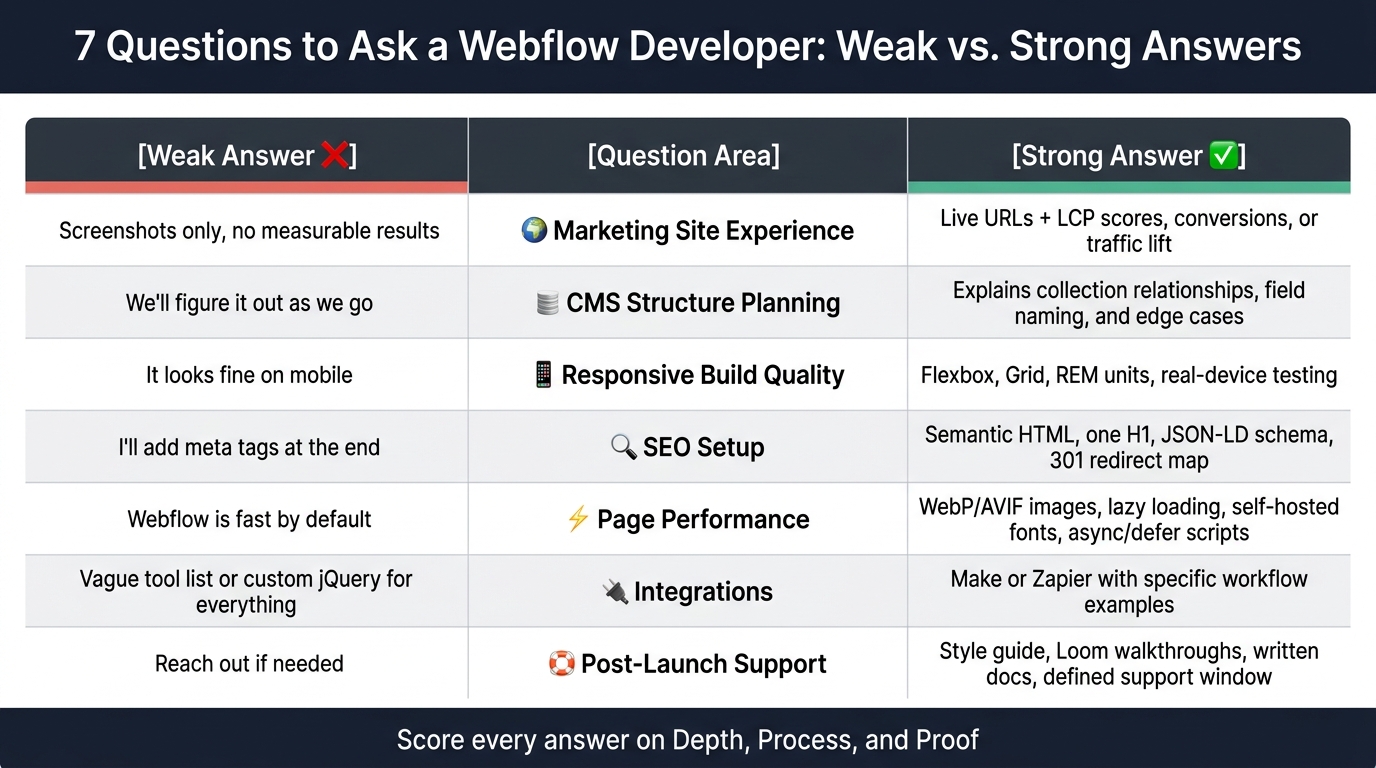
7 Questions to Ask a Webflow Developer: Weak vs. Strong Answers
These seven questions act like a practical filter. Each one points to a delivery risk that often stays hidden until six months after launch, when your site is slow and your team is afraid to touch it. Use the same three signals for every answer: depth, process, and proof.
This helps you tell the difference between developers who build conversion-driven marketing sites and those who lean hard on visuals while overlooking build quality. Skip screenshots. Ask for live URLs, a read-only Webflow link, and hard results like LCP, conversions, or traffic lift.
This gets straight to CMS architecture, which is one of the most misused parts of Webflow. A solid developer should explain how they set up collections for relationships, like authors tied to posts or categories tied to resources. They should also explain how they name fields clearly and how they plan for edge cases, such as missing fields or unusually long content.
If they say, “name fields as we build,” that’s a warning sign. It usually means the CMS will become a mess for your team a few months down the line.
This shows whether they build for responsiveness or just drag things around until they sort of fit. A strong answer should mention Flexbox and Grid for fluid layouts, REM units instead of pixels for type, and testing on actual mobile devices.
And don’t stop there. Apply that same standard to Webflow SEO tips, performance, integrations, and handoff too.
The next two questions draw a clear line between build quality and post-launch risk.
This shows whether SEO is built into the project or slapped on later. A strong answer should cover semantic HTML, one H1 per page, automated XML sitemaps, and JSON-LD schema wired into CMS templates.
If you’re redesigning an existing site, ask about their 301 redirect plan. This part matters more than many teams think. Without a clear redirect map, you can lose organic rankings.
A developer who gets performance should talk about converting images to WebP or AVIF, using lazy loading, self-hosting fonts in WOFF2 to cut outside requests, and loading third-party scripts with async or defer so they don’t block rendering.
Those choices shape LCP, INP, and CLS. In plain terms, they affect how fast the page feels, how stable it looks, and how smooth it is to use.
This brings practical limits into the open before they turn into your problem. Since Webflow Logic has been sunset, modern Webflow builds now depend on tools like Make or Zapier for automation flows, such as sending form submissions to a CRM or syncing lead data to a marketing platform.
Ask which tools they’ve connected before. Then ask for one specific example that’s close to your stack. That’s usually where vague claims fall apart.
This is the one many teams skip, and it comes back to bite them. Get clear on what happens in the first week after launch: who fixes bugs, how fast they reply, and whether they train your team to update content without breaking the layout.
You should expect:
Also ask whether support continues after launch, and get those terms in writing.
Once you've asked all seven questions, turn those answers into a scorecard. Then compare evidence, not confidence. Use the same lens from the previous section for depth, process, and proof.
Score each answer as vague, adequate, or evidence-based. Add a notes column for red flags, strengths, gaps, plus owner and project management details.
| Question Area | Candidate A | Candidate B | Notes |
|---|---|---|---|
| Marketing site experience | Live URLs and measurable results | Screenshots only | No measurable results |
| CMS structure planning | Explains collection relationships clearly | "We'll build it as you need it" | High maintenance risk |
| Responsive build quality | REM units and real-device testing | Pixel-based layouts | Accessibility concern |
| Webflow SEO setup | Semantic HTML, 301s, and schema | Meta tags at the end | SEO risk |
| Webflow page performance | WebP, lazy loading, deferred scripts | "Webflow is fast by default" | Core Web Vitals gap |
| Integrations | Make/Zapier with specific examples | Custom jQuery for everything | Maintainability risk |
| Post-launch support | Style guide, documentation, clear support window | "We'll be available" | No written terms |
Once the scorecard is filled out, do one last check: does the top candidate also have a clear post-launch plan?
The safest pick is usually the one who gives specific answers backed by proof: live URLs, measurable results, a named framework like Client-First or Lumos, and a clear post-launch support plan in writing.
Put simply, choose the person who lowers risk around strategy, SEO, performance, and governance in writing.
A strong candidate also asks about your stack, KPIs, and long-term goals before the build starts. That's a good sign. It shows they're thinking about the site after launch too, not just shipping pages fast.
When you compare candidates side by side, these seven criteria make the final call much easier. They help you spot developers who think past launch day and care about what happens after the site goes live.
That matters because a good hire doesn’t just ship pages. They help protect performance, maintainability, and conversions over time.
The right Webflow developer brings proven marketing-site experience, solid CMS planning, responsive builds, SEO from day one, fast performance, reliable integrations, and a clean handoff.
Use the same seven-question filter every time you hire:
Go with the candidate who answers all seven with specifics, proof, and a written support plan. That’s usually the person who lowers risk across build quality, SEO, performance, and handoff.
Create a shortlist of 4 to 6 developers or agencies. Then set up 30-minute technical calls with each one to see how they think, what they’ve built, and how they’d deal with your project’s specific limits.
A small, focused shortlist makes this much easier. Instead of getting lost in flashy portfolios, you can pay attention to what matters: how well each team understands the work, how they solve problems, and whether they can build a high-quality, scalable website.
Yes. A paid discovery phase can be a smart way to vet a developer or agency, especially for high-value projects.
A paid trial sprint, usually two to four weeks, gives you a chance to judge code quality, how they work with your team, and how they solve problems while they ship an actual deliverable. That tells you a lot more than a proposal or interview ever can before you commit to the full project.
A proper handoff should leave you with a site that’s easy to run and fully yours.
That means you should get a style guide, reusable components, editor training, clear documentation for the site structure, project backups, and full ownership of the Webflow project, assets, and related accounts.