






Insights
Webflow
Copy Link




Use a Webflow retainer to cut dev bottlenecks, launch pages in days, and boost marketing velocity with reusable components and CMS.
Marketing teams often face delays due to developer backlogs, slowing down campaigns and updates. A Webflow retainer solves this by providing consistent design and development support, ensuring faster execution and fewer bottlenecks.
Webflow retainers give marketing teams the tools and support to move faster, focus on their priorities, and achieve measurable growth.
Getting the most out of a Webflow retainer requires preparation. A well-prepared team can dive in and start seeing results right away.
Before kicking off a Webflow retainer, make sure your marketing assets are in order. The key elements to focus on are clear messaging, a defined design system, and a prioritized campaign roadmap.
Another critical area is your CRM setup. Tools like HubSpot need workflows and lead routing defined before implementation begins. Addressing these mid-retainer can create unnecessary friction and reduce development bandwidth.
Once your foundations are set, Webflow’s tools can help you move faster.
For teams that need help building their marketing assets, The Hoop Studio offers packages to set up everything from scratch.
These packages don’t just deliver a website - they establish the systems and tools needed for a retainer to succeed. With a ready-to-use component library, CMS, and brand system in place, your team can focus on launching, testing, and scaling from day one.
Retainer-based teams thrive on a predictable four-week cycle. Without a clear framework, tasks can pile up, priorities might shift, and launches risk falling behind schedule.
Here’s how a typical Webflow retainer operates:
This rhythm removes uncertainty, ensuring everyone knows the plan, the timeline, and how success will be measured. It also lays the groundwork for streamlined development practices that help teams launch campaigns faster.
The structured weekly cycle is only part of the equation. Smart development practices can further speed up campaign launches. For instance, teams often use pre-coded, brand-approved building blocks to assemble pages in just minutes instead of days. A well-organized CMS also allows marketers to publish updates - like case studies, blog posts, or campaign pages - without needing developer assistance. A great example is ResQ, which used Webflow’s CMS to create over 50 SEO-friendly landing pages. This setup enabled their marketing team to quickly adjust targeting and expand keyword clusters, all without developer input.
Integrations also play a major role in saving time. By connecting Webflow to platforms like HubSpot, Zapier, and GA4, teams can eliminate repetitive tasks like manual data entry and automate lead management. According to Flowout, this approach means "Marketing can finally move at marketing speed".
The Hoop Studio offers two retainer options tailored for marketing teams that need consistent output.
| Feature | Scale | Scale+ |
|---|---|---|
| Monthly Cost | $2,500 | $5,000 |
| Best For | Lean teams shipping weekly | Scaling B2B brands |
| Capacity | Dedicated design & dev | Expanded design & dev |
| Strategy | Monthly priorities check-in | Quarterly strategy reviews |
| Key Focus | Landing pages, SEO, CRM automations | Full growth system with AI automations |
| Response | Standard priority | Priority response & SLAs |
The Scale retainer is ideal for marketing leaders or small teams who need a dependable design and development partner without increasing staff. On the other hand, the Scale+ retainer acts as a co-managed growth system, integrating the website, search efforts, and pipeline into one cohesive strategy.
This structured approach has delivered tangible results. Kingsley Devon, working with Marketing Director Ruth Peters, achieved a 400% increase in organic traffic through The Hoop Studio's growth-focused partnership model.
"The quality of work has consistently been outstanding and the team are a pleasure to work with." - Ruth Peters, Director of Marketing, Kingsley Devon
A campaign calendar is great for planning, but it doesn’t automatically prioritize development tasks. That’s where a Webflow retainer comes in - it transforms your calendar into a dynamic build queue.
At the start of each month, review your upcoming campaigns and choose the three most impactful tasks to prioritize. These could be anything from a new landing page for a product launch to updating a pricing section for an upcoming sale or adding a case study before a major sales push. The beauty of a Webflow retainer is that the team already understands your brand, CMS structure, and component library. This means turning a campaign idea into an actionable task takes just minutes, not days of back-and-forth.
This system is also flexible. Campaign plans change, and new opportunities pop up - no problem. You can easily add or adjust tasks in the backlog without the hassle of extra paperwork or delays.
Once you’ve got your development backlog set up, the next step is all about speeding up page builds with pre-made templates.
Instead of starting from scratch every time, your team can use pre-designed, reusable components - like hero sections, feature blocks, social proof rows, and CTAs - to assemble pages quickly. This approach eliminates repetitive design work and ensures every page stays on-brand right from the start.
Take Column Tax as an example. Over four years, they adopted a component-based Webflow system that cut their landing page creation time by nearly 90%. What used to take weeks of developer effort now takes just 2–3 days of in-house work.
"The fix is a component-based Webflow build where the marketing team has a small library of pre-designed sections - heroes, feature blocks, social proof rows, CTA bands - they can assemble into a new page without writing code or touching the design system." - Parth Gaurav, Founder & CEO, Digi Hotshot
Another key piece? A well-structured CMS. When collections are organized in ways that make sense to marketers - like grouping case studies, integrations, or testimonials - a single update can instantly reflect across all pages where that content appears. It’s a massive time-saver.
Once you’ve streamlined the build process, the next bottleneck to address is the approval loop. Delayed approvals can bring everything to a screeching halt, but there’s a way to keep the momentum going: fewer meetings and smarter tools.
Modern workflows rely on asynchronous feedback tools where stakeholders can annotate live site elements directly. These comments sync with the developer’s task board, cutting out endless email threads and unnecessary meetings. As Flowout explains: "Speed requires asynchronous communication. A modern agency minimizes meetings. Instead of scheduling a 30-minute call to present a new feature, the developer records a three-minute video walking you through it."
Pre-approved design components also help reduce revision cycles. When elements like hero sections, buttons, and typography are already locked in, there’s less to review - only the copy and images need approval. RAREculture, an NYC-based art consultancy, experienced this firsthand. After a 32-minute training session, their non-technical team went from waiting days for agency updates to making campaign changes the same day.
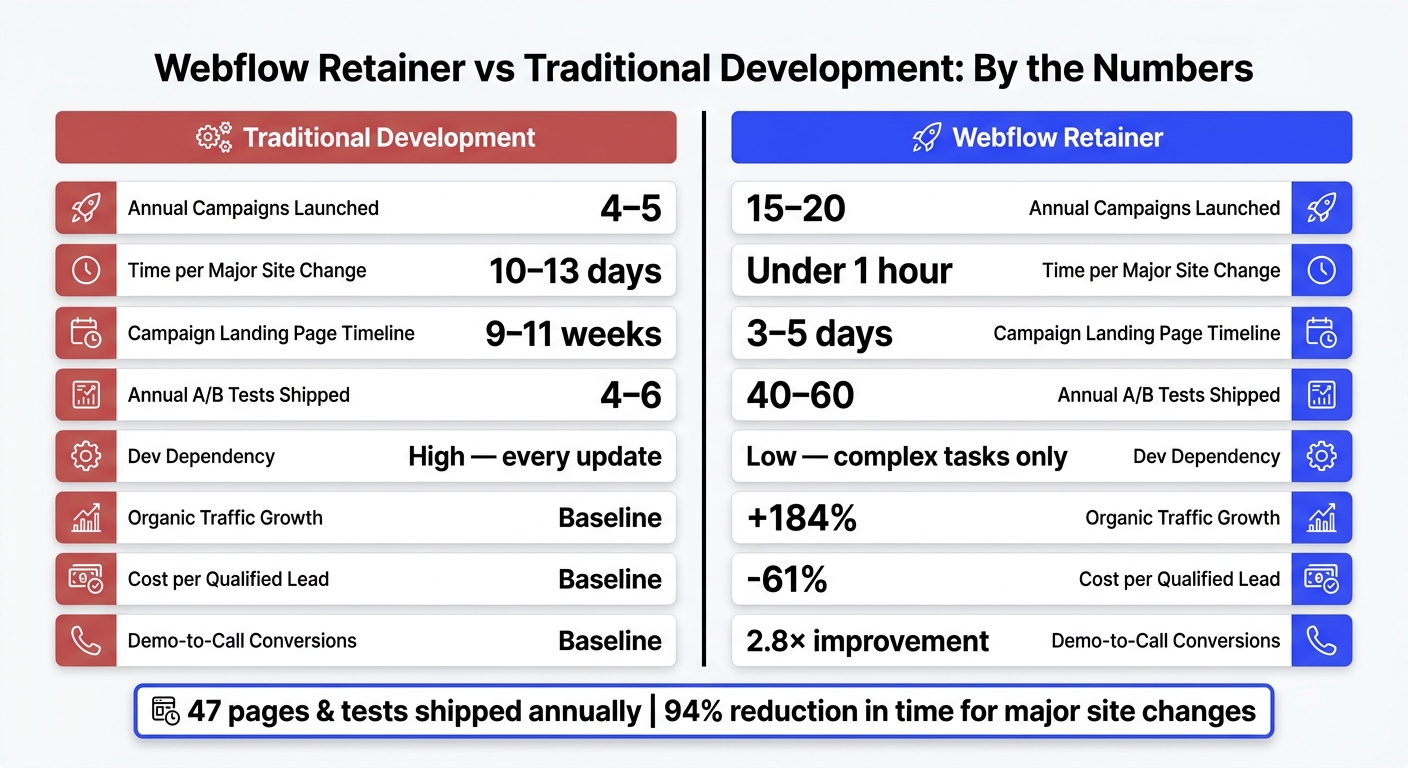
Webflow Retainer vs Traditional Development: Key Performance Metrics
Evaluating the success of your Webflow retainer is crucial for maintaining faster campaign launches and ensuring ongoing website improvements.
Once workflows are optimized, it’s time to measure performance using specific metrics like time-to-first-version (how long it takes to go from brief to a working draft), iteration cycle time (the speed of revisions), and pages shipped per month. For example, teams that switch from traditional development to a Webflow retainer model often see a jump from launching 4–5 campaigns annually to 15–20. They also cut timelines for major site changes by up to 94%.
Other key indicators include the speed of site updates and the frequency of new content. For instance, if site edits used to take 10–13 days but now take less than an hour, that’s a clear improvement. Similarly, if marketing teams were publishing just 3 blog posts a month and now publish 20 or more independently, it’s a strong sign of increased efficiency and autonomy.
These metrics provide a solid foundation for comparing results before and after adopting a Webflow retainer.
A before-and-after analysis can highlight progress across updates, cycle times, and campaign launches.
| Metric | Traditional Development | Webflow Retainer |
|---|---|---|
| Annual Campaigns Launched | 4–5 | 15–20 |
| Time per Major Site Change | 10–13 days | Under 1 hour |
| Campaign Landing Page Timeline | 9–11 weeks | 3–5 days |
| Annual A/B Tests Shipped | 4–6 | 40–60 |
| Dev Dependency | High (every update) | Low (complex tasks only) |
It’s also important to monitor conversion rates and revenue changes, especially when presenting data to financial decision-makers. As Andrey Petrov explains:
"If you track time-to-launch, cost of maintenance, and conversion improvements, Webflow becomes easy to justify in CFO language."
While short-term metrics are valuable, long-term tracking is essential to demonstrate sustained growth.
Short-term wins like faster launches are easy to spot, but proving long-term ROI requires consistent reviews. Each retainer tier - whether it’s Care Plus or Scale Plus - includes monthly or quarterly evaluations. These reviews track uptime, response times for fixes, and growth metrics like site performance, search visibility, and pipeline health. This structured approach ensures that speed and quality improvements translate into ongoing success.
For example, aggregated data from Scale retainer clients in 2025 revealed a 184% increase in organic search traffic and a 2.8× improvement in demo-to-call conversions, along with a 61% drop in cost per qualified lead. One standout case is Kingsley Devon, who partnered with The Hoop Studio and achieved a 400% boost in organic traffic. Ruth Peters, their Director of Marketing, described this as "consistently outstanding work".
A Webflow retainer empowers your marketing team to execute campaigns without being slowed down by technical hurdles. While marketing focuses on content and strategy, The Hoop Studio takes care of the website’s structure, performance, and integrations. This clear division of roles ensures work moves forward at a much faster pace.
For many organizations, adopting this approach leads to a noticeable shift in how they operate - campaigns roll out quicker, and technical debt no longer piles up.
"The site stops being a bottleneck." - The Hoop Studio
In addition to these immediate benefits, aligning your website, search efforts, and pipeline into a single system creates lasting growth. When SEO, CRM automations, and optimizing Webflow forms for conversions work together seamlessly, the impact multiplies. For instance, scale-tier clients in 2025 averaged 47 pages and tests shipped annually, while reducing their cost per qualified lead by 61%. Tailored retainer tiers further support this unified strategy, ensuring your business gets the most out of every effort.
Before diving into a Webflow retainer, it's crucial to create a clear project brief. This document should outline your primary goals, any challenges you anticipate, and the key performance metrics you'll use to measure success. If SEO is part of your strategy, make sure to address those considerations right from the start.
Another important step is ensuring your CMS is built for scalability. This means accounting for content types like case studies, blog posts, or team member profiles. Additionally, think ahead about role-based permissions to manage who can access or edit specific areas, staging environments for testing changes safely, and component-based design libraries to streamline updates and maintain consistency. These practices will help keep workflows efficient and updates safe throughout the retainer period.
At the beginning of every month, our team comes together for a strategy check-in. During this session, we pinpoint the three most impactful priorities for the month - whether that's creating new pages, running tests, or tackling pipeline tasks. This approach helps us stay focused on delivering high-value results while remaining flexible enough to adjust and refine our plans as the month unfolds.
To assess the impact of a Webflow retainer, focus on key performance indicators (KPIs) that reflect both growth and efficiency. For starters, track metrics like organic search traffic growth, improved demo-to-call conversion rates, and the number of pages, tests, and experiments launched. These provide a clear picture of progress in visibility and engagement.
Operational metrics also play a big role. Keep an eye on things like lower cost per qualified lead, quicker time-to-market, and shorter iteration cycles. These show how effectively your processes are running and how quickly you can adapt to changes.
Finally, technical performance is crucial. Look for Google Lighthouse scores that stay high and ensure page load times remain under three seconds. These benchmarks confirm that your website is optimized and performing well.